
Introduction
This manual provides essential instructions for the safe and efficient operation, maintenance, and troubleshooting of your Airbot CM7000 Espresso Coffee Machine. Please read this manual thoroughly before first use and retain it for future reference.
The Airbot CM7000 is a compact espresso machine designed for home use, featuring 20 Bar pressure, a 1.5-liter water tank, and an integrated steam wand for frothing milk. It is capable of preparing single or double espresso shots.
Important Safety Instructions
- Always ensure the machine is connected to a grounded power outlet with the correct voltage (220-240V, 50/60Hz).
- Do not immerse the machine, power cord, or plug in water or other liquids.
- Keep hands and cords away from hot surfaces, such as the brew head and steam wand, during and after operation.
- Unplug the machine from the power outlet before cleaning and when not in use.
- Do not operate the machine with a damaged cord or plug, or if the machine malfunctions or has been damaged in any way.
- This appliance is not intended for use by persons (including children) with reduced physical, sensory or mental capabilities, or lack of experience and knowledge, unless they have been given supervision or instruction concerning use of the appliance by a person responsible for their safety.
- Use only cold, fresh water in the water tank. Do not use hot water or other liquids.
Product Overview and Included Components
Familiarize yourself with the parts of your Airbot CM7000 Espresso Coffee Machine.
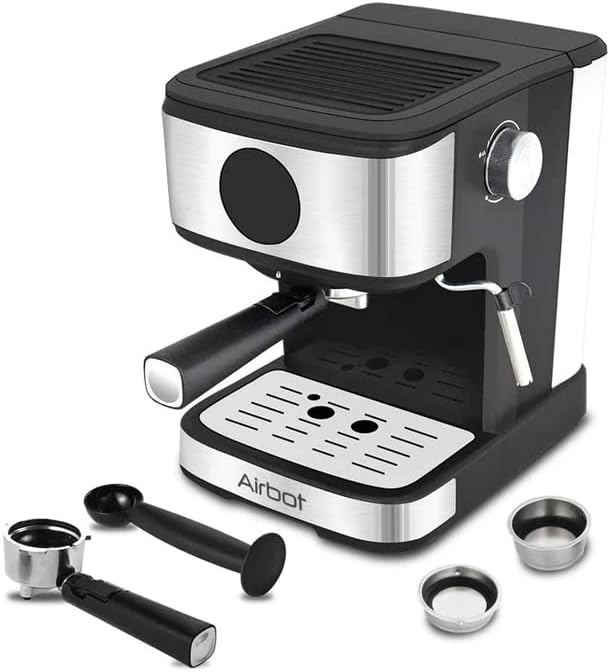
Image: The Airbot CM7000 Espresso Coffee Machine shown with its portafilter, two coffee baskets, and a 2-in-1 temper spoon.
Components List:
- Espresso Machine Body: Main unit with LED touch screen control.
- Water Tank: Removable tank for water supply, located at the back.
- Portafilter: Handle with a filter basket holder.
- Coffee Baskets: One 1-cup basket and one 2-cup basket for ground coffee.
- 2-in-1 Temper Spoon: Used for scooping coffee and tamping it into the basket.
- Steam Wand: For frothing milk.
- Removable Drip Tray: Collects excess liquid and supports cups.
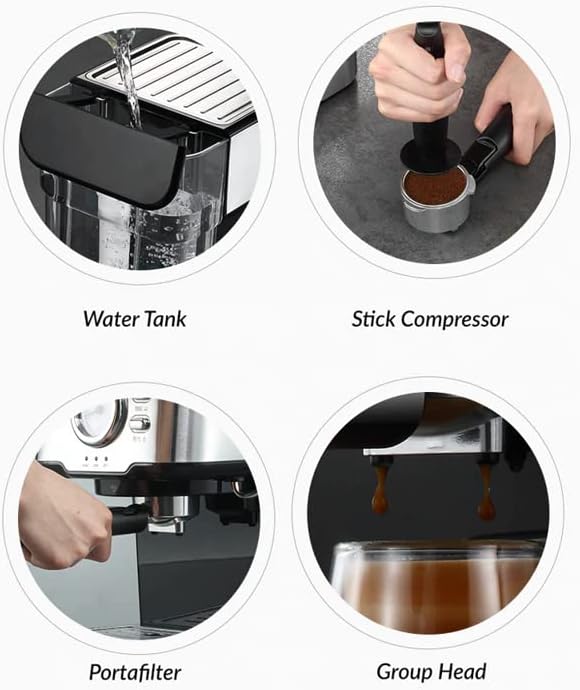
Image: Close-up views illustrating the Water Tank, the use of a Stick Compressor (temper), the Portafilter, and the Group Head where coffee is dispensed.
Setup
- Unpacking: Carefully remove all packaging materials and ensure all components are present and undamaged.
- Initial Cleaning: Before first use, wash the water tank, portafilter, coffee baskets, and drip tray with warm soapy water. Rinse thoroughly and dry. Wipe the exterior of the machine with a damp cloth.
- Fill Water Tank: Remove the water tank from the back of the machine. Fill it with fresh, cold water up to the MAX level indicator. Replace the tank securely.
- First Use / Priming:
- Ensure the water tank is filled.
- Place a cup under the brew head.
- Plug in the machine. The LED touch screen will illuminate.
- Press the power button to turn on the machine. It will preheat.
- Once preheated, press the single shot button to run water through the system without coffee. Repeat this process 2-3 times to clean and prime the internal components.
Operating Instructions

Image: The Airbot CM7000 Espresso Machine actively brewing coffee, highlighting its compact design and steam wand functionality.
Making Espresso:
- Prepare Portafilter: Select the desired coffee basket (1-cup or 2-cup) and place it into the portafilter.
- Add Ground Coffee: Scoop fresh, finely ground espresso coffee into the basket. Do not overfill.
- Tamp Coffee: Use the temper spoon to firmly tamp the coffee grounds evenly. Wipe any excess grounds from the rim of the basket.
- Attach Portafilter: Insert the portafilter into the group head on the machine. Turn it firmly to the right until it is securely locked in place.
- Place Cup: Position your espresso cup(s) on the drip tray directly under the portafilter spouts.
- Brew Espresso: Once the machine is preheated (indicator light stable), press the single shot or double shot button on the LED touch screen. The machine will begin brewing.
- Stop Brewing: The machine will automatically stop brewing after dispensing the programmed amount. You can manually stop it by pressing the button again if desired.
- Remove Portafilter: Carefully remove the portafilter by turning it to the left. Be cautious as it will be hot. Discard the used coffee grounds.
Using the Steam Wand for Milk Frothing:
- Prepare Milk: Fill a stainless steel frothing pitcher with cold milk (dairy or non-dairy) up to just below the spout.
- Activate Steam Function: Press the steam button on the LED touch screen. The machine will begin to heat up for steam production. Wait until the steam indicator light is stable.
- Purge Steam Wand: Position the steam wand over the drip tray and briefly open the steam knob to release any condensed water. Close the knob.
- Froth Milk: Immerse the tip of the steam wand just below the surface of the milk. Open the steam knob slowly. Angle the pitcher to create a swirling motion. Move the pitcher up and down slightly to incorporate air and create foam.
- Stop Steaming: Once the milk reaches the desired temperature and texture, close the steam knob and remove the pitcher.
- Clean Steam Wand: Immediately wipe the steam wand with a damp cloth to remove any milk residue. Briefly open the steam knob again to purge any milk from inside the wand.
Maintenance and Cleaning
Regular cleaning ensures optimal performance and extends the lifespan of your espresso machine.
- Daily Cleaning:
- Empty and rinse the drip tray after each use.
- Remove, empty, and rinse the portafilter and coffee basket after each use.
- Wipe down the exterior of the machine with a damp cloth.
- Clean the steam wand immediately after each use as described in the operating instructions.
- Water Tank: Clean the water tank weekly with warm soapy water, rinse thoroughly, and refill with fresh water.
- Descaling: Over time, mineral deposits (limescale) can build up in the machine. Descale your machine every 2-3 months, or more frequently if you have hard water. Use a commercial descaling solution specifically designed for coffee machines and follow the product's instructions. Run the descaling solution through the brew head and steam wand, then rinse thoroughly with several cycles of fresh water.
Troubleshooting
| Problem | Possible Cause | Solution |
|---|---|---|
| No coffee dispenses. | No water in tank; machine not primed; clogged portafilter/brew head. | Fill water tank; prime the machine; clean portafilter and brew head. |
| Coffee brews too slowly or drips. | Coffee grounds too fine or tamped too hard; clogged brew head. | Use coarser grind; tamp less firmly; descale machine. |
| Coffee brews too quickly or is watery. | Coffee grounds too coarse or not enough coffee; not tamped enough. | Use finer grind; use more coffee; tamp more firmly. |
| No steam from wand. | Steam function not activated; wand clogged; machine not heated. | Activate steam function; clean wand; wait for machine to heat up. |
| Machine leaks water. | Water tank not seated correctly; portafilter not secured; internal leak. | Reseat water tank; secure portafilter; contact customer support if leak persists. |
Specifications
| Model | CM7000 |
| Pressure | 20 Bar |
| Water Tank Capacity | 1.5 Liters |
| Power | 850W |
| Voltage | 220-240V, 50/60Hz |
| Product Dimensions (D x W x H) | 35 x 32 x 35 cm |
| Weight | 3 KG |
| Serve Amount | 1 Cup or 2 Cups |
| Special Features | Milk Frother, LED Touch Screen Control |
Warranty and Support
Your Airbot CM7000 Espresso Coffee Machine comes with a standard manufacturer's warranty. Please refer to the warranty card included with your purchase for specific terms and conditions, including coverage period and claim procedures.
For technical support, service, or warranty inquiries, please contact Airbot customer service through the contact information provided on your warranty card or the official Airbot website.