
Baseus CCZX-160CO
Baseus 160W USB C Car Charger Instruction Manual
Model: CCZX-160CO
1. Introduction
This manual provides essential information for the safe and efficient operation of your Baseus 160W USB C Car Charger. This device is designed to provide high-speed charging for multiple electronic devices simultaneously in your vehicle. Please read this manual thoroughly before use and retain it for future reference.
2. Key Features
- QC5.0 Quick Charge: Supports PPS PD3.0 QC5.0 fast charging protocols.
- Triple Port Output: Features 3 independent fast-charging ports (100W+30W+30W) for simultaneous charging without power reduction.
- Advanced Safety: Built-in intelligent circuit design protects against short-circuiting, overheating, over-currents, and overcharging. Certified RoHS, CE & FCC.
- Durable Design: Constructed with PC material for scratch resistance and longevity.
- LED Indicator: Soft LED light for easy port location in low-light conditions.
- Wide Compatibility: Compatible with a broad range of devices including smartphones, tablets, laptops, and gaming consoles.

Figure 2.1: The Baseus 160W USB C Car Charger, showcasing its three charging ports and sleek design.
3. Installation
- Ensure your vehicle's engine is off before installation.
- Locate the cigarette lighter socket (12V or 24V) in your vehicle.
- Insert the Baseus 160W USB C Car Charger firmly into the cigarette lighter socket. The LED indicator will illuminate when properly connected and receiving power.
- Start your vehicle's engine. The charger is now ready for use.

Figure 3.1: Proper insertion of the car charger into the vehicle's cigarette lighter socket.
4. Operating Instructions
The Baseus 160W USB C Car Charger features three output ports: two USB-C ports (Type-C1, Type-C2) and one USB-A port. Each port supports various fast charging protocols to optimize charging speed for your devices.
- Connecting Devices: Use appropriate charging cables to connect your devices to the available USB-C or USB-A ports.
- Power Distribution:
- Type-C1: Up to 100W (Max)
- Type-C2: Up to 30W (Max)
- USB-A: Up to 30W (Max)
- Charging Status: The soft LED light indicates the charger is active. Charging will automatically stop when the connected device's battery is full to prevent overcharging.
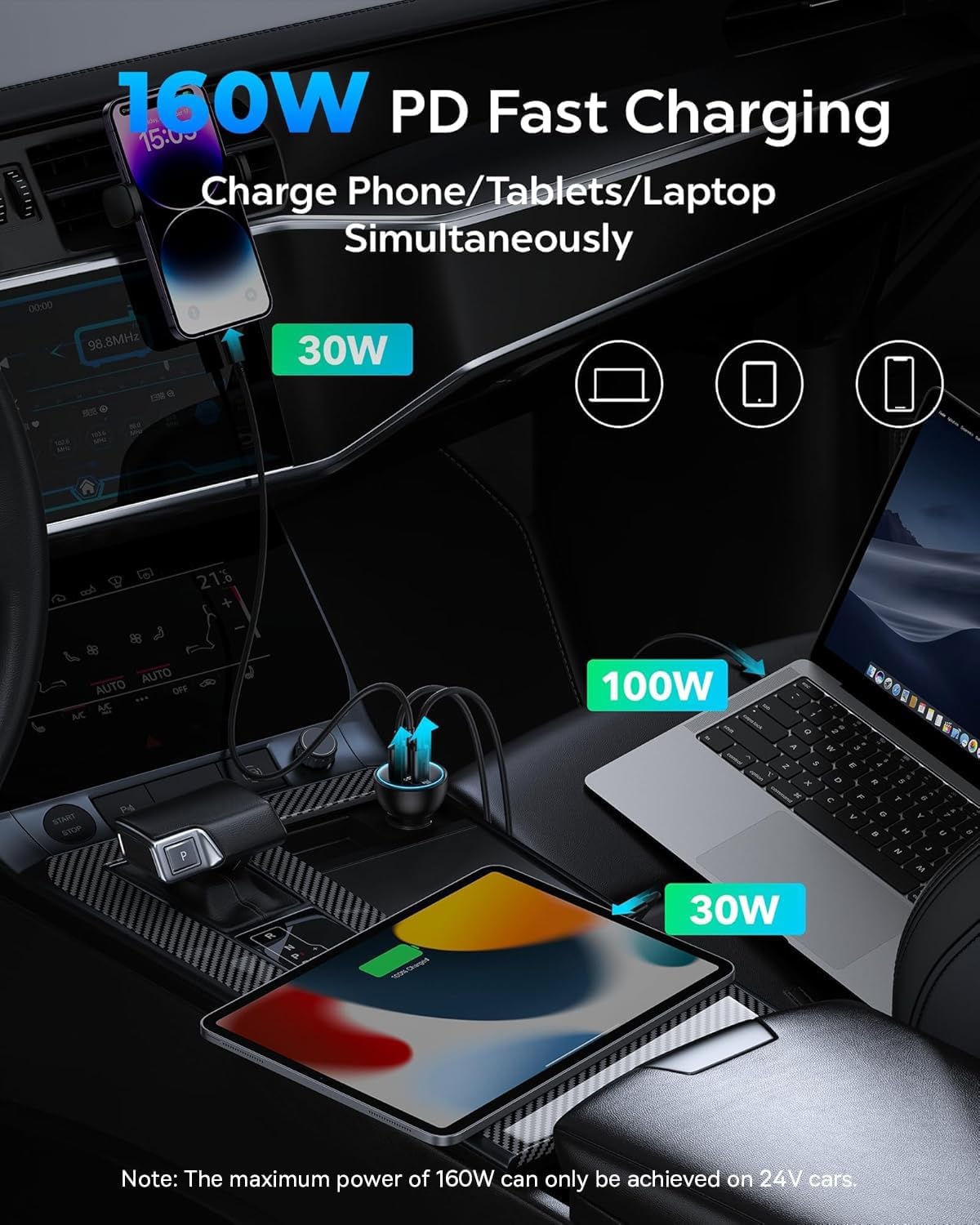
Figure 4.1: The charger providing 160W PD fast charging to a laptop (100W), tablet (30W), and phone (30W) simultaneously.

Figure 4.2: Illustration of power distribution across single, dual, and triple port usage scenarios.
5. Compatibility
This charger is broadly compatible with a variety of devices and vehicle types:
- Smartphones: iPhone 15/15 Pro/15 Plus/15 Pro Max, iPhone 14/14 Pro/14 Plus/14, iPhone 13/13 Pro/13 Mini/13 Pro Max, iPhone 12/12 Pro/12 mini/12 Pro Max, iPhone 11/11 Pro/11 Pro Max, iPhone XS/8/7 Plus, Samsung Galaxy S23/S22/S21/S20 Ultra/Tab S9/S8, Note 20/10, Google Pixel 7 Pro/7/6a/6 Pro/6/5a/5, LG, TCL, HTC, Nokia, Motorola, Sony, and other smartphones.
- Tablets: iPad Pro/iPad Air/iPad mini, Kindle Fire HD 10.
- Laptops: MacBook Pro 16'/15'/13', MacBook Air 13'/11', Dell XPS13, Chromebook, Lenovo, HP, Google Pixelbook.
- Other Devices: Drone, Switch, Steam Deck, ASUS ROG Ally, AirPods, etc.
- Vehicle Types: Compatible with 12V and 24V car cigarette lighter sockets (cars, ORVs, trucks, SUVs).

Figure 5.1: Visual representation of the charger's broad compatibility with different electronic devices and vehicles.

Figure 5.2: Supported charging protocols for each port, including QC5, PD3.0, PPS, and more.
6. Safety Guidelines
The Baseus 160W USB C Car Charger incorporates multiple safety features to protect your devices and vehicle:
- Over-current Protection: Prevents damage from excessive current flow.
- Over-voltage Protection: Safeguards against voltage spikes.
- Over-temperature Protection: Monitors and regulates internal temperature to prevent overheating.
- Short-circuit Protection: Automatically cuts power in case of a short circuit.
- Overcharging Protection: Charging ceases once the device battery is full.
Always ensure the charger is properly seated in the cigarette lighter socket. Do not attempt to disassemble or modify the charger. Keep out of reach of children.

Figure 6.1: Safety certifications and quality assurance for the Baseus car charger.
7. Product Specifications
| Feature | Detail |
|---|---|
| Model Number | CCZX-160CO |
| Product Dimensions | 3.03 x 1.65 x 1.65 inches |
| Item Weight | 1.9 ounces |
| Input Voltage | DC 12-24 Volts |
| Total USB Ports | 3 (2x USB-C, 1x USB-A) |
| Max Output (Type-C1) | 100W |
| Max Output (Type-C2) | 30W |
| Max Output (USB-A) | 30W |
| Total Max Output | 160W (requires 24V input) |
| Special Feature | Fast Charging (QC5.0, PD3.0, PPS) |
| Material | PC |
8. Care and Maintenance
- Keep the charger clean and free from dust and debris. Use a soft, dry cloth for cleaning.
- Avoid exposing the charger to extreme temperatures, direct sunlight, or moisture.
- Do not drop or subject the charger to strong impacts.
- Store the charger in a cool, dry place when not in use.
9. Troubleshooting
- Charger not powering on:
- Ensure the charger is fully inserted into the cigarette lighter socket.
- Verify that your vehicle's engine is running or the ignition is in the accessory position.
- Check the vehicle's fuse for the cigarette lighter socket.
- Device not charging or charging slowly:
- Ensure your charging cable is functional and properly connected to both the charger and your device.
- Verify that your device supports the fast charging protocols (QC5.0, PD3.0, PPS) for optimal speed.
- If charging multiple devices, ensure the total power draw does not exceed the charger's capacity for your vehicle's voltage (12V vs 24V).
- Try a different port on the charger.
- Charger feels warm:
- It is normal for the charger to become warm during high-power charging. If it becomes excessively hot, disconnect devices and allow it to cool. If the issue persists, contact support.
10. Product Overview Video
Video 10.1: An official overview of the Baseus 160W USB C Car Charger, demonstrating its features and functionality.
11. Warranty and Support
Baseus offers a lifetime warranty for this product. For any questions, concerns, or support needs, please contact Baseus customer service. Our team is available 24/7 to provide prompt assistance.
Contact Information:
- Email: care@baseus.com
- Website: https://www.baseus.com
Ask a question about this manual
Ask about setup, troubleshooting, compatibility, parts, safety, or missing instructions. Manuals+ will review the question and use this page’s manual context to help answer it.