
JBL DSP4086
JBL DSP4086 8-Channel Class D Amplifier with Digital Signal Processing User Manual
1. Introduction
This manual provides detailed instructions for the installation, operation, and maintenance of the JBL DSP4086 8-Channel Class D Amplifier with Digital Signal Processing. This device is designed to enhance your audio system with advanced sound control and amplification capabilities. Please read this manual thoroughly before using the product to ensure proper function and to maximize its performance.
2. Product Overview
The JBL DSP4086 is an all-in-one Class D amplifier featuring integrated Digital Signal Processing (DSP). Its compact design allows for installation in various spaces, while its versatile connectivity supports both RCA and speaker-level inputs. The amplifier is controlled via a simple tuning interface and includes a wired remote for bass adjustment.
Key Features
- Small footprint, all-in-one Class D amplifier with DSP control.
- Balanced differential inputs for sound quality and noise rejection.
- Accepts RCA or speaker-level inputs for broad system compatibility.
- Easy-to-use tuning interface with advanced features.
- Wired remote control for convenient bass adjustment (-30 to +6dB).
Component Identification
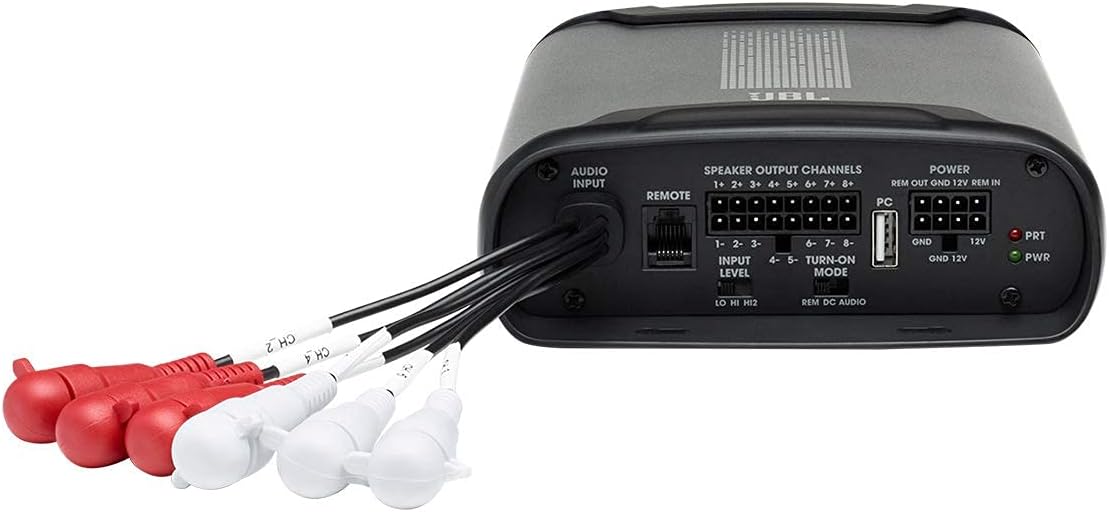
The following images illustrate the main components and connection points of the JBL DSP4086 amplifier.


3. Setup and Installation
Proper installation is crucial for optimal performance and safety. It is recommended that installation be performed by a qualified professional.
Package Contents
Verify that all items are present in the package before beginning installation:

Wiring Connections
Follow these general steps for connecting the amplifier:
- Power Connection: Connect the 12V power input, ground (GND), and remote turn-on (REM IN) wires to the vehicle's electrical system. Ensure proper gauge wiring is used for power and ground.
- Audio Input: Connect your audio source using either RCA cables or speaker-level inputs. The amplifier supports balanced differential inputs for superior noise rejection.
- Speaker Output: Connect your speakers to the designated speaker output channels. The DSP4086 features 8 output channels.
- Remote Bass Control: Connect the wired remote control to the amplifier for convenient bass level adjustments.
- PC Connection: Use the provided USB cable to connect the amplifier to a computer for DSP tuning and configuration.

4. Operating Instructions
Once installed, the JBL DSP4086 amplifier can be configured and operated using its dedicated software and wired remote control.
Software Tuning
Connect the amplifier to a computer via the USB port. Install the JBL DSP software (available from the manufacturer's website) to access the digital signal processing features. This software allows for detailed adjustments of equalization, crossovers, time alignment, and other audio parameters for each of the 8 channels.
Wired Remote Control
The wired remote control provides direct access to bass level adjustments from the driver's seat. Rotate the knob to increase or decrease the low-frequency output within a range of -30dB to +6dB.
5. Maintenance
To ensure the longevity and optimal performance of your JBL DSP4086 amplifier, follow these maintenance guidelines:
- Cleaning: Periodically wipe the exterior of the amplifier with a soft, dry cloth. Avoid using harsh chemicals or abrasive cleaners.
- Ventilation: Ensure that the amplifier's ventilation openings are not obstructed. Proper airflow is essential to prevent overheating.
- Environment: Install the amplifier in a location that is protected from direct sunlight, excessive heat, moisture, and dust.
- Connections: Periodically check all wiring connections to ensure they are secure and free from corrosion.
6. Troubleshooting
If you encounter issues with your JBL DSP4086 amplifier, refer to the following table for common problems and their solutions.
| Problem | Possible Cause | Solution |
|---|---|---|
| No power/No sound | Loose power or ground connection; Blown fuse; No remote turn-on signal. | Check all power and ground connections. Verify fuse integrity. Ensure remote turn-on wire is connected and receiving 12V. |
| Distorted sound | Input level too high; Speaker wires shorted; Improper DSP settings. | Reduce input gain. Check speaker wiring for shorts. Review and adjust DSP settings. |
| Amplifier overheats | Insufficient ventilation; Impedance mismatch; Prolonged high output. | Ensure adequate airflow around the amplifier. Verify speaker impedance matches amplifier specifications. Reduce volume or allow cooling time. |
| No audio from one channel | Loose speaker connection; Faulty speaker; DSP channel muted. | Check speaker wire connections. Test speaker with another source. Verify channel settings in DSP software. |
| PC software connection issues | USB cable issue; Driver not installed; Software compatibility. | Try a different USB cable or port. Install the latest drivers. Ensure software is compatible with your operating system. |
7. Specifications
The following table outlines the technical specifications for the JBL DSP4086 amplifier.
| Specification | Value |
|---|---|
| Brand | JBL |
| Model Number | DSP4086 |
| Number of Channels | 8 |
| Product Dimensions (L x W x H) | 15 x 11 x 6 inches |
| Item Weight | 4.77 pounds |
| Mounting Type | Surface Mount |
| Specification Met | FCC |
| UPC | 656942417439 |
| Date First Available | October 2, 2021 |
8. Warranty and Support
This product is offered as a renewed item. Renewed products are typically inspected and tested to work and look like new by Amazon-qualified suppliers. If not satisfied with the purchase, renewed products are generally eligible for replacement or refund under the Amazon Renewed Guarantee, which typically covers a period of 90 days from receipt.
For technical support, software updates, or further assistance, please refer to the official JBL support channels or the vendor from whom the renewed product was purchased.
Related Documents - DSP4086
 |
JBL DSP Amplifier DSP4086 Owner's Manual This manual provides comprehensive installation and operation guidelines for the JBL DSP Amplifier DSP4086. Learn about product features, wiring, sound tuning, specifications, and troubleshooting. |
 |
JBL GTO3501 1 Channel Power Amplifier Service Manual Comprehensive service manual for the JBL GTO3501 1 Channel Power Amplifier, covering specifications, installation instructions, troubleshooting guide, detailed parts lists, exploded views, block diagrams, PCB layouts, semiconductor pinouts, and schematics. |
 |
JBL Stage GT Amplifier: Powerful and Versatile Car Audio Explore the JBL Stage GT Amplifier series, offering high-performance Class-D car audio amplifiers with modern design, advanced features, and robust protection for an enhanced listening experience. |
 |
JBL Stadium 600 Amplifier Owner's Manual Comprehensive owner's manual for the JBL Stadium 600 Amplifier, covering installation, wiring, operation, and troubleshooting. Learn how to optimize your audio experience with this high-performance amplifier. |
 |
JBL ARC SUB 8 Service Manual: Specifications, Testing, and Troubleshooting Comprehensive service manual for the JBL ARC SUB 8 8-inch powered subwoofer, covering specifications, controls, test procedures, troubleshooting, parts lists, and schematics. |
 |
JBL GTO Series 75.4 / 75.4II 4-Channel Power Amplifier Service Manual This service manual provides detailed specifications, installation instructions, troubleshooting guides, and schematic diagrams for the JBL GTO Series 75.4 and 75.4II 4-channel power amplifiers. |