
1. Introduction
This manual provides detailed instructions for the installation, operation, and maintenance of the MZHOU PCI-E 1X to 16X Riser Card, model VER011pro. This product is designed to extend PCI-E 1X slots to 16X, primarily for use in cryptocurrency mining setups, allowing for flexible placement and connection of multiple graphics cards.
2. Product Overview
The MZHOU PCI-E 1X to 16X Riser Card (VER011pro) is engineered for stable and efficient performance in demanding environments. Key features include:
- Enhanced Power Stability: Equipped with 10 solid capacitors to ensure stable and safe power delivery to the graphics card, preventing overheating and overvoltage.
- Independent Power Supply: Features a 6PIN interface for independent graphics card power, reducing the load on the motherboard when multiple cards are connected.
- LED Power Indicator: An integrated LED light monitors the working status of the riser card.
- Secure Graphics Card Retention: The slot includes a fixed buckle mechanism, making it easier to install and remove graphics cards while ensuring they remain securely in place.
- High-Speed Data Transmission: Utilizes a multi-layer shielded USB 3.0 cable for reliable data transmission up to 3 meters without signal attenuation.
- Optimized for 2U Chassis: The upward-routed slot design facilitates wiring in 2U server chassis configurations.

Figure 2.1: MZHOU PCI-E 1X to 16X Riser Card VER011pro. This image shows the main riser card with its PCI-E 16X slot, 6-pin power connector, and USB 3.0 port.

Figure 2.2: Detailed view of the riser card components. This image highlights the 10 solid capacitors for power stability, power inductance, dual 6PIN power supply port, LED power indicator, and the USB 3.0 port for connection to the PCI-E 1X plug-in card.
3. Package Contents
Please verify that all items are present in your package:
- 6 x PCI-E 16X Main Card (Riser Board)
- 7 x PCI-E 1X Plug-in Card
- 6 x 24-inch USB 3.0 Cable
- 6 x 6PIN to 15PIN SATA Power Cable

Figure 3.1: Package contents. This image displays the PCI-E 16X riser board, PCI-E 1X plug-in card, USB 3.0 extension cable, and 6PIN SATA power cable included in the package.
4. Specifications
| Feature | Description |
|---|---|
| Brand | MZHOU |
| Model Number | VER011pro |
| Hardware Interface | PCIe x 1, PCIe x 16 |
| Power Supply | 10 Solid Capacitors, 6PIN Power Type |
| Compatible Devices | Personal Computer (for GPU mining) |
| Operating System | Windows, macOS, Linux |
| Item Weight | 0.6 Kilograms (approximate for 6-pack) |
| Main Card Dimensions | 12.8 cm / 5.1 inches (length) |
| Plug-in Card Dimensions | 3.2 cm / 1.3 inches (length) |
| USB 3.0 Cable Length | 60 cm / 24 inches |
| Power Cable Length | 15 cm / 5.9 inches |

Figure 4.1: Product dimensions. This image provides the measurements for the main riser card, PCI-E 1X plug-in card, USB 3.0 cable, and 6PIN SATA power cable.
5. Safety Precautions
Failure to follow these precautions may result in equipment damage or personal injury.
- Always ensure the power supply is disconnected from the system before installing or removing any components.
- When connecting cables, carefully identify the correct direction. Do not force connections, as this can damage the pins or equipment.
- Connect the cable to the equipment socket first, then connect the other end.
- Avoid excessive force when plugging or unplugging cables to prevent bending or breaking pins.
- Ensure proper ventilation for all components, especially in mining setups, to prevent overheating.
- The power cord uses pure copper wire to prevent oxidation and burning during operation. Do not substitute with inferior cables.
6. Setup Instructions
Follow these steps to properly install your MZHOU PCI-E 1X to 16X Riser Card:
- Prepare Your System: Ensure your computer or mining rig is powered off and disconnected from the main power source.
- Install PCI-E 1X Plug-in Card: Insert the small PCI-E 1X plug-in card into an available PCI-E 1X slot on your motherboard. Ensure it is seated firmly.
- Connect USB 3.0 Cable: Connect one end of the provided USB 3.0 cable to the USB port on the PCI-E 1X plug-in card. Connect the other end of the USB 3.0 cable to the USB port on the PCI-E 16X main riser card.
- Install Graphics Card on Riser: Carefully insert your graphics card into the PCI-E 16X slot on the main riser card. Ensure it clicks into place with the fixed buckle for secure retention.
- Connect Power to Riser Card: Connect the 6PIN end of the provided 6PIN to 15PIN SATA power cable to the 6PIN power input on the main riser card. Connect the SATA end of the power cable to an available SATA power connector from your power supply unit (PSU).
- Power On: Once all connections are secure, reconnect your system to the power source and power it on. The LED indicator on the riser card should illuminate, confirming power.
- Driver Installation: Install the necessary drivers for your graphics card as you normally would.
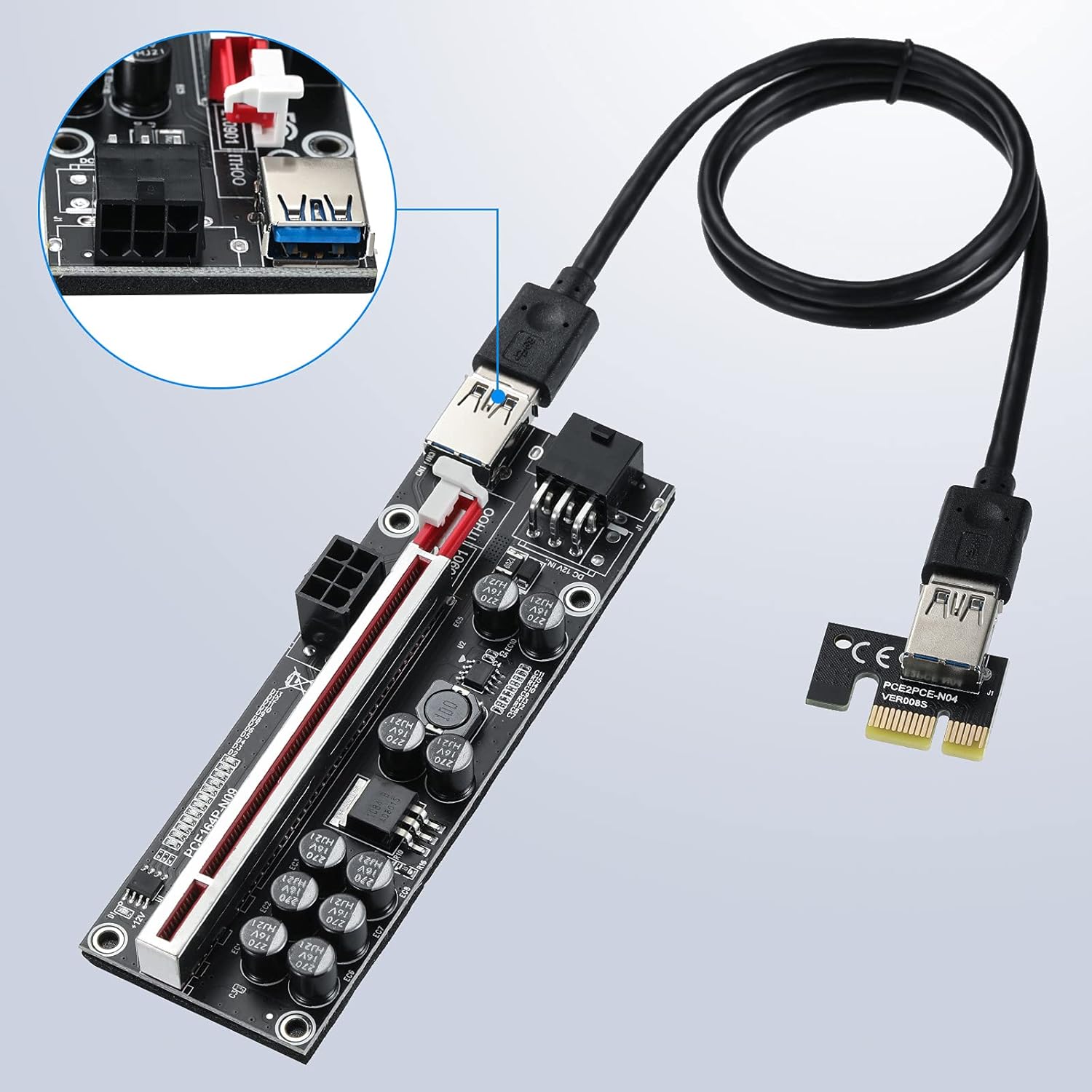
Figure 6.1: USB 3.0 cable connection. This image illustrates how to connect the USB 3.0 cable between the PCI-E 1X plug-in card and the PCI-E 16X main riser card.

Figure 6.2: Power connection to the riser card. This image shows the 6-pin power connector on the riser card and the USB 3.0 port, indicating where power and data cables should be connected.
7. Operating Instructions
Once installed and powered, the MZHOU PCI-E 1X to 16X Riser Card operates transparently, extending the PCI-E slot for your graphics card. Ensure your operating system and mining software recognize the graphics card connected via the riser. Monitor the LED indicator on the riser card to confirm it is receiving power and functioning correctly.
8. Maintenance
- Dust Removal: Regularly clean the riser cards and connected components to prevent dust buildup, which can lead to overheating and reduced performance. Use compressed air or a soft brush.
- Cable Inspection: Periodically check all cables (USB 3.0, power) for any signs of wear, damage, or loose connections. Replace damaged cables immediately.
- Environmental Control: Operate the riser cards in a well-ventilated, cool, and dry environment to maximize their lifespan and prevent component stress.
9. Troubleshooting
- Graphics Card Not Detected:
- Ensure all cables (USB 3.0, power) are securely connected.
- Verify the PCI-E 1X plug-in card is fully seated in the motherboard slot.
- Check if the graphics card is properly seated in the 16X riser slot.
- Confirm the riser card's LED indicator is lit.
- Try a different PCI-E slot on the motherboard or a different USB 3.0 cable.
- Ensure your motherboard BIOS settings are configured correctly for multiple GPUs (e.g., PCI-E Gen1/Gen2 setting, 4G Decoding enabled).
- System Instability/Crashes:
- Ensure your power supply unit (PSU) has sufficient wattage for all connected graphics cards and components.
- Check for overheating. Improve ventilation if necessary.
- Verify that the 6PIN power cable is securely connected to the riser card and the PSU.
- Update graphics card drivers to the latest version.
- LED Indicator Not Lit:
- Check the power connection to the riser card from the PSU.
- Ensure the PSU is powered on.
- Test with a different power cable or PSU port if available.
10. Warranty Information
The MZHOU PCI-E 1X to 16X Riser Card VER011pro comes with a 1-year warranty from the date of purchase. This warranty covers manufacturing defects and malfunctions under normal use. It does not cover damage caused by misuse, accidents, unauthorized modifications, or improper installation.
11. Customer Support
MZHOU is committed to providing high-quality products and sales services. If you have any questions about the product, require technical assistance, or need to claim warranty service, please do not hesitate to contact us. We aim to reply to all inquiries within 12 hours.
Please refer to your purchase platform or the MZHOU official website for specific contact details.