
VENTS-US VKM 200
VENTS-US VKM 200 Metal Inline Duct Fan Instruction Manual
Model: VKM 200 | Brand: VENTS-US
Introduction
This instruction manual provides essential information for the safe and efficient installation, operation, and maintenance of your VENTS-US VKM 200 Metal Inline Duct Fan. Please read this manual thoroughly before using the product and retain it for future reference.

Image 1: Front view of the VENTS-US VKM 200 Metal Inline Duct Fan, showcasing its blue housing, power cord, and mounting brackets.
Safety Information
Always follow basic safety precautions to reduce the risk of fire, electric shock, and injury to persons.
- Ensure the power supply matches the fan's voltage requirements (120 Volts).
- Disconnect power before servicing or cleaning the unit.
- Installation should be performed by a qualified electrician in accordance with all local codes and standards.
- Do not operate the fan with a damaged cord or plug.
- Keep fingers and foreign objects away from the fan blades.
- This fan is designed for ventilating applications. Do not use it for purposes other than its intended use.
Package Contents
Verify that all components are present before beginning installation:
- VENTS-US VKM 200 Inline Duct Fan
- Mounting Brackets (pre-attached or separate)
- Power Cord (pre-wired)
- Instruction Manual (this document)
Specifications
| Feature | Detail |
|---|---|
| Model Name | VKM 200 |
| Brand | VENTS-US |
| Duct Diameter | 8 inches |
| Air Flow Capacity | 541 CFM (at 0" static pressure), 480 CFM (at 0.2" static pressure) |
| Wattage | 152 W (motor), 195 W (total) |
| Voltage | 120 Volts |
| Noise Level | 8 Sones |
| Motor Type | Single-phase external rotor motor with backward curved centrifugal impellers |
| Bearings | Permanently lubricated ball bearings |
| Housing Material | Polymer-coated steel |
| Product Dimensions | 9.88"D x 15.38"W x 13.56"H |
| Item Weight | 15.22 pounds |
| Certification | ETL |
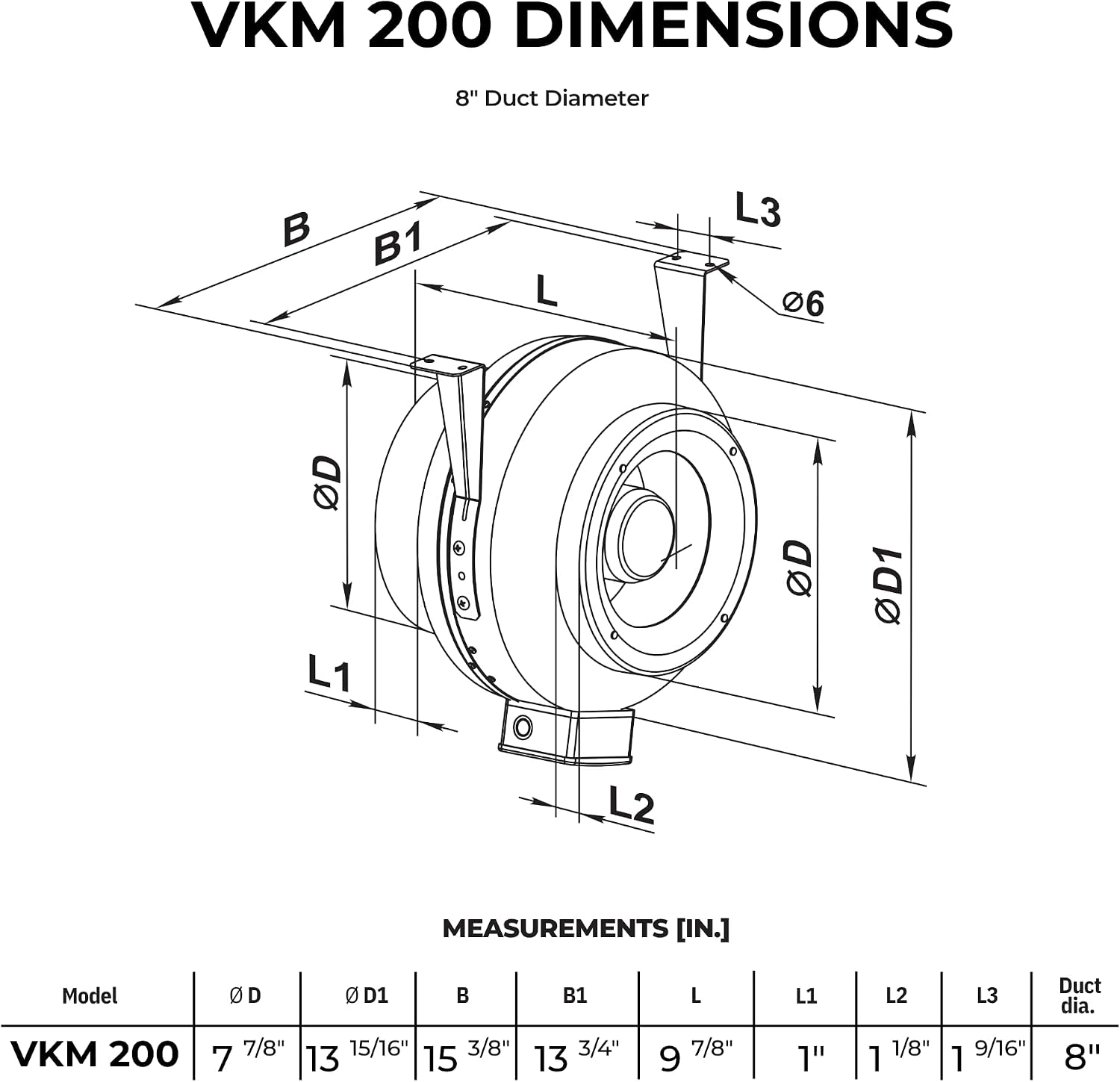
Image 2: Technical diagram showing the dimensions of the VKM 200 fan, including diameter (D, D1), length (L), and bracket measurements (B, B1, L1, L2, L3) in inches for an 8-inch duct diameter.
Installation
The VKM 200 fan is designed for inline duct installation. It comes pre-wired and includes mounting brackets for ease of setup.
General Placement
- This fan can be used as either a supply boosting or extract boosting fan.
- Install in interior walls or ceilings. Ensure adequate space for airflow and maintenance.
- Avoid installing in locations exposed to direct moisture or extreme temperatures unless properly protected.
Mounting the Fan
- Identify the desired location for the fan within your ductwork.
- Secure the mounting brackets to a stable surface (e.g., ceiling joist, wall stud) using appropriate fasteners (not included). The fan can be mounted horizontally or vertically.
- Ensure the fan is securely fastened to prevent vibration and noise during operation.

Image 3: Front and back views of the VKM 200 fan, illustrating the orientation and attachment points for the mounting brackets.
Duct Connection
- Connect the 8-inch ducting to both inlet and outlet ports of the fan.
- Use duct clamps or aluminum tape to ensure a tight, airtight seal at all connections. This prevents air leakage and maximizes efficiency.

Image 4: Bottom view of the VKM 200 fan, showing the labels with installation instructions and certifications. Note the "Install in Interior Wall" and "Install Behind Shutters for Protection from Rain" cautions.
Electrical Connection
- The fan comes with a pre-wired power cord. Connect it to a standard 120V AC power outlet.
- Ensure the power circuit is protected by a suitable circuit breaker.
- For permanent wiring, consult a qualified electrician.
Video 1: An overview of the VENTS-US VKM Series inline centrifugal fans, highlighting their features such as durable steel housing, powerful impeller, and multi-use applications. This video demonstrates the fan's design and capabilities relevant to installation and function.
Operating Instructions
Once properly installed and connected to power, the VKM 200 fan operates by simply supplying power to the unit. It is designed for continuous operation in various ventilation systems.
- Power On/Off: The fan will activate when power is supplied to its circuit. Use an external switch or controller (not included) to manage its operation.
- Airflow Direction: Ensure the fan is installed with the correct airflow direction for your application (supply or exhaust). The impeller design dictates the direction of airflow.
- Speed Control: If variable speed control is desired, an appropriate external speed controller compatible with AC motors must be installed by a qualified professional.

Image 5: Close-up internal view of the VKM 200 fan, showing the centrifugal impeller and motor assembly. This illustrates the core component responsible for air movement.
Maintenance
The VKM 200 fan features permanently lubricated ball bearings, requiring minimal maintenance. However, periodic cleaning is recommended to ensure optimal performance and longevity.
Cleaning
- Disconnect Power: Always turn off and disconnect the fan from the power supply before any cleaning or maintenance.
- Access Fan Blades: Carefully remove any ducting or covers to access the fan blades and interior housing.
- Clean Blades and Housing: Use a soft brush or cloth to remove dust and debris from the impeller blades and the interior surfaces of the fan housing. A vacuum cleaner can also be used.
- Reassemble: Ensure all components are dry before reassembling the fan and reconnecting power.
Frequency: Cleaning frequency depends on the operating environment. In dusty conditions, more frequent cleaning may be necessary.
Troubleshooting
| Problem | Possible Cause | Solution |
|---|---|---|
| Fan does not start | No power supply, faulty wiring, motor overload protection activated. | Check power connection and circuit breaker. Verify wiring. Allow motor to cool if overloaded. |
| Reduced airflow | Blocked ducts, dirty impeller blades, incorrect duct size, air leaks. | Inspect ducts for obstructions. Clean impeller blades. Ensure proper duct connections. |
| Excessive noise or vibration | Loose mounting, foreign object in fan, damaged impeller, unbalanced impeller. | Tighten mounting hardware. Disconnect power and inspect for foreign objects. Contact support if impeller is damaged or unbalanced. |
| Overheating | Insufficient ventilation around motor, prolonged operation in high temperatures, motor fault. | Ensure proper ventilation. Reduce operating time if necessary. If problem persists, contact support. |
If you encounter issues not listed here or if the suggested solutions do not resolve the problem, please contact VENTS-US customer support.
Warranty Information
VENTS-US products are covered by a manufacturer's warranty against defects in materials and workmanship. Specific warranty terms and duration may vary. Please refer to the warranty card included with your product or visit the official VENTS-US website for detailed information.
Keep your purchase receipt as proof of purchase for warranty claims.
Customer Support
For technical assistance, spare parts, or warranty inquiries, please contact VENTS-US customer support:
- Website: Visit the VENTS Store on Amazon
- Refer to your product packaging or the official VENTS-US website for direct contact information (phone, email).
Related documentsVKM 200


Ask a question about this manual
Ask about setup, troubleshooting, compatibility, parts, safety, or missing instructions. Manuals+ will review the question and use this page’s manual context to help answer it.