
Introduction
The PUR Plus 7-Cup Water Pitcher (Model PPT711BA) is designed to provide cleaner, great-tasting water by reducing various chemical and physical substances. This pitcher features a 3-in-1 powerful filtration system, including a WQA certified lead-reducing filter (PPF951K), and is NSF certified to reduce microplastics. Its slim design and dishwasher-safe components offer convenient use and maintenance.

Image: The PUR Plus 7-Cup Water Pitcher, showcasing its design and the included filter.
Package Contents
- 1 PUR Plus 7-Cup Water Pitcher (Model PPT711BA)
- 1 PUR PLUS Lead Reducing Filter (Model PPF951K)
Setup Instructions
- Unpack Components: Carefully remove all parts from the packaging.
- Wash Pitcher Components: Wash the pitcher, lid, and filter housing with mild soap and water. The pitcher and lid are dishwasher safe (top rack recommended). Rinse thoroughly.
- Prepare the Filter:
- Remove the PUR PLUS filter from its packaging.
- Submerge the filter in cold water for 15 minutes. This primes the filter and removes any loose carbon dust.
- Rinse the filter under cold tap water for 10 seconds.

Image: A close-up view of the PUR PLUS filter, ready for preparation.
- Insert the Filter:
- Align the filter with the opening in the filter housing.
- Twist the filter clockwise into the housing until it locks securely into place. The LockFit™ design ensures a tight seal to prevent unfiltered water from mixing with filtered water.
- Assemble the Pitcher: Place the filter housing with the installed filter into the pitcher. Ensure it sits correctly.
- Attach the Lid: Place the lid onto the pitcher, ensuring it fits snugly.
- Initial Filtration: Fill the pitcher with tap water. Discard the first two pitchers of filtered water to flush out any remaining carbon dust and activate the filter.
Operating Instructions
- Filling the Pitcher: Lift the lid's fill flap or remove the entire lid. Fill the upper reservoir with cold tap water. The water will slowly filter through to the main pitcher reservoir.
- Pouring Filtered Water: Once the water has filtered, you can pour it directly from the pitcher. The stay-tight lid allows pouring while filtering.
- Filter Change Indicator: The pitcher is equipped with a filter change light indicator on the lid.
- Green Light: Filter is working correctly.
- Yellow Light: Change filter soon.
- Red Light: Filter has reached the end of its life and needs to be replaced.
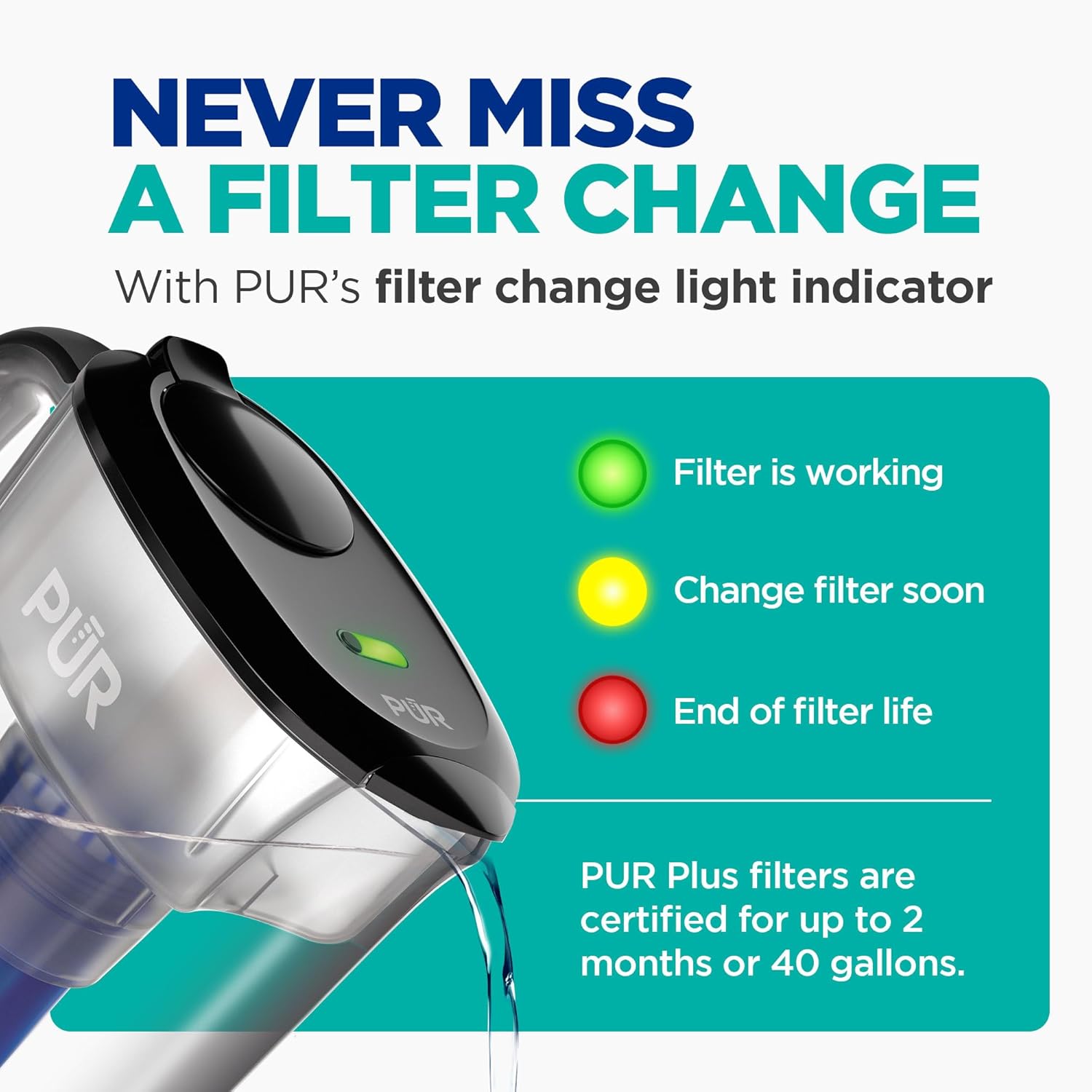
Image: Diagram illustrating the PUR filter change light indicator with its green, yellow, and red signals.
Maintenance
Cleaning the Pitcher
The pitcher, lid, and filter housing are dishwasher safe. For best results, place them on the top rack of your dishwasher. Alternatively, wash by hand with mild dish soap and rinse thoroughly.

Image: A PUR pitcher being loaded into a dishwasher, demonstrating its dishwasher-safe feature.
Replacing the Filter
Replace the PUR PLUS filter every 2 months or after filtering 40 gallons of water, whichever comes first. The filter change indicator will signal when replacement is needed.
- Remove the old filter by twisting it counter-clockwise and pulling it out of the housing.
- Prepare the new filter by submerging it in cold water for 15 minutes and rinsing for 10 seconds, as described in the Setup section.
- Insert the new filter into the housing and twist clockwise until it locks.
- Discard the first two pitchers of filtered water from the new filter.
- Reset the filter change indicator by pressing and holding the button on the lid until the green light flashes.
Important: Use only Genuine PUR PLUS filters. Generic filters may not provide the same level of filtration and are not certified to reduce the same substances.

Image: A visual comparison highlighting the differences between a genuine PUR filter and a generic filter, emphasizing the importance of using authentic PUR products.
Troubleshooting
| Problem | Possible Cause | Solution |
|---|---|---|
| Slow filtration rate |
|
|
| Water has an unusual taste or odor |
|
|
| Filter change light not working |
|
|
Specifications
| Feature | Detail |
|---|---|
| Model Name | PUR Plus 7 Cup Pitcher |
| Model Number | PPT711BA |
| Capacity | 7 Cups |
| Product Dimensions (L x W x H) | 9.6" x 9.6" x 10.1" |
| Item Weight | 2.14 pounds |
| Filter Type | PUR PLUS Lead Reducing Filter (PPF951K) |
| Filter Life Cycle | Up to 2 months or 40 gallons |
| Special Feature | Filter Change Indicator Light, LockFit Cap Design |
| Dishwasher Safe | Yes |
| UPC | 328785004991 |
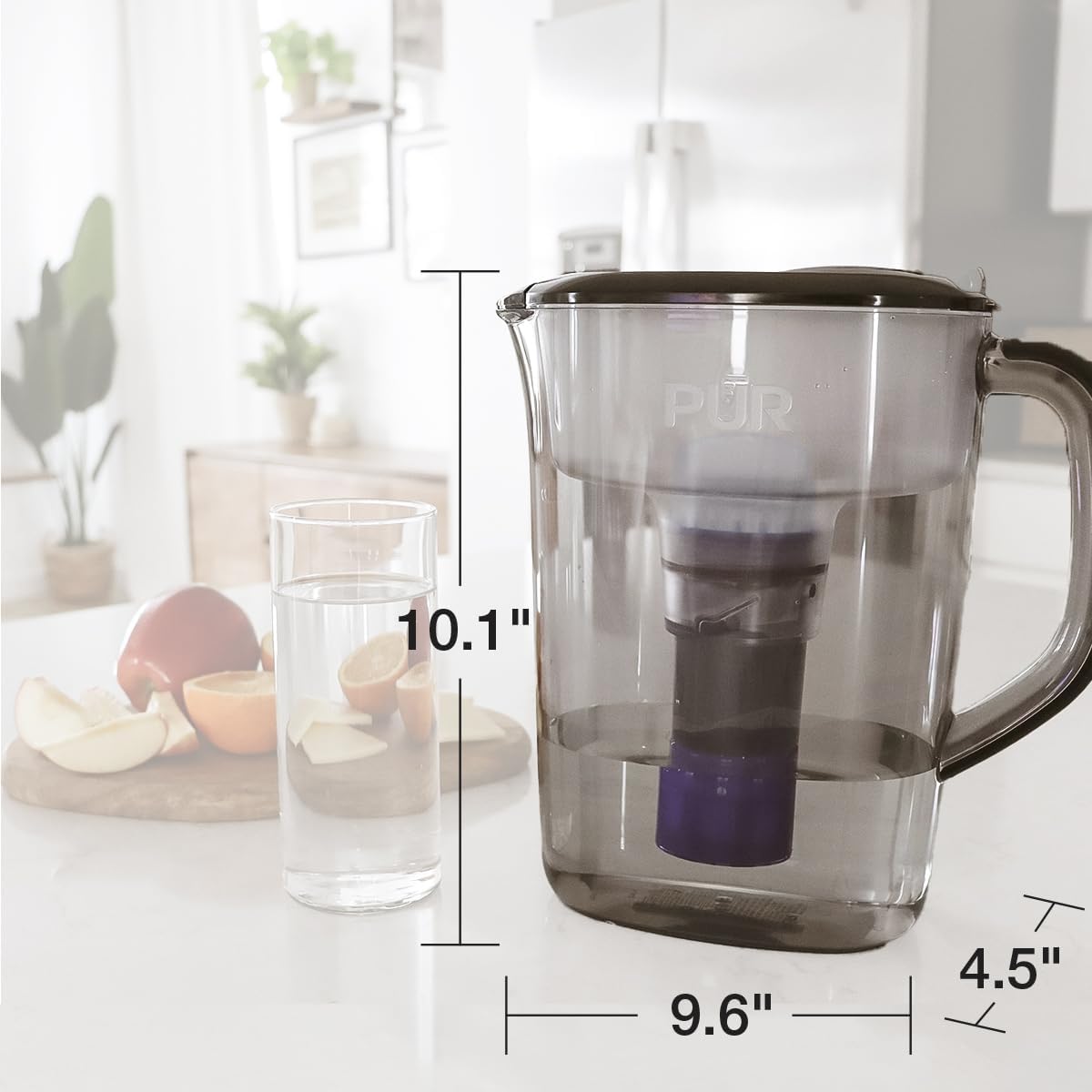
Image: Diagram showing the length, width, and height dimensions of the PUR Plus 7-Cup Water Pitcher.
Warranty and Support
For warranty information, product registration, or further assistance, please visit the official PUR website or contact PUR customer support directly.
Website: www.pur.com
Manufacturer: PUR


