
Marea B57009/4
Marea Smartwatch B57009/4 User Manual
Model: B57009/4
Introduction
Welcome to your Marea Smartwatch B57009/4. This comprehensive user manual provides detailed instructions for setting up, operating, and maintaining your device. Please read this manual carefully to ensure optimal performance and longevity of your smartwatch.
Package Contents
- Marea Smartwatch B57009/4 (Green)
- USB Charging Cable
- User Manual
Setup
1. Charging the Device
Before first use, fully charge your Marea Smartwatch. Connect the provided USB charging cable to the charging port on the back of the watch and plug the other end into a standard USB power adapter (not included) or a computer's USB port. The watch screen will indicate charging status. A full charge typically takes approximately 2 hours.
2. Pairing with Your Smartphone
- Download the Companion App: Search for the official Marea smartwatch application (or a compatible generic smartwatch app) in your smartphone's app store (Google Play Store for Android, Apple App Store for iOS). Install the application.
- Enable Bluetooth: Ensure Bluetooth is enabled on your smartphone.
- Open the App: Launch the installed companion app on your smartphone.
- Follow On-Screen Instructions: Within the app, follow the prompts to search for and pair with your Marea B57009/4 smartwatch. You may need to confirm the pairing on the watch screen.
3. Initial Configuration
After successful pairing, use the companion app to set up your personal profile. This includes entering your age, weight, and height for accurate activity tracking. You can also set the correct time and date, and configure notification preferences.
Operating Instructions
Basic Navigation
- Touchscreen: Swipe up, down, left, or right on the 1.69-inch touchscreen to navigate through menus, access different functions, and view data.
- Side Button: Press the physical button on the side of the watch to return to the home screen. Press and hold the button to power the device on or off.
Customizing the Watch Face
The Marea B57009/4 features a customizable dial. You can change the watch face directly on the device by long-pressing the home screen, or through the companion app, which often offers a wider selection of designs.
Activity Tracking
Your smartwatch automatically tracks various fitness metrics. The main screen often displays a summary of your daily activity.
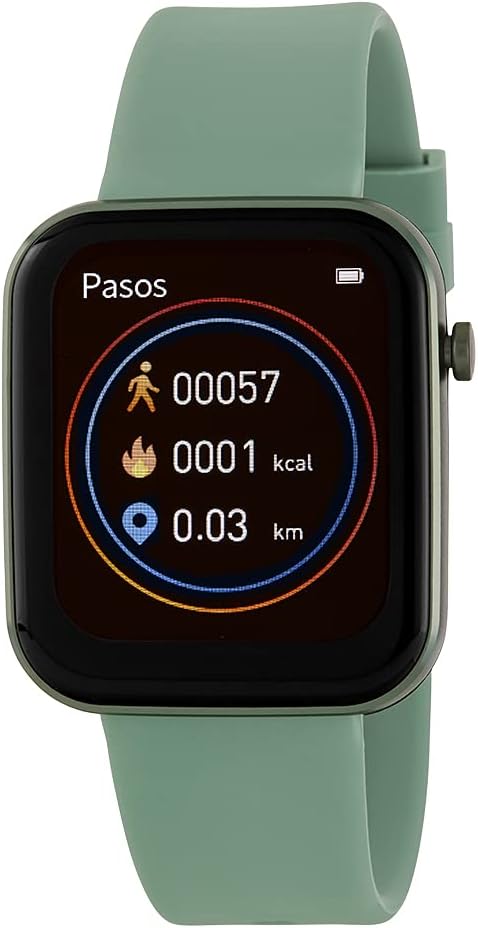
Image: Marea Smartwatch B57009/4 with a green strap. The screen displays activity tracking data, including steps (00057), calories burned (0001 kcal), and distance traveled (0.03 km). A battery icon is visible in the top right corner.
- Steps: The watch counts your daily steps.
- Calories: Estimates calories burned based on your activity and personal profile.
- Distance: Calculates the distance you have walked or run.
Detailed historical data and additional insights can be viewed within the companion app on your smartphone.
Notifications
Once paired with your smartphone, the Marea B57009/4 can receive notifications for calls, messages, and app alerts. Configure which notifications you wish to receive through the companion app settings.
Voice Control
The smartwatch supports voice control functionality. Activate this feature and issue commands directly to your watch for hands-free operation. Refer to the companion app or device settings for specific voice commands and supported functions.
Maintenance
Cleaning Your Smartwatch
To keep your Marea B57009/4 clean, gently wipe the screen and strap with a soft, slightly damp, lint-free cloth. Avoid using abrasive cleaners, solvents, or harsh chemicals, as these can damage the device's finish and seals.
Water Resistance (IP67)
The Marea B57009/4 has an IP67 water resistance rating. This means it is protected against dust ingress and can withstand immersion in fresh water up to 1 meter (3.3 feet) for a maximum of 30 minutes. It is suitable for everyday use, such as washing hands or light rain. It is not recommended for swimming, diving, showering, or exposure to high-pressure water. Prolonged exposure to water or use in hot water may compromise the water resistance.
Battery Care
To maximize the lifespan of your smartwatch battery:
- Avoid exposing the device to extreme temperatures (very hot or very cold).
- Charge the watch regularly, but avoid leaving it fully charged or completely depleted for extended periods.
- Use only the provided charging cable.
Troubleshooting
Watch Not Turning On
- Ensure the watch is fully charged. Connect it to the charger for at least 30 minutes.
- Perform a soft reset by pressing and holding the side button for approximately 10-15 seconds until the Marea logo appears.
Cannot Pair with Smartphone
- Verify that Bluetooth is enabled on your smartphone and the smartwatch.
- Restart both your smartphone and the smartwatch.
- Ensure the companion app is updated to the latest version.
- If previously paired, try unpairing the device from your phone's Bluetooth settings and then re-pairing through the app.
Inaccurate Activity Data
- Check that your personal profile (height, weight, age) in the companion app is accurate.
- Ensure the watch is worn snugly on your wrist, about one finger's width above your wrist bone.
- Calibrate the watch if the app provides such an option.
Specifications
| Model Number | B57009/4 |
| Brand | Marea |
| Screen Size | 1.69 inches (44 mm) |
| Dimensions | 38 x 44 mm |
| Water Resistance | IP67 |
| Operating System Compatibility | iOS 8.2 or higher, Android 4.4 or higher |
| Connectivity | Bluetooth |
| Special Features | Customizable dial, Voice control |
| Battery Composition | Silver Oxide |
| Color | Green |
Warranty and Support
For detailed warranty information, technical support, and customer service, please refer to the official Marea website or contact the retailer from whom you purchased the Marea Smartwatch B57009/4. Keep your proof of purchase for warranty claims.
Related documentsB57009/4


Ask a question about this manual
Ask about setup, troubleshooting, compatibility, parts, safety, or missing instructions. Manuals+ will review the question and use this page’s manual context to help answer it.