
1. Introduction
Thank you for choosing the KAIWEETS KM601 Smart Multimeter. This device is a high-performance, intelligent digital multimeter designed for precise and reliable electrical measurements. It is suitable for a wide range of applications, from household electrical troubleshooting to industrial and automotive diagnostics.
This manual provides essential information for the safe and effective operation, maintenance, and troubleshooting of your KM601 multimeter. Please read it thoroughly before use and keep it for future reference.
1.1 Package Contents
- 1 x KAIWEETS KM601 Smart Multimeter
- 1 x Kaiweets Tool Bag
- 1 x Test Lead Set
- 6 x AAA Batteries
- 1 x User Manual

Image: The KAIWEETS KM601 Smart Multimeter shown with its carrying case, test leads, and AAA batteries.
2. Safety Information
Your safety is paramount. Please observe all safety warnings and operating instructions to ensure safe use and to prevent damage to the device or injury to yourself.
2.1 General Safety Guidelines
- Always ensure the multimeter is in good working condition before use.
- Do not use the multimeter if it appears damaged or if the test leads are compromised.
- Never exceed the maximum input values for any function.
- Be cautious when working with voltages above 30V AC RMS, 42V peak, or 60V DC. These voltages pose a shock hazard.
- Always disconnect power to the circuit under test before connecting or disconnecting test leads.
- Use the correct terminals, function, and range for your measurements.
- Keep fingers behind the finger guards on the test leads during measurements.
- Replace batteries as soon as the low battery indicator appears to ensure accurate readings.
2.2 Certifications and Protection
The KAIWEETS KM601 multimeter is CE and RoHS certified. Its design and manufacturing strictly adhere to safety standards IEC61010-1 CAT III 1000 V, CAT IV 600 V, and pollution level 2. It features two ceramic fuses for anti-burn and overload protection, effectively safeguarding the device. The robust silicone casing provides protection against wear and electrical shocks.
3. Product Overview
The KM601 is designed for ease of use and versatility, offering a wide array of measurement capabilities in a compact form factor.
3.1 Multimeter Components

Image: Labeled diagram illustrating the key components and controls of the KM601 Multimeter, including the display, function buttons, input jacks, NCV sensor, and flashlight.
- Display: Large LED backlit screen for clear readings.
- AUTO FUNC Button: Activates Smart Mode or cycles through automatic functions.
- RANGE Button: Toggles between auto-ranging and manual ranging.
- REL HOLD Button: Data Hold function and Relative Value measurement.
- MAX MIN Button: Records maximum and minimum values.
- SEL Button: Selects different measurement modes within a function (e.g., AC/DC).
- Input Jacks: Dedicated ports for test leads (COM, VHz%C/T, mA, 10A).
- NCV Sensor: Non-Contact Voltage detection.
- Flashlight: Integrated light for illuminating dark work areas.
- Power Button: Turns the device on/off.
3.2 Key Features
- Smart Mode: Automatically identifies and measures voltage, resistance, and continuity.
- True RMS: Provides accurate readings for non-sinusoidal waveforms.
- 10,000 Counts Display: High resolution for precise measurements.
- Multi-functional: Measures AC/DC Voltage, AC/DC Current, Resistance, Capacitance, Frequency, Duty Cycle, Diode, Temperature, Continuity, NCV, and Live Wire.
- Auto-Ranging: Simplifies operation by automatically selecting the correct measurement range.
- Backlit LED Display: Ensures visibility in various lighting conditions.
- Data Hold: Freezes the current reading on the display.
- Auto-Off: Conserves battery life by automatically powering down after inactivity.

Image: The KM601 Multimeter's display surrounded by icons representing its professional and multifunctional capabilities, such as voltage, resistance, capacitance, frequency, and temperature measurements.
4. Setup
4.1 Battery Installation
The KM601 multimeter requires 3 AAA batteries for operation. To install or replace batteries:
- Ensure the multimeter is turned off and disconnect all test leads.
- Locate the battery compartment cover on the back of the device.
- Use a screwdriver to loosen the screw(s) securing the cover.
- Remove the cover and insert the 3 AAA batteries, observing the correct polarity (+/-) as indicated inside the compartment.
- Replace the battery compartment cover and tighten the screw(s).
4.2 Connecting Test Leads
Always connect the black test lead to the COM (Common) input jack. Connect the red test lead to the appropriate input jack based on the measurement you intend to perform:
- VHz%C/T: For Voltage, Frequency, Duty Cycle, Capacitance, and Temperature measurements.
- mA: For milliampere current measurements.
- 10A: For 10 Ampere current measurements.
Note: Ensure test leads are securely inserted into the correct jacks before taking any measurements.
5. Operating Instructions
The KAIWEETS KM601 offers various measurement modes. The Smart Mode simplifies common tasks, while other functions can be selected manually.
5.1 Smart Mode (AUTO FUNC)
Upon powering on, the multimeter defaults to Smart Mode. In this mode, the device automatically detects and measures AC/DC voltage, resistance, and continuity, providing the best resolution without manual range selection.

Image: The KM601 Multimeter's display showing 'AUTO Smart Mode' with icons for voltage, resistance, and continuity, indicating its automatic detection capabilities.
5.2 Specific Measurement Functions
To access other functions, press the AUTO FUNC button repeatedly to cycle through available modes, or use the SEL button to switch between AC/DC or other sub-functions.
- Voltage Measurement (AC/DC):
Connect test leads to COM and VHz%C/T jacks. Select Voltage mode. The multimeter will automatically detect AC or DC voltage in Smart Mode. For manual selection, press SEL. - Resistance Measurement:
Connect test leads to COM and VHz%C/T jacks. Select Resistance mode. Ensure the circuit is de-energized before measuring resistance. - Continuity Test:
Connect test leads to COM and VHz%C/T jacks. Select Continuity mode. The multimeter will emit an audible beep if continuity is detected (resistance below a certain threshold). - Capacitance Measurement:
Connect test leads to COM and VHz%C/T jacks. Select Capacitance mode. Discharge capacitors before testing. - Frequency Measurement:
Connect test leads to COM and VHz%C/T jacks. Select Frequency mode. - Diode Test:
Connect test leads to COM and VHz%C/T jacks. Select Diode mode. - Temperature Measurement:
Connect the included K-type thermocouple to the VHz%C/T and COM jacks. Select Temperature mode. - NCV (Non-Contact Voltage) Detection:
Hold the top of the multimeter near a live wire or outlet. The NCV sensor will detect AC voltage without direct contact, indicated by an audible alarm and visual indicator. - Current Measurement (AC/DC, 10A):
WARNING: Ensure the circuit is open before connecting the multimeter in series for current measurement. Connect the black test lead to COM and the red test lead to either the mA or 10A jack, depending on the expected current. Select the appropriate Current mode.
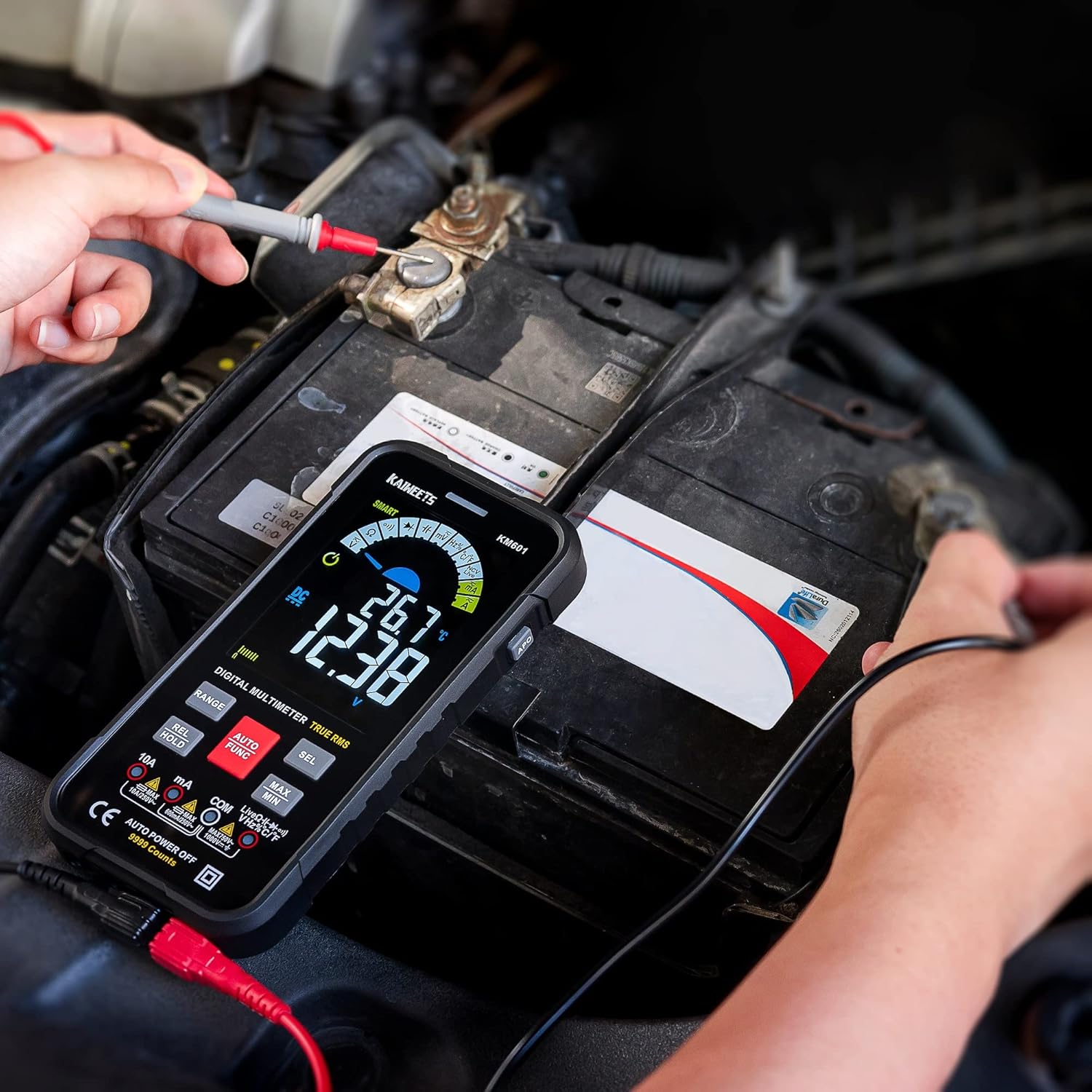
Image: The KM601 Multimeter in use, measuring the voltage of a car battery, demonstrating its practical application.
5.3 Additional Functions
- Data Hold (REL HOLD button): Press briefly to freeze the current reading on the display. Press again to release.
- Relative Value (REL HOLD button): Press and hold to enter relative measurement mode. This displays the difference between the current reading and a stored reference value.
- MAX/MIN (MAX MIN button): Press to display the maximum or minimum reading recorded since the function was activated.
- Flashlight: Press the flashlight button on the side to turn the integrated LED light on or off.
6. Maintenance
Proper maintenance ensures the longevity and accuracy of your KAIWEETS KM601 multimeter.
6.1 Cleaning
Wipe the case with a damp cloth and mild detergent. Do not use abrasives or solvents. Keep the input jacks free of dust and debris.
6.2 Battery Replacement
When the low battery indicator appears on the display, replace the batteries promptly to maintain measurement accuracy. Refer to Section 4.1 for battery installation instructions.
6.3 Storage
If the multimeter is not used for an extended period, remove the batteries to prevent leakage. Store the device in a cool, dry place, away from direct sunlight and extreme temperatures.
7. Troubleshooting
If you encounter issues with your KM601 multimeter, refer to the following common problems and solutions:
- No Display/Power On:
- Check if batteries are installed correctly and have sufficient charge. Replace if necessary.
- Ensure the power button is pressed firmly.
- Inaccurate Readings:
- Verify that test leads are securely connected to the correct input jacks.
- Ensure the correct function and range are selected for the measurement.
- Check battery level; low batteries can affect accuracy.
- Ensure the circuit under test is properly isolated or de-energized if required for the measurement (e.g., resistance).
- Continuity Test Not Beeping:
- Ensure the circuit is de-energized.
- Check if the resistance is too high for continuity detection.
- Verify test leads are not damaged.
- NCV Not Detecting:
- Ensure the NCV sensor is placed close enough to the AC voltage source.
- The NCV function is for detection, not precise measurement.
If the problem persists after attempting these solutions, please contact KAIWEETS customer support for assistance.
8. Specifications
| Feature | Specification |
|---|---|
| Brand | KAIWEETS |
| Model Number | KM601 |
| Display Counts | 10,000 Counts |
| Product Dimensions (L x W x H) | 16.5 x 8.5 x 2.5 cm |
| Weight | 265 Grams |
| Power Source | 3 x AAA Batteries (required) |
| Safety Standards | CE, RoHS, IEC61010-1 CAT III 1000 V, CAT IV 600 V, Pollution Level 2 |
| Max Temperature Rating | 85 Degrees Celsius |
| Color | Black |
9. Warranty and Support
KAIWEETS is committed to providing high-quality products and excellent customer service.
Your KAIWEETS KM601 Smart Multimeter comes with a 36-month after-sales service and lifetime technical support.
If you have any questions, concerns, or require technical assistance, please do not hesitate to contact KAIWEETS customer support. Refer to the contact information provided in your product packaging or on the official KAIWEETS website.

