
1. Introduction
This manual provides essential instructions for the safe and efficient operation, installation, and maintenance of your TECHTONGDA Commercial Ultrasonic Humidifier. Please read this manual thoroughly before using the product and retain it for future reference.
The TECHTONGDA Commercial Ultrasonic Humidifier is designed for large-scale humidification in environments such as greenhouses, supermarkets, warehouses, and other industrial facilities. It features a 20-head mist maker, digital control panel, and flexible water input options.
2. Product Features
- 20-Head Mist Maker: Equipped with a stainless steel 20-head mist maker, producing atomized particles of only 3-5 micrometers. Includes a water level induction switch for automatic shut-off during water shortage.
- Digital Control Panel: Features a digital control panel for adjusting humidifying capacity and cycle time.
- Easy Water Input: Supports dual water input methods: manual pouring into the water sink or continuous connection via a 1/2-inch pipe. Water input, output, and overflow threads are available for convenient installation.
- Portable Stainless Steel Design: The machine's shell is constructed from stainless steel with a protective white paint finish. Four universal wheels provide mobility for easy relocation in large spaces.
- Wide Application: Ideal for maintaining humidity in greenhouses, supermarkets, warehouses, and other facilities to keep produce fresh, support plant growth, and reduce dust.
3. Specifications
| Specification | Detail |
|---|---|
| Brand | TECHTONGDA |
| Operation Mode | Ultrasonic |
| Room Type | Commercial, Industrial, Greenhouse, Warehouse |
| Control Method | Touch (Digital Panel) |
| Material | Stainless Steel |
| Power Source | Corded Electric |
| UPC | 725683345766 |
4. Setup Instructions
- Unpacking and Placement:
Carefully remove the humidifier from its packaging. Place the unit on a stable, level surface in the desired location. Ensure adequate space around the unit for air circulation and maintenance.

Front-top view of the TECHTONGDA Commercial Ultrasonic Humidifier, showing the control panel and mist outlets.
- Secure the Unit:
If the unit is equipped with wheels, lock them to prevent accidental movement during operation. This ensures stability.
- Water Connection:
The humidifier offers two ways to add water:
- Manual Fill: Pour water directly into the water sink.
- Pipe Connection: For continuous operation, connect a 1/2-inch pipe to the water inlet. Ensure all connections are secure to prevent leaks. The unit also has an overflow and outfall connection for drainage.

Rear view of the humidifier, highlighting the water inlet, overflow, and outfall connections.
- Install Humidity Controller (Optional):
If using an external humidity controller, connect it to the designated port on the control panel. This allows for precise humidity monitoring and control.

An external humidity controller with a cable, designed to be connected to the humidifier for precise humidity management.
- Optional Fogging Pipes:
For directing mist, attach appropriate fogging pipes to the mist outlets on top of the unit. The length of these pipes can be adjusted as needed for your application. Note: Fogging pipes are not included with the unit.

The humidifier shown with optional external fogging pipes attached to the mist outlets, demonstrating how mist can be directed.
5. Operating Instructions
- Power On:
Plug the power cord into a suitable electrical outlet. Turn on the main power switch located on the control panel.

Detailed view of the digital control panel, showing the power switch, fuse, and digital display for humidity and cycle time settings.
- Set Control Mode:
Use the digital control panel to select your desired control mode. You can adjust the target humidity percentage and the operating cycle time (in minutes) using the 'SET', 'UP', 'DOWN', and 'MODE' buttons.
- Monitor Mist Output:
Once activated, the atomization modules will begin producing mist. The unit will automatically regulate mist output based on your settings and the detected humidity levels.
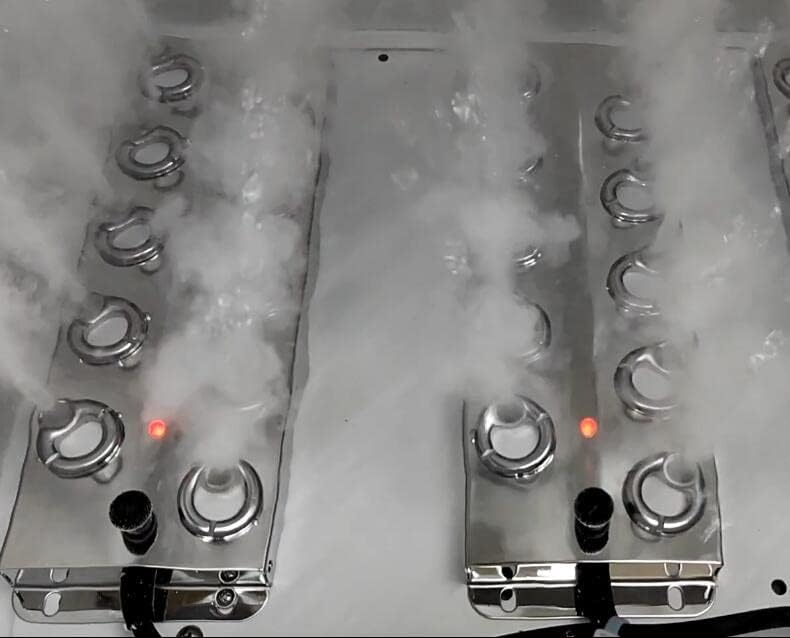
Close-up of the stainless steel mist makers actively producing fine mist, with red indicator lights visible.

An internal diagram showing how water is atomized and mist is expelled through the outlets, with air circulation indicated.
- Water Level Monitoring:
The humidifier is equipped with a water level induction switch. If the water level drops too low, the unit will automatically stop operation to prevent damage.

A close-up of an atomizer disc, showing the water level induction switch and the individual mist-producing elements.
Watch the Official Product Video for Setup and Operation:
Official product video demonstrating the setup, operation, and mist output of the TECHTONGDA Commercial Ultrasonic Humidifier, including installation of the water inlet pipe and humidity controller.
6. Maintenance
Regular maintenance ensures optimal performance and longevity of your humidifier.
- Atomization Device Cleaning:
Clean the atomization device once a month using a soft cloth or brush to remove scale buildup. After cleaning, rinse thoroughly with clean water.
- Watering Precautions:
When adding water, do not pour water directly onto the circuit board. This can lead to a short circuit and damage the unit. Always ensure water is directed into the water sink or through the designated water inlet pipe.
- Filter Maintenance:
Regularly inspect and clean any filters to remove dirt and debris, ensuring efficient operation.
7. Troubleshooting
If you encounter any issues with your humidifier, please review the following common troubleshooting steps:
- No Mist Output:
- Check if the power is connected and the unit is turned on.
- Verify that the water level is sufficient. The unit will stop if water is too low.
- Ensure the atomization device is clean and free of scale.
- Low Mist Output:
- Clean the atomization device and ensure no blockages.
- Check for proper water flow to the mist makers.
- Unit Not Responding to Controls:
- Ensure the humidity controller (if external) is properly connected.
- Restart the unit by turning it off and on again.
If problems persist after attempting these steps, please contact TECHTONGDA customer support for further assistance.
8. Warranty and Support
For warranty information, technical support, or service inquiries, please refer to the warranty card included with your product or contact TECHTONGDA customer service directly. Keep your purchase receipt as proof of purchase.