
1. Introduction
Thank you for purchasing the AIYIMA TUBE T9 Bluetooth 5.0 6K4 Tube Amplifier. This device combines a tube preamplifier with a digital power amplifier, offering multiple audio inputs including Bluetooth 5.0, USB, Coaxial, Optical, and RCA. It features a classic VU meter and tone controls for a personalized audio experience. This manual provides detailed instructions for setup, operation, and maintenance to ensure optimal performance and longevity of your amplifier.
2. Safety Information
- Power Supply: Use only the provided DC24V power adapter. Ensure the voltage is within the specified range (DC18V-30V).
- Ventilation: Place the amplifier in a well-ventilated area. Do not block ventilation openings.
- Moisture: Keep the device away from water, moisture, and high humidity.
- Heat: Avoid placing the amplifier near heat sources or in direct sunlight.
- Handling Tubes: Vacuum tubes can become hot during operation. Exercise caution when handling or replacing them. Allow the unit to cool down before touching the tubes.
- Cleaning: Disconnect power before cleaning. Use a soft, dry cloth. Do not use liquid cleaners or aerosols.
- Servicing: Do not attempt to service this product yourself. Refer all servicing to qualified personnel.
3. Package Contents
Please check the package for the following items:
- AIYIMA TUBE T9 Amplifier x 1
- 6K4 Vacuum Tube x 2
- Bluetooth Antenna x 1
- DC24V Power Adapter x 1
- PC-USB Cable x 1
- Remote Control x 1 (AA batteries not included)
- User Manual x 1
- Warranty Card x 1

Image: Contents included in the AIYIMA TUBE T9 amplifier package, showing the amplifier unit, two 6K4 tubes, a Bluetooth antenna, power adapter, USB cable, remote control, user manual, and warranty card.
4. Product Overview
4.1 Front Panel
The front panel features controls for power, input selection, volume, and tone, along with a classic VU meter and input indicators.
- VU Meter: Displays audio signal level in real-time.
- Input Indicator: LEDs indicate the currently selected input (Bluetooth, PC-USB, RCA, Coaxial, Optical).
- Volume/Input Knob: Rotate to adjust volume. Press to cycle through input sources. Press and hold to power on/off.
- Bass Control: Adjusts low-frequency output.
- Treble Control: Adjusts high-frequency output.
- IR Receiver: For remote control commands.

Image: Detailed view of the AIYIMA TUBE T9 amplifier's front panel, showing the VU meter, input indicators, volume knob, bass and treble controls, and the two visible 6K4 vacuum tubes.
4.2 Rear Panel
The rear panel provides all necessary audio input and output connections.
- Bluetooth Antenna Port: Connect the included Bluetooth antenna.
- RCA Input (L/R): For analog audio sources.
- Coaxial Input: For digital audio sources.
- Optical Input: For digital audio sources.
- PC-USB Input: For connecting to a computer as a USB DAC.
- AUX Out (3.5mm): For connecting to an active subwoofer or another amplifier.
- Speaker Output (L/R): Connect passive speakers (3-8Ω).
- DC18-30V Power Input: Connect the power adapter.
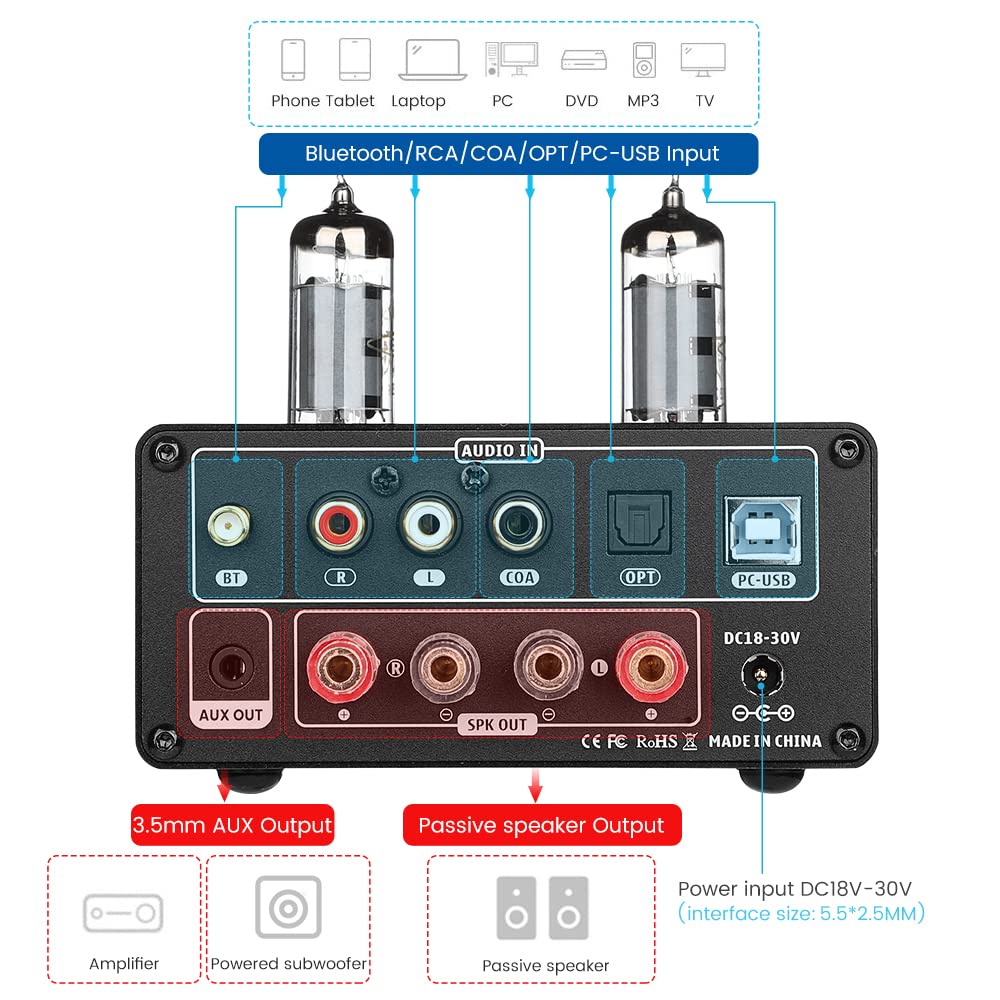
Image: Rear view of the AIYIMA TUBE T9 amplifier, highlighting the various input and output ports including Bluetooth, RCA, Coaxial, Optical, PC-USB, AUX Out, speaker terminals, and power input.
5. Setup
5.1 Tube Installation
- Carefully unpack the two 6K4 vacuum tubes.
- Align the pins of each tube with the corresponding holes on the amplifier's tube sockets.
- Gently push the tubes straight down into the sockets until they are firmly seated. Do not force them.
5.2 Connecting Speakers
The TUBE T9 is designed for passive speakers with an impedance of 3-8Ω.
- Connect your passive speakers to the Speaker Output (SPK OUT) terminals on the rear panel. Ensure correct polarity (+ to + and - to -).
- For a 2.1 channel system, connect an active subwoofer to the AUX Out (3.5mm) port.
5.3 Connecting Audio Sources
Connect your desired audio sources to the corresponding input ports:
- Bluetooth: Screw the included Bluetooth antenna into the BT port.
- PC-USB: Use the provided USB cable to connect your computer to the PC-USB port.
- RCA: Connect analog audio devices (e.g., CD player, streamer) using RCA cables to the RCA (L/R) input.
- Coaxial/Optical: Connect digital audio devices (e.g., TV, game console) using Coaxial or Optical cables to the respective inputs.
Important Note: This amplifier does not have a built-in phono preamplifier. Do not connect a vinyl record player directly to the RCA input without an external phono preamp, as this may result in very low volume or distorted sound.

Image: Diagrams illustrating various connection scenarios for the AIYIMA TUBE T9 amplifier, including connecting to passive speakers, an amplifier, and different audio sources like phones, tablets, laptops, PCs, DVDs, and TVs.

Image: A visual warning indicating that the AIYIMA TUBE T9 amplifier cannot be directly connected to a vinyl record player without an external phono preamplifier.
5.4 Power Connection
- Ensure all audio connections are secure.
- Connect the DC24V power adapter to the DC18-30V input port on the rear panel.
- Plug the power adapter into a wall outlet.
6. Operating Instructions
6.1 Power On/Off
Press and hold the main Volume/Input Knob on the front panel for approximately 1 second to power the amplifier on or off. The VU meter and tubes will illuminate upon power-on.
6.2 Input Selection
Short press the main Volume/Input Knob to cycle through the available input sources: Bluetooth, PC-USB, RCA, Coaxial, Optical. The corresponding LED indicator on the front panel will light up.
6.3 Volume Control
Rotate the main Volume/Input Knob clockwise to increase volume and counter-clockwise to decrease volume.
6.4 Tone Control
Use the Bass and Treble knobs on the front panel to adjust the low and high frequencies according to your preference. This allows for fine-tuning the sound profile.
6.5 Bluetooth Pairing
- Select the Bluetooth input using the Volume/Input Knob. The Bluetooth indicator will flash.
- On your mobile device (phone, tablet, etc.), enable Bluetooth and search for available devices.
- Select "AIYIMA TUBE T9" from the list of devices to pair.
- Once paired, the Bluetooth indicator will stop flashing and remain solid. You can now play audio from your device.

Image: A smartphone connected via Bluetooth 5.0 to the AIYIMA TUBE T9 amplifier, demonstrating wireless audio streaming.
6.6 VU Meter
The integrated VU meter provides a visual representation of the audio output level. Its warm light and dynamic movement add a retro aesthetic to your listening experience. The meter is designed to respond to various volume levels.

Image: A close-up view of the illuminated VU meter on the AIYIMA TUBE T9 amplifier, showing its needle indicating audio levels.
7. Maintenance
7.1 Tube Replacement
The 6K4 vacuum tubes can be replaced to customize the sound or if they wear out. Compatible tube models include:
- 6J1
- 6J2
- GE5654
- 6J3
- 6J4
- 6J5
- 6Ж1п (6Zh1p)
- 6AK5
To replace tubes:
- Power off the amplifier and disconnect it from the power outlet.
- Allow the tubes to cool completely (this may take several minutes).
- Gently pull the existing tubes straight up from their sockets.
- Insert the new compatible tubes, aligning the pins carefully, and push them straight down until seated firmly.
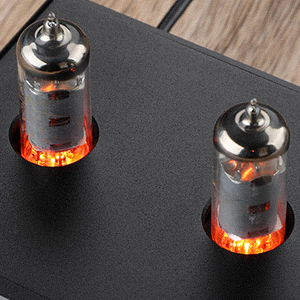
Image: A close-up view of the two 6K4 vacuum tubes installed on the AIYIMA TUBE T9 amplifier, showing their glowing filaments during operation.
7.2 Cleaning
Wipe the amplifier's exterior with a soft, dry cloth. Do not use abrasive cleaners or solvents.
7.3 Ventilation
Ensure adequate airflow around the amplifier to prevent overheating. Do not place objects on top of the unit that could obstruct ventilation.
8. Troubleshooting
| Problem | Possible Cause | Solution |
|---|---|---|
| No sound output |
|
|
| Distorted sound |
|
|
| Bluetooth connection issues |
|
|
| Clicking sound after silence | Automatic hibernation mode engaging | The amplifier may enter a hibernation state after a period of no audio signal, producing a soft click. This feature can be disabled using the remote control: press the M1 button on the remote to toggle the hibernation prompt on/off. |
| VU Meter not moving | Very low volume or specific audio characteristics | The VU meter is designed to respond to audio levels. Ensure the volume is sufficiently high for the meter to register movement. This issue has been addressed in updated models to work at various levels. |
9. Specifications

Image: The AIYIMA TUBE T9 amplifier shown with its physical dimensions and a table summarizing its key specifications.
| Feature | Specification |
|---|---|
| Model Number | TUBE T9 |
| Brand | AIYIMA |
| Input Interfaces | Bluetooth 5.0, PC-USB, RCA, Coaxial, Optical |
| Output Interfaces | Passive Speaker Output, 3.5mm AUX Out (for active subwoofer/amplifier) |
| Output Power | 100W x 2 (at 4Ω load) |
| Speaker Impedance | 3-8Ω |
| Frequency Response | 20-20kHz (±1dB) |
| Signal-to-Noise Ratio (S/N) | ≥98dB |
| Working Voltage | DC18V-30V |
| Dimensions (L x W x H) | 22 x 22 x 10 cm (approx. 8.66 x 8.66 x 3.94 inches) |
| Item Weight | 1 kg (approx. 2.2 lbs) |
| Certifications | CE |
| Country of Origin | China |
10. Warranty and Support
10.1 Warranty Information
According to the product specifications, there is no explicit warranty provided for this product. Please refer to your retailer's return policy for any issues within the initial purchase period.
10.2 Customer Support
For technical assistance or inquiries, please contact the seller or AIYIMA customer support through their official channels. Keep your purchase receipt or order details handy for any support requests.


