
Edifier MR4-WT
Edifier MR4 Powered Studio Monitor Speakers Instruction Manual
Model: MR4-WT | Brand: Edifier
Introduction
The Edifier MR4 Powered Studio Monitor Speakers are designed for artists and music creators, offering a near-flat responsive curve for accurate audio reproduction. These 4-inch active near-field monitors provide studio-quality sound suitable for both music production and casual listening.
Key Features
- •TRUE STUDIO MONITOR: Professionally fine-tuned to a near-flat responsive curve for accurate audio.
- •STUDIO QUALITY SOUND: Features 1-inch silk dome tweeters and 4-inch composite woofers for clear, smooth, and overall sound. MDF wooden structure reduces resonance.
- •FLEXIBLE CONNECTIONS: Equipped with 1/4-inch balanced TRS input, unbalanced RCA input, unbalanced AUX input, and a front headphone output for versatile connectivity.
- •THOUGHTFUL DUAL MODE DESIGN: Easily switch between Monitor mode (for true audio production) and Music mode (for relaxed daily listening).
- •EASY-TO-USE CONTROLS: Front-panel knob for volume and sound modes, plus separate knobs for high- and low-frequency adjustments on the rear.
Package Contents
Please ensure all items are present in your package:
- •Edifier MR4 Powered Studio Monitor Speakers (Pair)
- •Speaker Connection Cable (Red/Black)
- •RCA to 3.5mm Audio Cable
- •3.5mm to 3.5mm Audio Cable
- •User Manual

Image: Included accessories for Edifier MR4 speakers: user manual, speaker connection cable, RCA to 3.5mm audio cable, and 3.5mm to 3.5mm audio cable.
Setup
1. Speaker Placement
Place the active speaker (with controls) on your right and the passive speaker on your left. Position them at ear level, forming an equilateral triangle with your listening position for optimal sound imaging. Ensure adequate space behind the speakers for proper bass response and cable management.

Image: Edifier MR4 speakers positioned on a desk next to a computer monitor, illustrating a typical studio setup.
2. Connecting the Speakers
Connect the active speaker to the passive speaker using the included speaker connection cable. Ensure the red terminal on one speaker connects to the red terminal on the other, and the black to black.

Image: Close-up of the rear panel of the active speaker, highlighting the various input options and adjustment knobs.
3. Audio Input Connections
The MR4 offers multiple input options:
- RCA Input: Use the RCA to 3.5mm cable to connect to devices with RCA outputs (e.g., turntables, CD players) or a 3.5mm output (e.g., computers, smartphones).
- TRS Input: For balanced audio connections from professional audio equipment like mixers or audio interfaces, use 1/4-inch TRS cables.
- AUX Input: A front-panel 3.5mm AUX input is available for quick connection of portable devices.
4. Power Connection
Connect the power cable to the active speaker and then to a wall outlet. The power indicator on the front of the active speaker will illuminate.
Operating Instructions
1. Power On/Off & Volume Control
The multi-function knob on the front of the active speaker controls power and volume. Rotate clockwise to increase volume, counter-clockwise to decrease. Press and hold to power on or off.

Image: Detailed view of the front panel, highlighting the main control knob and auxiliary input ports.
2. Mode Selection (Monitor Mode / Music Mode)
Press the multi-function knob briefly to switch between Monitor mode (red LED) and Music mode (green LED). Monitor mode provides a flat frequency response for critical listening, while Music mode offers a more enhanced sound profile for general entertainment.
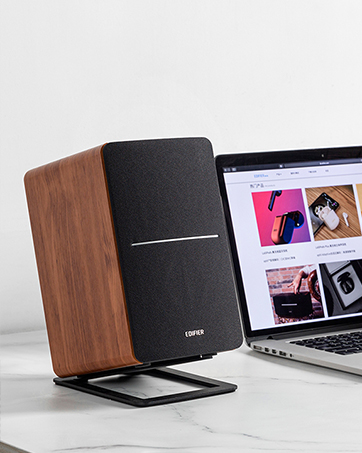
Image: Visual guide indicating the LED colors for Monitor mode (red) and Music mode (green).
3. Tone Controls (Low/High Frequency)
Adjust the "Low/Bass" and "High/Treble" knobs on the rear panel of the active speaker to fine-tune the sound to your preference or room acoustics. These controls allow for precise adjustments to the frequency response.
4. Headphone Output
Plug your headphones into the 3.5mm headphone jack on the front panel. The speakers will automatically mute when headphones are connected.
Maintenance
Cleaning
Wipe the speaker cabinets with a soft, dry cloth. Do not use liquid cleaners or aerosol sprays. Avoid placing objects on top of the speakers that could block the rear port or damage the drivers.
Storage
If storing the speakers for an extended period, disconnect them from power and store them in a cool, dry place, preferably in their original packaging to protect them from dust and physical damage.
Troubleshooting
No Sound
- Ensure the speakers are powered on and the LED indicator is lit.
- Check all cable connections (power, speaker-to-speaker, audio input) are secure.
- Verify the volume is not set to minimum on both the speakers and your audio source.
- Confirm the correct input source is selected (e.g., RCA, TRS, AUX).
- If using headphones, ensure they are unplugged from the front jack.
Distorted Sound
- Reduce the volume on both the speakers and your audio source.
- Check if the audio source is producing a clean signal. Try a different source.
- Adjust the Low/Bass and High/Treble controls on the rear panel.
Humming or Buzzing Noise
- Ensure all cables are properly shielded and away from power cables.
- Try plugging the speakers into a different power outlet.
- Disconnect all audio input cables to determine if the noise originates from the source device.
Specifications
| Feature | Detail |
|---|---|
| Model Name | MR4-WT |
| Speaker Type | Monitor |
| Color | White |
| Speaker Maximum Output Power | 42 Watts |
| Woofer Diameter | 4 Inches |
| Tweeter Diameter | 2.54 Centimeters (1 Inch) |
| Frequency Response | 60Hz - 20KHz |
| Signal-to-Noise Ratio | 85 dB |
| Connectivity Technology | RCA, Auxiliary, TRS |
| Product Dimensions | 7.2"D x 12.1"W x 16.9"H (per speaker) |
| Item Weight | 9.9 pounds (4.5 Kilograms) |
| Manufacturer | Edifier |
Warranty and Support
Edifier MR4 speakers come with a Limited Warranty. Please refer to the warranty card included in your package for specific terms and conditions. For technical support, product inquiries, or warranty claims, please visit the official Edifier website or contact their customer service department.
Official Edifier Store: Edifier Store on Amazon
Related documentsMR4-WT


Ask a question about this manual
Ask about setup, troubleshooting, compatibility, parts, safety, or missing instructions. Manuals+ will review the question and use this page’s manual context to help answer it.