
Introduction
The BOSS MD-200 Modulation Pedal is a versatile effects unit designed for guitarists and other musicians seeking a wide range of high-quality modulation effects. This pedal features 12 distinct modulation modes, offering everything from classic chorus and flanger to unique slicer and overtone effects. It incorporates advanced 32-bit AD/DA conversion, 32-bit internal processing, and a 96 kHz sampling rate for superior sound quality. The MD-200 provides intuitive controls, memory storage for custom settings, and extensive external control options via footswitches, an expression pedal, or MIDI.

Figure 1: The BOSS MD-200 Modulation Pedal, shown with typical bundled accessories. This manual focuses on the operation of the MD-200 pedal itself.
Product Overview
The MD-200 features a clear layout with dedicated knobs for essential parameters and a digital display for mode and value indication. The pedal's robust construction ensures durability for live performance and studio use.
Controls and Indicators (Front Panel)
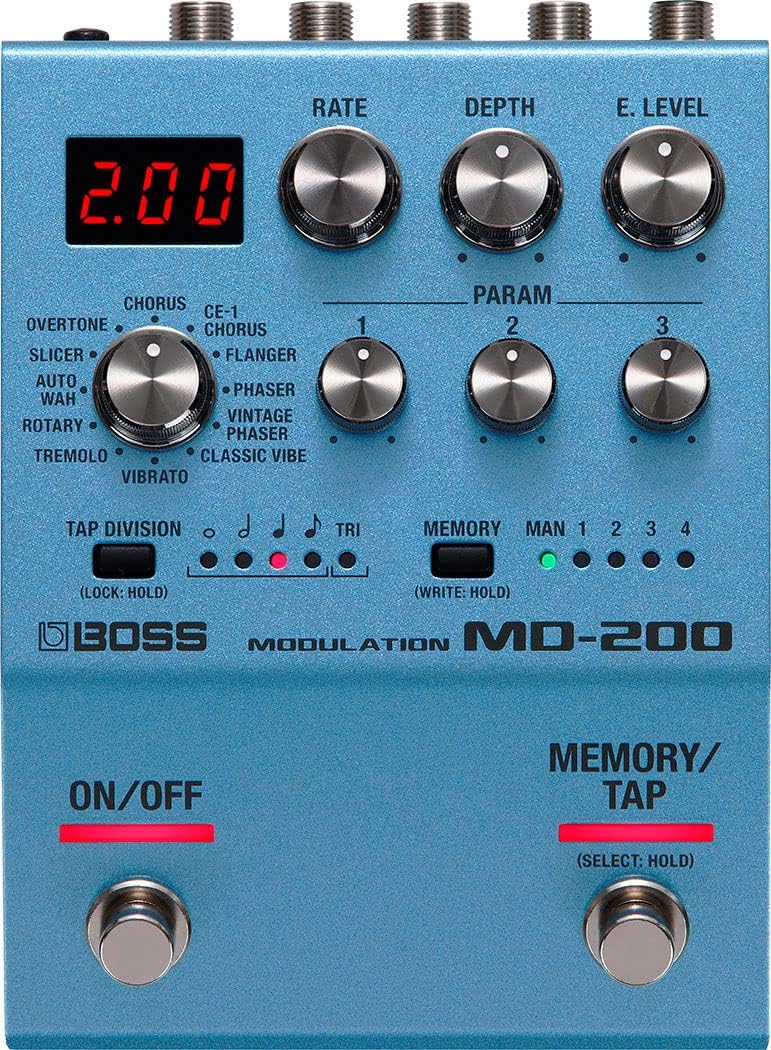
Figure 2: Front panel of the BOSS MD-200 Modulation Pedal, highlighting the display, control knobs, mode selector, and footswitches.
- RATE Knob: Adjusts the speed of the modulation effect.
- DEPTH Knob: Controls the intensity or range of the modulation.
- E. LEVEL Knob: Sets the overall effect level.
- MODE Knob: Selects one of the 12 modulation types.
- PARAM 1, 2, 3 Knobs: These parameters vary depending on the selected modulation mode, allowing for detailed sound shaping.
- ON/OFF Footswitch: Toggles the effect on or off.
- MEMORY/TAP Footswitch: Used for tap tempo input and memory selection.
- Display: Shows the current mode, parameter values, and memory number.
- MEMORY Indicators (MAN, 1-4): Indicate the currently selected memory or manual mode.
- TAP DIVISION Indicators: Show the selected tap tempo subdivision.
Connections (Rear and Side Panels)

Figure 3: Rear panel of the BOSS MD-200, showing the INPUT, OUTPUT, CTL 1,2/EXP, and DC IN jacks for audio, external control, and power connections.

Figure 4: Side panel of the BOSS MD-200, illustrating the MIDI IN/OUT ports and the USB Micro-B port for advanced connectivity and firmware updates.
- INPUT A/MONO, B Jacks: Connect your instrument or other effects pedals here. Use A/MONO for mono input.
- OUTPUT A/MONO, B Jacks: Connect to your amplifier or next effects pedal. Use A/MONO for mono output.
- CTL 1,2/EXP Jack: For connecting an external footswitch (FS-5U, FS-6, FS-7) or an expression pedal (EV-30, FV-500L/H, Roland EV-5) for additional control.
- DC IN Jack: Connect a BOSS PSA series AC adapter (sold separately) for power.
- MIDI IN/OUT Jacks: For MIDI control and communication with other MIDI devices.
- USB Port: For firmware updates.
Setup
Power Connection
The MD-200 can be powered by four AA batteries or a BOSS PSA series AC adapter (sold separately). For stable operation and optimal performance, using an AC adapter is recommended, especially during extended use.
- Battery Installation: Open the battery compartment on the bottom of the unit and insert four AA batteries, ensuring correct polarity.
- AC Adapter: Connect the BOSS PSA series AC adapter to the DC IN jack. Always use a genuine BOSS adapter to prevent malfunction.
Audio Connections
- Connect your guitar or the output of a preceding effects pedal to the INPUT A/MONO jack. If using a stereo input source, connect the left channel to INPUT A/MONO and the right channel to INPUT B.
- Connect the OUTPUT A/MONO jack to your amplifier's input or the next effects pedal in your chain. For stereo output, connect the left channel to OUTPUT A/MONO and the right channel to OUTPUT B.
Ensure all connections are secure before powering on the unit.
External Control Connections
The MD-200 supports external control devices for enhanced functionality:
- External Footswitch: Connect a BOSS FS-5U (single), FS-6, or FS-7 (dual) footswitch to the CTL 1,2/EXP jack using a TRS (stereo) cable. This allows for functions like tap tempo, memory up/down, or effect on/off.
- Expression Pedal: Connect an expression pedal (e.g., Roland EV-5, BOSS EV-30, FV-500L/H) to the CTL 1,2/EXP jack using a TRS cable. This enables real-time control over parameters like rate, depth, or effect level.
- MIDI: Connect MIDI cables to the MIDI IN and OUT jacks for integration with MIDI controllers or other MIDI-enabled devices. This allows for program change messages, control change messages, and MIDI clock synchronization.
Operating Instructions
Turning On/Off
- Power On: After making all connections, turn on your amplifier first, then the MD-200.
- Power Off: Turn off the MD-200 first, then your amplifier. This prevents sudden loud noises.
Selecting Modulation Modes
Rotate the MODE knob to select one of the 12 available modulation effects. The display will show the selected mode name or number.
Adjusting Parameters
- Use the RATE, DEPTH, and E. LEVEL knobs to adjust the fundamental characteristics of the chosen effect.
- The PARAM 1, PARAM 2, and PARAM 3 knobs offer additional, mode-specific controls for fine-tuning the effect. Refer to the "Modulation Modes" section for details on what each parameter controls for a given mode.
Saving and Recalling Memories
The MD-200 allows you to store and recall up to four custom settings (memories).
- Saving a Setting:
- Adjust the knobs to create your desired sound.
- Press and hold the MEMORY/TAP footswitch until the memory indicators flash.
- Press the MEMORY/TAP footswitch again to select the memory location (1-4) where you want to save the setting.
- Press and hold the MEMORY/TAP footswitch again until the indicators stop flashing to confirm the save.
- Recalling a Setting:
- Briefly press the MEMORY/TAP footswitch to cycle through the stored memories (1-4) and the manual mode (MAN). The corresponding indicator will light up.
- In manual mode, the pedal operates with the current physical knob settings.
Tap Tempo Function
The tap tempo function allows you to set the modulation rate by tapping the footswitch.
- While an effect is active, tap the MEMORY/TAP footswitch two or more times at your desired tempo. The rate will synchronize to your taps.
- To change the tap division (quarter note, eighth note, etc.), press and hold the MEMORY/TAP footswitch and then turn the RATE knob. The TAP DIVISION indicators will show the selected subdivision.
Customizing Footswitch Functions
The functions of the ON/OFF and MEMORY/TAP footswitches can be customized. Refer to the detailed owner's manual for specific instructions on entering the system settings and assigning functions.
Modulation Modes
The MD-200 offers 12 distinct modulation types, each with unique characteristics and adjustable parameters.
| Mode | Description | Param 1 | Param 2 | Param 3 |
|---|---|---|---|---|
| CHORUS | Classic BOSS chorus effect, adding richness and width. | Pre-Delay | Tone | Low Cut |
| CE-1 CHORUS | Authentic recreation of the legendary BOSS CE-1 Chorus Ensemble. | Pre-Delay | Tone | Low Cut |
| FLANGER | Jet plane-like swooshing sounds. | Manual | Resonance | Low Cut |
| PHASER | Smooth, swirling phase shifts. | Manual | Resonance | Low Cut |
| VINTAGE PHASER | A classic phaser sound with a distinct character. | Manual | Resonance | Low Cut |
| CLASSIC VIBE | Rotary speaker and vibrato effects, reminiscent of vintage units. | Intensity | Tone | Wave |
| TREMOLO | Volume modulation, from subtle pulse to choppy cuts. | Wave | Attack | Release |
| ROTARY | Authentic rotary speaker simulation. | Slow Speed | Fast Speed | Rotor Balance |
| VIBRATO | Pitch modulation for a wavering sound. | Delay | Tone | Low Cut |
| AUTO WAH | Filter effect that responds to picking dynamics. | Sensitivity | Depth | Resonance |
| SLICER | Rhythmic pattern generator that chops the sound. | Pattern | Attack | Release |
| OVERTONE | Adds harmonics and rich, resonant textures. | Pitch | Tone | Resonance |
External Control
The MD-200 offers flexible external control options to integrate seamlessly into your rig.
CTL 1,2/EXP Jack
This jack can be configured to accept either an external footswitch or an expression pedal. The function assigned to this jack can be customized in the system settings. Common uses include:
- Footswitch (CTL 1, CTL 2): Assign functions like memory up/down, tap tempo, effect on/off, or specific parameter toggles.
- Expression Pedal (EXP): Control parameters such as Rate, Depth, E. Level, or specific PARAM knobs in real-time.
MIDI Control
The MIDI IN/OUT jacks allow the MD-200 to communicate with other MIDI devices. This enables:
- Program Change (PC) Messages: Recall specific memories or modes remotely.
- Control Change (CC) Messages: Adjust parameters (Rate, Depth, etc.) from an external MIDI controller.
- MIDI Clock Synchronization: Sync the modulation rate with other MIDI-enabled devices.
Refer to the MD-200 Parameter Guide for detailed MIDI implementation charts and CC assignments.
Maintenance
- Cleaning: Wipe the unit with a soft, dry cloth. Avoid using abrasive cleaners, waxes, or solvents.
- Storage: When not in use for extended periods, remove the batteries to prevent leakage. Store the pedal in a dry, temperate environment away from direct sunlight.
- Firmware Updates: Periodically check the BOSS website for firmware updates to ensure optimal performance and access to new features. Updates can typically be installed via the USB port.
Troubleshooting
| Problem | Possible Cause | Solution |
|---|---|---|
| No sound or low volume. | Incorrect cable connections, low battery, effect level set too low. | Check all audio cables and ensure they are securely connected. Replace batteries or use an AC adapter. Increase the E. LEVEL knob. |
| Effect is not engaging. | Effect is bypassed, footswitch malfunction. | Press the ON/OFF footswitch to engage the effect. If the issue persists, try a factory reset (refer to the full manual). |
| Modulation rate is incorrect. | RATE knob setting, tap tempo issue, MIDI clock conflict. | Adjust the RATE knob. Re-tap the tempo. Check MIDI clock settings if using MIDI. |
| External footswitch/expression pedal not working. | Incorrect cable type, incorrect system settings. | Ensure a TRS (stereo) cable is used. Verify the CTL 1,2/EXP jack settings in the system menu. |
For more detailed troubleshooting, please consult the comprehensive owner's manual available on the BOSS website.
Specifications
- Model: MD-200
- Sampling Rate: 96 kHz
- AD/DA Conversion: 32 bits
- Internal Processing: 32-bit floating point
- Modulation Modes: 12 types
- Memories: 4 + Manual
- Nominal Input Level: INPUT A/MONO, B: -10 dBu
- Input Impedance: INPUT A/MONO, B: 1 M ohm
- Nominal Output Level: OUTPUT A/MONO, B: -10 dBu
- Output Impedance: OUTPUT A/MONO, B: 1 k ohm
- Recommended Load Impedance: 10 k ohms or greater
- Controls: ON/OFF switch, MEMORY/TAP switch, MODE knob, RATE knob, DEPTH knob, E. LEVEL knob, PARAM 1 knob, PARAM 2 knob, PARAM 3 knob.
- Display: 7 segments, 3 characters (LED)
- Indicators: MEMORY (MAN, 1–4), TAP DIVISION
- Connectors: INPUT (A/MONO, B) jacks: 1/4-inch phone type, OUTPUT (A/MONO, B) jacks: 1/4-inch phone type, CTL 1,2/EXP jack: 1/4-inch TRS phone type, MIDI (IN, OUT) connectors, DC IN jack, USB port: USB Micro-B type.
- Power Supply: Alkaline battery (AA, LR6) x 4 or AC adapter (PSA series: sold separately)
- Current Draw: 220 mA
- Expected Battery Life: Approximately 4.5 hours (Alkaline, varies depending on usage conditions)
- Dimensions (W x D x H): 101 mm x 138 mm x 63 mm (4 in x 5-7/16 in x 2-1/2 in)
- Weight (including batteries): 700 g (1 lb 9 oz)
- Accessories: Owner's Manual, Leaflet "USING THE UNIT SAFELY", Alkaline battery (AA, LR6) x 4
- Options (sold separately): AC adapter (PSA series), Footswitch (FS-5U, FS-6, FS-7), Expression pedal (EV-30, FV-500L, FV-500H, Roland EV-5), TRS/MIDI connecting cable (BMIDI-5-35)
* 0 dBu = 0.775 Vrms
* Specifications are subject to change without notice.
Warranty and Support
BOSS products are covered by a manufacturer's warranty. For specific warranty terms and conditions, please refer to the warranty card included with your product or visit the official BOSS website. For technical support, product registration, or to download the full owner's manual and parameter guide, please visit the BOSS global website or contact your local BOSS distributor.
Official BOSS Website: www.boss.info


