
Introduction
The Assistrust KY8000 TV Sound Bar is designed to enhance your audio experience with powerful sound and versatile connectivity. Featuring a 2-in-1 detachable design, it offers flexible placement options to suit your space and preferences. This manual provides detailed instructions for setup, operation, and maintenance of your sound bar system.

Figure 1: The Assistrust KY8000 Sound Bar, showcasing its main unit, remote control, and the two detachable speaker components with their base units.
What's in the Box
Please verify that all items listed below are included in your package:
- TV Sound Bar x1
- Metal Base x 1 (for detachable configuration)
- Remote Control x1
- Power Cord x1
- Optical Cable x1
- HDMI Cable x1
- AUX Cable x1
- User Guide x1

Figure 2: Contents of the package, including the sound bar, various connection cables (such as 3.5mm to 3.5mm audio cable, RCA to 3.5mm audio cable, HDMI line, optical cable), power supply, metal bases, and remote control.
Key Features
- Stereo 360° Surround Sound: 50W output with 4 powerful speakers delivering clear sound and ultra-shock bass effect for an immersive home theater experience.
- 3D Superior DSP Technology: Ensures stable and accurate sound output, reducing transmission loss and truthfully restoring sound quality without excessive volume amplification.
- Easy to Use: Simple setup with straightforward cable connections and remote control operation.
- Multiple Connection Options: Supports Bluetooth 5.0, Optical, HDMI (ARC), and AUX inputs for broad compatibility with various devices.
- 2-in-1 Detachable Design: Can be used as a single sound bar or split into two vertical stereo speakers with included metal bases for flexible placement and a minimalist aesthetic.
- Bluetooth 5.0: Offers high fidelity, high definition, and high stability with twice the data speed and four times greater transmission distance compared to Bluetooth 4.2, while consuming less power.
Setup & Installation
1. Choosing Your Configuration
The Assistrust KY8000 offers two primary setup configurations:
- Single Sound Bar: For a minimalist setup, connect the two halves of the sound bar together to form a single unit. This is ideal for placement directly below your TV.
- Split Stereo Speakers: For a wider soundstage or space-saving needs, detach the two halves and attach them to the provided metal bases. These can be placed vertically on either side of your TV.

Figure 3: Illustration of the sound bar's flexible 2-in-1 detachable design, showing both the single sound bar configuration and the split vertical speaker setup.

Figure 4: The sound bar positioned beneath a television, demonstrating a typical home theater setup.
2. Connecting to Your Devices
The KY8000 Sound Bar offers multiple connection options to ensure compatibility with various audio sources:
- HDMI (ARC): For the best audio quality and simplified control, connect an HDMI cable from the HDMI (ARC) port on the sound bar to the HDMI (ARC) port on your TV. This allows your TV remote to control the sound bar's volume.
- Optical: Connect an optical cable from the OPT port on the sound bar to the Optical Digital Audio Out port on your TV or other audio source.
- AUX: Use the provided AUX cable to connect the AUX port on the sound bar to the 3.5mm audio output or RCA output (with adapter) of your device (e.g., TV, computer, mobile phone).
- Bluetooth 5.0: For wireless audio streaming, enable Bluetooth on your device and pair it with the "KY8000" sound bar.
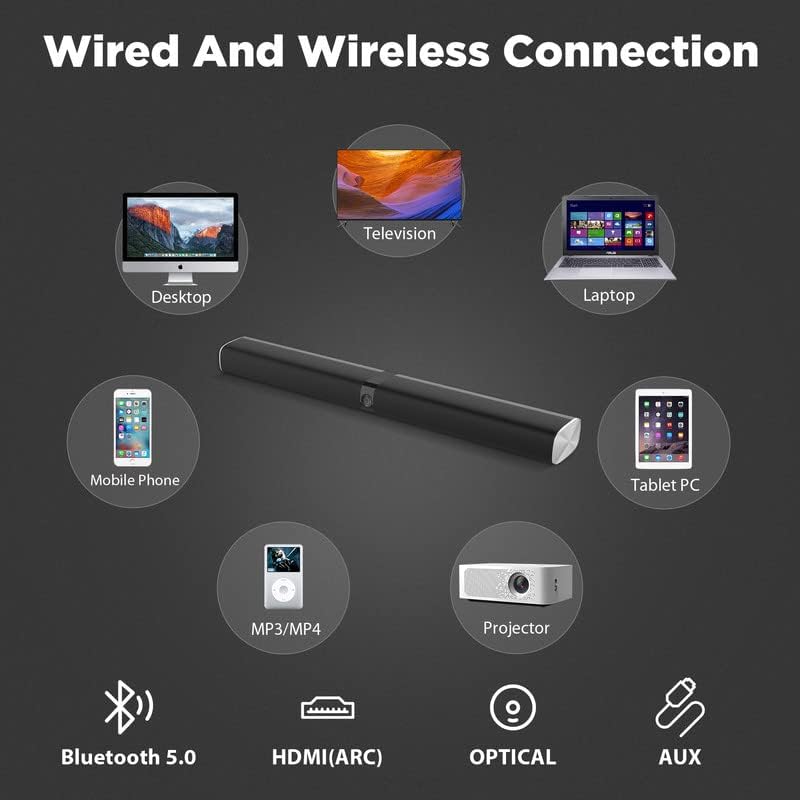
Figure 5: Overview of the sound bar's versatile connectivity, including Bluetooth 5.0, HDMI (ARC), Optical, and AUX, compatible with devices like desktops, televisions, laptops, mobile phones, MP3/MP4 players, and projectors.

Figure 6: Detailed view of the sound bar's rear ports (Service Only, HDMI ARC (TV), OPT, AUX, DC IN) and the remote control, highlighting the simple two-step process: 1) Set the mode on the remote, 2) Plug in the cable.
3. Power Connection
Connect the provided power cord to the DC IN port on the sound bar and then plug it into a standard wall outlet.
Operating Instructions
1. Power On/Off
Press the Power button on the remote control or on the sound bar to turn the unit on or off.
2. Mode Selection
Press the Mode button on the remote control to cycle through the available input modes: Bluetooth (BT), HDMI (ARC), Optical (OPT), and AUX. The current mode will be indicated by an LED light on the sound bar.
3. Volume Control
Use the Volume Up (+) and Volume Down (-) buttons on the remote control or on the sound bar to adjust the volume level.
4. Bluetooth Pairing
In Bluetooth mode, the sound bar will automatically enter pairing mode. On your device, search for "KY8000" in the Bluetooth settings and select it to connect. A confirmation sound will indicate successful pairing.
5. Remote Control Functions
The remote control provides full functionality for your sound bar, including power, mode selection, volume adjustment, and playback controls (for Bluetooth mode).
Maintenance
- Cleaning: Use a soft, dry cloth to clean the surface of the sound bar. Do not use liquid cleaners or aerosols, as they may damage the finish.
- Placement: Ensure the sound bar is placed on a stable, flat surface or securely mounted. Avoid placing it in direct sunlight, near heat sources, or in areas with high humidity.
- Ventilation: Do not block any ventilation openings on the sound bar to prevent overheating.
Troubleshooting
| Problem | Possible Cause | Solution |
|---|---|---|
| No Sound |
|
|
| Bluetooth Disconnection |
|
|
| Remote Not Working |
|
|
Specifications
| Feature | Detail |
|---|---|
| Model Name | KY8000 |
| Speaker Type | Soundbar, Surround Speaker |
| Special Feature | Subwoofer (implied by bass effect, though not a separate unit) |
| Recommended Uses | For Computers, For Smartphones or Tablets, For Televisions |
| Compatible Devices | Television |
| Unit Count | 1 Count (as a single unit) |
| Controller Type | Remote Control |
| Surround Sound Channel Configuration | 2.0, 4.2 (referring to the detachable setup) |
| Color | Black |
| Product Dimensions | 2.5"D x 31"W x 3.5"H (as a single unit) |
| Power Source | Corded Electric |
| Speaker Maximum Output Power | 50 Watts |
| Connectivity Technology | Auxiliary, Bluetooth, HDMI, Optical |
| Audio Output Mode | Stereo, Surround |
| Mounting Type | Bar Mount, TV Bar (for single unit), Vertical Stands (for split) |
Warranty & Support
The Assistrust KY8000 TV Sound Bar comes with a limited warranty. For specific warranty terms and conditions, please refer to the warranty card included in your product packaging or contact Assistrust customer support. For technical assistance or further inquiries, please visit the official Assistrust website or contact their customer service channels.
Note: Product specifications and features are subject to change without prior notice.


