
1. Introduction and Overview
Thank you for choosing the KOORUI 22 Inch Computer Monitor. This Full HD (1920x1080) display features a high 100Hz refresh rate and 5ms response time, powered by a VA panel with an impressive 3000:1 contrast ratio. Designed for both productivity and gaming, it includes AdaptiveSync technology for smooth visuals and eye-friendly features like Blue Light Filter, Flicker-Free, and Anti-Glare. This manual provides essential information for setting up, operating, and maintaining your new monitor.
2. What's in the Box
Please check the contents of your package to ensure all items are present:
- KOORUI 22 Inch Monitor x1
- Monitor Column x1
- Monitor Bottom Base x1
- Power Cord x1
- HDMI 1.4 Cable x1
- Power Adapter x1
- User Manual x1
- Screws (for assembly) x4

3. Setup and Installation
3.1. Assembling the Monitor Stand
- Carefully place the monitor face down on a soft, clean surface to prevent scratches.
- Push the monitor column into the main body of the monitor until it clicks securely into place. Ensure the bracket is firmly connected.
- Insert the column into the bottom base.
- Check that the base and the column are firmly connected. Place the assembled monitor on a stable, flat surface.
3.2. VESA Mounting (100x100mm Compatible)
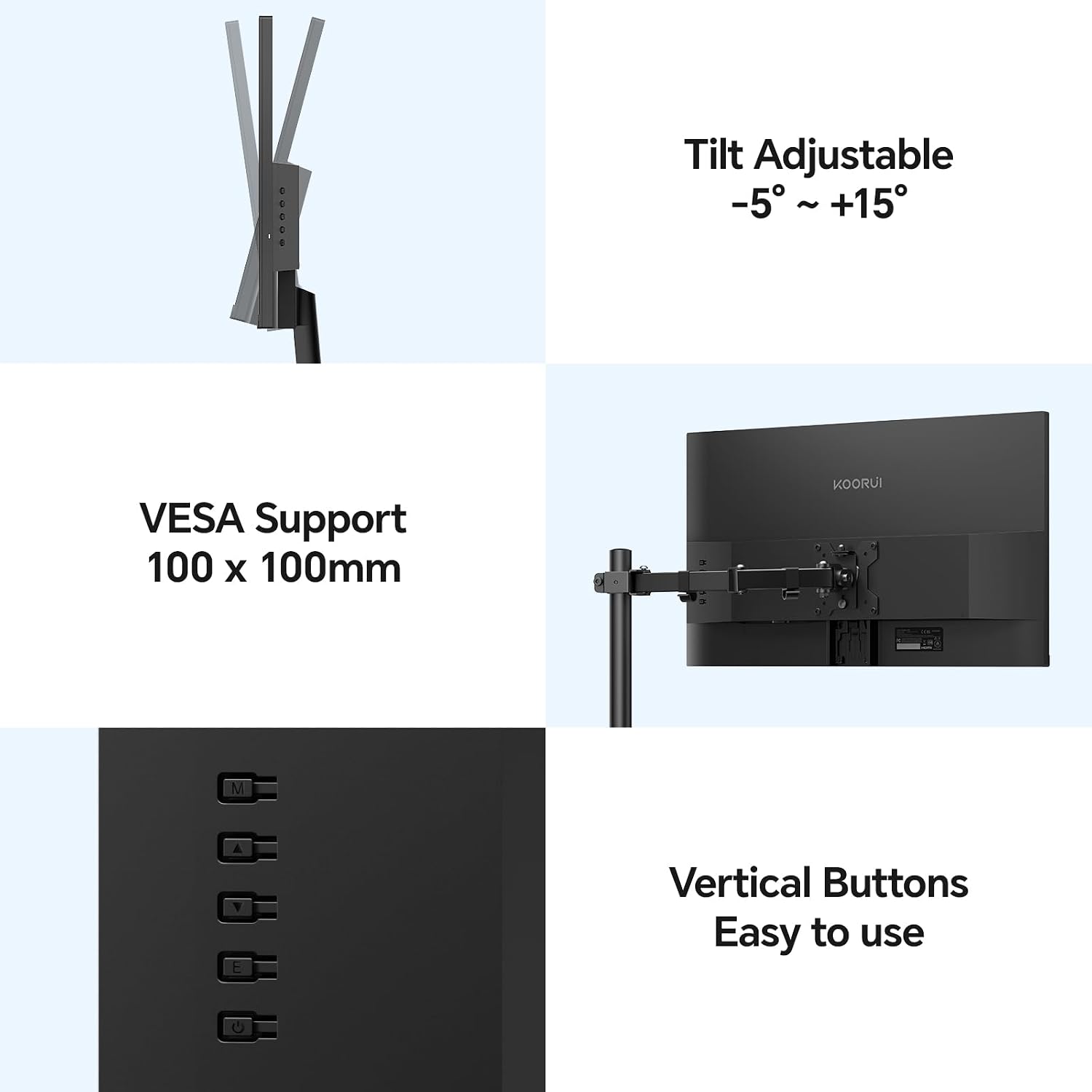
The KOORUI E2212F monitor supports VESA 100x100mm mounting standards, allowing you to attach it to compatible wall mounts or desk arms (sold separately) for enhanced flexibility and space-saving. Ensure your VESA mount is rated for the monitor's weight (2.3kg / 6.6 lbs).

3.3. Connecting to a Device
Connect your computer or other device to the monitor using the provided HDMI cable or a VGA cable (not included). The monitor also features an audio output terminal for external speakers or headphones.
- HDMI (1.4): For high-definition digital video and audio.
- VGA: For analog video signals.
- Audio Out: Connect external audio devices.
- DC In: Connect the power adapter.
4. Features and Usage
4.1. Display Performance
- Full HD (1920x1080) Resolution: Delivers crisp and clear images.
- VA Panel: Offers superior contrast (3000:1) and deeper blacks compared to TN and IPS panels, enhancing visual depth.
- 100Hz Refresh Rate & 5ms Response Time: Provides smoother motion and reduced input lag, ideal for gaming and fast-paced content.
- AdaptiveSync Technology: Synchronizes the monitor's refresh rate with your GPU's frame rate, eliminating screen tearing and stuttering for a fluid gaming experience.
- 99% sRGB Color Gamut: Ensures accurate and vibrant color reproduction.
- 250nit Brightness: Offers clear visibility in various lighting conditions.


4.2. Ergonomics and Design
- Ultra-Slim Design: Features an 8mm profile and three-sided slim bezels, maximizing screen space and providing an immersive viewing experience.
- Tilt Adjustment: The monitor stand allows for tilt adjustment from -5° to +20° for optimal viewing comfort.
- Wide Viewing Angle: A 178° wide viewing angle ensures consistent image quality and vibrant colors from various perspectives.
- Eye-Friendly Features: Includes a Blue Light Filter, Flicker-Free technology, and Anti-Glare coating to reduce eye strain during prolonged use.


5. Specifications
| Feature | Description |
|---|---|
| Screen Size | 22 Inches |
| Panel Type | VA |
| Maximum Resolution | FHD (1920x1080) |
| Aspect Ratio | 16:9 |
| Contrast Ratio | 3000:1 |
| Brightness | 250nit |
| Color Gamut | 99% sRGB |
| Refresh Rate | 100Hz |
| Response Speed | 5ms |
| Adaptive Sync | Yes |
| Tilt Angle Adjustment | -5° to 20° |
| Data Interfaces | 1x HDMI (1.4), 1x VGA, Audio Out |
| VESA Compatibility | 100x100mm |
| Item Weight | 2.3 kg (6.6 pounds) |
| Product Dimensions (WxHxD) | 495x388x185mm (19.5 x 15.35 x 7.09 inches) |
| Power Consumption | 12V2A |
6. Troubleshooting
If you encounter any issues with your KOORUI monitor, please refer to the common solutions below:
- No Display / Black Screen:
- Ensure the power adapter is securely connected to both the monitor and a working power outlet.
- Verify that the video cable (HDMI or VGA) is properly connected to both the monitor and your computer/device.
- Check the input source on the monitor using the control buttons on the back. Make sure it matches the cable you are using (e.g., HDMI if using an HDMI cable).
- Restart your computer/device.
- Try a different video cable or port on your computer/device if available.
- Flickering or Distorted Image:
- Ensure the video cable is securely connected.
- Check your computer's display settings to ensure the resolution and refresh rate are compatible with the monitor's specifications (1920x1080 at 100Hz).
- Disable or enable AdaptiveSync in your computer's graphics settings to see if it resolves the issue.
- No Audio from Monitor (if using HDMI):
- Ensure your computer's audio output is set to the monitor (e.g.,


