
1. Introduction and Overview
The Donner DED-400 Electric Drum Set is designed to provide a comprehensive and quiet drumming experience for musicians of all levels. Featuring quiet mesh heads, an elite drum module with a wide array of sounds, and robust construction, this kit offers versatility for practice, performance, and recording. Its compact design allows for easy setup and storage, making it suitable for various environments.

Figure 1.1: The complete Donner DED-400 Electric Drum Set, including drum pads, cymbals, module, pedals, throne, and headphones.
2. Package Contents
Please verify that all items listed below are included in your package:
- 1 x 10" Dual-Zone Mesh Snare Drum
- 3 x 8" Mesh Tom Drums
- 1 x 8" Mesh Bass Drum
- 1 x 12" Hi-Hat Cymbal
- 1 x 12" Crash Cymbal (with Choke function)
- 1 x 12" Ride Cymbal (with Choke function)
- 1 x Professional Drum Rack (foldable for storage)
- Cables for connections
- Drumsticks
- Drum Key
- Bass Drum Pedal
- Hi-Hat Control Pedal
- Drum Throne
- Headphones
- Power Supply
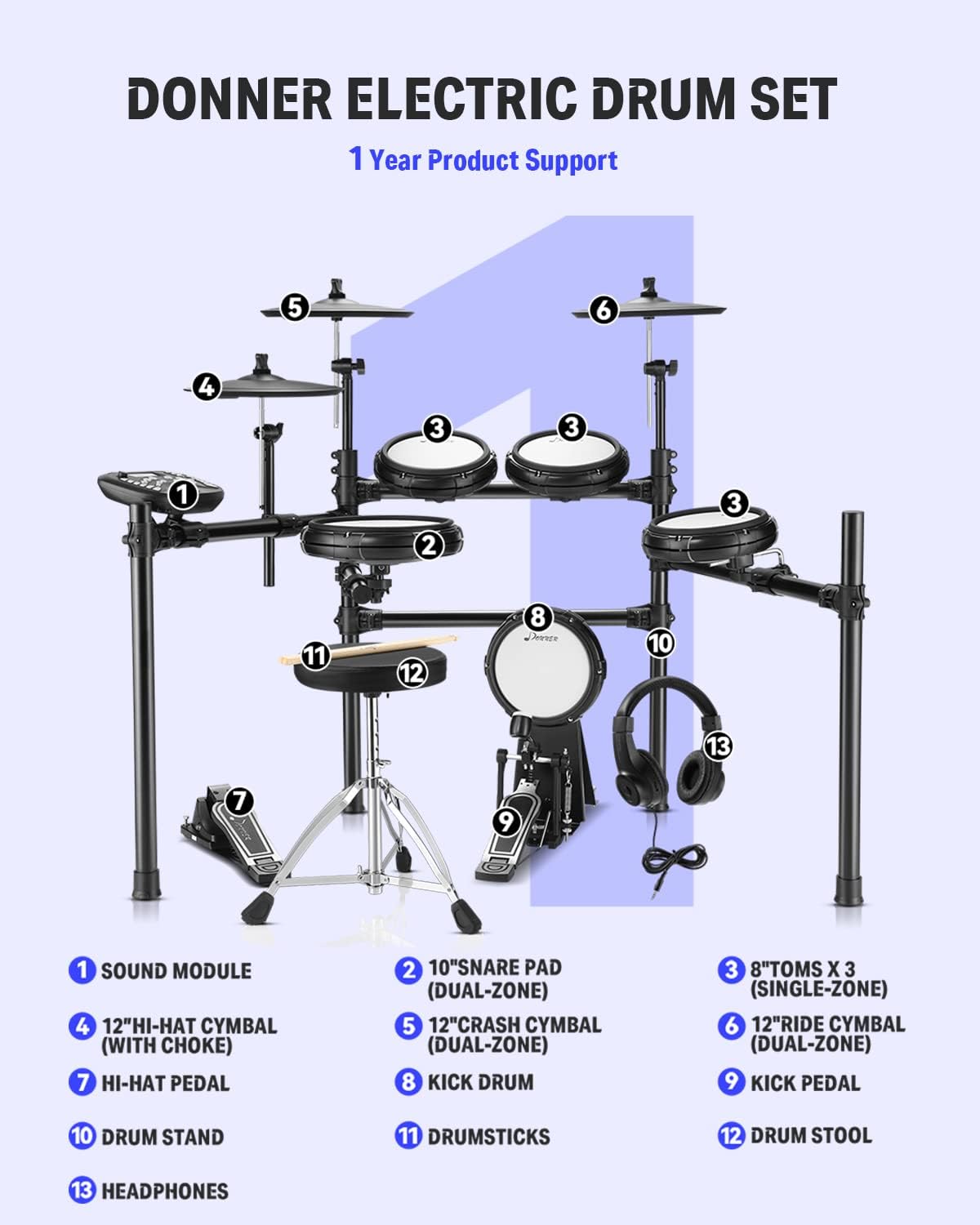
Figure 2.1: Detailed diagram illustrating each numbered component of the DED-400 drum set for easy identification.
3. Setup Guide
3.1 Assembling the Drum Rack
Unfold the professional drum rack and ensure all joints are securely fastened. The rack is designed for stability and can be adjusted to suit your playing preference. Refer to the included assembly diagram for precise positioning of the vertical and horizontal bars.

Figure 3.1: The robust steel frame of the drum set, designed for stability and durability.
3.2 Attaching Pads and Cymbals
Attach the snare, tom, and bass drum pads, along with the hi-hat, crash, and ride cymbals, to the designated clamps on the drum rack. Ensure each component is firmly secured but do not overtighten. The mesh heads provide a realistic feel and quiet response.

Figure 3.2: A close-up view of the quiet mesh drum head, providing a realistic and responsive playing surface.
3.3 Connecting Pedals
Connect the bass drum pedal to the bass drum pad and the hi-hat control pedal to its designated input on the drum module. The solid kick pad is designed to accommodate double bass pedals for advanced playing techniques.

Figure 3.3: The solid kick pad and pedal assembly, designed for durability and compatibility with double bass pedals.
3.4 Wiring the Module
Connect all drum pads and cymbals to the corresponding inputs on the DED-400 drum module using the provided cables. Ensure each connection is secure. Plug in the power supply and connect your headphones to the headphone jack for private practice, or connect to an amplifier for external sound.

Figure 3.4: The connectivity panel of the drum module, showing AUX IN and USB ports for external device connections.
4. Operating Instructions
4.1 Drum Module Functions
The DED-400 drum module is the central control unit for your electric drum set. Power on the module using the dedicated button. Use the navigation buttons and rotary knob to select from 50 pre-set drum kits and explore 400 individual drum sounds. Adjust the master volume and individual pad volumes as needed.

Figure 4.1: The DED-400 drum module, featuring a clear display and intuitive controls for sound and kit selection.
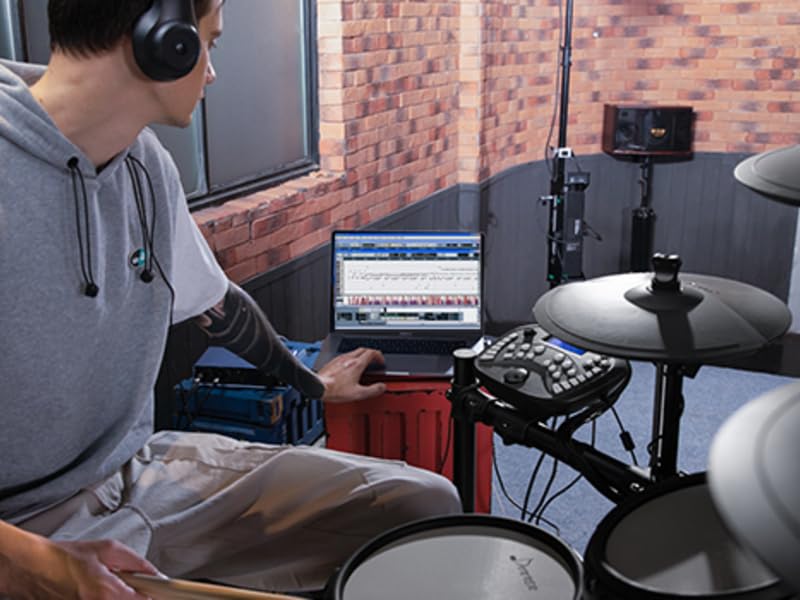
Figure 4.2: A user interacting with the drum module, highlighting its ease of use for sound customization.
4.2 Playing Along and Recording
The module includes 50 accompaniment tracks and a metronome to assist with practice. You can connect your phone or other portable device via the CD/MP3 auxiliary input to play along with your favorite music. The built-in drum recording feature allows you to capture your performances directly on the module.

Figure 4.3: The DED-400 is designed for quiet practice, allowing drummers to immerse themselves in music without disturbing others.
4.3 USB/MIDI Connectivity
Utilize the USB/MIDI port to connect the DED-400 to a computer or other MIDI-compatible devices. This allows you to record your drumming into third-party software, control virtual instruments, or expand your sound library.
4.4 Melodics Lessons
The DED-400 includes free virtual lessons from Melodics. Connect your drum set to a compatible device and access interactive lessons to hone your drumming skills in various styles.
4.5 Performance Demonstration
Watch the official performance video to see the Donner DED-400 Electric Drum Set in action and hear its capabilities.
Video 4.1: A performance demonstration showcasing the sound and responsiveness of the Donner DED-400 Electric Drum Set.
5. Maintenance and Care
- Cleaning: Wipe down drum pads, cymbals, and the module with a soft, dry cloth. For stubborn dirt, a slightly damp cloth can be used, followed by immediate drying. Avoid abrasive cleaners or solvents.
- Mesh Heads: The mesh heads are durable, but using drumsticks with nylon tips can help prolong their lifespan and prevent marking.
- Rack Stability: Periodically check all clamps and bolts on the drum rack to ensure they are tight and secure. This maintains the stability of your kit during play.
- Cable Management: Keep cables organized and untangled to prevent damage and ensure reliable connections.
6. Troubleshooting
- No Sound from Pads:
- Check all cable connections from the pads/cymbals to the module.
- Ensure the module is powered on and the master volume is turned up.
- Verify that headphones or an external amplifier are properly connected and their volume is adjusted.
- If a specific pad is not triggering, check its individual volume setting on the module.
- Pad Not Responding Consistently:
- Adjust pad sensitivity settings within the drum module's menu. Refer to the module's specific guide for navigation.
- Check for crosstalk settings, which can cause unintended triggers from nearby pads.
- Review retrigger mask timing if rapid hits are not registering correctly.
- Wobbly Drum Throne:
- Ensure all tightening mechanisms on the drum throne are fully secured.
- Verify that the legs are spread evenly and firmly on the floor.
- Headphones Low Volume:
- Ensure the headphone plug is fully inserted into the module's headphone jack.
- Adjust the master volume on the module.
- Test with a different pair of headphones to rule out headphone issues.
7. Specifications
| Feature | Specification |
|---|---|
| Model | DED-400 |
| Drum Sounds | 400 |
| Drum Kits | 50 |
| Accompaniment Tracks | 50 |
| Snare Drum | 10" Dual-Zone Mesh |
| Tom Drums | 3 x 8" Mesh |
| Bass Drum | 1 x 8" Mesh |
| Cymbals | 1 x 12" Hi-Hat, 1 x 12" Crash (w/Choke), 1 x 12" Ride (w/Choke) |
| Connectivity | USB/MIDI, CD/MP3 AUX Input |
| Drum Rack Material | Steel |
| Item Weight | 53.9 pounds |
8. Warranty and Support
The Donner DED-400 Electric Drum Set comes with 1 Year Product Support. For any technical assistance, warranty claims, or inquiries, please contact Donner customer service through the official channels provided at the point of purchase or on the Donner website. Please retain your proof of purchase for warranty validation.
For additional resources and frequently asked questions, visit the official Donner website or refer to the product page where you purchased the item.

