
1. Introduction
Thank you for choosing the Sanag A5S Open Ear Headphones. These headphones utilize advanced air conduction technology to deliver sound while keeping your ears open to ambient surroundings, ensuring safety during outdoor activities. Designed for comfort and durability, the A5S features Bluetooth 5.0 connectivity, IP67 water resistance, and a lightweight design, making them ideal for sports, work, and daily use.
2. Package Contents
Please check the package for the following items:
- Sanag A5S Sports Headset x1
- Micro USB Charging Cable x1
- User Manual x1
3. Product Overview
Familiarize yourself with the various parts and controls of your Sanag A5S headphones.
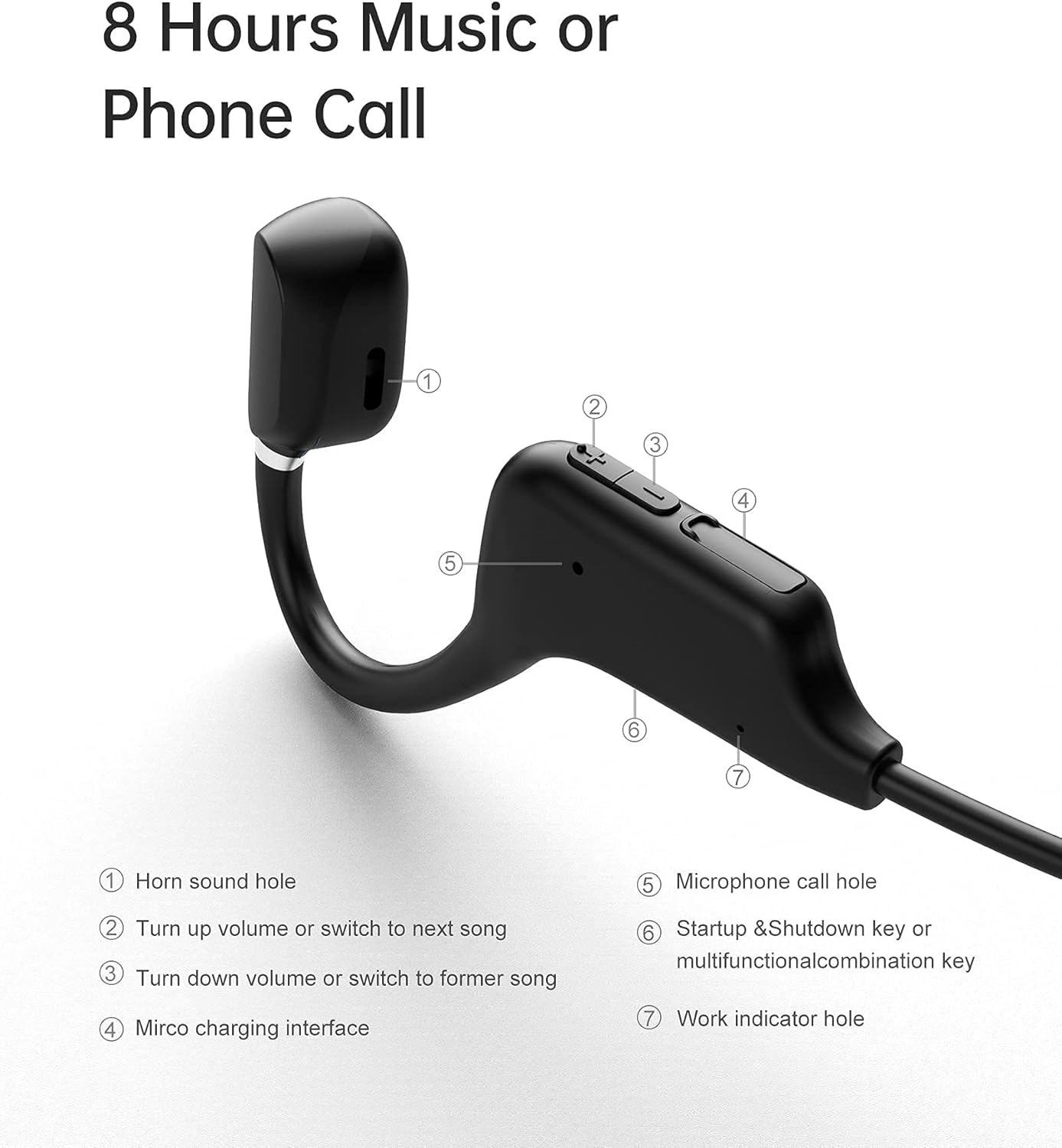
Figure 3.1: Sanag A5S Headset Components
- Horn sound hole
- Volume Up / Next Song button
- Volume Down / Previous Song button
- Micro USB charging interface
- Microphone call hole
- Power On/Off / Multifunction button
- Work indicator hole

Figure 3.2: Key Features of Sanag A5S Headphones
4. Setup
4.1 Charging the Headphones
Before first use, fully charge your Sanag A5S headphones.
- Connect the Micro USB charging cable to the charging interface (4) on the headphones.
- Connect the other end of the cable to a USB power source (e.g., computer, wall adapter).
- The indicator light (7) will show charging status. A full charge takes approximately 2 hours.
A fully charged battery provides up to 8 hours of continuous use or 300 hours of standby time.

Figure 4.1: Charging the Sanag A5S Headphones
4.2 Pairing with a Bluetooth Device
Follow these steps to connect your headphones to your smartphone, tablet, or other Bluetooth-enabled device:
- Power On: Press and hold the Multifunction button (6) for 3 seconds until the indicator light (7) flashes, indicating the headphones are in pairing mode.
- Activate Bluetooth: On your device, go to the Bluetooth settings and ensure Bluetooth is turned on.
- Connect: In the list of available devices, select "A5S". Once connected, the indicator light will stop flashing or change color (refer to specific light patterns in troubleshooting if needed).
The headphones will automatically attempt to reconnect to the last paired device when powered on.

Figure 4.2: Bluetooth 5.0 Connectivity
5. Operating Instructions
5.1 Power On/Off
- Power On: Press and hold the Multifunction button (6) for 3 seconds.
- Power Off: Press and hold the Multifunction button (6) for 3 seconds.
5.2 Music Playback
- Play/Pause: Short press the Multifunction button (6).
- Next Song: Short press the Volume Up button (2).
- Previous Song: Short press the Volume Down button (3).
5.3 Volume Control
- Increase Volume: Long press the Volume Up button (2).
- Decrease Volume: Long press the Volume Down button (3).
5.4 Call Management
- Answer Call: Short press the Multifunction button (6) when a call comes in.
- End Call: Short press the Multifunction button (6) during a call.
- Reject Call: Long press the Multifunction button (6) when a call comes in.
- Voice Assistant: Double-press the Multifunction button (6) to activate your device's voice assistant (if supported).
6. Maintenance
6.1 Cleaning
Regularly clean your headphones to ensure optimal performance and hygiene.
- Wipe the headphones with a soft, dry, or slightly damp cloth.
- Do not use harsh chemicals, cleaning solvents, or strong detergents.
- Ensure the charging port is dry before charging.
6.2 Storage
When not in use, store the headphones in a cool, dry place away from direct sunlight and extreme temperatures.
6.3 Water Resistance
The Sanag A5S headphones are IP67 rated, meaning they are resistant to dust and can withstand immersion in water up to 1 meter for 30 minutes. While they are sweat and light rain resistant, avoid prolonged exposure to water or using them during swimming.

Figure 6.1: Open Ear Design for Awareness

Figure 6.2: Flexible and Durable Design
7. Troubleshooting
If you encounter any issues with your headphones, please refer to the following common problems and solutions:
- Headphones do not power on:
Ensure the headphones are fully charged. Connect them to a power source using the Micro USB cable. - Cannot pair with device:
Make sure Bluetooth is enabled on your device. Ensure the headphones are in pairing mode (indicator light flashing). Move the headphones closer to your device (within 10 meters). Turn off and on both the headphones and your device's Bluetooth. - No sound or low volume:
Check the volume levels on both the headphones and your connected device. Ensure the headphones are properly paired. Try playing different audio sources. - Intermittent connection:
Ensure there are no obstructions between the headphones and your device. Move away from other wireless devices that might cause interference. - Microphone not working:
Ensure the headphones are properly connected and selected as the audio input device on your phone/computer. Check for any mute settings on your device.
If the problem persists, please contact customer support.
8. Specifications
| Feature | Specification |
|---|---|
| Model Name | A5S Sports Headset |
| Connectivity Technology | Wireless (Bluetooth) |
| Wireless Communication Technology | Bluetooth 5.0 |
| Bluetooth Range | Up to 10m (30 feet) |
| Water Resistance Level | IP67 (Waterproof and Sweat-proof) |
| Battery Life | Up to 8 Hours (continuous use) |
| Standby Time | Up to 300 Hours |
| Charging Time | Approx. 2 Hours |
| Battery Capacity | 120mAh |
| Item Weight | 18g (0.63 ounces) |
| Material | Silicone |
| Audio Driver Type | Air Conduction Driver |
| Control Type | Volume Control, Multifunction Button |
| Compatible Devices | Smartphones, Laptops, Tablets, Smart Speakers |
9. Warranty and Support
9.1 Warranty Information
Sanag products are designed and manufactured to the highest quality standards. This product is covered by a limited warranty from the date of purchase. Please refer to the warranty card included in your package or visit the official Sanag website for detailed warranty terms and conditions.
9.2 Customer Support
If you have any questions, require technical assistance, or need to report an issue with your Sanag A5S headphones, please contact our customer support team. Contact information can typically be found on the Sanag official website or through your retailer.


