
1. Introduction
Thank you for choosing the Beetel X73N Cordless 2.4Ghz Landline Phone. This manual provides essential information for setting up, operating, and maintaining your new phone. Please read these instructions carefully before use to ensure optimal performance and longevity of your device.
2. What's in the Box
Upon opening your Beetel X73N package, you should find the following items:
- Product (Handset and Base Unit)
- User Manual
- Power Adapter
- Telephone Line Cord
- 2 AAA Rechargeable Batteries
3. Product Overview
The Beetel X73N is designed for ease of use and reliable communication. It features a sleek handset with an illuminated keypad and an LCD display, paired with a compact base unit.
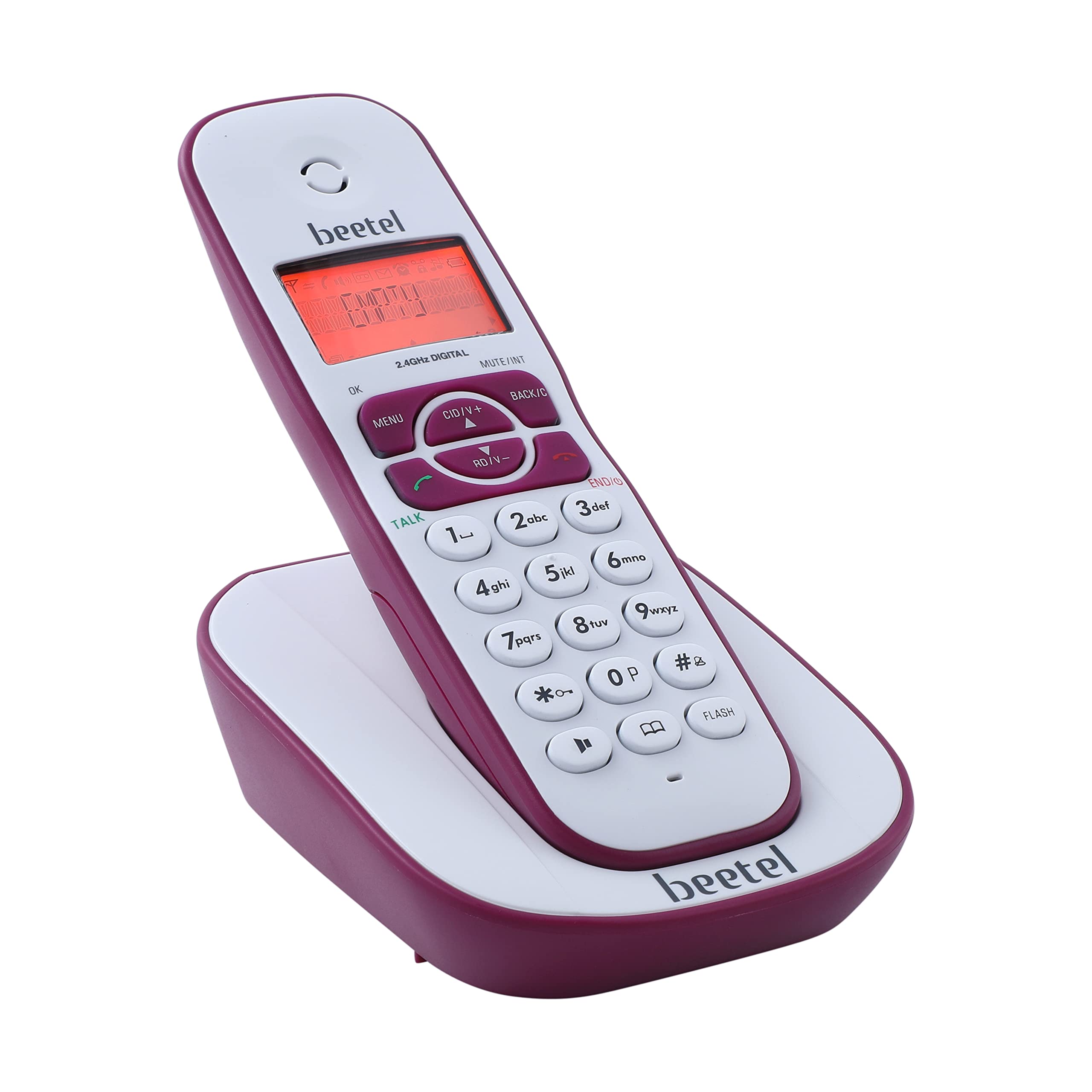
Image: Beetel X73N Cordless Phone Handset and Base Unit.

Image: The LCD display with backlight shows calling party information, battery capacity, and signal strength.

Image: The alphanumeric illuminated keypad ensures easy visibility of buttons for operation in various lighting conditions.
4. Setup Instructions
Follow these steps to set up your Beetel X73N cordless phone:
- Connect the Base Unit: Plug the power adapter into the base unit and then into a wall outlet. Connect the telephone line cord from the base unit to your telephone wall jack.
- Install Batteries: Open the battery compartment on the back of the handset. Insert the two AAA rechargeable batteries, ensuring correct polarity. Close the compartment.
- Charge the Handset: Place the handset on the base unit. The charging indicator on the handset should illuminate, indicating that it is charging. For first-time use, charge the handset for at least 12-15 hours to ensure full battery capacity.
Video: This video demonstrates the unboxing and initial setup process of the Beetel X73N Cordless Landline Phone, including connecting the base unit and installing/charging the handset batteries.

Image: The phone uses rechargeable batteries, ensuring convenience and portability.
5. Operating Instructions
5.1 Making and Receiving Calls
- To Make a Call: Press the TALK button, then dial the desired phone number.
- To Receive a Call: When the phone rings, press the TALK button.
- To End a Call: Press the END/C button or place the handset back on the base unit.
5.2 Using the 2-Way Speaker Phone
The Beetel X73N features a 2-way speakerphone for hands-free communication.
- During a call, press the Speaker button to activate the speakerphone.
- Press the Speaker button again to switch back to handset mode.

Image: Enjoy hands-free conversations with the 2-way speaker phone, featuring adjustable receive volume.
5.3 Volume Controls
Adjust the call volume during a conversation using the CID/V+ and RD/V- buttons on the handset.
5.4 Phonebook
Store frequently called numbers in the phonebook for quick dialing.
- Press the dedicated Phonebook button to access your saved contacts.
- Use the navigation buttons to scroll through entries.
- Follow on-screen prompts to add, edit, or delete contacts.

Image: The phone offers storage capacity for up to 50 numbers with names in its phonebook.
5.5 Caller ID and Call Waiting
The phone displays the caller's number and name (if available in your phonebook or service provider's database) for incoming calls. Call waiting alerts you to a second incoming call while you are already on a call.
5.6 Alarm Function
Set an alarm to remind you of important events. Refer to the on-screen menu for setting up the alarm.
6. Key Features
The Beetel X73N is equipped with several features to enhance your calling experience:
- Caller ID, Call Waiting, and Call Forwarding: Manage your calls efficiently with these essential functions.
- Alphanumeric Illuminated Keypad: Ensures clear visibility and easy dialing in any light condition.
- 2-Way Speaker Phone with Volume Controls: Enjoy hands-free conversations with adjustable audio levels.
- Dedicated Phonebook Button: Provides quick and immediate access to your saved contacts.
- LCD Display with Backlight: Clearly displays calling party phone number/name, battery capacity, and signal strength.
- Out of Range Warning Tone: Alerts you when the handset is too far from the base unit.
- Low Battery Warning Tone: Notifies you when the battery level is low, prompting you to charge the handset.
- Battery Charging Level Indicator: Visible on the handset display.
- Handset Locator: Helps you find a misplaced handset by paging it from the base unit.
- Key Tone ON/OFF: Customize keypad sound preferences.
- Polyphonic Ring Tones: Choose from a variety of ringtones.
Video: This video highlights various features of the Beetel X73N, including its illuminated keypad, phonebook capacity, LCD display, 2-way speakerphone, out-of-range warning, and manufacturer warranty.

Image: A diagram illustrating key features such as battery charging indicator, caller line identification, alarm, handset locator, polyphonic ring tones, key tone ON/OFF, and adjustable ringer volume.
7. Maintenance
To ensure the longevity and proper functioning of your Beetel X73N phone, follow these maintenance guidelines:
- Cleaning: Wipe the handset and base unit with a soft, damp cloth. Do not use abrasive cleaners or solvents.
- Battery Care: Use only the specified rechargeable batteries. If the phone will not be used for an extended period, remove the batteries to prevent leakage.
- Placement: Keep the phone away from direct sunlight, heat sources, and moisture. Avoid placing it near other electronic devices that may cause interference.
8. Troubleshooting
If you encounter any issues with your Beetel X73N, refer to the following common troubleshooting steps:
| Problem | Possible Solution |
|---|---|
| No dial tone | Ensure the telephone line cord is securely connected to both the base unit and the wall jack. Check if the power adapter is properly connected. |
| Handset not charging | Verify the handset is correctly placed on the base unit. Clean the charging contacts on both the handset and base. Ensure batteries are inserted correctly. |
| Poor sound quality | Move closer to the base unit to improve signal strength. Check for interference from other electronic devices. |
| Caller ID not displayed | Ensure you have subscribed to Caller ID service from your telephone service provider. |
| Handset out of range warning | Move the handset closer to the base unit. The operating range may vary depending on environmental factors. |
9. Specifications
Key technical specifications for the Beetel X73N Cordless Phone:
- RAM: 25 MB
- Product Dimensions: 8 x 12 x 16 cm
- Batteries: 2 AAA batteries (included)
- Call Conference: 2-way
- Other Display Features: Wireless
- Colour: Red
- Phone Standby Time: 180 Minutes
- Item Weight: 350 g
- Country of Origin: China
- Material: Plastic
- Telephone Type: Cordless
10. Warranty and Support
Your Beetel X73N Cordless Phone comes with a 1-year manufacturer warranty from the date of purchase. Please retain your purchase receipt as proof of warranty.
For technical support, service, or warranty claims, please contact Beetel customer service. Refer to the contact information provided in your product packaging or visit the official Beetel website for the most up-to-date support details.