
ieGeek S2
ieGeek 2K Magnetic Base WiFi Security Camera S2 User Manual
Model: S2 | Brand: ieGeek
Introduction
Thank you for choosing the ieGeek 2K Magnetic Base WiFi Security Camera S2. This camera offers advanced features such as 2K resolution, color night vision, 300° pan, Wi-Fi 6 connectivity, AI/PIR motion detection, and two-way audio. This manual will guide you through the installation, operation, and maintenance to ensure optimal performance and security for your home or property.
What's in the Box
Please check the contents of your package to ensure all items are present:
- ieGeek Camera S2
- User Manual
- Magnetic Camera Mount
- Magnetic Base
- USB-C Charging Cable
- Screw Bag (3 x Screws & Nuts)
- 3M Adhesive

Image: All components included in the ieGeek S2 camera package.
Product Overview
Camera Components

Front view: Ultra HD lens, spotlight, PIR sensor.

Back view: Speaker grille, QR code for setup.
Key Features
- 2K Ultra HD Video: Captures clear and detailed footage.
- 300° Pan Field of View: Offers panoramic views, covering a wide area.
- Wi-Fi 6 Connectivity: Provides faster and more reliable image transfer, reduced interference, and enhanced security.
- Color Night Vision: See in full color even in low-light conditions up to 10 meters.
- AI/PIR Motion Detection: Advanced detection system recognizes individuals and sends real-time alerts (0.2s to 3s).
- Alarm Siren: Automatically or manually trigger a siren to deter intruders.
- Two-Way Audio: Built-in microphone and speaker for real-time conversations.
- 100% Wire-Free & Rechargeable Battery: Easy installation without cables, suitable for both indoor and outdoor use.
- IP65 Weatherproof: Designed to withstand various weather conditions.
Setup and Installation
Initial Charging
Before first use, ensure the camera is fully charged using the provided USB-C cable. A standard 5V USB power adapter (not included) is required.
App Installation and Connection
- Step 1: Download the ieGeek Cam App. Search for "ieGeek Cam" on your smartphone's app store (Android 5.0+ or iOS 8.0+).
- Step 2: Connect to 2.4GHz Wi-Fi. Ensure your camera is within range of a 2.4GHz Wi-Fi network for initial setup.
- Step 3: Start Recording. Follow the in-app instructions to pair your camera and begin monitoring.
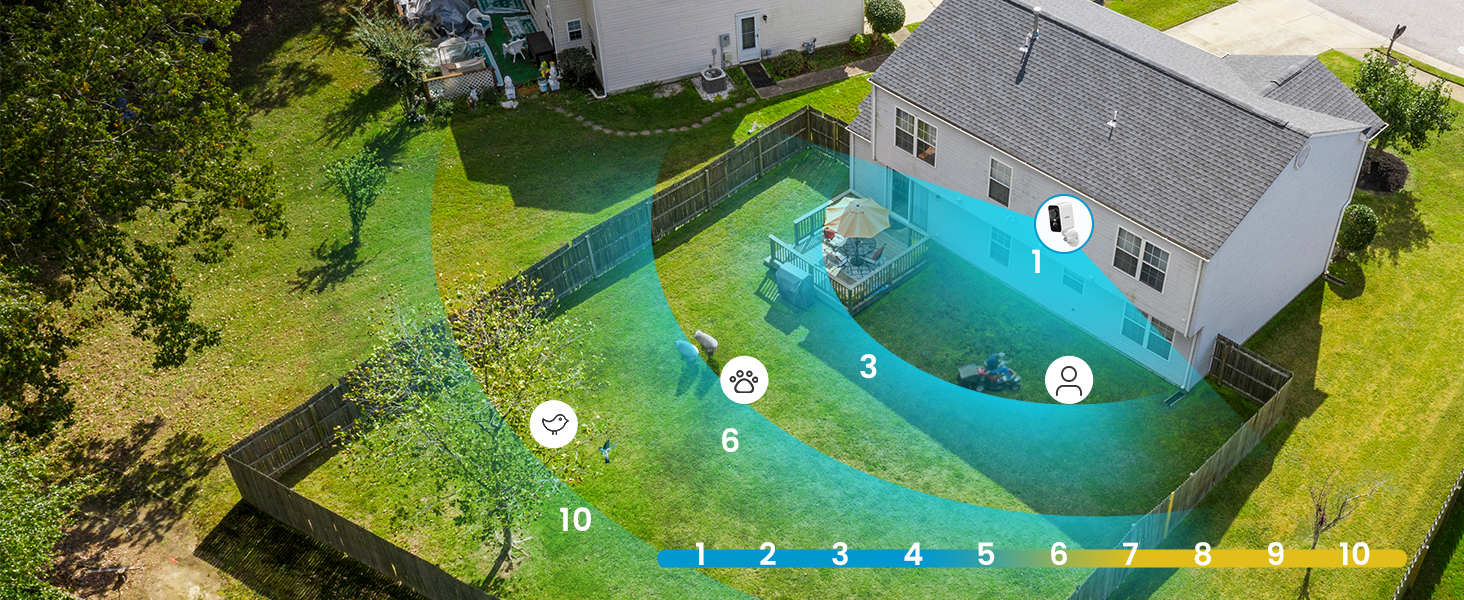
Image: Simplified setup process using the ieGeek Cam app.
Mounting Options
The ieGeek S2 camera offers flexible installation with its magnetic base. You can choose between adhesive mounting or screw mounting:
- Method 1: Adhesive Mounting (Tool-free).
- Install the 3M adhesive on a clean, flat wall surface.
- Allow the adhesive to rest for 8 hours to achieve optimal adhesion before attaching the magnetic base.
- Fix the magnetic base to the adhesive.
- Attach the camera to the magnetic base.
- Method 2: Screw Mounting.
- Drill three holes in the desired location.
- Fix the magnetic camera mount to the wall using the provided screws and nuts.
- Attach the camera to the magnetic mount.
The magnetic base allows for easy removal of the camera for recharging or repositioning.

Image: Magnetic base for easy, tool-free installation.

Image: Two installation methods for the ieGeek S2 camera.
Operating Instructions
Live View and Playback
Access live video streams and recorded footage through the ieGeek Cam app. The app supports simultaneous viewing of up to 4 cameras and allows sharing access with family members.
300° Pan Control
Utilize the in-app controls to remotely adjust the camera's horizontal viewing angle up to 300°, ensuring comprehensive coverage without blind spots.

Image: The camera's 300° pan capability provides wide area surveillance.
2K Ultra HD and Color Night Vision
The camera records in 2K resolution, providing sharp images. With its color night vision feature, you can see clear, full-color images even at night, up to 10 meters. Infrared night vision is also available.

Image: 2K 3MP HD image quality for clear details.

Image: Color night vision provides clear, vibrant images in low light.
AI/PIR Motion Detection and Alarm
The camera's advanced AI/PIR detection system identifies human shapes, reducing false alarms. Upon detection, you receive real-time alerts (0.2s to 3s) on your phone. You can also configure the camera to automatically trigger a siren or a strong light alarm to deter intruders.

Image: AI recognition minimizes false alarms by focusing on human shapes.

Image: PIR motion detection with siren and light alarm for immediate deterrence.
Two-Way Audio
Communicate directly with visitors or deter unwanted guests using the camera's integrated microphone and speaker. This feature allows for real-time, two-way conversations through the app.

Image: Two-way audio for real-time communication.
Storage Options
The camera supports local storage via a Micro SD card (up to 128GB, not included). Additionally, a free 6-second loop cloud storage is available through the ieGeek Cam app.

Image: Storage options including Micro SD card and cloud storage.
Maintenance
- Battery Charging: Recharge the camera battery as needed. The magnetic base allows for easy removal for charging.
- Cleaning: Periodically wipe the camera lens and body with a soft, damp cloth to remove dust and debris. Avoid harsh chemicals.
- Weather Protection: While the camera is IP65 weatherproof, ensure it is installed in a location that minimizes direct exposure to extreme weather conditions for prolonged durability.
Troubleshooting
- Camera Not Connecting to Wi-Fi:
- Ensure your Wi-Fi network is 2.4GHz. The camera does not support 5GHz Wi-Fi.
- Check the Wi-Fi signal strength at the camera's installation location.
- Verify that the Wi-Fi password entered in the app is correct.
- Restart your router and the camera.
- Excessive Battery Drain:
- Frequent motion detection events, especially in high-traffic areas, can increase battery consumption. Adjust motion detection sensitivity and detection zones in the app.
- Live viewing for extended periods also consumes more battery.
- Ensure the camera is fully charged before deployment.
- False Alarms:
- Adjust the AI/PIR detection sensitivity in the app.
- Define specific detection zones to exclude areas with irrelevant movement (e.g., trees swaying, distant traffic).
- Ensure the camera lens is clean and free from obstructions.
- Poor Image Quality:
- Check your internet connection speed.
- Ensure the camera lens is clean.
- Verify that the camera is set to 2K resolution in the app settings.
For further assistance, please refer to the ieGeek Cam app's help section or contact ieGeek customer support.
Specifications
| Feature | Specification |
|---|---|
| Video Recording Resolution | 2K |
| Effective Video Resolution | 1296p |
| Color | White |
| Wireless Communication Technology | Wi-Fi (2.4GHz) |
| Viewing Angle | 300° (Pan) |
| Night Vision Range | 10 Meters |
| Water Resistance Level | IP65 (Waterproof) |
| Material | Extra resistant ABS+PC material (heat and rust resistant) |
| Power Source | Battery Powered (Lithium-ion) |
| Memory Support | 32-128GB (Micro SD card) |
| Operating System Compatibility | Android 5.0+, iOS 8.0+ |
| Item Dimensions (L x W x H) | 17.5 x 6.6 x 5.5 cm |
Warranty and Support
The ieGeek 2K Magnetic Base WiFi Security Camera S2 comes with a 2-year manufacturer's warranty.
For any questions, technical support, or warranty claims, please contact ieGeek customer service. Their team is available to assist you within 24 hours on business days.
You can find contact information and additional resources within the ieGeek Cam app or on the official ieGeek website.
Related documentsS2


Ask a question about this manual
Ask about setup, troubleshooting, compatibility, parts, safety, or missing instructions. Manuals+ will review the question and use this page’s manual context to help answer it.