
SOLUSTRE B09CFZ3SNV
SOLUSTRE Vacuum Cleaner Brush Attachments User Manual
Model: B09CFZ3SNV
Introduction
Thank you for choosing the SOLUSTRE 4pcs Vacuum Cleaner Brush Attachments. This set provides versatile tools for effective dust cleaning in various areas of your home, including keyboards, tables, countertops, and hard-to-reach gaps. Made from durable materials, these attachments are designed for easy installation and efficient cleaning. This manual will guide you through the product's features, setup, operation, and maintenance to ensure optimal performance and longevity.
Product Overview

Image: The complete set of four SOLUSTRE vacuum cleaner brush attachments.
Components
- 4 x Multipurpose Vacuum Cleaner Brush Attachments
Key Features
- Versatile Cleaning: Designed for cleaning keyboards, dust tables, countertops, sliding doors, windows, blinds, and other tracks.
- Double-Head Design: Both ends of the brush can be utilized for cleaning, enhancing versatility.
- Durable Materials: Constructed from high-quality ABS plastic and durable nylon bristles for lasting use.
- Easy Installation: Simple to attach to most standard vacuum cleaners.
- Easy to Clean: The fine fluff is easy to clean, allowing for quick rinsing under water.

Image: Close-up view highlighting the high-quality materials and design of the brush attachment.
Each brush attachment features a unique design that allows for effective cleaning in narrow gaps and on delicate surfaces. The combination of durable ABS material and soft nylon bristles ensures effective dust removal without causing damage.
Setup
Attaching the Brush
The SOLUSTRE brush attachments are designed for easy integration with most standard vacuum cleaner hoses or wands. To attach a brush:
- Ensure your vacuum cleaner is turned off and unplugged for safety.
- Locate the end of your vacuum cleaner's hose or wand where attachments are typically connected.
- Firmly push the opening of the SOLUSTRE brush attachment onto the hose/wand until it is securely in place. Ensure a snug fit to prevent air leakage and maintain suction power.
- Once attached, the vacuum cleaner is ready for use with the new brush attachment.

Image: Illustrates the process of attaching the brush to a vacuum cleaner hose or wand.
Operating Instructions
General Cleaning
These brush attachments are ideal for light dust and debris. Turn on your vacuum cleaner and gently guide the brush over the surface you wish to clean. The soft bristles are designed to agitate dust without scratching surfaces.
Specific Applications
- Keyboards: Use the brush to gently sweep between keys, dislodging dust and crumbs. The narrow profile allows access to tight spaces.
- Tables & Countertops: Effectively remove fine dust and particles from flat surfaces.
- Sliding Doors & Window Tracks: The brush's design is particularly effective at reaching into the narrow grooves of tracks to remove accumulated dirt and debris.
- Blinds & Vents: Carefully brush along the slats of blinds or vents to remove dust.
- Appliance Interiors: The compact size and double-head design allow for cleaning inside certain appliances, such as the interior of a vacuum cleaner's dustbin area or other hard-to-reach components.

Image: Demonstrates using the brush attachment to clean a computer keyboard.

Image: Illustrates the double-head design and its application for cleaning various items, including vacuum cleaner components.
Maintenance
Cleaning the Brushes
To maintain the effectiveness and hygiene of your SOLUSTRE brush attachments, regular cleaning is recommended:
- After use, detach the brush from the vacuum cleaner.
- Remove any visible debris or tangled hair from the bristles by hand or with a small comb.
- Rinse the brush head under lukewarm running water. You may use a mild soap if necessary for stubborn dirt.
- Gently rub the bristles to dislodge any remaining dust or grime.
- Rinse thoroughly until all soap residue is gone.
- Shake off excess water and allow the brush to air dry completely before storing or reattaching to your vacuum.

Image: Highlights the ease of cleaning the brush attachments, showing a clean brush.
Troubleshooting
Most issues with the brush attachments are related to their connection or cleanliness. If you encounter problems, consider the following:
- Reduced Suction: Ensure the brush attachment is securely fitted to your vacuum cleaner's hose or wand. A loose connection can cause air leaks and reduce suction. Also, check if the vacuum cleaner's filter or dustbin needs emptying.
- Ineffective Cleaning: The bristles may be clogged with debris. Follow the maintenance instructions to clean the brush thoroughly.
- Difficulty Attaching: Ensure the attachment is compatible with your vacuum cleaner's hose diameter. While designed for universal fit, some variations may exist. Do not force the attachment if it does not fit easily.
Specifications
| Attribute | Detail |
|---|---|
| Product Dimensions | 5.51 x 1.18 x 0.39 inches (14 x 3 x 1 cm) |
| Item Weight | 1.28 ounces (per set of 4) |
| Material | ABS Plastic, Nylon Bristles |
| Color | White |
| Quantity | 4 pieces per set |
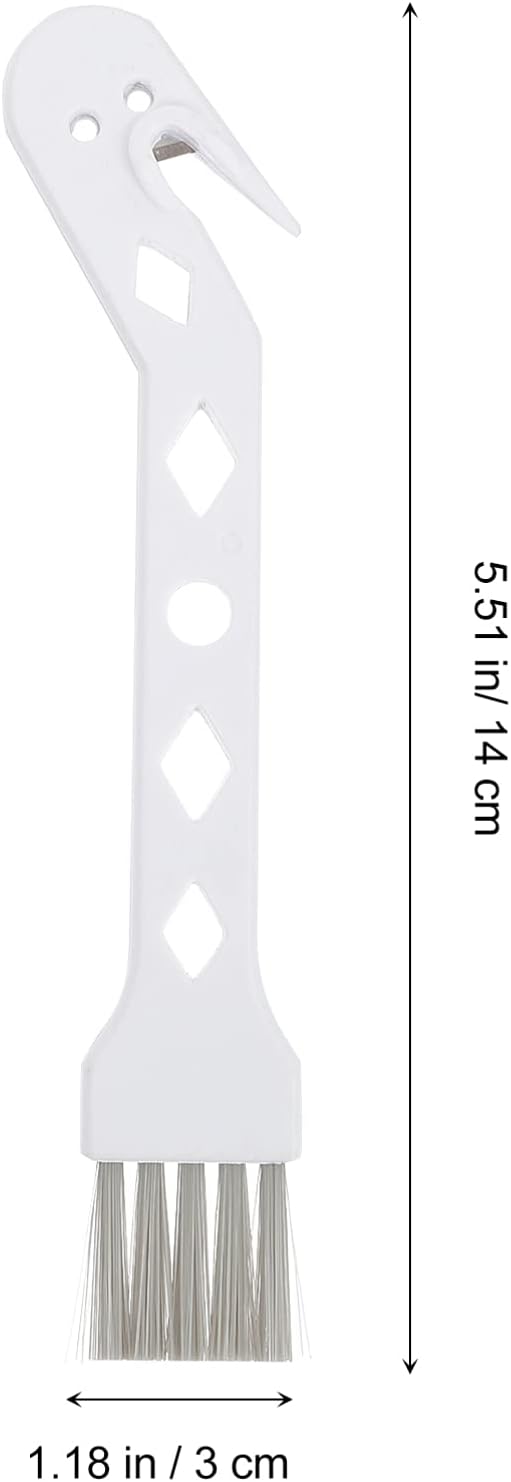
Image: Detailed dimensions of a single brush attachment.
Warranty and Support
For any questions, concerns, or support regarding your SOLUSTRE Vacuum Cleaner Brush Attachments, please refer to the retailer's return and support policies where the product was purchased. For direct assistance, you may also contact the manufacturer, SOLUSTRE, through their official channels or the contact information provided with your purchase. Please retain your proof of purchase for any warranty claims or support inquiries.
Ask a question about this manual
Ask about setup, troubleshooting, compatibility, parts, safety, or missing instructions. Manuals+ will review the question and use this page’s manual context to help answer it.