
Introduction
The Fitfiu Fitness MC-460 treadmill is engineered for effective and convenient home cardio workouts. Its compact, foldable design allows for intensive daily walking and running sessions without requiring excessive space. Equipped with a quiet 2200W motor and an adjustable speed range up to 15 km/h, it provides a comfortable and engaging exercise experience. The 46 x 122 cm running surface is designed to support your joints during use. This manual provides essential information for the safe assembly, operation, and maintenance of your MC-460 treadmill.

Image: The Fitfiu Fitness MC-460 Foldable Treadmill in its unfolded, ready-to-use state, showcasing its sleek design and control panel.
Safety Instructions
Before using the Fitfiu Fitness MC-460 treadmill, please read and understand all safety instructions. Failure to follow these instructions may result in injury or damage to the equipment.
- Consult a physician before starting any exercise program.
- Keep children and pets away from the treadmill during operation.
- Ensure the emergency stop key is properly attached to your clothing before starting your workout.
- Place the treadmill on a flat, stable surface with adequate clearance around it (at least 2 meters behind and 0.6 meters on each side).
- Do not operate the treadmill if it has a damaged cord or plug, or if it is not working properly.
- Wear appropriate athletic footwear and clothing.
- Do not step on or off the treadmill while the belt is moving.
- Maximum user weight for this treadmill is 100 kg.
Package Contents
Verify that all components are present and undamaged before assembly and use.
- Fitfiu Fitness MC-460 Treadmill main unit
- Emergency Stop Key
- Power Cord
- User Manual (this document)
- Assembly Tools (if required for minor setup)
- Lubricant for running belt
Setup
The Fitfiu Fitness MC-460 treadmill comes largely pre-assembled. Follow these steps for initial setup:
- Unpacking: Carefully remove the treadmill from its packaging. Retain packaging for future storage or transport.
- Unfolding: Place the treadmill on a flat surface. Gently lift the console and handlebars until they lock into the upright position. Ensure all locking mechanisms are securely engaged.
- Placement: Position the treadmill on a firm, level surface. Ensure there is at least 2 meters of clear space behind the treadmill and 0.6 meters on each side for safety.
- Power Connection: Plug the power cord into a grounded electrical outlet (220-240V).
- Emergency Stop Key: Attach the emergency stop key to the designated slot on the console. Always clip the other end of the key to your clothing before starting your workout.
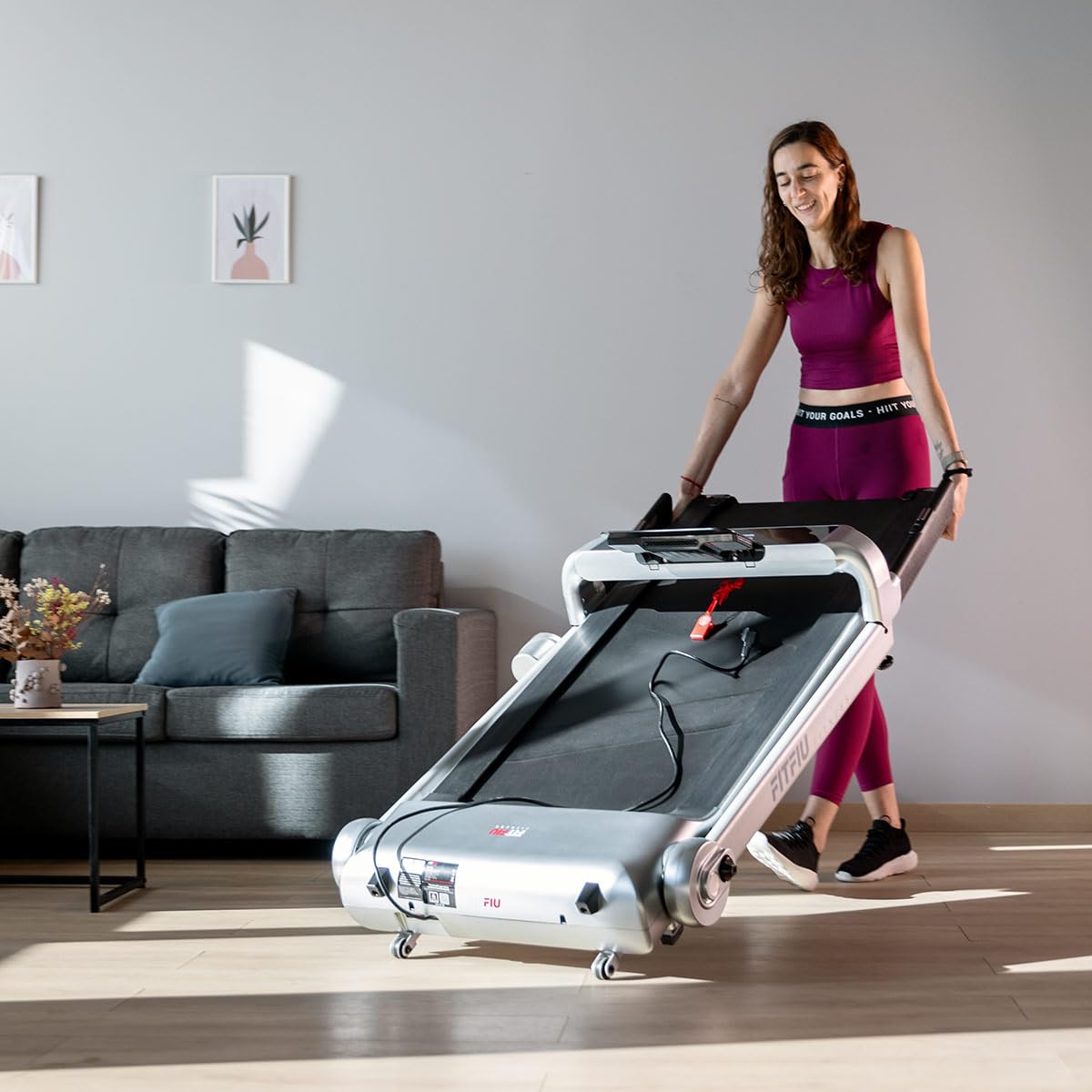
Image: The Fitfiu Fitness MC-460 Treadmill fully unfolded and ready for use, showing the running deck and upright console.
Operating Instructions
Familiarize yourself with the control panel and functions before beginning your workout.
Control Panel Overview

Image: Close-up of the Fitfiu Fitness MC-460 treadmill's control panel, featuring the LCD display, touch buttons, and tablet holder.
- LCD Display: Shows real-time workout data including Speed, Time, Distance, and Calories burned.
- Start/Stop Buttons: Located on the console and handlebars for easy access.
- Speed Adjustment: Use the '+' and '-' buttons on the console or handlebars to adjust speed. Four preset speed buttons are also available for quick changes.
- Tablet/Phone Holder: Securely place your device for entertainment during your workout.
- USB Port: Connect a USB device for charging or playing audio through the built-in speakers.
- Bluetooth Connectivity: Pair your device via Bluetooth to stream music through the treadmill's speakers or connect to compatible fitness apps for tracking your performance.

Image: Detail of the treadmill handlebar showing the integrated Start and Stop buttons for convenient operation.
Starting a Workout
- Ensure the emergency stop key is in place and clipped to your clothing.
- Step onto the treadmill, placing your feet on the side rails.
- Press the 'START' button. The belt will begin moving at a low speed.
- Gradually increase the speed to your desired level using the '+' button or preset speed buttons.
- Carefully step onto the moving belt and begin your exercise.
Stopping a Workout
- Press the 'STOP' button. The belt will gradually slow down and come to a complete stop.
- Alternatively, pull the emergency stop key to immediately stop the treadmill in an emergency.
- Once the belt has stopped, step off the treadmill.
Maintenance
Regular maintenance ensures the longevity and optimal performance of your treadmill.
- Cleaning: Wipe down the treadmill surfaces with a damp cloth after each use. Avoid abrasive cleaners.
- Lubrication: The running belt requires periodic lubrication to reduce friction and wear. Refer to the specific instructions provided with your lubricant. Typically, this involves lifting the belt and applying lubricant to the deck underneath. Frequency depends on usage, but generally every 3-6 months.
- Belt Tension and Alignment: Check the running belt tension and alignment regularly. If the belt feels loose or drifts to one side, adjust it according to the instructions in the full manual (not provided here, but typically involves adjusting screws at the rear of the treadmill).
- Motor Cover: Periodically vacuum dust and debris from under the motor cover to prevent overheating. Ensure the treadmill is unplugged before performing this.
Troubleshooting
Here are solutions to common issues you might encounter:
| Problem | Possible Cause | Solution |
|---|---|---|
| Treadmill does not start | Power cord unplugged, emergency stop key not in place, circuit breaker tripped. | Check power connection, ensure emergency stop key is fully inserted, reset circuit breaker. |
| Running belt slips or hesitates | Belt too loose, insufficient lubrication. | Adjust belt tension (refer to full manual), lubricate the running deck. |
| Unusual noise during operation | Loose components, motor issues, worn belt. | Check and tighten all visible bolts and screws. If noise persists, contact customer support. |
| Display not working | Loose cable connection, power issue. | Check all cable connections to the console. Ensure power supply is stable. |
Specifications
Detailed technical specifications for the Fitfiu Fitness MC-460 Treadmill.

Image: Diagram illustrating the dimensions of the Fitfiu Fitness MC-460 Treadmill in both unfolded and folded states.
| Feature | Specification |
|---|---|
| Brand | Fitfiu Fitness |
| Model | MC-460 |
| Motor Power | 2200W |
| Voltage | 220-240V |
| Maximum Speed | 15 km/h |
| Running Surface | 46 x 122 cm |
| Display Type | LCD (Speed, Time, Distance, Calories) |
| Safety Feature | Magnetic Emergency Stop System |
| Connectivity | Bluetooth, USB |
| Maximum User Weight | 100 kg |
| Recommended Max User Height | 1.80 m |
| Unfolded Dimensions (L x W x H) | 80 x 124 x 158 cm |
| Folded Dimensions (L x W x H) | 80 x 158 x 32 cm |
| Product Weight | 48 kg |
| Frame Material | Steel Alloy |
| Power Source | Corded Electric |
| Color | Light Grey |
| Recommended Use | Residential |
| Assembly Required | No (Minimal setup) |
Storage
The Fitfiu Fitness MC-460 treadmill features a vertical folding system and transport wheels for convenient storage and mobility.
- Folding: Ensure the treadmill is turned off and unplugged. Gently lift the running deck until it locks into the vertical position.
- Moving: Once folded, tilt the treadmill slightly to engage the front transport wheels. You can then easily roll it to your desired storage location.
- Storage Location: Store the treadmill in a dry, clean area away from direct sunlight and extreme temperatures.

Image: The Fitfiu Fitness MC-460 Treadmill in its folded, upright position, demonstrating its space-saving design.

Image: A person easily moving the folded Fitfiu Fitness MC-460 Treadmill using its integrated transport wheels.
Warranty and Support
For warranty information, please refer to the documentation provided at the time of purchase or contact your retailer. For technical support, spare parts, or service inquiries, please contact Fitfiu Fitness customer service through their official website or the contact details provided in your purchase documentation. Please have your model number (MC-460) and proof of purchase ready when contacting support.


