
QCY BH20T13A
QCY T13 True Wireless Earbuds User Manual
Model: BH20T13A
Brand: QCY
Introduction
The QCY T13 True Wireless Earbuds offer a high-quality audio experience with advanced features designed for convenience and performance. Equipped with a 7.2mm large speaker driver, these earbuds deliver rich bass, clear midrange, and crisp treble. The integrated ENC noise cancellation technology ensures clear voice calls by reducing ambient noise, making them suitable for various communication needs.
What's in the Box
- QCY T13 Earbuds (Left and Right)
- Charging Case
- Type-C Charging Cable
- Ear-tips (Small, Medium, Large)
- User Manual

Image: All components included in the QCY T13 Earbuds package.
Setup
Charging the Earbuds and Case
Before first use, fully charge the earbuds and charging case. Connect the provided Type-C charging cable to the charging case and a power source. The indicator light on the case will show charging status. A full charge provides up to 8 hours of listening time for the earbuds, with the charging case extending total playtime to 40 hours. A quick 5-minute charge can provide 1 hour of use.

Image: The QCY T13 charging case with a Type-C charging cable connected.
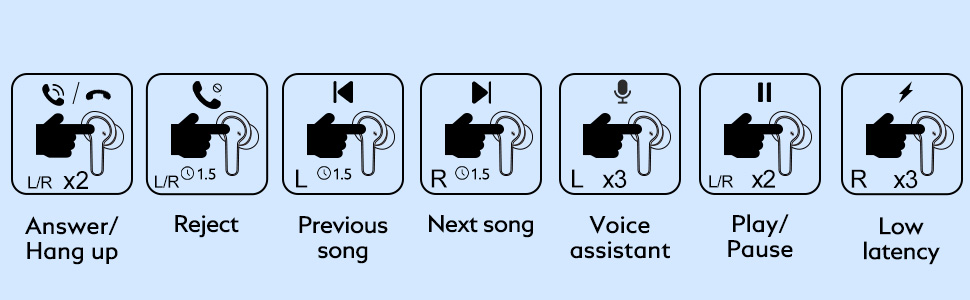
Image: Battery indicator lights on the charging case: Red (<50%), Blue (50-90%), Green (>90%).
Pairing with Your Device
- Ensure the earbuds are charged.
- Open the charging case. The earbuds will automatically power on and enter pairing mode.
- On your device (smartphone, tablet, etc.), enable Bluetooth and search for "QCY-T13".
- Select "QCY-T13" to connect. Once connected, you will hear a confirmation tone.

Image: The QCY T13 earbuds in their charging case, ready for pairing.
Video: Demonstrates how to operate the QCY T13 wireless Bluetooth earbuds, including pairing and basic functions.
Operating Instructions
Touch Controls
The QCY T13 earbuds feature smart touch controls for convenient operation without needing to access your phone. The touch-sensitive area is located on the outer surface of each earbud.
| Action | Control |
|---|---|
| Answer/Hang up Call | Double-tap L/R earbud |
| Reject Call | Press and hold L/R earbud for 1.5 seconds |
| Play/Pause Music | Double-tap L/R earbud |
| Previous Song | Press and hold Left earbud for 1.5 seconds |
| Next Song | Press and hold Right earbud for 1.5 seconds |
| Activate Voice Assistant | Triple-tap Left earbud |
| Low Latency Mode | Triple-tap Right earbud |

Image: Visual guide to the touch controls for the QCY T13 earbuds.
Video: A short demonstration of the QCY T13 Wireless Bluetooth Earbuds in use.
Video: A brief overview of the QCY T13 Earbuds, highlighting their microphone capabilities.
Wearing the Earbuds
For optimal sound quality and comfort, choose the ear tips that best fit your ears. The QCY T13 comes with small, medium, and large ear tips. Insert the earbuds into your ears and gently twist them to secure a snug fit.

Image: Various ear tip sizes for a customizable and comfortable fit.
Usage Modes: Stereo, Mono, and Share
- Stereo Mode: Use both earbuds for an immersive stereo audio experience. Ideal for music and videos.
- Mono Mode: Use either the left or right earbud independently. This is useful for calls or when you need to be aware of your surroundings.
- Share Mode: Share one earbud with another person while you use the other, allowing two people to listen to the same audio source.

Image: Illustrations of Stereo, Mono, and Share modes for the earbuds.
Maintenance
Cleaning
To maintain optimal performance and hygiene, regularly clean your earbuds. Use an alcohol pad to gently clean the charging contacts, ear tips, and the mesh covering the speaker.

Image: Instructions for cleaning the earbuds' components.
Water Resistance
The QCY T13 earbuds are IPX5 water-resistant, meaning they are protected against low-pressure water jets from any direction. This makes them suitable for workouts and light rain. However, they are not designed for submersion in water or for use during swimming.

Image: The earbuds demonstrating their IPX5 water resistance.
Troubleshooting
Resetting the Earbuds
If you experience pairing issues, sound problems, or other malfunctions, resetting the earbuds can often resolve the issue.
- Place both earbuds back into the charging case and ensure they are charging.
- Keep the charging case open.
- Press and hold the button on the charging case for 10 seconds until the red and blue LED indicators flash alternately 3 times.
- Close the case, then open it again to re-enter pairing mode and attempt to reconnect to your device.
Image: Step-by-step guide to resetting the earbuds.
Common Issues
- Only one earbud connects: Try resetting the earbuds as described above. Ensure both earbuds are properly seated in the charging case before resetting.
- Earbuds not charging: Check if the charging cable is securely connected and the power source is active. Ensure the charging contacts on both the earbuds and the case are clean and free of debris.
- Low volume or poor sound quality: Adjust the volume on your connected device. Ensure the ear tips provide a good seal in your ear canal. Clean the earbud mesh to remove any obstructions.
- Connection drops frequently: Ensure your device is within the Bluetooth range (approximately 30 feet). Avoid environments with strong electromagnetic interference.
Specifications
| Feature | Detail |
|---|---|
| Model Name | T13 |
| Model Number | BH20T13A |
| Connectivity Technology | Wireless (Bluetooth 5.1) |
| Bluetooth Range | Up to 30 feet |
| Audio Driver Size | 7.2 mm Dynamic Driver |
| Frequency Response | 20Hz - 20kHz |
| Impedance | 16 Ohm |
| Noise Control | Sound Isolation, ENC Noise Cancellation (for calls) |
| Battery Life (Earbuds) | Up to 8 hours |
| Total Playtime (with Charging Case) | Up to 40 hours |
| Charging Time | Approx. 1.5 hours (earbuds and case) |
| Charging Port | USB Type-C |
| Water Resistance Level | IPX5 |
| Control Type | Touch Control |
| Item Weight | 49 Grams (total) |
| Product Dimensions | 2.13 x 2.09 x 1.1 inches |
| Included Components | Earphone, Charging Case, Type-C Charging Cable, Ear-tips, User manual |
Warranty and Support
The QCY T13 True Wireless Earbuds come with a 1-Year Replacement Warranty, ensuring peace of mind regarding product defects or malfunctions under normal use.
For further assistance, you may refer to the official User Manual PDF available here. You can also visit the official QCY store on Amazon for more information and support: QCY Amazon Store.
Ask a question about this manual
Ask about setup, troubleshooting, compatibility, parts, safety, or missing instructions. Manuals+ will review the question and use this page’s manual context to help answer it.