
1. Introduction
Thank you for choosing the Zodiac RE 4400 iQ Robotic Pool Cleaner. This manual provides essential information for the safe and efficient operation, maintenance, and troubleshooting of your new pool cleaner. Please read this manual thoroughly before using the appliance and retain it for future reference. The Zodiac RE 4400 iQ is designed to clean the floor, walls, and waterline of your pool, offering cyclonic suction and agile movement for optimal performance.

Image 1.1: The Zodiac RE 4400 iQ robotic pool cleaner shown with a smartphone displaying its control application. This image illustrates the cleaner's modern design and its smart control capabilities.
2. Safety Instructions
Always observe the following safety precautions to reduce the risk of injury or damage to the product.
- Read all instructions carefully before use.
- Ensure the power supply is disconnected before performing any maintenance or cleaning.
- Do not operate the cleaner if the power cable is damaged. Contact qualified service personnel for repair.
- Keep children and pets away from the pool area when the cleaner is in operation.
- Only use the cleaner in water temperatures between 10°C and 35°C (50°F and 95°F).
- Do not use the cleaner if there are people in the pool.
- Store the cleaner in a dry, shaded area when not in use.
3. Product Overview
Familiarize yourself with the main components of your Zodiac RE 4400 iQ pool cleaner.
3.1 Main Unit

Image 3.1: Top-down view of the Zodiac RE 4400 iQ robotic pool cleaner, highlighting its robust chassis and track system. This view shows the cleaner's overall structure.
- Cleaner Body: Houses the motor, pump, and filtration system.
- Traction Tracks: Provide movement across pool surfaces.
- Brushes: Agitate debris for effective cleaning.
- Filter Basket: Collects debris (see Section 5.1).
3.2 Control Unit

Image 3.2: The control panel for the Zodiac RE 4400 iQ, featuring a digital display, mode selection buttons, and indicators for power, cleaning cycles, and connectivity (Bluetooth/Wi-Fi). This panel allows manual control and monitoring of the cleaner.
- Power Button: Turns the unit on/off.
- Mode Selection: Allows choosing different cleaning cycles (e.g., floor, walls, waterline).
- Display: Shows current status, cleaning time, and error codes.
- Connectivity Indicators: Bluetooth and Wi-Fi status for app control.
3.3 Accessories
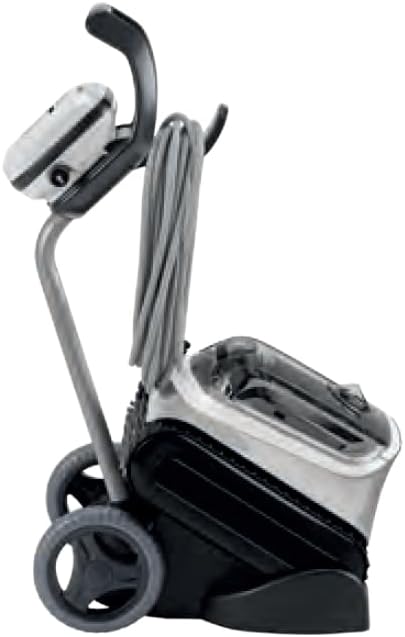
Image 3.3: A transport caddy designed for the Zodiac RE 4400 iQ, featuring wheels and a handle for easy portability and storage of the cleaner and its cable. This accessory aids in moving the cleaner to and from the pool.
- Transport Caddy: For easy transportation and storage of the cleaner.
- Storage Cover: Protects the cleaner from elements when not in use.

Image 3.4: A blue protective cover for the Zodiac RE 4400 iQ, designed to shield the cleaner from dust and environmental factors during storage. This cover helps prolong the life of the unit.
4. Setup Instructions
Follow these steps to prepare your Zodiac RE 4400 iQ for its first use.
- Unpack the Cleaner: Carefully remove all components from the packaging. Ensure all parts listed in the product overview are present.
- Assemble the Caddy (if applicable): If your model includes a transport caddy, assemble it according to the separate caddy instructions.
- Connect the Control Unit: Place the control unit at least 3.5 meters (11.5 feet) from the edge of the pool. Connect the cleaner's floating cable to the control unit, ensuring a secure connection.
- Power Connection: Plug the control unit's power cable into a grounded electrical outlet. Ensure the outlet is protected by a Ground Fault Circuit Interrupter (GFCI) or Residual Current Device (RCD).
- Submerge the Cleaner: Gently lower the cleaner into the pool. Tilt it from side to side to release any trapped air. The cleaner will sink to the bottom.
- Spread the Cable: Spread the floating cable evenly across the pool surface to prevent tangling during operation.
5. Operating Instructions
Your Zodiac RE 4400 iQ offers various cleaning modes and smart control options.
5.1 Starting a Cleaning Cycle
- Power On: Press the power button on the control unit. The display will illuminate.
- Select Cleaning Mode: Use the mode selection buttons on the control unit to choose your desired cleaning cycle (e.g., Floor Only, Floor/Walls/Waterline). Refer to the control unit display for current selection.
- Start Cycle: Press the Start/Pause button to begin the cleaning cycle. The cleaner will start moving and cleaning.
5.2 Using the iAquaLink™ App (Optional)
For enhanced control and scheduling, download the iAquaLink™ app on your smartphone.
- Download App: Search for "iAquaLink" in your device's app store.
- Pair Device: Follow the in-app instructions to pair your smartphone with the Zodiac RE 4400 iQ via Bluetooth or Wi-Fi. Ensure the cleaner's control unit has its connectivity indicators active.
- Control and Schedule: Use the app to start/stop cleaning cycles, select cleaning modes, set cleaning schedules, and monitor the cleaner's status.
6. Maintenance
Regular maintenance ensures optimal performance and extends the lifespan of your cleaner. Always disconnect the power supply before performing any maintenance.
6.1 Cleaning the Filter Basket

Image 6.1: The removable filter basket of the Zodiac RE 4400 iQ, showing its mesh construction designed to capture debris. The letter 'F' indicates its function as a filter. Regular cleaning of this basket is crucial for the cleaner's efficiency.
- Remove Cleaner from Pool: Gently pull the cleaner out of the water using the handle. Do not pull by the cable.
- Access Filter Basket: Open the top lid of the cleaner to access the filter basket.
- Empty and Rinse: Remove the filter basket. Empty any collected debris and rinse the basket thoroughly with a garden hose.
- Reinstall: Place the clean filter basket back into the cleaner and close the lid securely.
Recommendation: Clean the filter basket after each cleaning cycle or when the "Filter Full" indicator appears on the control unit/app.
6.2 Cleaning the Brushes/Tracks
- Periodically inspect the brushes and traction tracks for debris (hair, leaves, etc.) and clean them as needed.
- Use a soft brush or hose to remove stubborn dirt.
6.3 Cable Management and Storage
- After each use, coil the floating cable neatly to prevent kinks and tangles.
- Store the cleaner and control unit in a dry, shaded area, preferably on its transport caddy and covered with the protective cover (if available).
7. Troubleshooting
This section addresses common issues you might encounter with your Zodiac RE 4400 iQ.
| Problem | Possible Cause | Solution |
|---|---|---|
| Cleaner does not start. | No power to control unit. Cable not properly connected. | Check power outlet and GFCI/RCD. Ensure cable is securely connected to the control unit. |
| Cleaner moves slowly or not at all. | Filter basket is full. Debris caught in brushes/tracks. Air trapped in cleaner. | Clean the filter basket (Section 6.1). Remove debris from brushes/tracks (Section 6.2). Submerge cleaner and tilt to release air. |
| Poor cleaning performance. | Filter basket is dirty. Worn brushes. Incorrect cleaning mode selected. | Clean the filter basket. Inspect brushes for wear; replace if necessary. Select an appropriate cleaning mode for your pool. |
| Cleaner floats or does not sink. | Air trapped inside the cleaner. | Gently shake the cleaner underwater to release trapped air. |
| Cable tangles. | Cable not spread properly. Cleaner operating for too long in one direction. | Ensure cable is fully extended before use. Consider shorter cleaning cycles or adjusting entry point. |
If the problem persists after attempting these solutions, please contact Zodiac customer support or a qualified service technician.
8. Specifications
Technical details for the Zodiac RE 4400 iQ Robotic Pool Cleaner.
| Feature | Detail |
|---|---|
| Model Number | RE 4400 IQ |
| Brand | Zodiac |
| Dimensions (L x W x H) | 25 x 25 x 25 cm (approx. 9.8 x 9.8 x 9.8 inches) |
| Weight | 8 Kilograms (approx. 17.6 lbs) |
| Cleaning Areas | Floor, Walls, Waterline |
| Filtration Type | Cyclonic Suction with Filter Basket |
| Connectivity | Bluetooth, Wi-Fi (via iAquaLink™ App) |
| Color | Grey |
9. Warranty and Support
For detailed warranty information, please refer to the warranty card included with your product or visit the official Zodiac website.
If you require technical assistance, spare parts, or have questions not covered in this manual, please contact Zodiac customer support. Contact details can typically be found on the manufacturer's website or on your purchase documentation.
Online Resources: Zodiac RE 4400 iQ Product Page


