
1. Product Overview
The BIUBLE JS001S is a portable car jump starter designed to provide emergency power to start vehicles with dead batteries. It also functions as a power bank for charging electronic devices and includes an LED flashlight for illumination.
This device is suitable for 12V vehicles, including cars, trucks, SUVs, motorcycles, boats, lawn mowers, and snowmobiles, with gas engines up to 7.0L and diesel engines up to 5.5L.

Image 1.1: The BIUBLE JS001S Portable Car Jump Starter, illustrating its compatibility with various vehicle types and engine sizes.
2. Safety Instructions
Please read and understand all safety information before using this product. Failure to follow these instructions may result in electric shock, explosion, fire, which may result in serious injury, death, or property damage.
- Do not jump start a frozen battery.
- Do not use the jump starter if the battery clamps or cables are damaged.
- Ensure the clamps are connected to the correct polarity (red to positive, black to negative). Reverse polarity can cause damage to the device and vehicle.
- Do not allow the red and black clamps to touch each other.
- Keep the jump starter away from children.
- Do not expose the product to rain or water.
- Do not disassemble the unit. Only qualified service personnel should repair this device.
- Store the device in a cool, dry place when not in use.
- Remove the jump starter from the vehicle battery within 30 seconds after the vehicle starts.

Image 2.1: The BIUBLE JS001S features spark-proof technology and reverse polarity protection for safe operation.
3. Package Contents
Verify that all items are present in the package:
- BIUBLE JS001S Portable Car Jump Starter
- Smart Battery Clamps
- USB Charging Cable (Type-C)
- User Manual
4. Product Diagram

Image 4.1: Detailed diagram of the BIUBLE JS001S, highlighting its components including the power button, battery indicator, USB output ports, Type-C input, LED flashlight, and jump start port.
- Power Button
- Battery Indicator Lights
- Type-C Input Port
- USB 5V / 2.1A Output Port
- USB QC3.0 Output Port
- LED Flashlight
- Jump Start Port
5. Setup
5.1 Initial Charging
Before first use, fully charge the BIUBLE JS001S. Connect the provided USB charging cable to the Type-C input port on the jump starter and a suitable USB power adapter (not included). The battery indicator lights will illuminate to show the charging progress. All four lights will be solid when fully charged.
5.2 Connecting Smart Clamps
The smart battery clamps are designed with safety features. Ensure the clamps are securely plugged into the jump start port on the device before connecting to a vehicle battery.
6. Operating Instructions
6.1 Jump Starting a Vehicle
Follow these steps to safely jump start your vehicle:
- Prepare the Jump Starter: Ensure the jump starter is fully charged.
- Connect Smart Clamps: Insert the blue plug of the smart battery clamps firmly into the jump start port on the BIUBLE JS001S.
- Connect to Vehicle Battery: Attach the red (+) clamp to the positive (+) terminal of the vehicle battery and the black (-) clamp to the negative (-) terminal of the vehicle battery. Ensure a secure connection. The indicator light on the smart clamp will turn green if the connection is correct. If it shows red or flashes, check the connections.
- Start the Vehicle: Once the smart clamp indicator is green, start your vehicle's engine.
- Remove Clamps: After the vehicle starts, immediately remove the smart clamps from the vehicle battery terminals, then unplug the clamps from the jump starter. Do not leave the jump starter connected for more than 30 seconds after the vehicle has started.
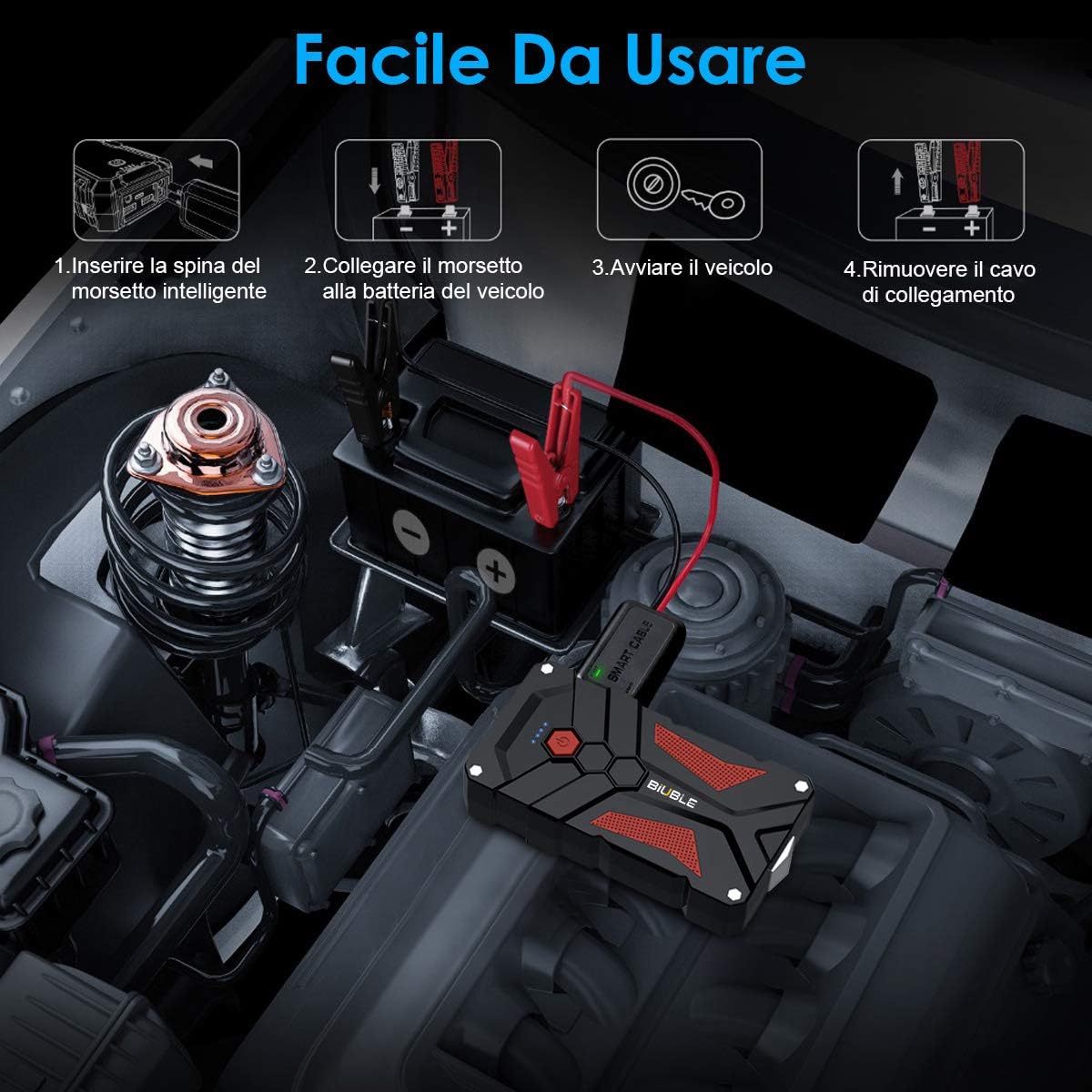
Image 6.1: Visual guide demonstrating the four simple steps to use the BIUBLE JS001S for jump starting a vehicle.
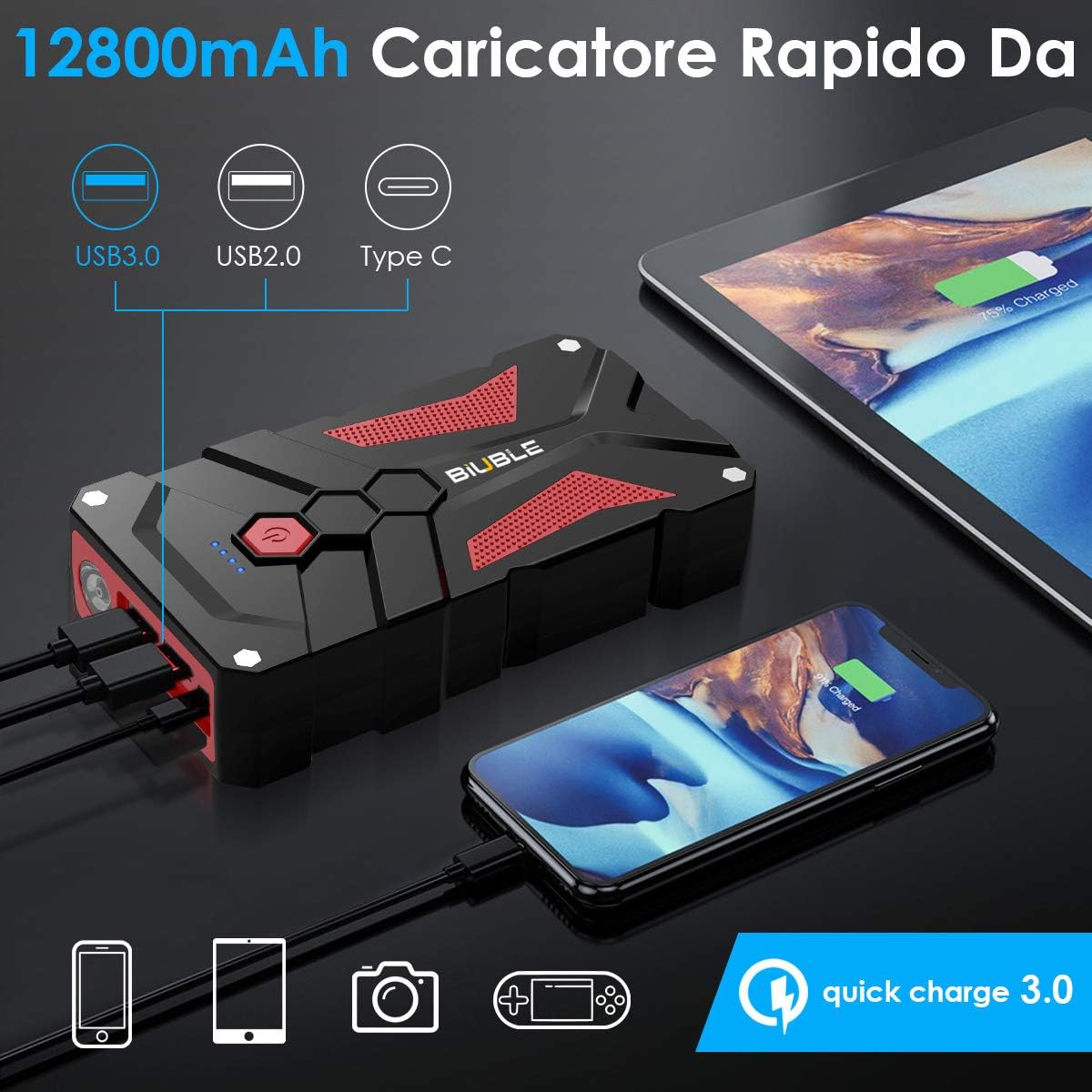
Image 6.2: The BIUBLE JS001S connected to a vehicle battery, ready for jump starting.
6.2 Using as a Power Bank
The BIUBLE JS001S can charge various electronic devices via its USB output ports.
- Connect Device: Use a compatible USB cable to connect your electronic device (e.g., smartphone, tablet) to either the USB 5V/2.1A port or the USB QC3.0 port on the jump starter.
- Start Charging: Press the power button once to begin charging. The battery indicator lights will show the remaining power.
- Stop Charging: Disconnect your device when charging is complete. The jump starter will automatically turn off after a period of inactivity.

Image 6.3: The BIUBLE JS001S functioning as a portable power bank, charging a smartphone and a tablet simultaneously.
6.3 Using the LED Flashlight
The built-in LED flashlight offers multiple modes for different situations.
- Turn On/Off: Press and hold the power button for 3 seconds to turn the flashlight on or off.
- Change Modes: With the flashlight on, short press the power button to cycle through the modes: Solid Light > Strobe Light > SOS Signal > Warning Light.

Image 6.4: The BIUBLE JS001S LED flashlight showcasing its four functional modes: illumination, warning, strobe, and SOS.
7. Maintenance
- Recharge Regularly: To prolong battery life, recharge the jump starter every 3-6 months, even if not used.
- Storage: Store the device in a cool, dry environment, away from direct sunlight and extreme temperatures.
- Cleaning: Use a soft, dry cloth to clean the exterior of the jump starter. Do not use harsh chemicals or abrasive materials.
- Battery Care: The internal lithium-ion battery is not user-replaceable. Do not attempt to open the unit.
8. Troubleshooting
- Vehicle Does Not Start:
- Ensure the jump starter is fully charged.
- Check that the smart clamps are securely connected to the correct battery terminals (red to positive, black to negative).
- Verify that the smart clamp indicator light is green. If not, adjust connections.
- The vehicle battery might be severely discharged or damaged. Consult a professional.
- Jump Starter Not Charging:
- Ensure the USB cable and power adapter are working correctly.
- Check the Type-C input port for any debris.
- Smart Clamp Indicator Light Flashing Red:
- This indicates a reverse polarity connection. Disconnect immediately and re-attach the clamps to the correct terminals.
- It could also indicate a short circuit or an issue with the vehicle battery.
9. Specifications
| Feature | Specification |
|---|---|
| Model | JS001S |
| Peak Amperage | 1000 Amperes |
| Battery Capacity | 12000 mAh |
| Voltage | 12 Volts |
| Battery Cell Composition | Lithium Ion |
| Gas Engine Rating | Up to 7.0 Liters |
| Diesel Engine Rating | Up to 5.5 Liters |
| USB Output 1 | 5V / 2.1A |
| USB Output 2 | QC3.0 (Quick Charge) |
| Charging Input | Type-C |
| Dimensions | 16.5 x 8.5 x 3.5 cm |
| Weight | 800 Grams |
| UPC | 725423034615 |
10. Warranty and Support
BIUBLE products are manufactured to high-quality standards. This product comes with a standard manufacturer's warranty against defects in materials and workmanship. Please refer to the warranty card included in your package for specific terms and conditions.
For technical support, warranty claims, or any questions regarding your BIUBLE JS001S Portable Car Jump Starter, please contact our customer service team. Contact information can typically be found on the product packaging or our official website.