
1. Introduction
The Orientek TPN-35 is a specialized optical power meter designed for Passive Optical Network (PON) testing. It is capable of simultaneously measuring optical power at 1310nm, 1490nm, and 1550nm wavelengths, which are standard in EPON networks. This device is essential for technicians to verify and troubleshoot fiber optic installations, ensuring optimal network performance. This manual provides detailed instructions for the proper use, maintenance, and troubleshooting of your TPN-35 device.
2. Safety Information
Please read and understand all safety instructions before operating the TPN-35. Failure to follow these instructions may result in injury or damage to the device.
- Eye Safety: Never look directly into the optical output of any fiber optic cable or device. Invisible laser radiation can cause severe eye damage. Always use appropriate eye protection.
- Power Source: Use only the specified power adapter or USB cable for charging. Incorrect power sources can damage the device or pose a fire hazard.
- Handling: Handle the device with care. Avoid dropping or subjecting it to strong impacts.
- Environment: Do not expose the device to extreme temperatures, humidity, or corrosive environments. Keep it away from water and other liquids.
- Cleaning: Use only approved cleaning methods and materials for optical connectors. Improper cleaning can damage the fiber end-face and affect measurement accuracy.
3. Package Contents
Verify that all items are present in the package upon unboxing:
- Orientek TPN-35 Main Unit
- USB Charging Cable
- User Guide (this manual)
- SC Connectors (adapters)
- Cleaning Swabs
- Carry Bag
- Warranty Card

4. Product Overview
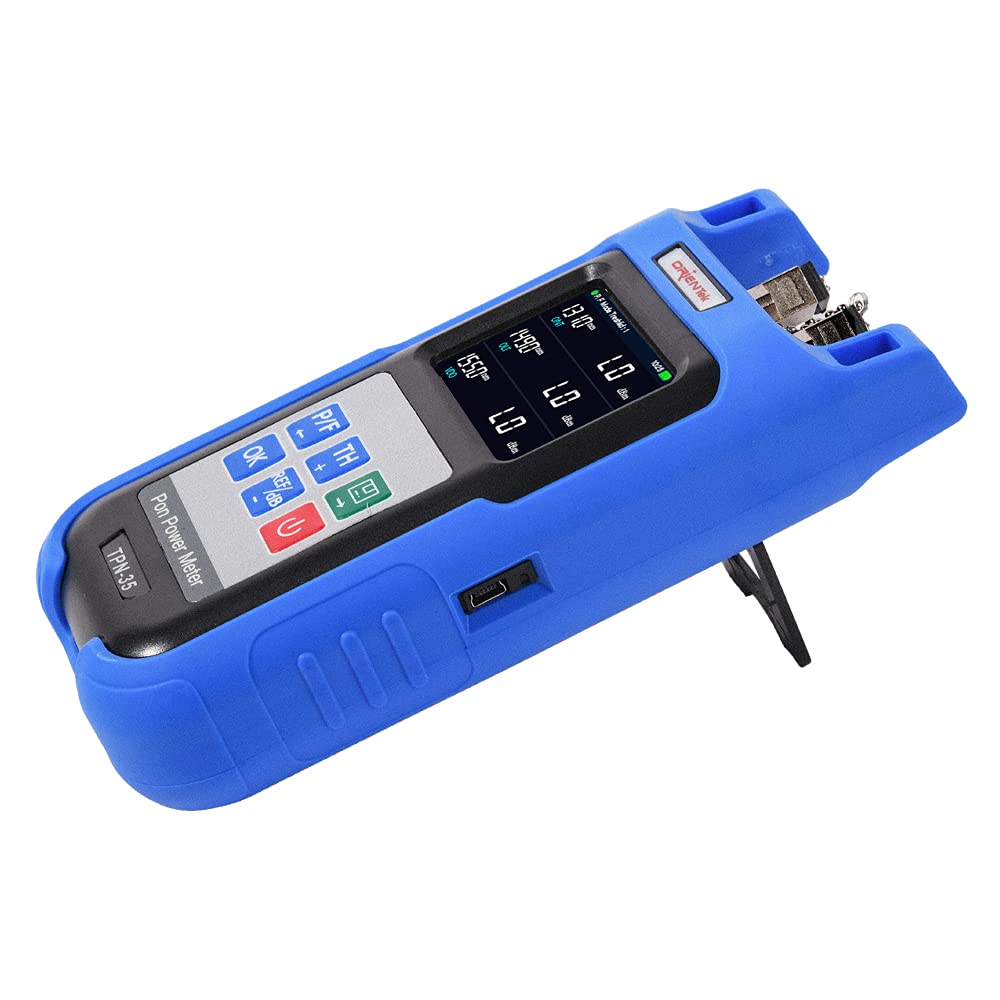
The Orientek TPN-35 is a compact and robust PON optical power meter designed for field use. It features a clear display and intuitive controls for efficient operation.

4.1 Key Features
- UPC Connector: Equipped with Universal Polished Connector (UPC) interfaces for reliable connections.
- Multi-Wavelength Testing: Capable of testing 1310nm (upstream), 1490nm (downstream data), and 1550nm (downstream video) wavelengths simultaneously in PON networks.
- Simultaneous Display: Measures and displays power levels for different PON architectures, data, and video signals concurrently.
- Automatic Shutdown: Features an automatic shutdown function to conserve battery life, which can be enabled or disabled by the user.
- Data Storage: Internal memory for storing up to 500 measurement records.

5. Setup
5.1 Charging the Battery
Before first use, ensure the device is fully charged. Connect the provided USB cable to the TPN-35's USB port (refer to Figure 4.3) and to a standard USB power adapter (not included) or a computer's USB port. The charging indicator on the display will show the charging status.
5.2 Attaching the Protective Cover
Slide the blue silicone protective cover onto the TPN-35 unit. This cover provides enhanced durability and grip during field operations.
5.3 Initial Power On
Press and hold the Power button (usually marked with a circle and vertical line) for a few seconds until the display illuminates. The device will perform a self-test and then enter the measurement interface.
6. Operating Instructions
6.1 Connecting to a Fiber Optic Network
- Ensure the fiber optic cable end-face is clean using the provided cleaning swabs.
- Carefully insert the UPC connector of the fiber optic cable into the corresponding input port on the TPN-35. Ensure a secure connection.

6.2 Taking Measurements
Once connected, the TPN-35 will automatically detect and display the optical power levels for 1310nm, 1490nm, and 1550nm wavelengths. The display shows the power in dBm for each wavelength.

6.3 Button Functions
- P/F (Pass/Fail) Button: Used to set or check Pass/Fail thresholds for measurements.
- TH (Threshold) Button: Allows adjustment of the threshold values for Pass/Fail criteria.
- REF/dB Button: Sets the current power reading as a reference (REF) value or switches between absolute (dBm) and relative (dB) power measurements.
- OK Button: Confirms selections or enters menu options.
- Arrow Buttons (Up/Down/Left/Right): Navigate through menus and adjust settings.
- Save Button (Disk Icon): Saves the current measurement data to internal memory.
- Power Button: Turns the device on/off (long press) or backlight on/off (short press).
6.4 Automatic Shutdown
The TPN-35 is equipped with an automatic shutdown feature to conserve battery. If no operation is performed for a set period (configurable in settings), the device will power off automatically. This feature can be enabled or disabled via the device's menu.

7. Maintenance
7.1 Cleaning Optical Connectors
Cleanliness of optical connectors is crucial for accurate measurements. Always use the provided cleaning swabs or other approved fiber optic cleaning tools. Never use abrasive materials or solvents that are not specifically designed for fiber optics.
- Gently insert a cleaning swab into the TPN-35's input port and rotate it to clean the internal ferrule.
- For fiber patch cords, use a one-click cleaner or lint-free wipes with isopropyl alcohol to clean the connector end-face before connecting to the TPN-35.
7.2 Device Cleaning
Wipe the exterior of the device with a soft, dry, lint-free cloth. Do not use harsh chemicals or abrasive cleaners. Ensure no liquids enter the device.
7.3 Storage
When not in use, store the TPN-35 in its carry bag in a cool, dry place, away from direct sunlight and extreme temperatures. Ensure the optical ports are covered with dust caps to prevent contamination.
8. Troubleshooting
| Problem | Possible Cause | Solution |
|---|---|---|
| No power/Device won't turn on | Low battery; Device malfunction | Charge the battery fully. If the problem persists, contact support. |
| Inaccurate or unstable readings | Dirty optical connectors; Damaged fiber cable; Incorrect measurement mode | Clean all optical connectors thoroughly. Inspect the fiber cable for damage. Ensure the correct wavelength and measurement mode are selected. |
| Display is blank or frozen | Software glitch; Low battery | Perform a soft reset by holding the Power button for 10 seconds. Charge the device. |
| Automatic shutdown occurs too quickly/not at all | Auto-shutdown settings configured incorrectly | Adjust the auto-shutdown timer in the device settings menu. |
9. Specifications
| Parameter | Value |
|---|---|
| Brand | ORIENTEK |
| Model | TPN-35 |
| Measurement Type | Optical Power Meter (PON) |
| Wavelengths Tested | 1310nm, 1490nm, 1550nm |
| Connector Type | UPC |
| Power Source | Battery Powered |
| Item Weight | 386 g |
| Package Dimensions | 22.1 x 11.94 x 6.1 cm |
| Memory Storage | 500 records |
10. Warranty and Support
The Orientek TPN-35 comes with a manufacturer's warranty. Please refer to the included warranty card for specific terms and conditions, including warranty period and coverage details. For technical support, service, or inquiries regarding your device, please contact your local distributor or the official Orientek customer service channels.
Keep your purchase receipt and warranty card in a safe place as proof of purchase may be required for warranty claims.


