
1. Product Overview
The FANTECH MAXFIT61 is a compact 60% RGB mechanical keyboard designed for gaming and everyday use. It features hot-swappable switches, allowing for easy customization of your typing experience. The keyboard also includes a detachable Type-C cable for portability and a 'Magic FN' key for extended functionality. Enjoy vibrant RGB backlighting with multiple modes and customizable settings through dedicated software.

Image: FANTECH MAXFIT61 RGB Mechanical Keyboard showcasing its 60% form factor, RGB lighting, detachable Type-C cable, and hot-swappable switches.
2. What's in the Box
Upon unboxing your FANTECH MAXFIT61 keyboard, please ensure all the following items are present:
- FANTECH MAXFIT61 Mechanical Keyboard
- Switch Puller
- Keycap Puller
- Detachable Type-C Cable
- Instruction Manual (this document)
- Warranty Card

Image: All items included in the FANTECH MAXFIT61 package: the keyboard, switch puller, keycap puller, detachable Type-C cable, and documentation.
3. Setup Guide
Follow these steps to set up your FANTECH MAXFIT61 keyboard:
- Unpack the keyboard and all accessories from the box.
- Connect the detachable Type-C cable to the Type-C port on the keyboard.
- Plug the USB-A end of the cable into an available USB port on your computer.
- The keyboard will automatically be recognized by your operating system.
- For advanced customization, download the FANTECH MAXFIT61 software from the official FANTECH website (fantechworld.com).

Image: A close-up view of the detachable USB-C cable being connected to the keyboard's port.
4. Operating Instructions
4.1. Magic FN Key Functionality
The MAXFIT61 utilizes a 'Magic FN' key (Caps Lock by default when 'Magic FN' mode is active) to access secondary functions on the 60% layout. This allows for quick access to multimedia controls, function keys, and other commands without needing a full-sized keyboard.
To activate 'Magic FN' mode, press FN + Caps Lock. The Caps Lock key will illuminate to indicate 'Magic FN' mode is active. In this mode, pressing Caps Lock will act as the FN key, allowing you to use the secondary functions printed on the keycaps.
Video: Demonstration of the FANTECH MAXFIT61's 'Magic FN' key functionality, showing how to access extended commands on the compact keyboard layout.
4.2. RGB Backlighting Control
The MAXFIT61 features 18 RGB backlight modes. You can adjust these modes, brightness, and flowing effects directly from the keyboard using FN key combinations:
- FN + \|: Cycle through different RGB lighting modes.
- FN + [ {: Decrease brightness.
- FN + ] }: Increase brightness.
- FN + ; :: Decrease lighting speed.
- FN + ' ": Increase lighting speed.
4.3. Software Customization
For comprehensive customization of RGB lighting, key remapping, and macro creation, download the dedicated FANTECH MAXFIT61 software from fantechworld.com. The software allows you to:
- Customize RGB lighting effects per key.
- Create and assign complex macros.
- Remap keys to different functions.
- Manage multiple profiles for different applications or games.
5. Hot-Swappable Switches
The FANTECH MAXFIT61 features universal hot-swappable sockets, compatible with both 3-pin and 5-pin mechanical switches. This allows you to easily change switches without soldering, customizing the feel and sound of your keyboard.
5.1. Replacing Switches
To replace a switch, follow these steps:
- Using the provided keycap puller, gently remove the keycap from the switch you wish to replace.
- Once the keycap is removed, use the provided switch puller to carefully grip the top and bottom clips of the switch.
- Gently pull the switch upwards until it detaches from the PCB.
- Align the pins of the new switch with the holes on the PCB. Ensure the pins are straight to avoid bending.
- Press the new switch firmly into place until it clicks securely.
- Reattach the keycap to the new switch.

Image: The FANTECH MAXFIT61 keyboard with keycaps and switches removed, illustrating the hot-swappable design.
Video: A demonstration of how to remove keycaps and switches using the provided tools, and how to install new switches into the hot-swappable sockets.
6. Maintenance
Proper maintenance ensures the longevity and optimal performance of your keyboard:
- Cleaning Keycaps: Use a keycap puller to remove keycaps and clean them with a mild soap solution and a soft cloth. Ensure they are completely dry before reattaching.
- Cleaning the Board: Use compressed air to remove dust and debris from between the switches. A soft brush can also be used.
- Cable Care: Avoid sharp bends or excessive pulling on the detachable Type-C cable to prevent damage.
- Storage: Store the keyboard in a dry, dust-free environment when not in use.
7. Troubleshooting
If you encounter any issues with your FANTECH MAXFIT61, refer to the following common solutions:
| Problem | Possible Solution |
|---|---|
| Keyboard not responding | Ensure the Type-C cable is securely connected to both the keyboard and the computer. Try a different USB port or cable. Restart your computer. |
| RGB lighting not working or stuck | Check FN key combinations for lighting control. Ensure the FANTECH software is installed and updated. Try resetting the keyboard (refer to software or advanced manual for specific reset instructions). |
| Keys not registering or double-typing | Carefully remove the keycap and switch for the affected key. Inspect the switch pins for bends or damage. Reinsert the switch firmly or replace it if damaged. Clean any debris from the switch socket. |
| Software not detecting keyboard | Ensure the keyboard is connected and powered on. Reinstall the FANTECH software. Check for any conflicting drivers or software. |
If the issue persists, please contact FANTECH customer support.
8. Specifications
Detailed technical specifications for the FANTECH MAXFIT61 RGB Mechanical Keyboard:
| Feature | Detail |
|---|---|
| Model Name | MAXFIT61 |
| Model Number | MK857 |
| Number of Keys | 61 |
| Keyboard Layout | 60% (QWERTY) |
| Switch Type | Mechanical (Blue Switch - Clicky) |
| Hot-Swappable | Yes (Supports 3-pin and 5-pin switches) |
| Connectivity | Wired (Detachable USB-C) |
| Backlighting | RGB (18 modes) |
| Anti-Ghosting | All keys |
| Material | Acrylonitrile Butadiene Styrene (ABS) |
| Dimensions (L x W x H) | 11.54" x 4.05" x 1.65" (294mm x 103mm x 42mm) |
| Weight | 1.2 Pounds (566g) |
| Compatible OS | Windows, Mac (basic functionality) |
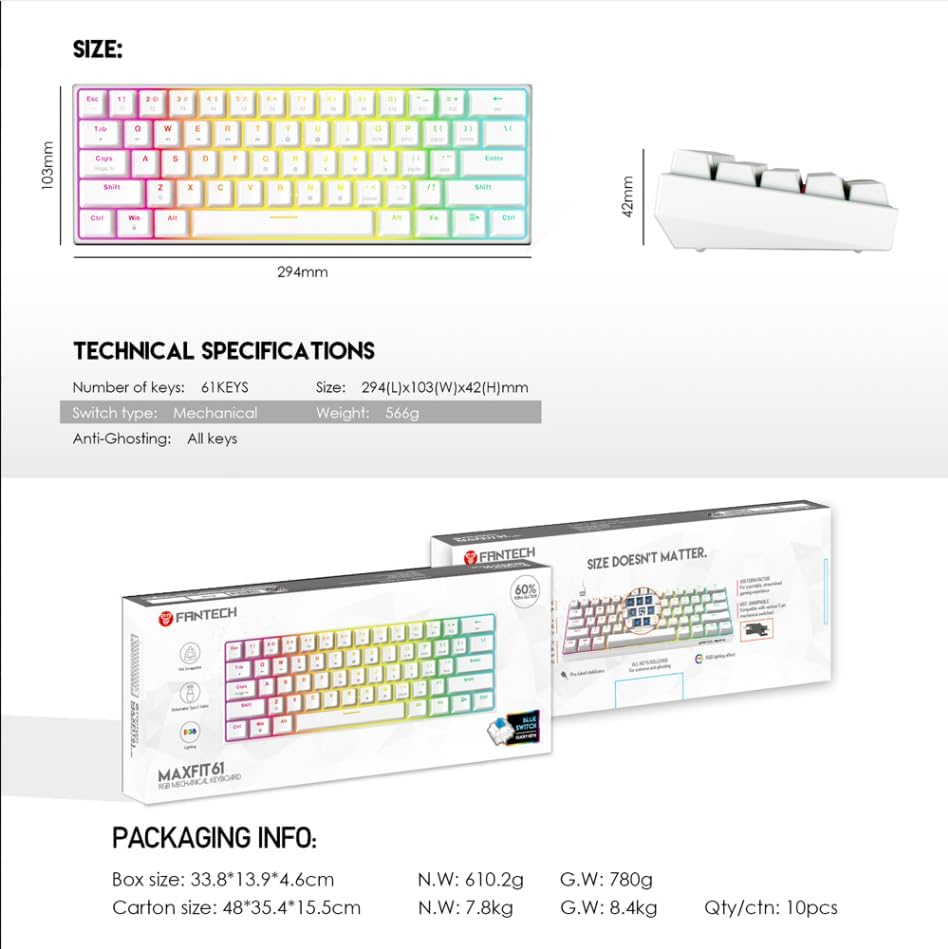
Image: Technical specifications and physical dimensions of the FANTECH MAXFIT61 keyboard.
9. Warranty and Support
The FANTECH MAXFIT61 RGB Mechanical Keyboard comes with a 1-year warranty from the date of purchase. This warranty covers manufacturing defects and ensures your product is free from material and workmanship flaws under normal use.
For warranty claims, technical support, or further inquiries, please visit the official FANTECH website or contact their customer service:
- Official Website: www.fantechworld.com
- Support Contact: Refer to the 'Contact Us' section on the official website for the latest support information.
Please retain your proof of purchase for warranty validation.


