
NC DF-A001
NC DF-A001 Handheld Steam Cleaner User Manual
Model: DF-A001 | Brand: NC
1. Introduction and Safety Information
Thank you for purchasing the NC DF-A001 Handheld Steam Cleaner. This manual provides essential information for the safe and effective operation, maintenance, and troubleshooting of your device. Please read this manual thoroughly before first use and keep it for future reference.
Important Safety Instructions:
- Always ensure the steam cleaner is unplugged before filling with water or performing maintenance.
- Do not overfill the water tank.
- Never point the steam nozzle at people, pets, or electrical appliances. Steam is extremely hot and can cause severe burns.
- Use only clean tap water. Distilled water is recommended to prevent mineral buildup.
- Keep out of reach of children and pets.
- Do not immerse the unit in water or other liquids.
- If the power cord is damaged, it must be replaced by the manufacturer or a qualified service agent to avoid hazards.
- Allow the unit to cool completely before storing.
2. Product Overview and Components
Familiarize yourself with the parts of your NC DF-A001 Handheld Steam Cleaner and its included accessories.

This image displays the NC DF-A001 handheld steam cleaner along with its various attachments and the product packaging. The main unit is yellow and black, and the accessories are laid out clearly, numbered for identification.
Included Components:
- Main Steam Cleaner Unit
- Flexible Extension Hose
- Window/Door Cleaning Tool
- Angled Nozzle
- Round Brush Nozzle
- Long Spray Nozzle
- Fabric Steamer Tool
- Measuring Cup
- Funnel
- Towel Cloth for Fabric Steamer

The steam cleaner unit is displayed with its attached power cord and plug, emphasizing its corded electric power source.
3. Setup and Preparation
- Unpack: Carefully remove all components from the packaging.
- Fill Water Tank: Unscrew the safety cap counter-clockwise. Using the provided measuring cup and funnel, fill the water tank with up to 250ml of clean tap water. Do not exceed the maximum fill line. For best results and to prevent mineral buildup, distilled water is recommended.
- Secure Cap: Screw the safety cap back on clockwise until it is tightly sealed.
- Attach Accessory: Select the appropriate attachment for your cleaning task and securely connect it to the nozzle of the steam cleaner. Ensure it clicks into place or is firmly twisted on.
- Power On: Plug the steam cleaner into a suitable electrical outlet (1200W, 220-240V). The indicator light will illuminate, signaling that the unit is heating up.
- Heating Time: Allow approximately 3-5 minutes for the water to heat and steam to be ready. The indicator light may turn off when ready, or steam will begin to emit when the trigger is pressed.
4. Operating Instructions
Once the unit is heated, you can begin cleaning. Always test on an inconspicuous area first, especially on delicate surfaces.
General Operation:
- Hold the steam cleaner firmly by the handle.
- Press and hold the steam trigger to release steam. Release the trigger to stop steam flow.
- For continuous steam, some models may have a lock button on the trigger.
- Move the nozzle slowly over the surface to be cleaned, allowing the steam to penetrate and loosen dirt.
Specific Applications:

The steam cleaner is shown in action, demonstrating its effectiveness on a kitchen stovetop and a range hood, highlighting its utility for kitchen cleaning.

This image illustrates the steam cleaner being used to clean a microwave oven and the interior of a range hood, showing steam effectively removing grime.

A user is shown operating the steam cleaner to clean a greasy range hood filter, demonstrating the direct application of steam for tough kitchen stains.
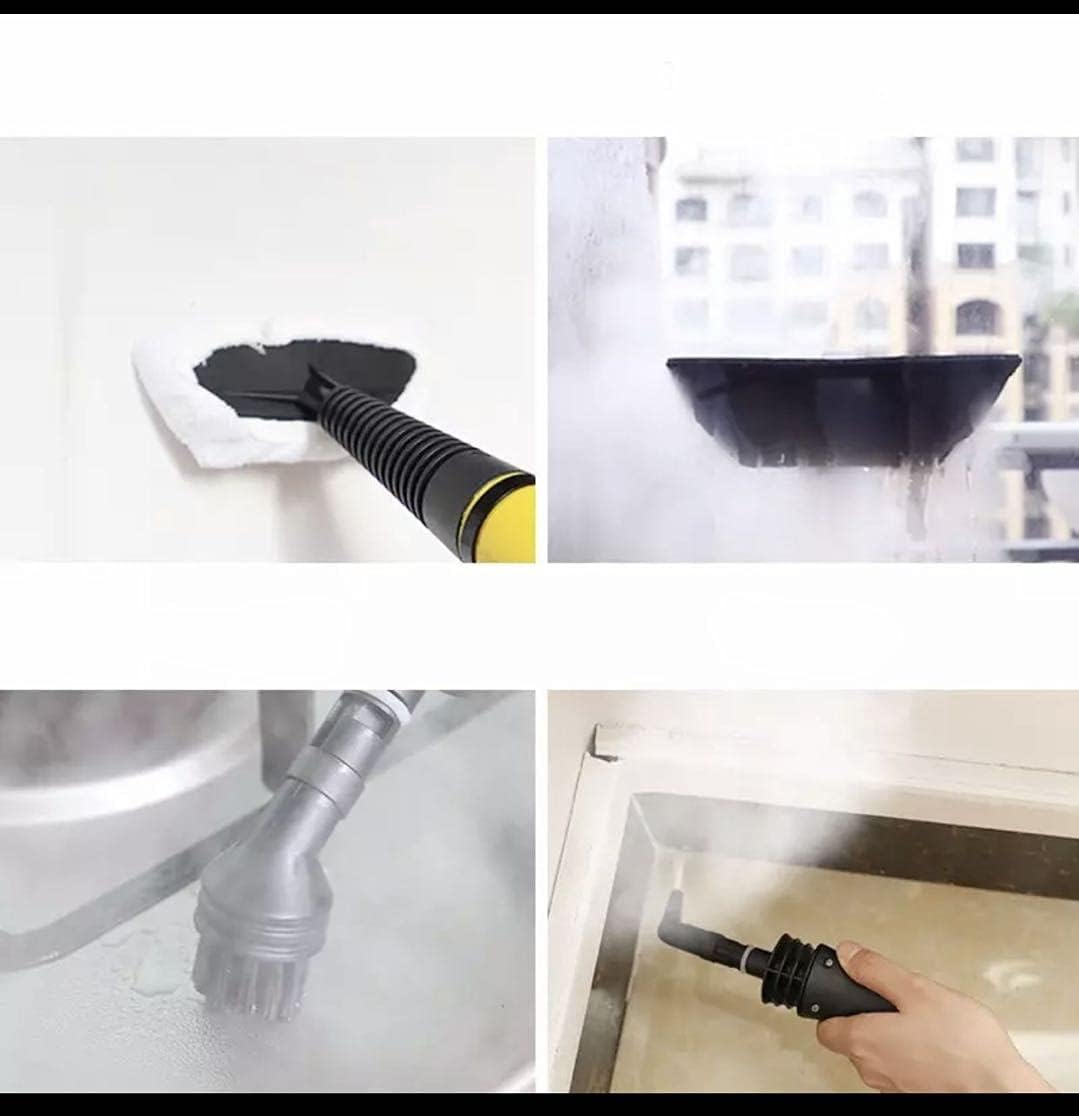
This composite image shows the versatility of the steam cleaner, with examples of cleaning a window, a kitchen sink, and using a brush attachment on a fabric surface, indicating its multi-purpose functionality.
- Kitchen Cleaning (Stovetops, Ovens, Microwaves, Tiles): Use the round brush nozzle or the angled nozzle for targeted cleaning of grease and grime. For larger flat surfaces like stovetops, the flexible hose with the long spray nozzle can be effective.
- Window/Mirror/Glass Cleaning: Attach the window/door cleaning tool. Spray steam onto the glass surface, then use the squeegee to wipe away condensation and dirt. For best results, wipe with a clean cloth immediately after steaming.
- Fabric Refreshing (Sofa, Carpet, Clothes): Use the fabric steamer tool with the towel cloth. Hold the tool a few inches from the fabric and move it slowly. This helps to refresh fabrics and loosen dirt. For ironing clothes, use the fabric steamer tool to smooth out wrinkles.
- Air Conditioner/Engine Cleaning: For intricate areas, the angled nozzle or long spray nozzle can direct steam into tight spaces. Exercise extreme caution with electrical components and ensure the area is well-ventilated.
- Corners and Hard-to-Reach Areas: The angled nozzle and long spray nozzle are ideal for directing steam into tight corners, grout lines, and other confined spaces.
- Dust Removal (e.g., Lights): Use the long spray nozzle to gently steam and loosen dust from light fixtures or other surfaces, then wipe clean with a cloth.
5. Maintenance and Storage
Regular maintenance ensures the longevity and optimal performance of your steam cleaner.
- Empty Water Tank: After each use, unplug the unit and allow it to cool completely. Carefully unscrew the safety cap and pour out any remaining water.
- Clean Attachments: Wash removable attachments with warm, soapy water. Rinse thoroughly and allow them to air dry completely before storing.
- Wipe Down Unit: Wipe the exterior of the main unit with a damp cloth. Do not use abrasive cleaners or solvents.
- Descaling (Optional): If you notice reduced steam output or mineral buildup, you may need to descale the unit. Consult the manufacturer's website or customer support for specific descaling instructions.
- Storage: Store the steam cleaner and its accessories in a cool, dry place, away from direct sunlight and out of reach of children. Ensure the unit is completely dry before storage.
6. Troubleshooting
If you encounter issues with your steam cleaner, refer to the following common problems and solutions:
| Problem | Possible Cause | Solution |
|---|---|---|
| No steam or weak steam output |
|
|
| Water leaking from nozzle/cap |
|
|
| Indicator light not on |
|
|
If the problem persists after trying these solutions, please contact customer support.
7. Specifications
| Feature | Detail |
|---|---|
| Brand | NC |
| Model Name | DF-A001 |
| Power / Wattage | 1200 watts |
| Item Weight | 1 Kilogram |
| Package Dimensions | 23.9 x 22.24 x 22 cm |
| Special Features | Handheld form factor, multiple attachments for various cleaning tasks |
| Included Components | 1-7 attachments (as described in Section 2) |
| Surface Recommendation | Sealed Hard Floors, Glass |
| Form Factor | Handheld |
| Power Source | Corded Electric |
| Color | Multi |
| Style | Modern |
8. Warranty and Support
Specific warranty information for the NC DF-A001 Handheld Steam Cleaner is not provided in this manual. Please refer to the product packaging, the retailer's website, or contact NC customer support directly for details regarding warranty coverage and service.
For technical assistance, replacement parts, or any other inquiries, please contact the manufacturer's customer service department. Keep your purchase receipt as proof of purchase for any warranty claims.
Ask a question about this manual
Ask about setup, troubleshooting, compatibility, parts, safety, or missing instructions. Manuals+ will review the question and use this page’s manual context to help answer it.