
Important Safety Information
Please read all instructions carefully before assembly and use. Retain this manual for future reference.
- Always assemble the chair according to the provided instructions.
- Ensure the chair is placed on a flat and stable surface before use.
- Do not exceed the maximum weight capacity of 150 kg (330 lbs).
- Keep the chair away from direct heat sources and sharp objects to prevent damage and potential injury.
- Regularly check all bolts and screws to ensure they are tightened.
Product Overview
The MELOKEA Ergonomic Office Chair is designed to provide comfort and support for extended periods of sitting. Key features include an adjustable headrest, unique lumbar support, breathable mesh back, and a comfortable seat cushion.

Figure 1: Front view of the MELOKEA Ergonomic Office Chair in red with white frame.

Figure 2: The office chair positioned in a modern office environment, demonstrating its aesthetic integration.

Figure 3: Detailed dimensions of the chair, including height (112.5-119.5cm), width (68cm), seat height (40.5-47.5cm), and seat cushion size (51cm wide, 49cm deep, 10cm thick). Maximum weight capacity is 150 kg.
Setup and Assembly
Assembly is required. Please follow the steps below carefully. It is recommended to assemble the chair on a soft, clean surface to prevent scratches.
- Unpack Components: Carefully remove all parts from the packaging and lay them out. Verify all components are present against the parts list (not provided in this manual, refer to included assembly guide).
- Attach Casters to Base: Insert the five casters into the holes at the end of each leg of the chair base. Push firmly until they click into place.
- Insert Gas Lift: Place the gas lift cylinder into the center hole of the chair base.
- Assemble Seat Mechanism: Attach the seat mechanism to the underside of the seat cushion using the provided screws. Ensure the front of the mechanism aligns with the front of the seat.
- Attach Armrests: Secure the armrests to the seat cushion using the designated screws.
- Connect Backrest to Seat: Attach the backrest to the seat assembly. Some users find it easier to attach the lower part of the backrest first, then align the upper part. Ensure all screws are securely tightened.
- Place Assembled Seat onto Gas Lift: Carefully place the assembled seat and backrest onto the gas lift cylinder, ensuring it is centered and stable.
Note: For detailed visual instructions, refer to the assembly diagram included with your product packaging.
Operating Instructions
This chair offers several adjustment features to customize your seating experience.
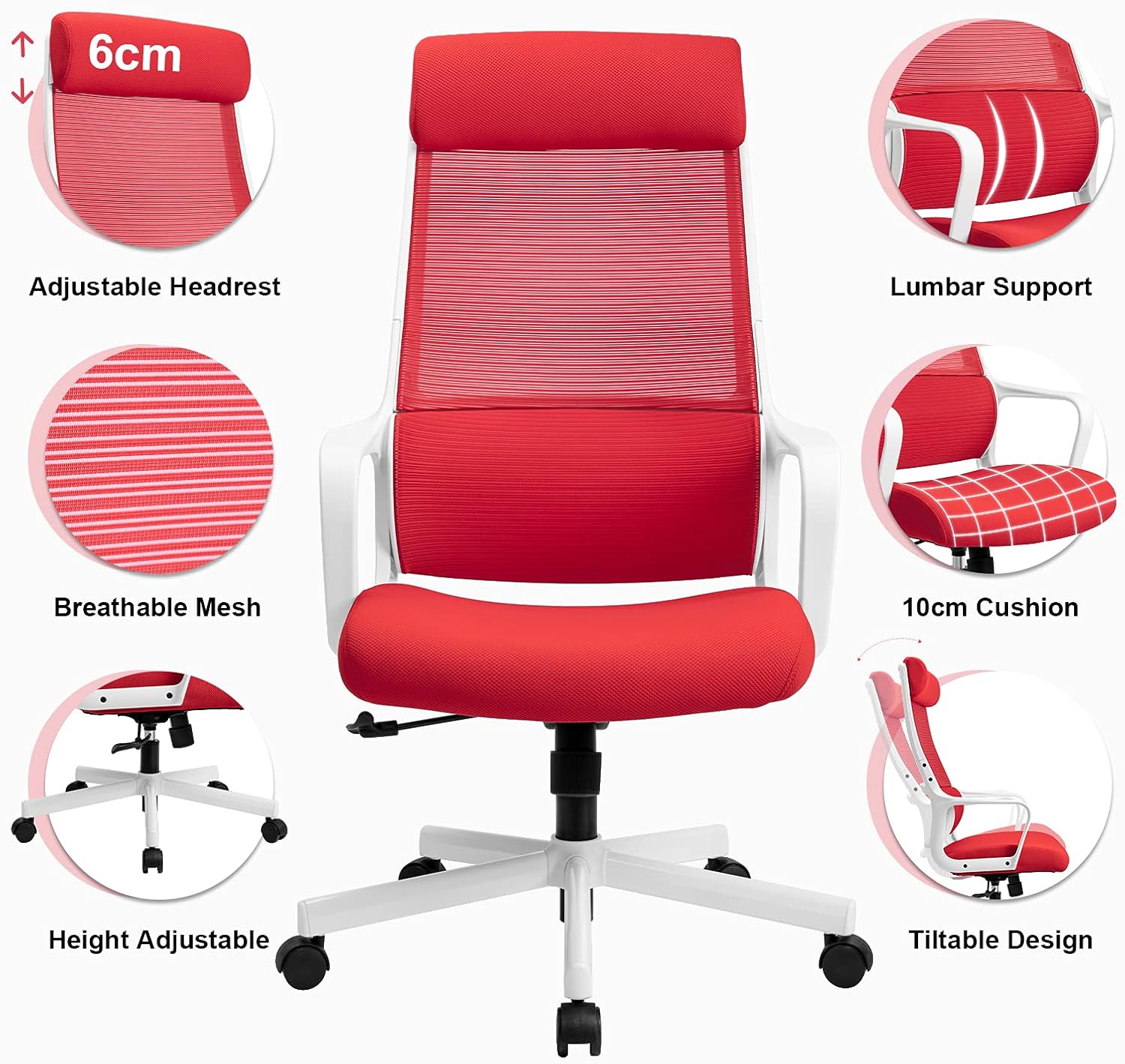
Figure 4: Overview of key adjustable features including adjustable headrest, lumbar support, breathable mesh, 10cm cushion, height adjustment, and tiltable design.

Figure 5: Demonstrates the tilt function (90° to 115° recline) and how to adjust the height and lock/unlock the tilt mechanism. Pulling the lever inwards locks the tilt, pulling it outwards unlocks it for height adjustment.
1. Height Adjustment
To adjust the seat height:
- To raise the seat: While standing, pull the lever located under the right side of the seat upwards. The seat will rise. Release the lever at the desired height.
- To lower the seat: While seated, pull the lever located under the right side of the seat upwards. The seat will lower. Release the lever at the desired height.
2. Tilt Function and Lock
The chair features a tilt mechanism allowing you to recline the backrest.
- To recline: Pull the lever located under the right side of the seat outwards to unlock the tilt. Lean back to recline.
- To lock the tilt: Push the lever inwards to lock the backrest in an upright position (90 degrees).
- Adjusting Tilt Tension: Rotate the round knob located under the front of the seat to adjust the tension of the tilt mechanism. Turn clockwise to increase tension (harder to recline) and counter-clockwise to decrease tension (easier to recline).
3. Adjustable Headrest
The headrest can be adjusted vertically to provide optimal neck support.
- Grasp the headrest and gently pull it upwards or push it downwards to adjust its height. It will click into place at various positions.
4. Lumbar Support
The chair features a unique S-shaped lumbar support designed to conform to the natural curve of your spine, promoting healthy posture.

Figure 6: Illustration of the ergonomic design, highlighting the support provided to the cervical, thoracic, and lumbar regions of the spine.
This support is integrated and adapts to your back as you sit.
Maintenance and Care
Proper maintenance will extend the life of your MELOKEA office chair.
- Cleaning:
- For fabric and mesh surfaces, use a soft cloth dampened with mild soap and water. Avoid harsh chemicals or abrasive cleaners.
- Wipe metal and plastic parts with a dry or slightly damp cloth.
- Inspection: Periodically check all screws and bolts to ensure they are tight. Re-tighten if necessary.
- Casters: Keep casters clean from hair and debris to ensure smooth rolling.
- Avoid Overloading: Do not exceed the maximum weight capacity of 150 kg.
- Storage: Store the chair in a dry, cool place away from direct sunlight and extreme temperatures.
Troubleshooting
If you encounter issues with your chair, refer to the following common problems and solutions:
| Problem | Possible Cause | Solution |
|---|---|---|
| Chair does not adjust height. | Gas lift issue or lever not engaged. | Ensure the height adjustment lever is fully pulled. If the issue persists, the gas lift may need replacement. |
| Chair wobbles or is unstable. | Loose screws or uneven surface. | Check and tighten all assembly screws. Ensure the chair is on a flat, level surface. |
| Casters do not roll smoothly. | Debris caught in casters. | Turn the chair over and remove any hair, dust, or debris from the caster wheels. |
| Backrest does not recline or lock. | Tilt mechanism locked or tension too high. | Ensure the tilt lock lever is disengaged (pulled outwards). Adjust the tilt tension knob counter-clockwise to loosen. |
If the problem persists after attempting these solutions, please contact MELOKEA customer support.
Specifications
| Feature | Detail |
|---|---|
| Brand | MELOKEA |
| Model Number | DECHAF007R (F007) |
| Color | Red |
| Overall Dimensions (L x W x H) | 49 x 51 x 120 cm (approx. 19.3 x 20.1 x 47.2 inches) |
| Seat Cushion Dimensions | 50 x 49 x 10 cm (approx. 19.7 x 19.3 x 3.9 inches) |
| Adjustable Height Range | 40.5 - 47.5 cm (approx. 15.9 - 18.7 inches) |
| Weight Capacity | 150 kg (330 lbs) |
| Product Weight | 14.1 kg (31.1 lbs) |
| Materials | Metal, Fabric, Nylon Mesh, Polyurethane Foam |
| Special Features | Adjustable Headrest, Integrated Lumbar Support, Height Adjustment, Tilt Function, Breathable Mesh Back |
Warranty and Support
MELOKEA is committed to providing high-quality products and excellent customer service.
For warranty information, product support, or if you have any questions or concerns regarding your MELOKEA office chair, please contact our customer service team. While specific warranty details are not provided in this manual, MELOKEA values customer experience and strives to provide the best products and services.
Please refer to the contact information provided with your purchase or visit the official MELOKEA website for the most up-to-date support details.


