
1. Introduction
This instruction manual provides detailed guidance for assembling your JEKCA T-Rex 02S-M02 Dinosaur Plastic Building Blocks model. Please read all instructions carefully before beginning assembly to ensure a smooth and enjoyable building experience.
Safety Information
WARNING: Small parts are included. This product is recommended for individuals aged 14 years and above. Keep out of reach of small children to prevent choking hazards.
2. What's in the Box
Verify that all components listed below are present in your package:
- Instruction Manual
- Building Bricks (over 4000 pieces)
- Pins
- Pin Driver
- Quick Guide
3. Setup and Assembly
The JEKCA T-Rex model utilizes a special interlocking brick-through system for sturdy construction. Follow these steps carefully for assembly.
Understanding the JEKCA Interlocking System
JEKCA blocks are designed to interlock securely using pins and a pin driver. This system ensures the finished model is robust and less prone to falling apart.
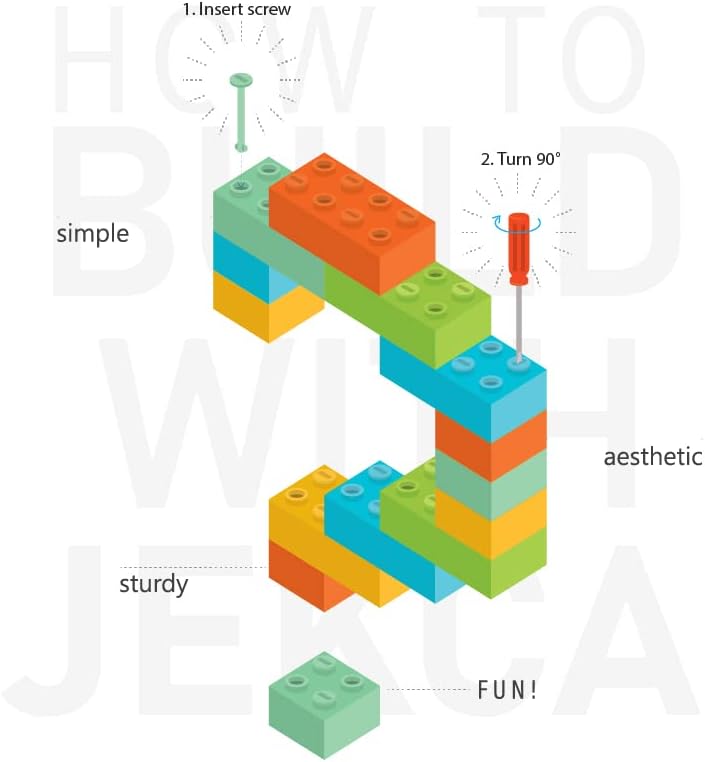
Figure 3.1: Basic interlocking mechanism. Insert the pin (screw) into the block and turn 90 degrees with the pin driver to secure it.

Figure 3.2: Detailed steps for connecting blocks. 1. Align blocks. 2. Insert pins. 3. Turn pins 90 degrees using the pin driver to lock them in place.
General Assembly Steps
- Unpack Components: Carefully remove all bricks, pins, and the pin driver from the packaging. Organize bricks by color or type if helpful.
- Consult the Manual: Refer to the included detailed building manual for step-by-step instructions specific to the T-Rex 02S-M02 model. The manual will guide you through each layer and section of the dinosaur.
- Connect Blocks: As shown in Figure 3.1 and 3.2, align the blocks according to the manual. Insert the provided pins into the designated holes.
- Secure Connections: Use the pin driver to turn each inserted pin 90 degrees. This action expands the pin within the blocks, creating a strong, secure connection.
- Layer by Layer Construction: Build the model layer by layer, ensuring each section is firmly connected before proceeding. Pay close attention to the orientation of each block.
- Final Touches: Once all sections are assembled, double-check all connections to ensure the model is stable and complete.
4. Operating and Display
Once assembled, your JEKCA T-Rex 02S-M02 model is ready for display. This model is designed as a static display piece.
Displaying Your Model
Place your finished T-Rex model on a stable, flat surface. The interlocking system ensures its sturdiness, making it suitable for various display environments.

Figure 4.1: Front view of the completed JEKCA T-Rex model.

Figure 4.2: Side view of the completed JEKCA T-Rex model.

Figure 4.3: The JEKCA T-Rex model shown at 1:1 scale alongside a 13-inch iPad Pro, illustrating its dimensions.
5. Maintenance
To keep your JEKCA T-Rex model in optimal condition, follow these simple maintenance guidelines:
- Cleaning: Dust the model regularly with a soft, dry cloth or a soft brush. For more stubborn dirt, a slightly damp cloth can be used, but avoid excessive moisture.
- Avoid Direct Sunlight: Prolonged exposure to direct sunlight may cause the plastic colors to fade over time. Display the model in a location away from direct sun.
- Handle with Care: While sturdy, avoid dropping the model or applying excessive force, which could dislodge blocks or pins.
6. Troubleshooting
If you encounter any difficulties during assembly or with your finished model, consider the following:
- Difficulty Following Instructions: The assembly process can be intricate due to the high number of pieces. Take your time, review each step in the included building manual carefully, and ensure correct block orientation and pin insertion. Sometimes, taking a break and returning with fresh eyes can help.
- Loose Connections: Ensure that all pins are fully inserted and turned 90 degrees with the pin driver. A properly turned pin will create a secure, tight connection.
- Missing Pieces: Double-check your packaging and work area. If you believe a piece is genuinely missing, refer to the support section for contact information.
7. Specifications
| Feature | Detail |
|---|---|
| Model Number | ST19DN08-M02 |
| Product Dimensions | 24.61 x 8.86 x 12.8 inches (62.5 x 22.5 x 32.5 cm) |
| Item Weight | 9.92 pounds |
| Number of Pieces | Over 4000 |
| Recommended Age | 14 years and up |
| Material | Plastic |
8. Warranty Information
JEKCA products are manufactured to high-quality standards. For specific warranty details, please refer to the documentation included with your purchase or contact JEKCA customer support. General warranty terms typically cover manufacturing defects.
9. Support
For further assistance, questions, or to report missing parts, please visit the official JEKCA website or contact their customer service department. Contact information can usually be found on the product packaging or the JEKCA brand store page.
JEKCA Store Link: Visit the JEKCA Store on Amazon


