
Introduction
Thank you for choosing the VGR V-266 Professional Rechargeable Hair Trimmer. This manual provides essential information for the safe and effective use of your new grooming device. Please read these instructions carefully before first use and retain them for future reference.
Safety Instructions
- Keep the appliance dry. Do not use it near water or in wet conditions.
- This appliance is not intended for use by persons (including children) with reduced physical, sensory or mental capabilities, or lack of experience and knowledge, unless they have been given supervision or instruction concerning use of the appliance by a person responsible for their safety.
- Children should be supervised to ensure that they do not play with the appliance.
- Only use the charging cable provided with the device.
- Do not disassemble, repair, or modify the appliance yourself. Contact qualified service personnel for any repairs.
- Ensure the power adapter is compatible with your local voltage before charging.
- Unplug the trimmer before cleaning or performing maintenance.
- Avoid dropping the trimmer or subjecting it to strong impacts.
Package Contents
Verify that all items are present in the package:
- VGR V-266 Hair Trimmer
- Guide Combs (6 pieces for various lengths)
- Cleaning Brush
- Lubricating Oil Bottle
- USB Charging Cable
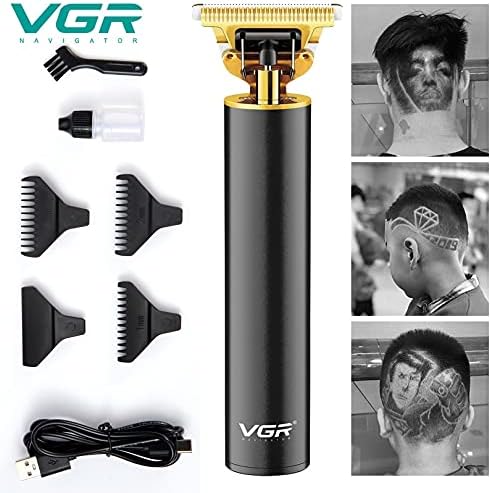
Image: VGR V-266 Hair Trimmer with all included accessories.
Product Overview
The VGR V-266 features a durable stainless steel blade and a rechargeable battery for cordless operation. It is designed for precise trimming and grooming.

Image: Front and back view of the VGR V-266 Trimmer, highlighting the digital display.
Key Components:
- Blade Head: Stainless steel blades for efficient cutting.
- Power Button: To turn the trimmer on and off.
- Digital Display: (On some models) Shows battery level and RPM.
- Charging Port: USB interface for convenient charging.
- Guide Combs: Attachments for adjusting trimming length.
Setup
Initial Charging:
- Before first use, fully charge the trimmer.
- Connect the USB charging cable to the trimmer's charging port.
- Plug the other end of the USB cable into a compatible USB power adapter (not included) or a computer USB port.
- The digital display (if present) will indicate charging status. Allow sufficient time for a full charge as indicated in the specifications.
Attaching Guide Combs:
- Ensure the trimmer is turned off.
- Select the desired guide comb for your preferred hair length. The VGR V-266 comes with 6 different guide combs.
- Align the guide comb with the trimmer blade and push it firmly until it clicks into place.
- To remove, gently pull the comb away from the blade.
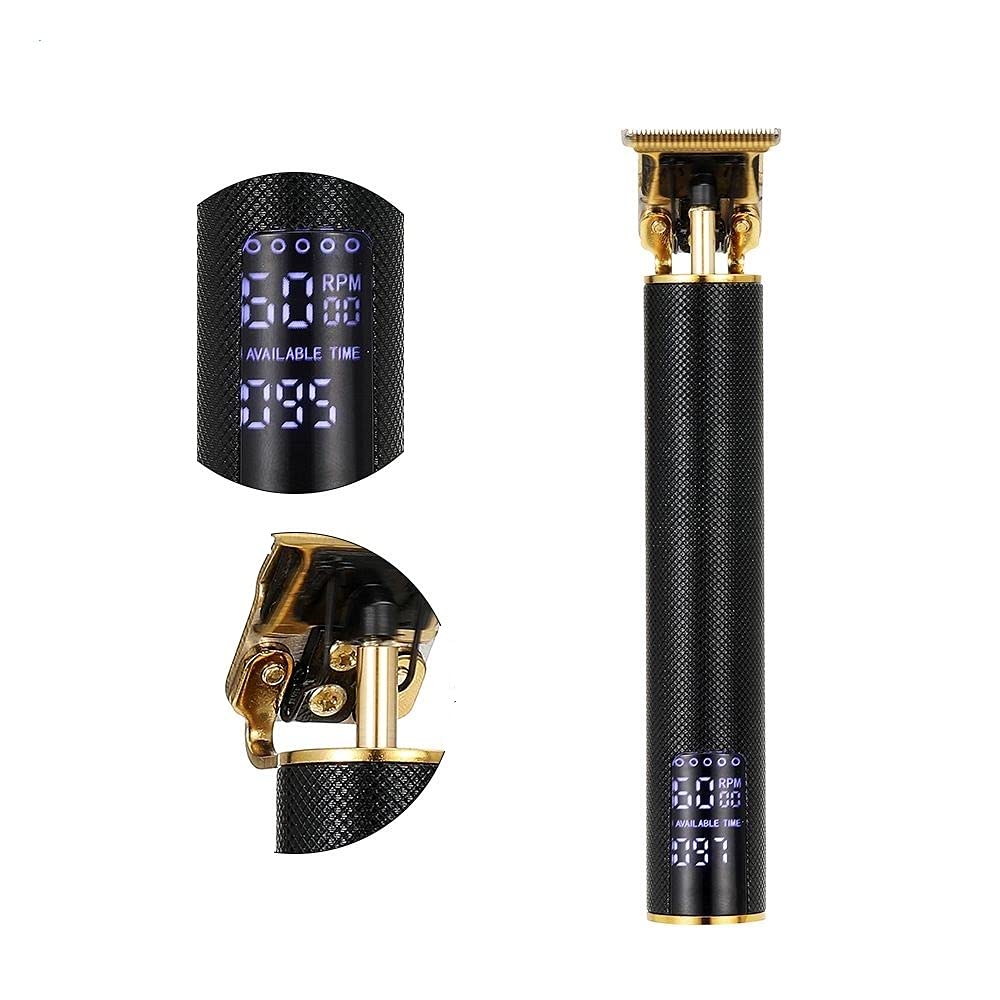
Image: VGR V-266 Trimmer showing guide combs and potential styling results.
Operating Instructions
Basic Operation:
- Ensure the trimmer is charged and a guide comb is securely attached (if desired).
- Press the power button to turn the trimmer on.
- Hold the trimmer at a comfortable angle and move it against the direction of hair growth for an even trim.
- For detailing or edging without a guide comb, use caution to avoid skin irritation.
- After use, press the power button to turn the trimmer off.
Trimming Tips:
- Start with a longer guide comb and gradually reduce the length if you are unsure.
- For best results, use on clean, dry hair.
- Stretch the skin taut in the area you are trimming to ensure a smooth pass.
- Clean the blades regularly during use to prevent hair buildup.
Maintenance
Cleaning the Blades:
- Turn off the trimmer and disconnect it from the power source.
- Remove any attached guide comb.
- Use the provided cleaning brush to remove loose hairs from the blade head.
- Apply a small drop of lubricating oil (provided) to the blades. Turn the trimmer on for a few seconds to distribute the oil, then turn it off. This helps maintain blade sharpness and prevents rust.
- Wipe off any excess oil with a soft cloth.
Storage:
Store the trimmer in a cool, dry place, away from direct sunlight and moisture. Keep it out of reach of children.
Battery Care:
- To prolong battery life, avoid completely draining the battery before recharging.
- If the trimmer will not be used for an extended period, charge it fully every three months to maintain battery health.
Troubleshooting
| Problem | Possible Cause | Solution |
|---|---|---|
| Trimmer does not turn on. | Battery is depleted. | Charge the trimmer fully. |
| Poor trimming performance. | Blades are dirty or unlubricated. | Clean and oil the blades as per maintenance instructions. |
| Trimmer stops during use. | Battery is low. | Recharge the trimmer. |
| Trimmer gets hot. | Prolonged use or dirty blades. | Allow the trimmer to cool down. Clean and lubricate blades. |
If the problem persists after attempting these solutions, please contact customer support.
Specifications
| Feature | Detail |
|---|---|
| Model Number | V-266 |
| Brand | VGR |
| Power Source | Rechargeable Battery, USB Interface |
| Blade Material | Stainless Steel |
| Number of Guide Combs | 6 |
| Speed Settings | 1 |
| Operation Type | Dry |
| Target Audience | Men |
| Batteries Required | Yes |
Warranty and Support
For warranty information or technical support, please refer to the warranty card included with your product or contact the retailer where the product was purchased. You may also visit the official VGR website for further assistance.


