
Introduction
Thank you for purchasing the Hoco BS40 Sports Wireless Bluetooth Speaker. This manual provides detailed instructions for the proper setup, operation, and maintenance of your device. Please read this manual thoroughly before use to ensure optimal performance and longevity of your speaker.
Safety Information
- Do not expose the speaker to extreme temperatures, direct sunlight, or high humidity.
- Avoid dropping or subjecting the speaker to strong impacts.
- Keep the speaker away from water and liquids, despite its water-resistant rating, to prevent damage.
- Do not attempt to disassemble or repair the speaker yourself. Contact qualified service personnel for assistance.
- Use only the provided charging cable or a certified equivalent.
- Keep out of reach of children.
Package Contents
Please check the package for the following items:
- Hoco BS40 Wireless Speaker
- Charging Cable
- User Manual
Product Overview
Familiarize yourself with the speaker's components and controls.

Image: Hoco BS40 speaker, top-down view, highlighting the control panel and overall design.

Image: Hoco BS40 speaker in an upright position, displaying the side control buttons and the Hoco branding.
Control Buttons and Ports:
- Power Button: Press and hold to turn the speaker on/off.
- Mode Button (M): Press to switch between Bluetooth, FM Radio, TF Card, USB, and AUX modes.
- Play/Pause Button: Press to play or pause audio. In call mode, press to answer/end calls.
- Volume Up (+)/Next Track: Short press for volume up, long press for next track.
- Volume Down (-)/Previous Track: Short press for volume down, long press for previous track.
- TF Card Slot: Insert a TF (MicroSD) card for music playback.
- USB Port: Insert a USB flash drive for music playback.
- AUX Port: Connect external audio devices via a 3.5mm audio cable.
- Charging Port: Connect the charging cable to power the speaker.
Setup
Charging the Speaker
- Connect the charging cable to the speaker's charging port.
- Connect the other end of the cable to a USB power adapter (not included) or a computer's USB port.
- The charging indicator light will illuminate during charging.
- Charging typically takes approximately 1.5 hours. The indicator light will change or turn off once fully charged.
Powering On/Off
- To Power On: Press and hold the Power Button for a few seconds until you hear an audible prompt or see the indicator light.
- To Power Off: Press and hold the Power Button again for a few seconds until you hear an audible prompt or the indicator light turns off.
Operating Instructions
Bluetooth Pairing
- Ensure the speaker is powered on and in Bluetooth mode (indicated by a flashing blue light or an audible prompt). If not, press the 'M' (Mode) button to switch to Bluetooth mode.
- Enable Bluetooth on your mobile device (smartphone, tablet, etc.).
- Search for available Bluetooth devices. You should find "Hoco BS40" in the list.
- Select "Hoco BS40" to connect. Once paired, the speaker will emit an audible confirmation, and the indicator light will stop flashing.
- You can now play audio from your device through the speaker.
FM Radio Mode
- Press the 'M' (Mode) button repeatedly until you enter FM Radio mode.
- To auto-scan for stations, press the Play/Pause button once. The speaker will scan and save available FM stations.
- Use the Volume Up (+) and Volume Down (-) buttons to navigate between saved stations.
TF Card / USB Playback
- Insert a TF (MicroSD) card or a USB flash drive containing MP3 audio files into the respective slot/port.
- The speaker should automatically switch to TF Card or USB mode and begin playback. If not, press the 'M' (Mode) button to select the correct mode.
- Use the Play/Pause, Volume Up (+), and Volume Down (-) buttons to control playback.
AUX Mode
- Connect one end of a 3.5mm audio cable (not included) to the AUX port on the speaker.
- Connect the other end of the audio cable to the audio output jack of your external device.
- Press the 'M' (Mode) button to switch to AUX mode.
- Audio will now play from your external device through the speaker. Control playback from your external device.
Volume Control and Track Navigation
- Volume Up: Short press the '+' button.
- Volume Down: Short press the '-' button.
- Next Track: Long press the '+' button.
- Previous Track: Long press the '-' button.

Image: Hoco BS40 speaker highlighting its versatile connectivity options including Bluetooth, FM, TF card, USB, and AUX.
Maintenance
- Cleaning: Use a soft, dry cloth to clean the speaker's surface. Do not use abrasive cleaners or solvents.
- Storage: Store the speaker in a cool, dry place when not in use for extended periods.
- Battery Care: To prolong battery life, fully charge the speaker before first use and recharge it at least once every three months if not used regularly.
Troubleshooting
| Problem | Possible Cause | Solution |
|---|---|---|
| Speaker does not turn on. | Battery is depleted. | Charge the speaker for at least 30 minutes. |
| Cannot pair via Bluetooth. | Speaker is not in pairing mode or too far from device. | Ensure speaker is in Bluetooth mode and within 10 meters of your device. Restart both devices. |
| No sound. | Volume is too low or incorrect mode selected. | Increase volume on both speaker and connected device. Press 'M' to ensure correct input mode (Bluetooth, AUX, etc.). |
| FM radio reception is poor. | Weak signal. | Move the speaker to an open area or adjust its position for better reception. |
Specifications
| Feature | Specification |
|---|---|
| Model Name | BS40 |
| Bluetooth Version | 5.0 |
| Speaker Type | Outdoor |
| Connectivity Technology | Bluetooth, FM, TF, USB, AUX |
| Maximum Speaker Output Power | 14 Watts |
| Rated Output Power | 7 Watts |
| Battery Capacity | 2400 mAh |
| Music Playback/Call Time | 4 hours or more |
| Charging Time | Approximately 1.5 hours |
| Dimensions (L x W x H) | 230 x 98 x 94 mm (9.06 x 3.86 x 3.7 inches) |
| Item Weight | 775 grams (1.71 lbs) |
| Water Resistant | Yes (IPX5 rating implied by image) |
| Material | Thermoplastic Polyurethane |
| Color | Blue |
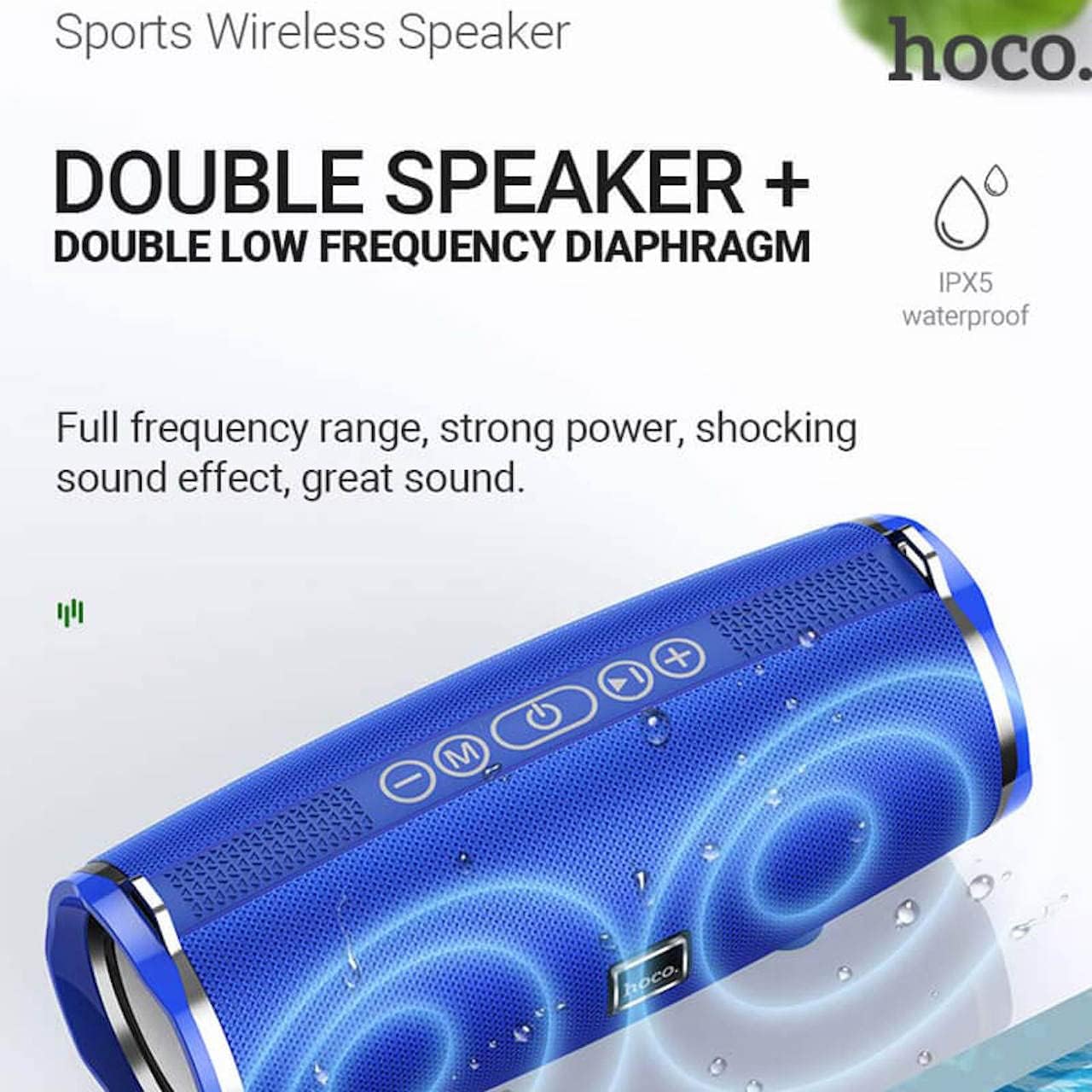
Image: Hoco BS40 speaker highlighting its IPX5 waterproof rating and dual speaker design for enhanced sound.
Warranty and Support
Hoco products are designed and manufactured to the highest quality standards. For warranty information and customer support, please refer to the warranty card included with your product or visit the official Hoco website.
Official Hoco Website: http://www.hocotech.com
Please retain your proof of purchase for warranty claims.


