
VGR V-282
VGR V-282 Professional Hair Clipper User Manual
Model: V-282
Introduction
Thank you for choosing the VGR V-282 Professional Digital Display Cordless Hair Clipper. This manual provides essential information for the safe and effective use, maintenance, and troubleshooting of your new hair clipper. Please read it thoroughly before first use and keep it for future reference.
Important Safety Instructions
WARNING: To reduce the risk of electric shock, injury, or fire:
- Do not reach for an appliance that has fallen into water. Unplug immediately.
- Do not use while bathing or in a shower.
- Do not place or store appliance where it can fall or be pulled into a tub or sink. Do not place in or drop into water or other liquid.
- Always unplug this appliance from the electrical outlet immediately after using.
- Unplug this appliance before cleaning, putting on or taking off parts.
- Close supervision is necessary when this appliance is used by, on, or near children or invalids.
- Use this appliance only for its intended household use as described in this manual. Do not use attachments not recommended by the manufacturer.
- Never operate this appliance if it has a damaged cord or plug, if it is not working properly, if it has been dropped or damaged, or dropped into water. Return the appliance to a service center for examination and repair.
- Keep the cord away from heated surfaces.
- Never drop or insert any object into any opening.
- Do not use outdoors or operate where aerosol (spray) products are being used or where oxygen is being administered.
- Do not use this appliance with a damaged or broken comb, as facial injury may occur.
- Always attach plug to appliance first, then to outlet. To disconnect, turn all controls to “OFF” then remove plug from outlet.
Package Contents

The VGR V-282 hair clipper is supplied with a comprehensive set of accessories for various grooming needs.
Your VGR V-282 package should include the following items:
- 1 x VGR V-282 Hair Clipper
- 6 x Guide Combs (1.5mm, 3mm, 4.5mm, 6mm, 10mm, 13mm)
- 1 x USB Charging Cable
- 1 x Cleaning Brush
- 1 x Lubricating Oil
- 1 x User Manual
Product Features
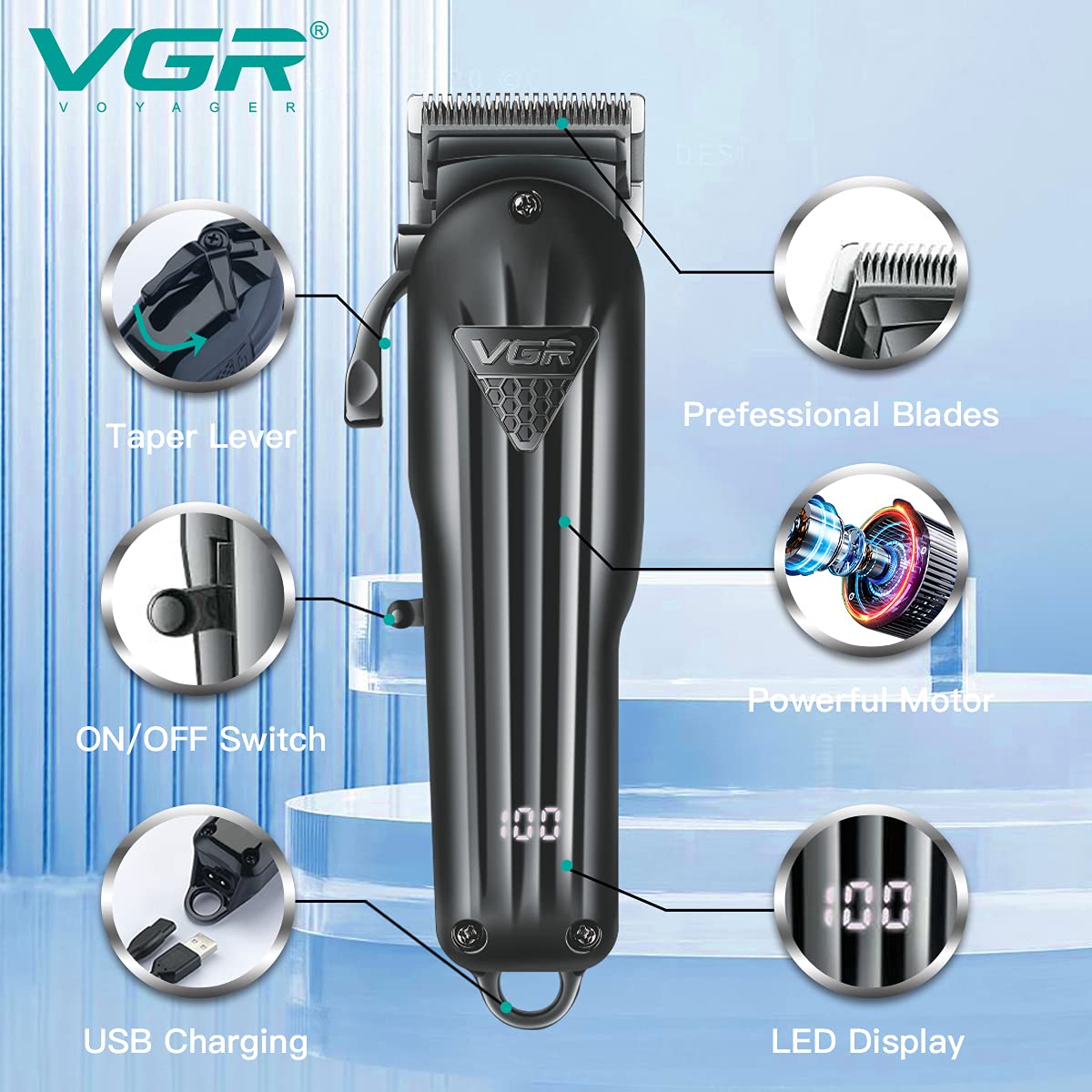
An overview of the VGR V-282's main components and their functions.
- Professional Blades: High-quality stainless steel blades designed for precise and smooth cutting.
- Powerful Motor: Ensures efficient and consistent performance.
- Taper Lever: Allows for easy adjustment of cutting length without changing guide combs.
- ON/OFF Switch: Simple control for powering the device.
- USB Charging: Convenient charging via USB, compatible with various power sources.
- LED Display: Digital display showing battery percentage and charging status.
Setup and Charging
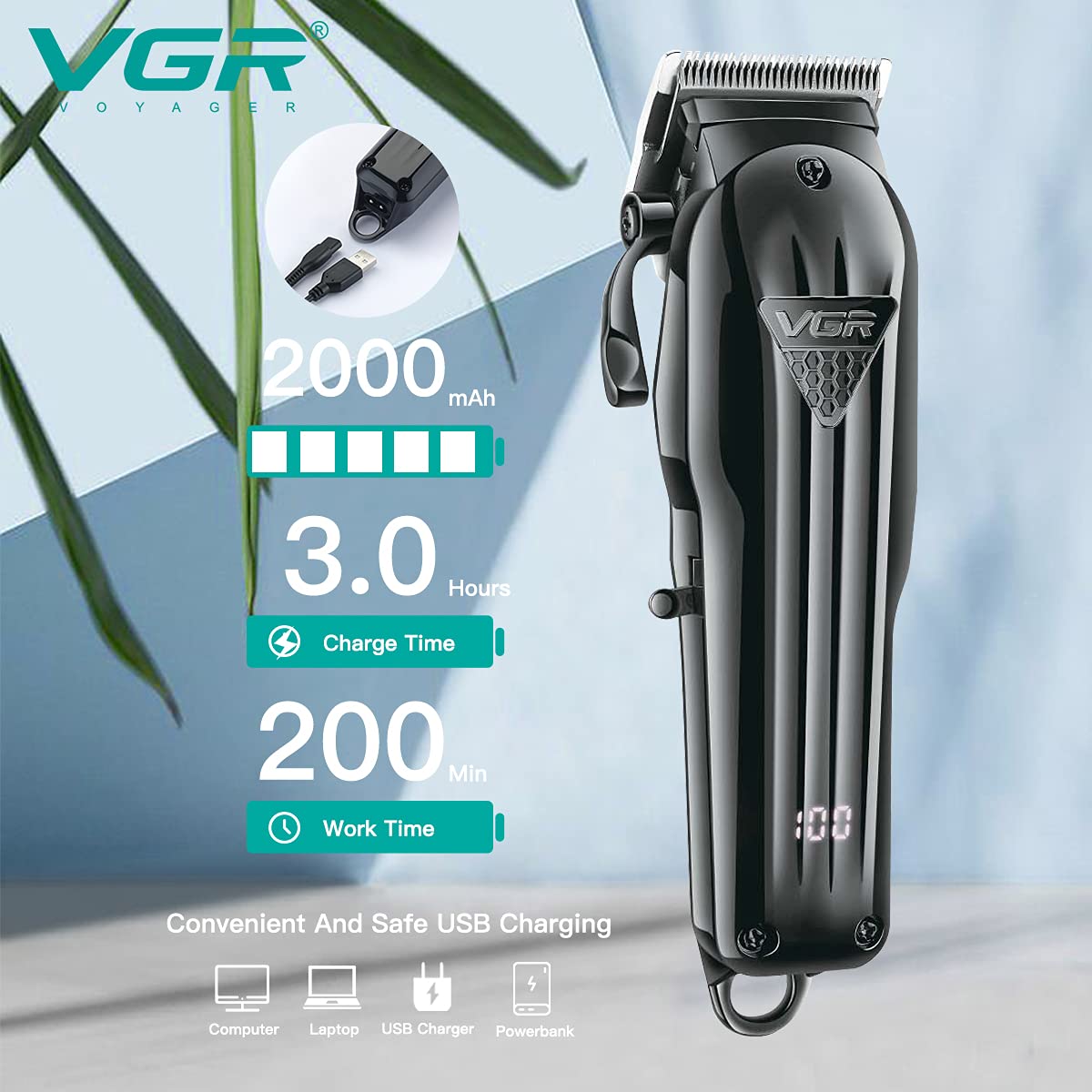
Information on the VGR V-282's battery specifications and charging compatibility.
- Initial Charge: Before first use, fully charge the clipper for approximately 3 hours. The LED display will show the battery percentage, indicating full charge when it reaches 100%.
- Connecting to Power: Insert the USB charging cable into the clipper's charging port and connect the other end to a USB power source (e.g., computer, laptop, USB charger, power bank).
- Battery Life: A full charge provides approximately 200 minutes of continuous cordless operation.
- Battery Indicator: The LED display will show the remaining battery percentage. Recharge when the battery level is low to ensure optimal performance.
Operating Instructions
Attaching Guide Combs

The various guide comb sizes available for precise hair cutting lengths.
- Select the desired guide comb based on the cutting length required (1.5mm, 3mm, 4.5mm, 6mm, 10mm, or 13mm).
- Align the guide comb with the clipper blade and push it firmly until it clicks into place.
- To remove, gently pull the comb away from the blade.
Adjusting Blade Length (Taper Lever)

Visual guide for adjusting the blade length using the taper lever.
The taper lever on the side of the clipper allows for fine-tuning the cutting length between 0.8mm and 2mm without using a guide comb. This is ideal for fading and blending.
- Push the lever up for a shorter cut (closer to 0.8mm).
- Pull the lever down for a longer cut (closer to 2mm).
Powering On/Off
Locate the ON/OFF switch on the side of the clipper. Press the switch to turn the clipper on or off.
Hair Cutting Tips
- Ensure hair is clean and dry before cutting.
- Always start with a longer guide comb and gradually switch to shorter ones if needed.
- Cut against the direction of hair growth for best results.
- Use smooth, overlapping strokes.
Maintenance and Cleaning
Cleaning the Blades

A close-up of the durable stainless steel blades, emphasizing their design for effective cutting.
- After each use, turn off the clipper and remove any attached guide comb.
- Use the provided cleaning brush to remove loose hair from the blades and the clipper body.
- For a more thorough clean, the blades can be rinsed under running water. Ensure the clipper body remains dry if it is not fully waterproof.
- Allow the blades to air dry completely before reattaching or storing.
Oiling the Blades
To maintain optimal cutting performance and blade longevity, apply a few drops of the provided lubricating oil to the blades after every few uses or after cleaning with water.
- Apply 1-2 drops of oil evenly across the top of the blades.
- Turn on the clipper for a few seconds to allow the oil to distribute.
- Wipe off any excess oil with a clean cloth.
Storage
Store the clipper in a cool, dry place, away from direct sunlight and moisture. Keep it out of reach of children.
Troubleshooting
| Problem | Possible Cause | Solution |
|---|---|---|
| Clipper does not turn on. | Battery is depleted. | Charge the clipper fully. |
| Clipper is not cutting effectively. | Blades are dull or clogged with hair. | Clean and oil the blades. If blades are dull, consider professional sharpening or replacement. |
| Clipper makes unusual noise. | Blades need lubrication. | Apply lubricating oil to the blades. |
| Battery life is shorter than expected. | Battery not fully charged or aging. | Ensure full charge cycle. If issue persists, battery may need replacement (contact support). |
Product Specifications
| Feature | Specification |
|---|---|
| Model Number | V-282 |
| Power Source | Battery Powered, Corded Electric |
| Blade Material | Stainless Steel |
| Battery Type | Lithium-Ion |
| Battery Capacity | 2000mAh |
| Charging Time | 180 Minutes (3 hours) |
| Runtime | 200 Minutes (3 hours and 20 minutes) |
| Product Dimensions (LxWxH) | 7.3 x 13.2 x 23.2 cm |
| Item Weight | 590 g |
Warranty and Support
Warranty: This product comes with a 12-month quality warranty against defects in materials and workmanship from the date of original purchase (invoice required). This warranty does not cover intentional or unintentional damage by the user.
Initiating a Warranty Claim: To initiate a warranty claim, please contact VGR INDIA at WARRANTY@VGRINDIA.CO.IN. Provide a clear description of the problem, associated pictures, and a copy of your original invoice. Once the claim is verified, the company will, at its discretion, either repair or exchange the product.
Shipping Costs: Customers are responsible for the cost of transporting the product to the service center. VGR INDIA will bear the cost of transporting the product back to the customer if a repair or exchange is performed under warranty.
Customer Service: For any inquiries or support, our customer service team aims to respond within 24 hours.
Official Product Videos
No official product videos from the seller were found for this product.
Related documentsV-282


Ask a question about this manual
Ask about setup, troubleshooting, compatibility, parts, safety, or missing instructions. Manuals+ will review the question and use this page’s manual context to help answer it.