
awei Y600
Awei Y600 Wireless Bluetooth Stereo Mini Speaker User Manual
Model: Y600 | Brand: Awei
Introduction
This manual provides detailed instructions for the safe and efficient use of your Awei Y600 Wireless Bluetooth Stereo Mini Speaker. Please read this manual thoroughly before operating the device and retain it for future reference.
The Awei Y600 is a portable wireless speaker designed for high-quality audio playback. Key features include:
- Bluetooth Version: CSR 4.1
- Battery Capacity: 2600mAh
- Driver Unit: 50mm
- Speaker power: 8W
- Charging time: 5.5 hours
- Talk time: 14 hours
- Time to play the music: 14 hours
- Size: 188x78x78 mm
- Frequency Range: 20Hz-20KHz
- Charge Voltage: DC 5V / 1.5A
- Microphone: Yes
Package Contents
Please check the package contents upon unboxing to ensure all items are present:
- Awei Y600 Wireless Bluetooth Stereo Mini Speaker
- USB Charging Cable
- Audio Cable (AUX)
- User Manual (this document)
Product Overview
Familiarize yourself with the various parts of your Awei Y600 speaker.

Figure 1: Front-side view of the Awei Y600 speaker, showcasing its rose gold finish and black speaker grille.
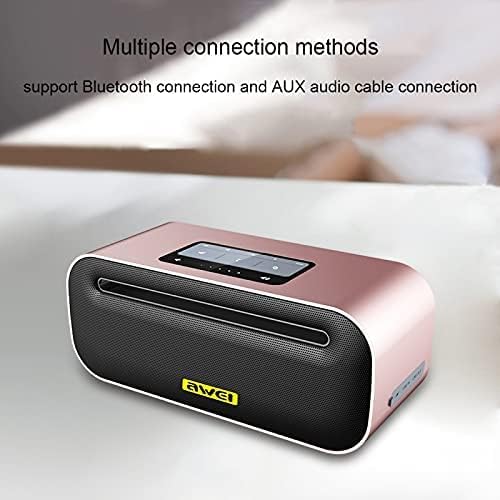
Figure 2: Top view of the Awei Y600 speaker, highlighting the control panel and indicating support for Bluetooth and AUX audio cable connections.
The speaker features a sleek design with a control panel on the top for easy access to functions like power, volume, and mode selection. The rear panel typically houses the charging port and AUX input.
Setup
Charging the Speaker
Before first use, fully charge the speaker. Connect the provided USB charging cable to the speaker's charging port and the other end to a USB power adapter (DC 5V / 1.5A) or a computer's USB port.
- The charging indicator light will illuminate during charging.
- Charging time is approximately 5.5 hours for a full charge.
- The indicator light will change or turn off once charging is complete.
Operating Instructions
Power On/Off
- To power on: Press and hold the Power button for a few seconds until you hear an audible prompt or see the indicator light illuminate.
- To power off: Press and hold the Power button again for a few seconds.
Bluetooth Pairing
- Ensure the speaker is powered on and in Bluetooth pairing mode (indicated by a flashing blue light or audible prompt).
- On your device (smartphone, tablet, computer), enable Bluetooth and search for available devices.
- Select "Awei Y600" from the list of found devices.
- Once paired, the speaker will provide an audible confirmation, and the indicator light will become solid blue.
- The speaker will automatically connect to the last paired device when powered on, if the device's Bluetooth is active and within range.
AUX Mode
To use the speaker with a non-Bluetooth device, connect one end of the provided 3.5mm audio cable to the speaker's AUX input port and the other end to the audio output jack of your device.
- The speaker should automatically switch to AUX mode. If not, press the Mode button (if available) to cycle through modes.
- Volume control can be managed both on the speaker and the connected device.
Controlling Playback
- Play/Pause: Press the Play/Pause button.
- Volume Up: Press the Volume Up (+) button.
- Volume Down: Press the Volume Down (-) button.
- Next Track: Press and hold the Volume Up (+) button (or specific button if available).
- Previous Track: Press and hold the Volume Down (-) button (or specific button if available).
Hands-Free Calling
When connected via Bluetooth to a smartphone, the speaker can be used for hands-free calls.
- Answer Call: Press the Play/Pause button (or Call button if available).
- End Call: Press the Play/Pause button (or Call button if available) again.
- Reject Call: Press and hold the Play/Pause button (or Call button if available).
Maintenance
- Cleaning: Use a soft, dry cloth to clean the speaker's surface. Do not use abrasive cleaners, alcohol, or chemical solvents.
- Storage: Store the speaker in a cool, dry place away from direct sunlight and extreme temperatures.
- Battery Care: To prolong battery life, avoid fully discharging the battery frequently. Charge the speaker regularly, even if not in use for extended periods.
- Water Resistance: This speaker is not waterproof. Avoid exposure to water or high humidity.
Troubleshooting
| Problem | Possible Cause | Solution |
|---|---|---|
| Speaker does not power on. | Low battery. | Charge the speaker fully. |
| Cannot pair via Bluetooth. | Speaker not in pairing mode; Device Bluetooth off; Too far from speaker. | Ensure speaker is in pairing mode; Turn on Bluetooth on your device; Move device closer to speaker (within 10 meters). |
| No sound. | Volume too low; Incorrect mode; Device not playing audio. | Increase volume on speaker and device; Ensure correct mode (Bluetooth/AUX); Check if audio is playing on the connected device. |
| Sound distortion. | Volume too high; Weak signal. | Lower volume; Move closer to the connected device. |
Specifications
| Feature | Detail |
|---|---|
| Model Name | Y600 |
| Brand | Awei |
| Bluetooth Version | CSR 4.1 |
| Battery Capacity | 2600mAh |
| Driver Unit | 50mm |
| Speaker Power | 8W |
| Charging Time | 5.5 hours |
| Talk Time | 14 hours |
| Music Playback Time | 14 hours |
| Dimensions (L x W x H) | 188x78x78 mm |
| Frequency Range | 20Hz-20KHz |
| Charge Voltage | DC 5V / 1.5A |
| Microphone | Yes |
| Connectivity Technology | Wired/Wireless |
| Audio Output Mode | Stereo |
Safety Information
- Do not expose the speaker to extreme temperatures, direct sunlight, or high humidity.
- Do not disassemble, repair, or modify the device yourself. This will void the warranty and may cause damage or injury.
- Keep the speaker away from children and pets.
- Use only the original or certified charging cables and adapters.
- Avoid dropping or subjecting the speaker to strong impacts.
Warranty and Support
For warranty information and technical support, please refer to the warranty card included with your purchase or visit the official Awei website. Please retain your proof of purchase for warranty claims.
Note: Any risks associated with the product's use are stated as "No" in the product description.
Related documentsY600


Ask a question about this manual
Ask about setup, troubleshooting, compatibility, parts, safety, or missing instructions. Manuals+ will review the question and use this page’s manual context to help answer it.