
VGR V-116
VGR V-116 Rechargeable Hair Shaver User Manual
1. Introduction
Thank you for choosing the VGR V-116 Rechargeable Hair Shaver. This manual provides essential information for the safe and effective use, maintenance, and care of your device. Please read these instructions thoroughly before first use and retain them for future reference.
2. Important Safety Instructions
When using an electrical appliance, basic precautions should always be followed, including the following:
- Read all instructions before using this appliance.
- Keep the appliance dry. Do not use it near water or in wet conditions.
- Do not immerse the appliance in water or other liquids.
- Do not reach for an appliance that has fallen into water. Unplug it immediately.
- Always unplug this appliance from the electrical outlet immediately after using and before cleaning.
- Close supervision is necessary when this appliance is used by, on, or near children or individuals with certain disabilities.
- Use this appliance only for its intended use as described in this manual.
- Never operate this appliance if it has a damaged cord or plug, if it is not working properly, or if it has been dropped or damaged.
- Keep the cord away from heated surfaces.
- Never drop or insert any object into any opening.
- Do not use outdoors or operate where aerosol (spray) products are being used or where oxygen is being administered.
- Always attach the plug to the appliance first, then to the outlet. To disconnect, turn all controls to 'OFF', then remove the plug from the outlet.
- This appliance is intended for household use only.
3. Package Contents
Please check the package for the following items:
- VGR V-116 Professional Hair Clipper
- 4 Guide Combs (various sizes)
- Cleaning Brush
- Lubricating Oil
- Charging Adapter
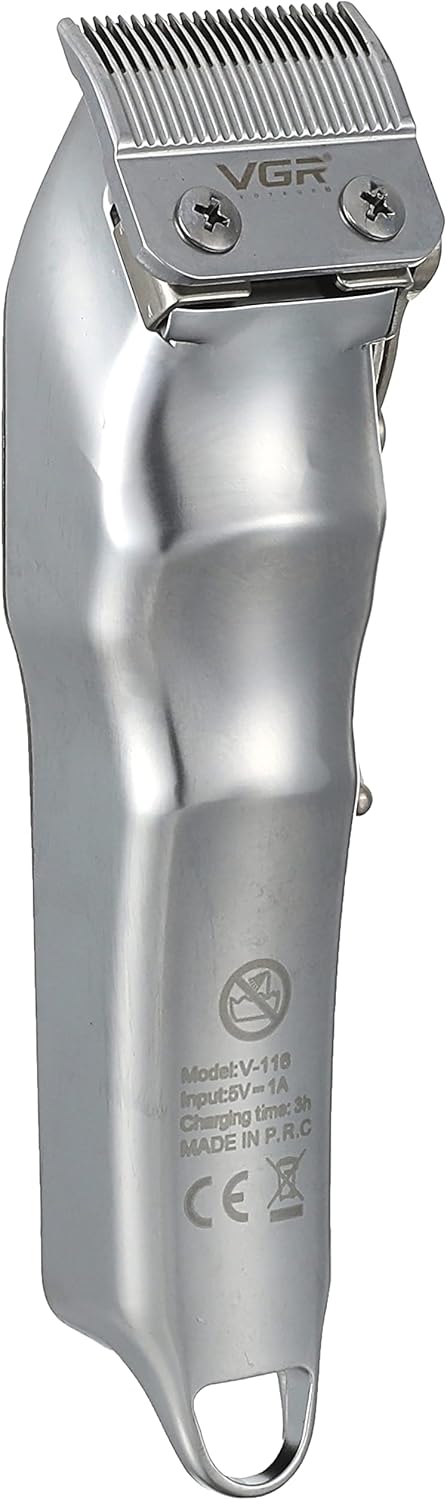
Image: The VGR V-116 hair shaver displayed with all included accessories: the shaver unit, four guide combs, a cleaning brush, lubricating oil, and a charging adapter.
4. Product Overview
Familiarize yourself with the components of your VGR V-116 hair shaver.

Image: A side view of the VGR V-116 hair shaver, showcasing its metallic silver finish, stainless steel blade, and ergonomic design with decorative patterns on the casing.

Image: The back of the VGR V-116 hair shaver, displaying the model number (V-116), input voltage (5V == 1A), charging time (3h), and 'MADE IN P.R.C.' text, along with CE and recycling symbols.

Image: A close-up view of the four black plastic guide combs included with the VGR V-116 hair shaver, showing various cutting lengths indicated in millimeters and inches.
5. Setup
5.1 Initial Charging
- Before first use, ensure the shaver is fully charged.
- Connect the charging adapter to the shaver and plug it into a suitable electrical outlet.
- The LED display will indicate the charging status. A full charge typically takes approximately 3 hours.
- Once fully charged, the shaver provides approximately 200 minutes of operating time.
5.2 Attaching Guide Combs
- Select the desired guide comb for your preferred hair length.
- Align the comb with the shaver blade and push it firmly until it clicks into place.
- To remove, gently pull the comb away from the blade.
6. Operating Instructions
6.1 Turning On/Off
- To turn on the shaver, slide the On/Off switch upwards.
- To turn off the shaver, slide the On/Off switch downwards.
6.2 Adjusting the Taper Lever
- The taper lever allows for fine adjustment of cutting length without changing guide combs.
- Move the lever upwards for a shorter cut and downwards for a longer cut.
6.3 Hair Clipping
- Ensure hair is clean and dry before clipping.
- Start with a longer guide comb if you are unsure of the desired length.
- Hold the shaver with the blade teeth pointing upwards.
- Move the shaver slowly against the direction of hair growth.
- Overlap strokes to ensure an even cut.
7. Maintenance and Cleaning
Regular cleaning and maintenance will prolong the life of your shaver.
7.1 Cleaning the Blades
- Turn off the shaver and unplug it from the power source.
- Remove any attached guide comb.
- Use the provided cleaning brush to brush away loose hairs from the blades and the shaver head.
- For a more thorough cleaning, the blades can be carefully detached (refer to specific instructions if provided with the product for blade removal).
7.2 Lubricating the Blades
- After cleaning, apply a few drops of the lubricating oil (provided) to the blades.
- Turn on the shaver for a few seconds to allow the oil to distribute evenly.
- Wipe off any excess oil with a soft cloth.
- Lubricate blades regularly to maintain optimal cutting performance and prevent rust.
7.3 Storage
- Store the shaver in a cool, dry place, away from direct sunlight and moisture.
- Ensure the shaver is turned off and unplugged before storing.
8. Troubleshooting
If you encounter issues with your VGR V-116 hair shaver, refer to the following common problems and solutions:
- Shaver does not turn on: Ensure the shaver is charged. Check if the power switch is in the 'ON' position.
- Poor cutting performance or pulling hair: The blades may be dull or clogged with hair. Clean and lubricate the blades as described in the Maintenance section. Ensure the guide comb is correctly attached.
- Shaver not charging: Verify that the charging adapter is properly connected to both the shaver and the power outlet. Check the power outlet for functionality.
- Excessive noise or vibration: This could indicate a need for cleaning and lubrication. If the issue persists, contact customer support.
9. Specifications
| Model Number | V-116 |
| Brand | VGR |
| Power Source | Electric & Battery (Cordless, Rechargeable) |
| Battery Type | 2000mAh Lithium battery |
| Charging Time | Approximately 3 hours |
| Operating Time | Approximately 200 minutes |
| Blade Material | Stainless Steel |
| Input Voltage | 5V # 1A |
| Item Weight | 0.8 Kilograms |
| Package Dimensions | 21.5 x 18.5 x 7 cm |
10. Warranty and Support
For warranty information or technical support, please refer to the warranty card included with your product or contact VGR customer service through their official website or the retailer where the product was purchased. Please have your model number (V-116) and purchase details ready when contacting support.
Related documentsV-116


Ask a question about this manual
Ask about setup, troubleshooting, compatibility, parts, safety, or missing instructions. Manuals+ will review the question and use this page’s manual context to help answer it.