
1. Introduction
Thank you for choosing the VGR Unisex Dry Clipper & Trimmer, Model V-095. This manual provides essential information for the safe and effective operation, maintenance, and troubleshooting of your new grooming device. Please read this manual thoroughly before first use and keep it for future reference.
The VGR V-095 is designed for dry operation, offering a convenient and versatile solution for hair clipping and trimming for unisex use. It features a durable stainless steel blade and can be powered by both electric and battery sources, providing cordless functionality.
2. Safety Information
WARNING: To reduce the risk of electric shock, injury, or damage, always follow these basic safety precautions:
- Avoid use near water sources, such as bathtubs, showers, basins, or other vessels containing water.
- Keep away from children and pets. This appliance is not intended for use by persons (including children) with reduced physical, sensory, or mental capabilities, or lack of experience and knowledge, unless they have been given supervision or instruction concerning use of the appliance by a person responsible for their safety.
- Do not use on infants or individuals with sensitive skin without proper care and supervision.
- Always unplug the device and allow it to cool completely before cleaning or performing any maintenance.
- Keep blades away from eyes and face during operation. Exercise caution when handling sharp blades.
- Always test the clipper on a small, inconspicuous area of skin before full use, especially if you have sensitive skin or are prone to irritation.
- Follow recommended cleaning and maintenance procedures as outlined in this manual to ensure optimal performance and longevity of the device.
- Do not operate the appliance with a damaged cord or plug, or if it malfunctions, or has been dropped or damaged in any manner.
- Use only attachments supplied by the manufacturer.
3. Package Contents
Upon unpacking, please verify that all items listed below are present and in good condition. If any items are missing or damaged, please contact your retailer.

Figure 3.1: Complete VGR V-095 Clipper Kit. This image shows the main clipper unit, multiple guide combs, a cleaning brush, lubricating oil, a power adapter, a charging cable, a comb, and a pair of scissors, all neatly organized in a carrying case.
- VGR V-095 Clipper/Trimmer Unit
- Multiple Guide Combs (various sizes)
- Power Adapter
- Charging Cable
- Cleaning Brush
- Lubricating Oil
- Hair Comb
- Scissors
- Storage/Carrying Case
- Instruction Manual (this document)
4. Setup
4.1 Initial Charging
Before first use, fully charge the VGR V-095 clipper. This ensures optimal battery performance and longevity.
- Connect the charging cable to the clipper's charging port.
- Plug the power adapter into a standard electrical outlet.
- Allow the clipper to charge until the charging indicator light (if present) indicates a full charge, or for the recommended duration specified in the product packaging.
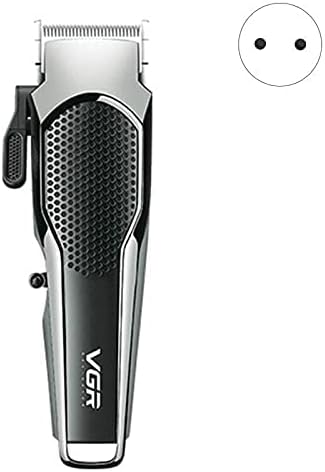
Figure 4.1: VGR V-095 Clipper with its power plug. This image highlights the clipper unit and the type of electrical plug used for charging.
4.2 Attaching Guide Combs
Guide combs are used to control the length of hair being cut.
- Ensure the clipper is turned off.
- Select the desired guide comb size.
- Align the comb with the clipper blade and firmly push it into place until it clicks securely.
- To remove, gently pull the comb away from the blade.
5. Operating Instructions
The VGR V-095 is designed for dry operation. Ensure hair is clean and dry before use for best results.
5.1 Basic Clipping/Trimming
- Ensure the clipper is fully charged or plugged in if using corded operation.
- Attach the appropriate guide comb for your desired hair length.
- Turn on the clipper using the power switch.
- Hold the clipper with the blade flat against the skin or at a slight angle, depending on the area and desired cut.
- Move the clipper slowly and steadily against the direction of hair growth.
- For detailing or edging, remove the guide comb and use the bare blade with caution.
- After use, turn off the clipper.
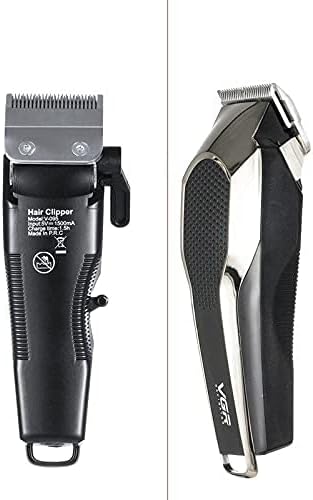
Figure 5.1: Front and back view of the VGR V-095 Clipper. This image provides a detailed look at the ergonomic design and the power switch location on the clipper.
6. Maintenance and Cleaning
Regular cleaning and maintenance will ensure the longevity and optimal performance of your VGR V-095 clipper.
6.1 Cleaning the Blades
- Ensure the clipper is turned off and unplugged.
- Use the provided cleaning brush to remove loose hairs from the blades and the area around them.
- For a more thorough cleaning, you may carefully detach the blade assembly if the model allows (refer to product specific instructions if different).
- Do not rinse the clipper under water as it is designed for dry operation.
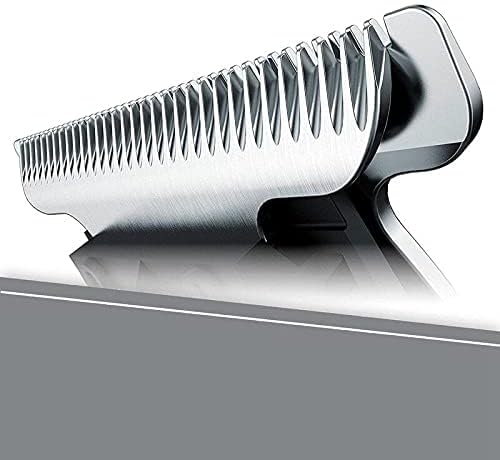
Figure 6.1: Close-up view of the VGR V-095 Clipper blade. This image highlights the stainless steel blade, emphasizing the importance of keeping it clean and well-maintained.
6.2 Oiling the Blades
To maintain cutting performance and prevent blade wear, oil the blades regularly (e.g., after every few uses).
- Apply 1-2 drops of the provided lubricating oil (or a suitable clipper oil) onto the blades.
- Turn on the clipper for a few seconds to allow the oil to distribute evenly.
- Wipe off any excess oil with a soft cloth.
6.3 Storage
Store the clipper and its accessories in the provided carrying case in a cool, dry place, away from direct sunlight and moisture.
7. Troubleshooting
If you encounter any issues with your VGR V-095 clipper, please refer to the following common problems and solutions:
| Problem | Possible Cause | Solution |
|---|---|---|
| Clipper not turning on. | Battery is low or depleted. / Not properly plugged in (if corded). | Charge the clipper fully. / Ensure the power adapter is securely plugged into both the clipper and the outlet. |
| Poor cutting performance / Pulling hair. | Blades are dull or dirty. / Blades are not oiled. / Hair is wet or tangled. | Clean the blades thoroughly. / Apply lubricating oil to the blades. / Ensure hair is clean and dry before clipping. |
| Clipper making unusual noise. | Blades need oiling. / Debris caught in the blades. | Oil the blades. / Clean the blades and remove any trapped hair or debris. |
| Battery not holding charge. | Battery lifespan reached. / Improper charging habits. | Ensure you are charging for the recommended duration. If the issue persists, the battery may need replacement or the unit may require servicing. |
If the problem persists after trying these solutions, please contact customer support.
8. Specifications
| Model Number | V-095 |
| Brand | VGR |
| Type | Clipper & Trimmer |
| Targeted Group | Unisex |
| Operating Function | Dry |
| Power Source | Electric & Battery (Cordless) |
| Number of Speed Settings | 1 |
| Blade Material | Stainless Steel |
| Item Weight | 11 Grams |
| Color | Tan |
| Hair Type | All |
9. Warranty and Support
VGR products are manufactured to high-quality standards. For information regarding warranty coverage, please refer to the warranty card included with your product or visit the official VGR website. Keep your purchase receipt as proof of purchase for any warranty claims.
For technical support, spare parts, or service inquiries, please contact the retailer where you purchased the product or refer to the contact information provided on the VGR official website.
Online Resources: While specific links are not provided in this manual, you can typically find more information, FAQs, and support on the official VGR brand website.