
Introduction
Thank you for choosing the VGR V-140 Men's Dry Shaver and Trimmer. This manual provides essential information for the safe and effective use, maintenance, and troubleshooting of your device. Please read these instructions carefully before first use and keep them for future reference.
Safety Instructions
- This appliance is designed for dry use only. Do not use it in the shower or bath, or immerse it in water.
- Keep the appliance away from water sources. If the appliance falls into water, do not reach for it. Unplug it immediately.
- Do not use the appliance if it is damaged, especially the power cord or plug. Contact customer support for repair.
- This appliance is not intended for use by persons (including children) with reduced physical, sensory, or mental capabilities, or lack of experience and knowledge, unless they have been given supervision or instruction concerning use of the appliance by a person responsible for their safety.
- Children should be supervised to ensure that they do not play with the appliance.
- Only use the charger supplied with the appliance.
- Do not disassemble the appliance. For repairs, contact authorized service personnel.
- Ensure the voltage specified on the adapter matches your local mains voltage before connecting.
Package Contents
Upon opening the package, please verify that all items are present and in good condition:
- VGR V-140 Shaver and Trimmer Unit
- 4 Guide Combs (various lengths)
- Charging Cable/Adapter
- Cleaning Brush
- Lubricating Oil
- User Manual
Product Overview
Familiarize yourself with the main components of your VGR V-140:
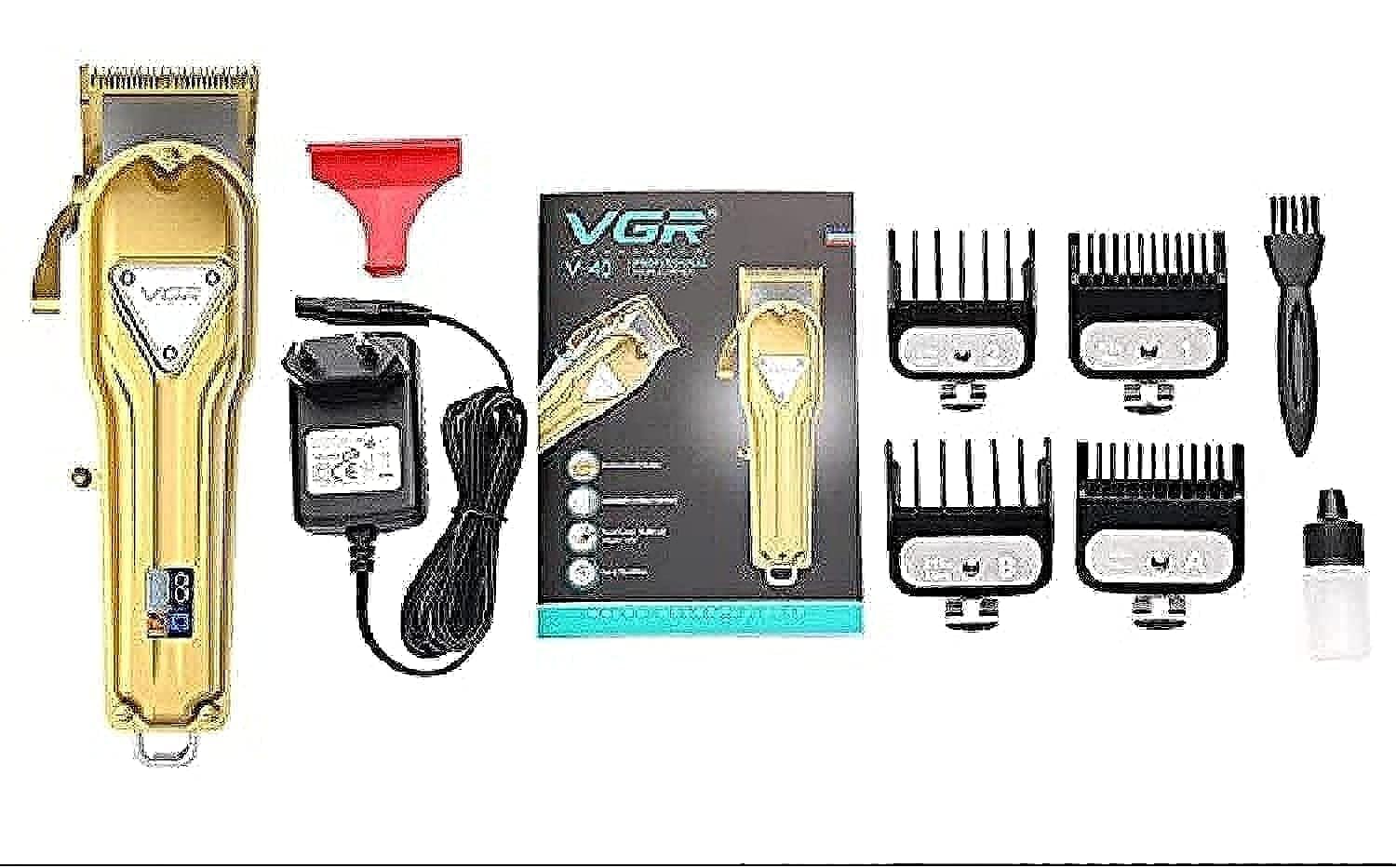
- Cutting Head: Precision blades for shaving and trimming.
- Power Button: To turn the device ON/OFF.
- Charging Port: For connecting the charging cable.
- Indicator Light: Shows charging status or battery level.
- Guide Combs: Attachments for adjusting trimming length.
Setup
Initial Charging
- Before first use, fully charge the shaver. Connect the charging cable to the shaver's charging port and plug the adapter into a power outlet.
- The indicator light will illuminate to show that the device is charging. Refer to the specifications for typical charging time.
- Once fully charged, disconnect the charger.
Attaching Guide Combs
- Ensure the shaver is turned OFF.
- Select the desired guide comb for your preferred hair length.
- Align the comb with the cutting head and push it firmly until it clicks into place.
- To remove, gently pull the comb away from the cutting head.
Operating Instructions
Basic Operation
- Press the Power Button to turn the shaver ON.
- For shaving, hold the shaver at a right angle to your skin and move it against the direction of hair growth.
- For trimming, attach the desired guide comb. Hold the shaver with the comb flat against your skin and move it slowly against the direction of hair growth.
- Press the Power Button again to turn the shaver OFF after use.
Tips for Best Results
- Ensure your skin and hair are completely dry before use for optimal performance.
- Stretch your skin with your free hand to make the hairs stand upright, allowing for a closer shave/trim.
- Clean the cutting head regularly during use, especially when trimming thicker hair, to prevent clogging.
Maintenance
Cleaning the Cutting Head
- Turn OFF the shaver and disconnect it from any power source.
- Carefully remove the cutting head from the shaver body.
- Use the provided cleaning brush to remove any trapped hairs from the blades and inside the shaver body.
- Do not rinse the cutting head or shaver body with water, as this is a dry-use appliance.
- Reattach the cutting head securely.
Lubricating the Blades
To maintain optimal performance and blade longevity, lubricate the blades regularly (e.g., after every few uses):
- After cleaning, apply one or two drops of the provided lubricating oil onto the blades.
- Turn the shaver ON for a few seconds to distribute the oil evenly.
- Turn OFF the shaver and wipe off any excess oil with a soft cloth.
Storage
Store the shaver in a cool, dry place, away from direct sunlight and out of reach of children. Ensure it is clean and dry before storing.
Troubleshooting
| Problem | Possible Cause | Solution |
|---|---|---|
| Shaver does not turn ON. | Battery is depleted. | Charge the shaver fully. |
| Poor shaving/trimming performance. | Blades are dirty or dull. Hair is wet. | Clean and oil the blades. Ensure hair is dry. Consider blade replacement if dull. |
| Shaver stops during use. | Battery is low. | Recharge the shaver. |
| Unusual noise or vibration. | Blades are clogged or misaligned. | Clean the blades thoroughly. Ensure the cutting head is properly attached. |
Specifications
- Model Number: V-140
- Brand: VGR
- Power Source: Electric (corded) and Rechargeable Battery (cordless operation)
- Operation Function: Dry
- Number of Speed Settings: 1
- Number of Heads: 4 (referring to guide combs)
- Blade Material: Stainless Steel
- Body Material: Plastic
- Color: Black
- Target Audience: Men
- Shipping Dimensions: 26.7 x 16.2 x 8.3 cm
- Weight: 930 grams
- Batteries Required: No (This refers to no additional disposable batteries; the device has a built-in rechargeable battery.)
Warranty and Support
For warranty information, please refer to the warranty card included in your product packaging or contact your retailer. Keep your purchase receipt as proof of purchase.
If you encounter any issues not covered in this manual, or require further assistance, please contact the VGR customer support or your local distributor.

