
1. Introduction
This manual provides comprehensive instructions for the installation, operation, and maintenance of your Prestige APS510Z 1-Way Remote Keyless Entry Car Security System. Please read this manual thoroughly before attempting to install or operate the system to ensure proper function and to maximize the benefits of your new security system.
The Prestige APS510Z system is designed to provide enhanced security for your vehicle with features such as remote keyless entry, automatic arming, and a starter interrupt. It includes two five-button 1-way transmitters for convenient control.
2. Key Features
- Two (2) Five-Button 1-Way Transmitters: For remote control of system functions.
- 800 Feet Operating Range: Extended range for remote commands.
- Remote Keyless Entry: Lock and unlock vehicle doors remotely.
- Automatic Arming: System arms automatically after a set period.
- Automatic Locking: Doors lock automatically under certain conditions.
- Illuminated Entry: Interior lights illuminate upon disarming.
- Multi-Tone Mini Siren: Provides audible alerts during alarm events.
- Starter Interrupt: Prevents the vehicle from starting when armed.
- Dual Stage Shock Sensor with City Mode: Detects impacts and provides warnings or full alarm.
- DBI Port: Supports DBI and ADS protocols for enhanced integration.
- Telematics Port: Carlink Ready for optional telematics module integration.
- Glass Mount Antenna with Built-in LED Light and Valet Switch: For system status indication and service mode.
3. Setup and Installation
Installation of the Prestige APS510Z system should be performed by a qualified professional. Incorrect installation can lead to vehicle damage or system malfunction. This section provides a general overview; refer to the detailed installation guide provided with the product for specific wiring diagrams and procedures.
3.1 Components Overview
The system includes the main control module, two remote transmitters, a siren, a shock sensor, and an antenna with an integrated LED and valet switch.
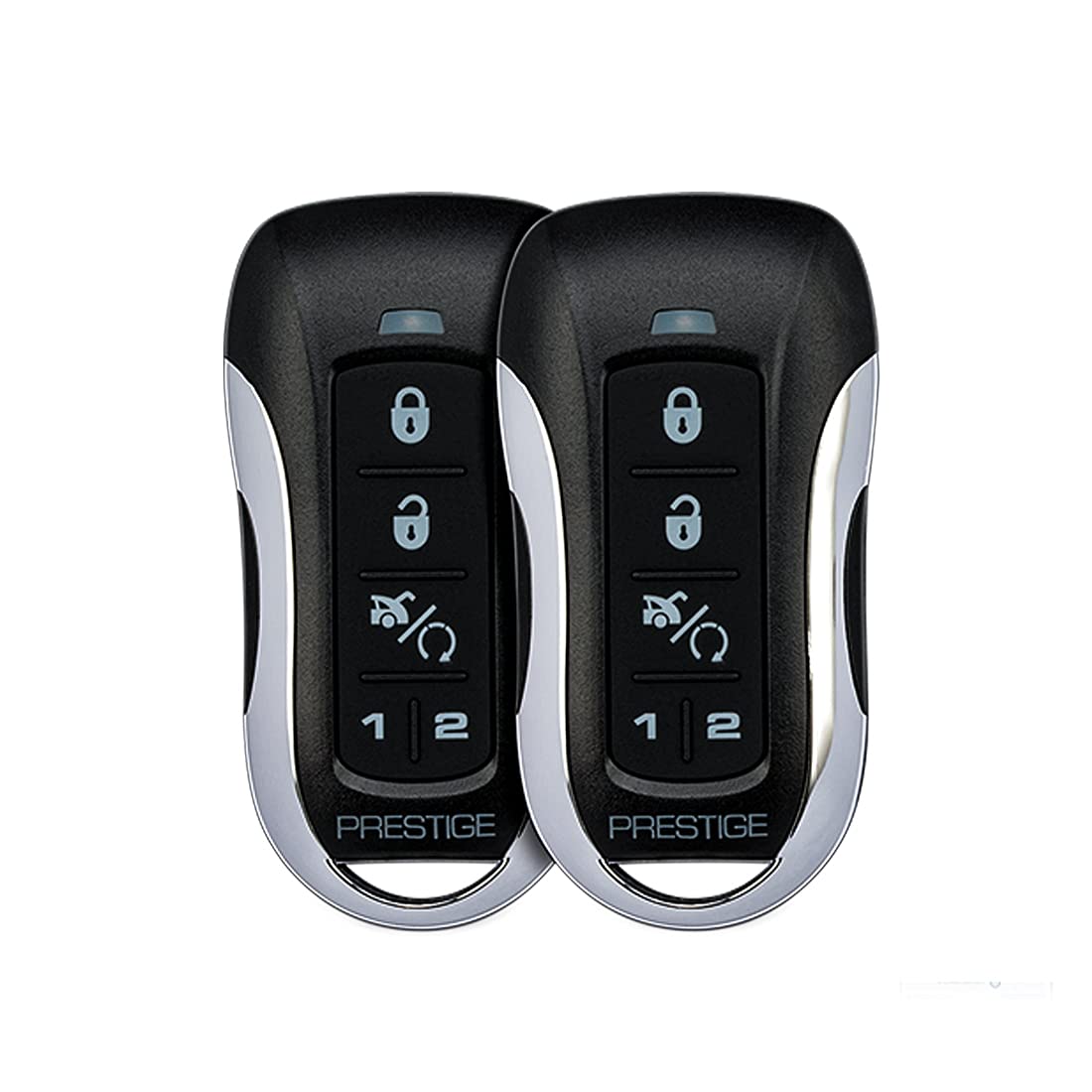
Figure 1: Overview of Prestige APS510Z Car Security System components. This image shows the main control unit, a remote transmitter, and the siren, illustrating the primary parts of the security system.
3.2 Initial System Programming
After physical installation, the system requires initial programming, which typically involves:
- Transmitter Learning: Programming the remote transmitters to the system.
- Feature Programming: Customizing features such as automatic arming delay, shock sensor sensitivity, and auxiliary output functions. This is often done via the valet switch or a dedicated programming button.
- DBI/ADS Module Integration: If using a data interface module, ensure it is correctly connected and programmed according to its specific instructions.
Consult the detailed installation manual for specific programming steps and options.
4. Operating Instructions
This section details the basic functions of your Prestige APS510Z system using the five-button remote transmitter.
4.1 Remote Transmitter Functions
The remote transmitter typically has five buttons. Refer to your specific transmitter's button layout for exact functions.
- Lock Button: Press to arm the security system and lock the vehicle doors. The siren will chirp once, and the parking lights will flash once.
- Unlock Button: Press to disarm the security system and unlock the vehicle doors. The siren will chirp twice, and the parking lights will flash twice. If the alarm was triggered, it will chirp four times.
- Trunk Release Button (or Auxiliary 1): Press and hold for 3 seconds to activate the trunk release or auxiliary output 1.
- Panic Button: Press and hold for 3 seconds to activate the panic alarm. The siren will sound, and the parking lights will flash. Press any button to turn off panic mode.
- Auxiliary 2 Button (or Function Button): This button may control a second auxiliary output or be used in combination with other buttons for advanced functions (e.g., silent arm/disarm).
4.2 Valet Mode
Valet mode allows you to temporarily disable the security system's alarm functions while retaining keyless entry. This is useful when servicing your vehicle or when you do not want the alarm to arm automatically.
- Entering Valet Mode: Turn the ignition ON, then press and release the valet switch. The system's LED will illuminate solid to indicate valet mode is active.
- Exiting Valet Mode: Turn the ignition ON, then press and release the valet switch again. The system's LED will turn off, indicating valet mode is deactivated.
4.3 LED Indicator Status
The system's LED indicator, typically mounted on the windshield, provides visual feedback on the system's status:
- Slow Flash: System armed.
- Fast Flash: System armed with passive arming countdown.
- Solid ON: Valet mode active.
- Rapid Flash (after disarm): Indicates an alarm trigger occurred. Count the flashes to identify the zone (e.g., 3 flashes for door trigger).
5. Maintenance
The Prestige APS510Z system is designed for reliable operation with minimal maintenance. Regular checks can help ensure its longevity and performance.
5.1 Remote Transmitter Battery Replacement
When the remote transmitter's range decreases significantly or the LED on the remote dims, it's time to replace the battery. Refer to your transmitter's specific model for battery type and replacement instructions. Typically, this involves opening the remote casing and replacing a coin-cell battery.
5.2 System Cleaning
Keep the system's components, especially the shock sensor and antenna, free from excessive dirt or moisture. Use a soft, dry cloth for cleaning. Do not use harsh chemicals or abrasive cleaners.
6. Troubleshooting
This section addresses common issues you might encounter with your Prestige APS510Z system.
| Problem | Possible Cause | Solution |
|---|---|---|
| System does not respond to remote. | Dead remote battery, out of range, or system in valet mode. | Replace remote battery. Move closer to the vehicle. Check if the valet LED is solid ON; if so, exit valet mode. |
| Alarm triggers without apparent reason. | Shock sensor sensitivity too high, faulty sensor, or intermittent wiring. | Adjust shock sensor sensitivity (refer to installation manual). Inspect wiring for loose connections. If problem persists, consult an installer. |
| Vehicle does not start when system is disarmed. | Starter interrupt circuit issue, or system still armed. | Ensure system is fully disarmed (two chirps). Check for valet mode. If problem persists, consult an installer. |
| Doors do not lock/unlock with remote. | Actuator issue, wiring problem, or system programming. | Verify remote battery. Check vehicle's door lock fuses. Consult an installer to check wiring and programming. |
For issues not covered here, or if troubleshooting steps do not resolve the problem, it is recommended to contact a professional installer or Prestige customer support.
7. Specifications
- Model: APS510Z
- Type: 1-Way Remote Keyless Entry Car Security System
- Operating Range: Up to 800 feet (approx. 244 meters)
- Transmitters: Two (2) Five-Button 1-Way
- Siren Output: Multi-Tone Mini Siren, 110 dB
- Sensors: Dual Stage Shock Sensor with City Mode
- Connectivity: DBI Port (DBI and ADS Protocol support), Telematics Port (Carlink Ready)
- Features: Remote Keyless Entry, Automatic Arming/Locking, Illuminated Entry, Starter Interrupt, 2 Auxiliary Outputs
- Weight: Approximately 1.5 pounds (0.68 kg)
8. Warranty and Support
Prestige products are manufactured to high-quality standards. For specific warranty information, please refer to the warranty card included with your product packaging or visit the official Prestige website. Warranty terms typically cover manufacturing defects for a specified period from the date of purchase.
For technical support, service, or to locate an authorized installer, please contact Prestige customer service or visit their official website. Keep your proof of purchase handy when contacting support.
Official Website: www.prestige.com (Note: This is a placeholder URL. Please refer to your product documentation for the actual support website.)


