
Behringer 000-E4102-00010
Behringer DR18SUB Active PA Subwoofer User Manual
High-Performance Active 800W 18" PA Subwoofer with Built-In Sound Processor
1. Introduction
Thank you for choosing the Behringer DR18SUB Active 2400-Watt 18" PA Subwoofer. This powerful subwoofer is designed to deliver deep, impactful bass for live sound reinforcement and playback applications. Featuring a robust 18-inch long-excursion driver and a state-of-the-art 2400-Watt Class-D amplifier, the DR18SUB provides exceptional low-frequency reproduction and high sound pressure levels. This manual provides essential information for the safe and effective operation of your DR18SUB subwoofer.
2. Important Safety Instructions
Please read these instructions carefully before operating your DR18SUB subwoofer. Retain these instructions for future reference. Observe all warnings and follow all instructions.
- Do not use this apparatus near water.
- Clean only with a dry cloth.
- Do not block any ventilation openings. Install in accordance with the manufacturer’s instructions.
- Do not install near any heat sources such as radiators, heat registers, stoves, or other apparatus (including amplifiers) that produce heat.
- Do not defeat the safety purpose of the polarized or grounding-type plug. A polarized plug has two blades with one wider than the other. A grounding-type plug has two blades and a third grounding prong. The wide blade or the third prong are provided for your safety. If the provided plug does not fit into your outlet, consult an electrician for replacement of the obsolete outlet.
- Protect the power cord from being walked on or pinched particularly at plugs, convenience receptacles, and the point where they exit from the apparatus.
- Only use attachments/accessories specified by the manufacturer.
- Use only with the cart, stand, tripod, bracket, or table specified by the manufacturer, or sold with the apparatus. When a cart is used, use caution when moving the cart/apparatus combination to avoid injury from tip-over.
- Unplug this apparatus during lightning storms or when unused for long periods of time.
- Refer all servicing to qualified service personnel. Servicing is required when the apparatus has been damaged in any way, such as power-supply cord or plug is damaged, liquid has been spilled or objects have fallen into the apparatus, the apparatus has been exposed to rain or moisture, does not operate normally, or has been dropped.
3. Key Features
The Behringer DR18SUB is engineered with advanced features to deliver superior audio performance:
- High-performance 2400-Watt powered subwoofer for live and playback applications.
- Extremely powerful 18" long-excursion driver provides incredibly deep bass and acoustic power.
- Extremely high sound pressure level and incredibly accurate bass.
- Precise reproduction of ultra-low frequencies for "bulletproof" punch and impact.
- State-of-the-art 2400-Watt Class-D amplifier with comprehensive over-excursion, thermal, RMS and clip limit protection.

Figure 3.1: Front-side view of the Behringer DR18SUB Active PA Subwoofer, showcasing its robust grille and compact design.
4. Setup and Connections
Proper setup is crucial for optimal performance and safety. Follow these steps to connect your DR18SUB subwoofer:
- Placement: Position the subwoofer on a stable, flat surface. For best bass response, consider placing it in a corner or near a wall. Ensure adequate ventilation around the unit.
- Power Connection: Ensure the subwoofer's power switch is in the OFF position. Connect the supplied power cord to the AC INlet on the rear panel of the subwoofer and then to a grounded electrical outlet.
- Audio Input:
- Connect your audio source (e.g., mixer, audio interface) to the INPUT 1 and/or INPUT 2 XLR/TRS combo jacks on the rear panel. Use balanced XLR cables for best results.
- If using a stereo signal, connect the left channel to INPUT 1 and the right channel to INPUT 2.
- Audio Output (Stereo Crossover):
- The DR18SUB features a built-in stereo crossover. Connect your full-range loudspeakers to the OUTPUT 1 and OUTPUT 2 XLR jacks. These outputs provide a high-pass filtered signal, sending frequencies above the crossover point to your main speakers.
- The THRU outputs (not explicitly mentioned in features but common for subwoofers) typically pass the full-range input signal directly, allowing for daisy-chaining to other subwoofers or full-range speakers without crossover processing.
- Initial Power On: Once all connections are secure, switch the power ON. The POWER indicator LED on the rear panel should illuminate.
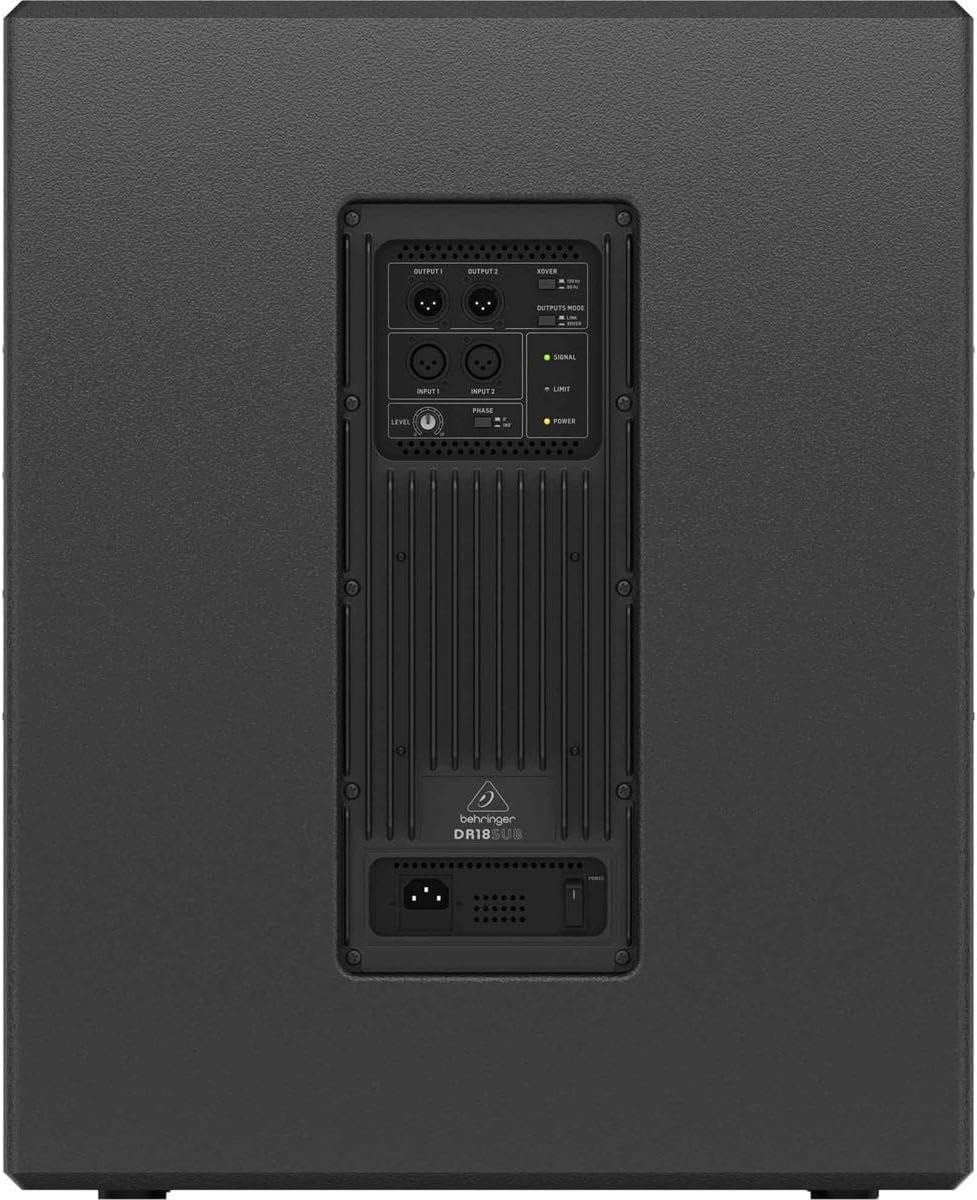
Figure 4.1: Rear panel of the Behringer DR18SUB, showing the input, output, and control sections.
5. Operating the DR18SUB
Once connected, follow these guidelines for optimal operation:
- Level Control: Adjust the LEVEL knob on the rear panel to control the subwoofer's output volume. Start with the knob at its minimum setting and gradually increase it to achieve the desired bass level in conjunction with your main speakers.
- Phase Switch: The PHASE switch (0°/180°) allows you to invert the phase of the subwoofer's output. Experiment with both settings to find the one that provides the most coherent and impactful bass response with your main speakers. This often depends on the physical placement of the subwoofer relative to the main speakers.
- Crossover Frequency: The XOVER knob adjusts the crossover frequency, determining the point at which the subwoofer handles low frequencies and passes higher frequencies to the main speakers via the OUTPUTs. Adjust this to blend seamlessly with your full-range speakers. Common settings range from 80 Hz to 120 Hz.
- LED Indicators:
- SIGNAL: Illuminates when an audio signal is present.
- LIMIT: Illuminates when the internal limiter is active, indicating that the subwoofer is approaching its maximum output. Occasional flickering is normal, but constant illumination suggests the signal is too hot and could lead to distortion or damage. Reduce the input level or the subwoofer's LEVEL.
- POWER: Indicates that the unit is powered on.
- System Gain Staging: Always set the gain structure of your entire sound system correctly. Start with the subwoofer's level low, then bring up the main mixer's output, and finally adjust the subwoofer's level to blend with the main speakers. Avoid clipping at any stage of the signal chain.
6. Maintenance
Regular maintenance ensures the longevity and optimal performance of your DR18SUB subwoofer:
- Cleaning: Disconnect the power cord before cleaning. Use a soft, dry cloth to wipe down the exterior. Do not use liquid cleaners, aerosols, or abrasive chemicals.
- Ventilation: Ensure that all ventilation openings remain clear and unobstructed. Do not place the subwoofer on carpets or surfaces that could block airflow.
- Storage: If storing the subwoofer for an extended period, keep it in a cool, dry place, away from direct sunlight and extreme temperatures. It is recommended to use the original packaging for protection.
- Inspection: Periodically inspect the power cord for any signs of damage. If damaged, replace it immediately with an approved cord.
7. Troubleshooting
If you encounter issues with your DR18SUB, refer to the following common problems and solutions:
| Problem | Possible Cause | Solution |
|---|---|---|
| No sound from subwoofer. |
|
|
| Distorted or clipped sound. |
|
|
| Weak or muddy bass. |
|
|
If the problem persists after trying these solutions, please contact qualified service personnel.
8. Technical Specifications
| Feature | Specification |
|---|---|
| Model Name | DR18SUB |
| Speaker Type | Subwoofer |
| Speaker Amplification Type | Active |
| Speaker Maximum Output Power | 2400 Watts |
| Subwoofer Diameter | 18 Inches |
| Connectivity Technology | Auxiliary (XLR/TRS Combo) |
| Audio Output Mode | Stereo (with Crossover) |
| Product Dimensions (D x W x H) | 68D x 60W x 72.5H Centimetres |
| Item Weight | 90.41 Pounds (approx. 41 kg) |
| Signal-to-noise ratio (dB) | 70 dB |
| Power Source Type | Corded Electric |
| Manufacturer | Behringer |
| Model Number | 000-E4102-00010 |
9. Warranty and Support
Behringer products are built to the highest quality standards. For detailed warranty information, please refer to the warranty card included with your product or visit the official Behringer website. For technical support, service, or spare parts, please contact your local Behringer distributor or authorized service center. Always provide your product model number (DR18SUB) and serial number when seeking support.
Online Support: For the latest information, FAQs, and software downloads, please visit www.behringer.com.
Related documents000-E4102-00010


Ask a question about this manual
Ask about setup, troubleshooting, compatibility, parts, safety, or missing instructions. Manuals+ will review the question and use this page’s manual context to help answer it.