1. Introduction
Thank you for choosing the Mecurate 10-Inch Digital Level. This professional-grade tool is designed for precise measurement and leveling, featuring a bright LCD display, audible alerts, a magnetic bottom, and dust/water resistance. Its robust aluminum alloy construction ensures durability and consistent accuracy across various work environments. This manual will guide you through the setup, operation, and maintenance of your new digital level.

Image: The Mecurate 10-Inch Digital Level shown alongside its protective carrying case.
2. What's in the Box
Upon opening the package, please verify that all the following items are included:
- Mecurate 10-Inch Digital Level
- Carrying Case
- User Manual
- Batteries (Alkaline)
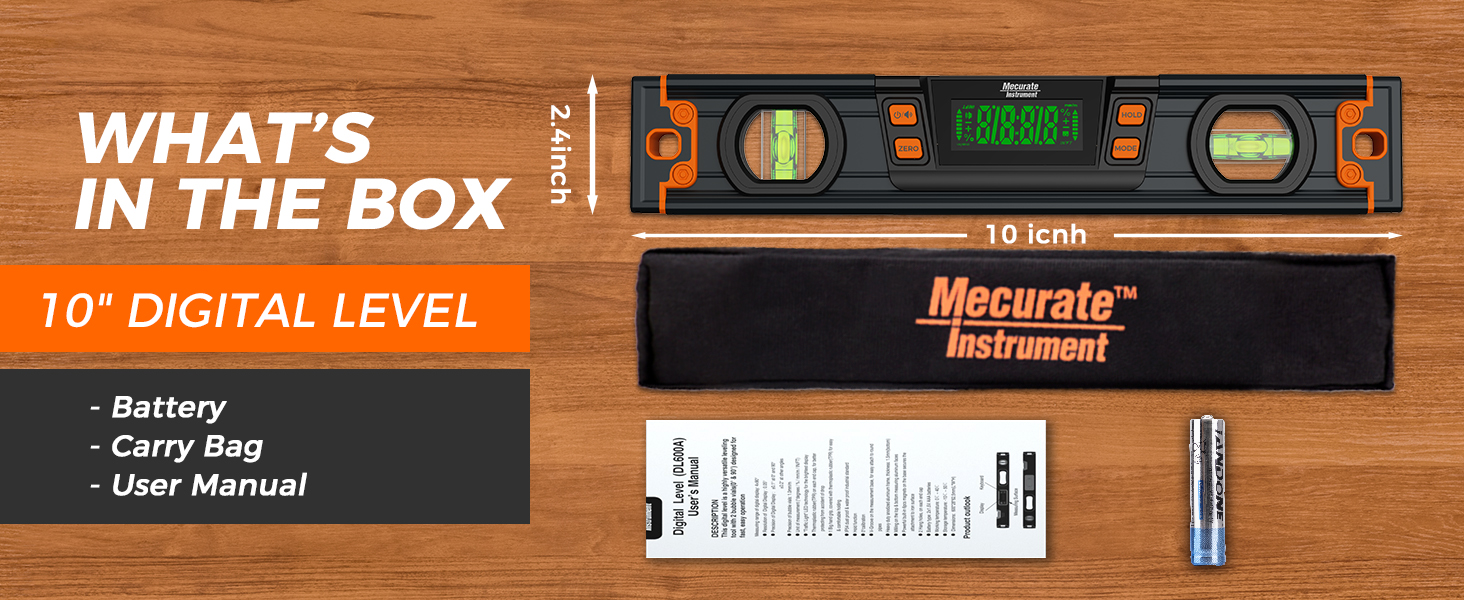
Image: A visual representation of the items included in the product packaging: the 10-inch digital level, its carrying bag, the user manual, and two AAA batteries.
3. Setup
3.1 Battery Installation
- Locate the battery compartment cover on the back of the digital level.
- Slide or unclip the cover to open the compartment.
- Insert the provided alkaline batteries, ensuring the correct polarity (+/-) as indicated inside the compartment.
- Close the battery compartment cover securely.
3.2 Initial Power On
Press the power button (ON/OFF) to turn on the device. The LCD display will illuminate, showing the current angle reading.
4. Operating Instructions
4.1 Accuracy and Readability
The Mecurate Digital Level provides high measurement accuracy up to ±0.1° (at 0° & 90°) and ±0.2° at other angles, with a resolution of 0.05°. The large, backlit LCD display ensures clear and intuitive numerical readings, reducing human error compared to traditional bubble levels.

Image: A user utilizing the Mecurate Digital Level to ensure accurate measurement on a tiled floor, highlighting its precision.
4.2 Magnetic Base and One-Handed Operation
The integrated magnetic base allows the level to securely attach to metal surfaces, enabling convenient hands-free operation for tasks such as pipe alignment or working with metal frameworks.
4.3 Versatility Features
- Audible Reminders: The level emits an audible alert at 0° and 90° for enhanced convenience and accuracy, allowing for quick identification of true horizontal and vertical positions.
- Automatic Display Flip: The digital display automatically inverts when the torpedo level is turned upside down, ensuring readings are always upright and easy to read.
- Multiple Display Units: The electronic level supports four display unit options. Press the MODE button to cycle through:
- Degrees (°)
- Percentage (%)
- mm/m
- in/ft
- Hold Function: Press the HOLD button to freeze the current reading on the display. Press again to release.

Image: A detailed view of the Mecurate Digital Level's display, illustrating its auto-rotate feature, hold reading function, backlit LED display, and wide viewing angle.
4.4 Relative Angle Measurement (ZERO Function)
To measure a relative angle, place the level on your initial surface. Press the ZERO button to set the current position as the new reference (0.00°). Then, move the level to the second surface to measure the angle relative to your set zero point.

Image: A user demonstrating the relative angle measurement feature of the Mecurate Digital Level on a wooden frame, showing the ease of setting a zero reference point.
4.5 Effortless Pipe Alignment (V-Groove Design)
The level features a V-groove design along its magnetic base, allowing it to sit securely on cylindrical surfaces like pipes. This, combined with the strong magnets, makes pipe alignment tasks straightforward and accurate.

Image: The Mecurate Digital Level demonstrating its capability for effortless pipe alignment, showcasing its strong magnets and V-groove design for secure placement on cylindrical surfaces.
5. Maintenance
- Cleaning: Wipe the digital level with a soft, dry cloth. For stubborn dirt, a slightly damp cloth can be used, but ensure no moisture enters the display or battery compartment. Do not use abrasive cleaners or solvents.
- Storage: Store the level in its provided carrying case when not in use to protect it from dust, impacts, and moisture. Store in a cool, dry place.
- Battery Replacement: If the display dims or the level behaves erratically, replace the batteries promptly. Remove batteries if the device will not be used for an extended period to prevent leakage.
- Calibration: While the level is factory calibrated, if you suspect a significant deviation, refer to the full user manual for specific calibration procedures.
6. Troubleshooting
| Problem | Possible Cause | Solution |
|---|---|---|
| Display does not turn on | Dead or incorrectly installed batteries | Check battery polarity or replace batteries. |
| Inaccurate readings | Device needs calibration or is on an unstable surface | Ensure the surface is stable. Refer to the full manual for calibration steps if needed. |
| Audible alert not working | Sound function might be disabled or low battery | Check if the sound function is enabled (if applicable). Replace batteries. |
| Display flickering or dim | Low battery power | Replace batteries immediately. |
7. Specifications
| Feature | Detail |
|---|---|
| Model Number | 10-Inch Digital Level (DL254A) |
| Accuracy | ±0.1° (0° & 90°), ±0.2° (other angles) |
| Resolution | 0.05° |
| Display | Bright Backlit LCD |
| Units | Degrees (°), Percentage (%), mm/m, in/ft |
| Material | Aluminum Alloy |
| Features | Magnetic Base, Audible Alerts, Auto-Flip Display, Hold Function, V-Groove Design |
| Power Source | Battery Powered (Alkaline) |
| Item Weight | 9.9 ounces |
| Package Dimensions | 10.98 x 3.03 x 1.69 inches |

Image: A comparison chart highlighting the advantages of the Mecurate Digital Level, including ANSI B40.1 accuracy, 140/140 LED viewing angle, and inclusion of a carry bag, compared to other standard levels.
8. Warranty and Support
Mecurate is committed to providing high-quality products. For specific warranty information, product support, or any inquiries not covered in this manual, please refer to the contact information provided on the product packaging or visit the official Mecurate website. Please retain your purchase receipt for warranty claims.


