
1. Introduction
This manual provides detailed instructions for the installation, operation, and maintenance of your GreenYi AHD 1080P Backup Camera, Model GreenYi-116. Please read this manual thoroughly before installation and use to ensure proper functionality and safety. This camera is designed to enhance rear visibility for safer reversing and parking maneuvers.
2. Product Overview
The GreenYi AHD 1080P Backup Camera is a high-definition reverse camera designed for specific Audi and Volkswagen vehicles. It features a 170-degree wide-angle lens, starlight night vision, and supports both AHD 1080P and CVBS video signals, making it versatile for various monitor types. The camera is integrated into a trunk handle design for a seamless factory-like appearance.

Image 2.1: Front view of the GreenYi AHD 1080P Backup Camera, integrated into a trunk handle.
3. Compatibility
This camera is designed to fit specific vehicle models. It is crucial to verify compatibility by checking your vehicle's trunk handle size against the camera's dimensions before purchase and installation. The camera requires a monitor or head unit that supports RCA connections and preferably AHD 1080P video signals for optimal performance.
3.1 Compatible Vehicle Models (Reference Only):
- Volkswagen: Jetta MK6 (2010-2018), Jetta/Sagitar (2012-2017), Lavida (2011-2016), Gran Lavida (2013, 2015), Passat (2012-2016), Passat B5 (2009-2010), New Passat (2011, 2013, 2015), Sharan Seat Alhambra 7N (2011-2015), Tiguan (5N facelift) (2008-2015), Touareg (2011-2016), Touran 1T3 1T2 (2011-2015), Caddy 4 (2011-2015), T5 Facelift (2011-2015), Golf Sportwagen 2.5 (2011-2015), Golf VI Variant (from 2010)
- Audi: A3 A6L (2012-2017), A4 B8 (Facelift) (2008-2015), A4 B6 A4L A5 A8L S5 S3 (2011-2015), Q3 Q5 (2012-2016), Q7 (2015-2017), RS6 (2009-2015)
- Porsche: Cayenne 958 (2011-2015)
- Skoda: Fabia Octavia Superb Rapid Spaceback (2015)
Important: Always check your vehicle's trunk handle size for final confirmation before purchasing and installing.

Image 3.1: Camera dimensions for pre-installation size check. (4.33in x 1.93in x 2.76in)

Image 3.2: Visual representation of the camera and a list of compatible car models.
4. Package Contents
Verify that all items listed below are included in your package:
- 1 x GreenYi AHD 1080P Backup Camera (Trunk Handle Design)
- 1 x 19.7FT Double-Shielded RCA Video Cable
- 1 x 4.92FT Power Cable
- 1 x User Manual
- 1 x RCA Coupler Female
- 1 x Thank You Card

Image 4.1: Visual display of all components included in the GreenYi backup camera package.
5. Setup and Installation
Professional installation is recommended. Ensure the vehicle's power is off before beginning installation.
5.1 Pre-Installation Checks:
- Confirm your monitor or head unit supports RCA video input.
- If your monitor supports AHD 1080P, ensure it is configured to receive this signal type.
- Verify the camera's dimensions match your vehicle's trunk handle opening.
5.2 Wiring Diagram:
Follow the diagram below for correct wiring connections.
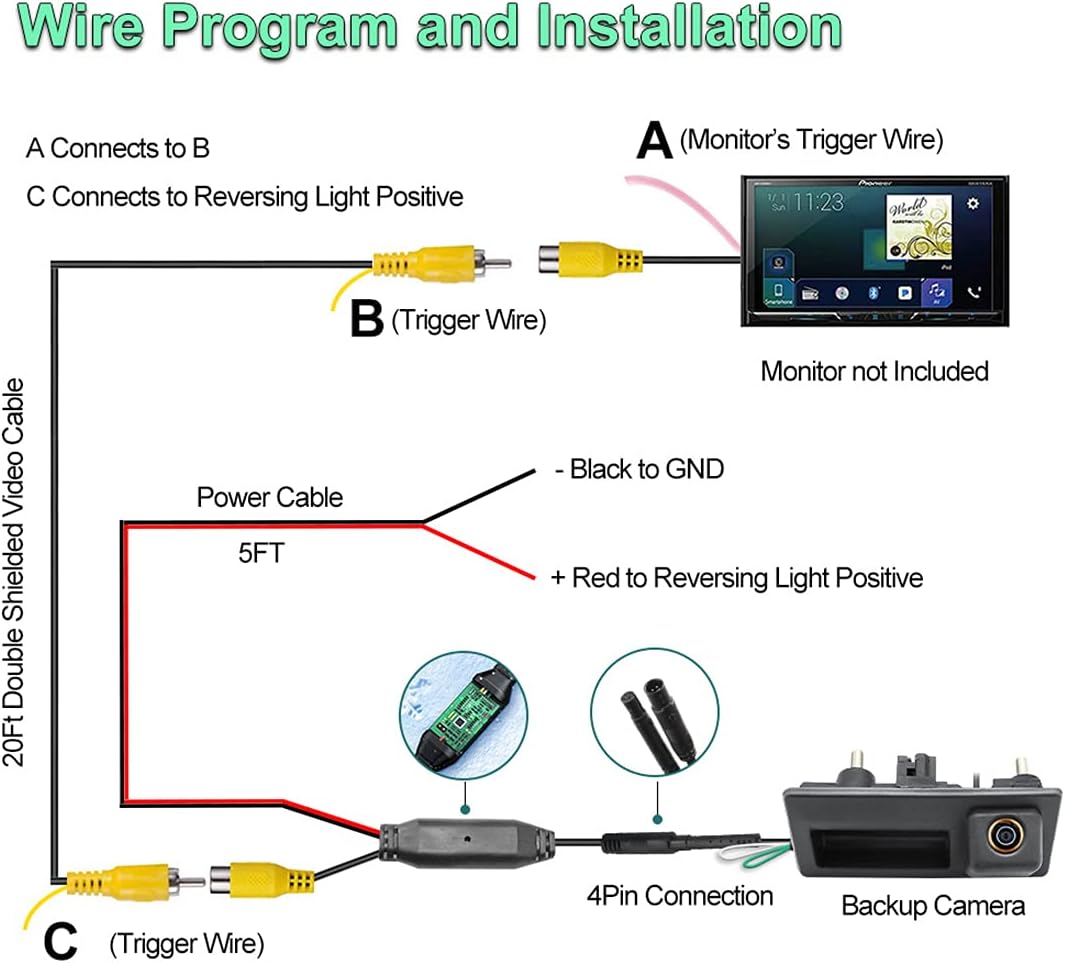
Image 5.1: Detailed wiring diagram showing connections for the backup camera, power, and video cables to the monitor and reversing light.
- Power Connection: Connect the red wire of the power cable to the positive (+) terminal of your vehicle's reversing light. Connect the black wire to a ground (GND) point.
- Video Connection: Connect the 4-pin cable from the camera to the provided video cable. Route the video cable to your monitor/head unit. Connect the yellow RCA connector to the video input of your monitor.
- Trigger Wire: The video cable includes a red trigger wire at both ends. Connect the trigger wire from the video cable (near the monitor) to your monitor's reverse trigger input (usually labeled 'Reverse In' or 'Back'). Connect the trigger wire from the video cable (near the camera) to the positive (+) terminal of the reversing light, alongside the camera's red power wire. This ensures the monitor switches to the camera view when reverse gear is engaged.
5.3 Cable Management:
The camera features a 4-pin cable design, which is thinner than standard RCA cables, facilitating easier routing through tight spaces. The included video cable is double-shielded to minimize interference and ensure stable signal transmission.

Image 5.2: Illustration comparing the slim 4-pin cable for easy installation versus a thicker RCA cable.

Image 5.3: Diagram highlighting the superior signal integrity of a double-shielded video cable compared to an ordinary cable.
6. Operating Instructions
The GreenYi AHD 1080P Backup Camera offers flexible video output options and adjustable guidelines.
6.1 Video Signal Configuration:
By default, the camera outputs an AHD 1080P 25HZ video signal. If your monitor or head unit only supports CVBS (standard definition) video, you must convert the signal.
- To switch to CVBS: Locate the small white cable loop on the camera's wiring harness. Cut this white cable loop and then reconnect the camera to its power supply. The camera will now output a CVBS signal.
Note: AHD video signals provide significantly clearer images than CVBS. Ensure your monitor is compatible with AHD 1080P for the best viewing experience.
6.2 Parking Guideline Control:
The camera displays parking guidelines by default to assist with parking maneuvers. If you prefer to operate without these guidelines, they can be disabled.
- To disable guidelines: Locate the small green cable loop on the camera's wiring harness. Cut this green cable loop and then reconnect the camera to its power supply. The guidelines will no longer appear on the display.

Image 6.1: Instructions for cutting the white cable to switch to CVBS video signal and cutting the green cable to toggle parking guidelines.
6.3 Head Unit Settings for AHD:
If your head unit supports AHD, you may need to configure its settings to properly display the AHD 1080P signal. Refer to your head unit's manual for specific instructions. Typically, this involves navigating to car settings, then reverse (picture) settings, and selecting AHD-1080P 25HZ.
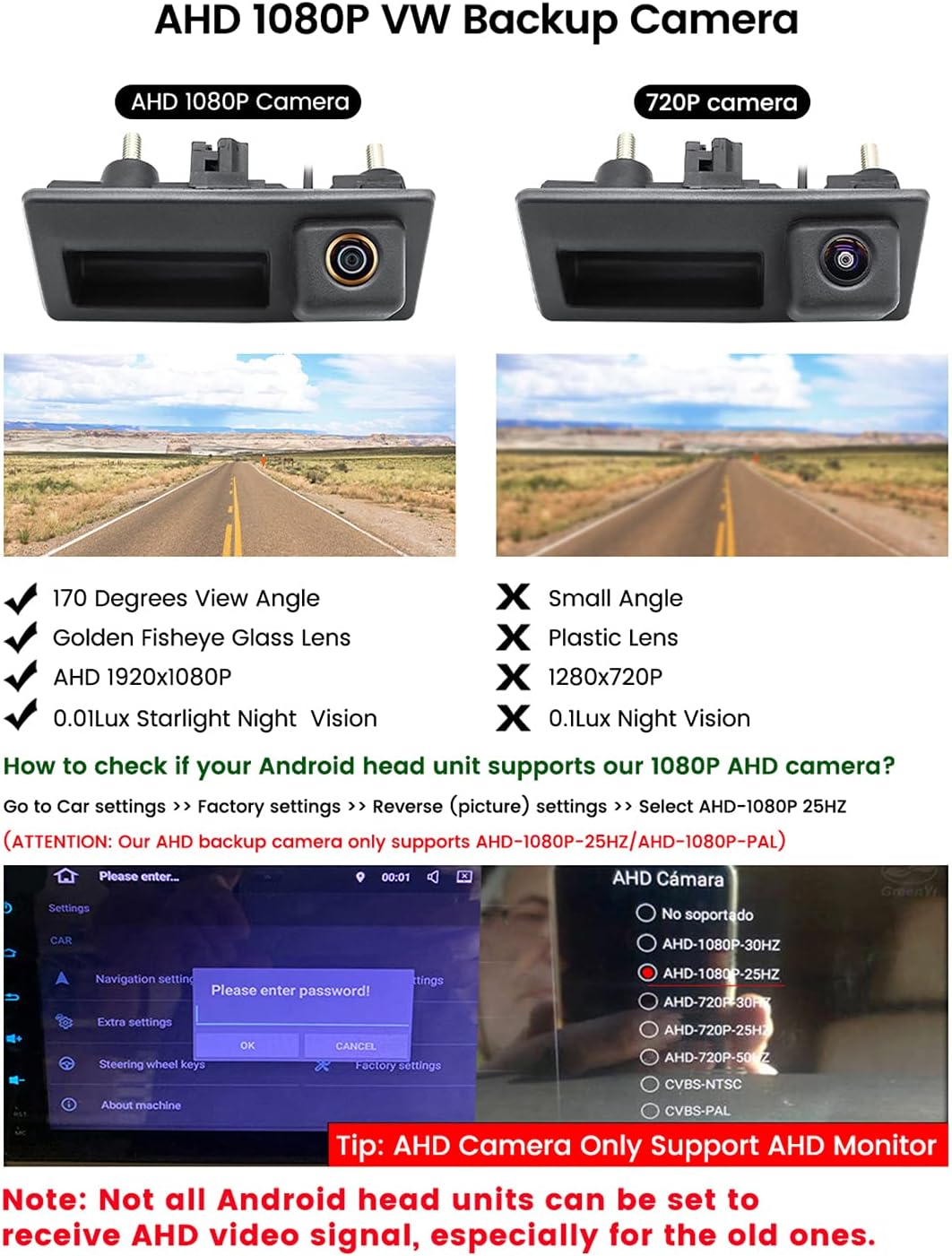
Image 6.2: Comparison of AHD 1080P and 720P camera views, along with an example of head unit settings for selecting AHD 1080P 25HZ.
7. Maintenance
To ensure the longevity and optimal performance of your GreenYi Backup Camera, follow these maintenance guidelines:
- Cleaning: Regularly clean the camera lens with a soft, damp cloth to remove dirt, dust, or water spots that may obstruct the view. Avoid abrasive cleaners.
- Cable Inspection: Periodically check all cables for any signs of wear, damage, or loose connections. Secure any loose wiring.
- Environmental Protection: While the camera is designed for outdoor use, extreme weather conditions (e.g., heavy snow, ice, prolonged direct sunlight) can affect performance. Ensure the camera is free from ice or snow buildup before use.
8. Troubleshooting
If you encounter issues with your backup camera, refer to the following troubleshooting steps:
- No Video Signal / Black Screen:
- Check all power connections (red wire to reverse light positive, black wire to ground).
- Verify the video cable is securely connected to both the camera and the monitor.
- Ensure the monitor is set to the correct video input (e.g., AV1, AV2, Camera).
- Confirm the video signal type: If your monitor is CVBS only, ensure you have cut the white cable loop on the camera. If your monitor is AHD, ensure it is configured for AHD 1080P 25HZ.
- Check the reverse trigger wire connection to the monitor.
- Blurry or Distorted Image:
- Clean the camera lens.
- Ensure all connections are tight and free from corrosion.
- If using CVBS, the image quality will be lower than AHD. Consider upgrading to an AHD-compatible monitor for clearer visuals.
- Check for electrical interference. Some vehicles may require a relay or filter box to stabilize the 12V power supply to the camera.
- No Parking Guidelines:
- Check if the green cable loop on the camera's wiring harness has been cut. If it has, the guidelines are disabled. To re-enable, you would typically need to replace the camera or splice the wire back, though this is not officially supported.
- Two Sets of Guidelines:
- Some head units have their own built-in guidelines. If you see two sets, disable the original guidelines through your head unit's settings.
9. Specifications
| Feature | Specification |
|---|---|
| Model Number | GreenYi-116 |
| Video Signal Output | AHD 1080P 25HZ (Default), CVBS (Switchable) |
| Optical Sensor Technology | CMOS |
| Real Angle of View | 170 Degrees |
| Lens Type | Wide Angle |
| Installation Type | In the original Trunk Handle |
| Voltage | 12 Volts |
| Connector Type | 4-Pin, RCA |
| Product Dimensions | 4.42"L x 1.96"W x 1.74"H |
| Item Weight | 9.1 ounces |
| Color | Black |
10. Warranty and Support
For warranty information and technical support, please refer to the documentation provided with your purchase or contact GreenYi customer service through their official channels. Keep your proof of purchase for warranty claims.