
1. Product Overview
The BONSEN S3105 is a heavy-duty cross-cut paper shredder designed for office and home use, offering high security and efficient document disposal. It is capable of shredding various materials beyond paper, ensuring comprehensive protection of sensitive information.

Image: The BONSEN S3105 Heavy Duty Paper Shredder, a black and silver unit with casters.
Key Features:
- 24-Sheet Shredding Capacity: Shreds up to 24 sheets of paper (letter size, 20 pound) at a time.
- Multi-Material Shredding: Also shreds CDs, staples, clips, credit cards, and junk mail.
- P-4 Security Level: Shreds paper into cross-cut pieces of 5/32 x 1-12/32 inches (4 x 35 mm) for high security.
- 9-Gallon Large Bin: Pull-out bin holds up to 650 sheets of paper, reducing emptying frequency.
- 40-Minute Continuous Run Time: Allows shredding of up to 5230 sheets in one continuous period before a cool-down is needed.
- Quiet Operation: Operates at an ultra-low noise level of 55 dB.
- Easy to Use: Features 3-button control (Power On, Forward, Reverse) and LED light indicators.
2. Setup and Assembly
Follow these steps to set up your BONSEN S3105 paper shredder:
- Unpack the Shredder: Carefully remove all components from the packaging. Ensure you have the shredder unit, the pull-out waste bin, and the user manual.
- Attach Casters (if not pre-installed): If your unit requires caster attachment, insert the casters into the designated slots at the bottom of the shredder base until they click into place.
- Insert Waste Bin: Slide the 9-gallon pull-out waste bin into the shredder unit until it is securely in place. Ensure it is fully inserted to avoid the "Bin Open" indicator light.
- Position the Shredder: Place the shredder on a flat, stable surface. Ensure there is adequate space around the unit for ventilation and easy access to the waste bin.
- Connect Power: Plug the power cord into a standard electrical outlet.
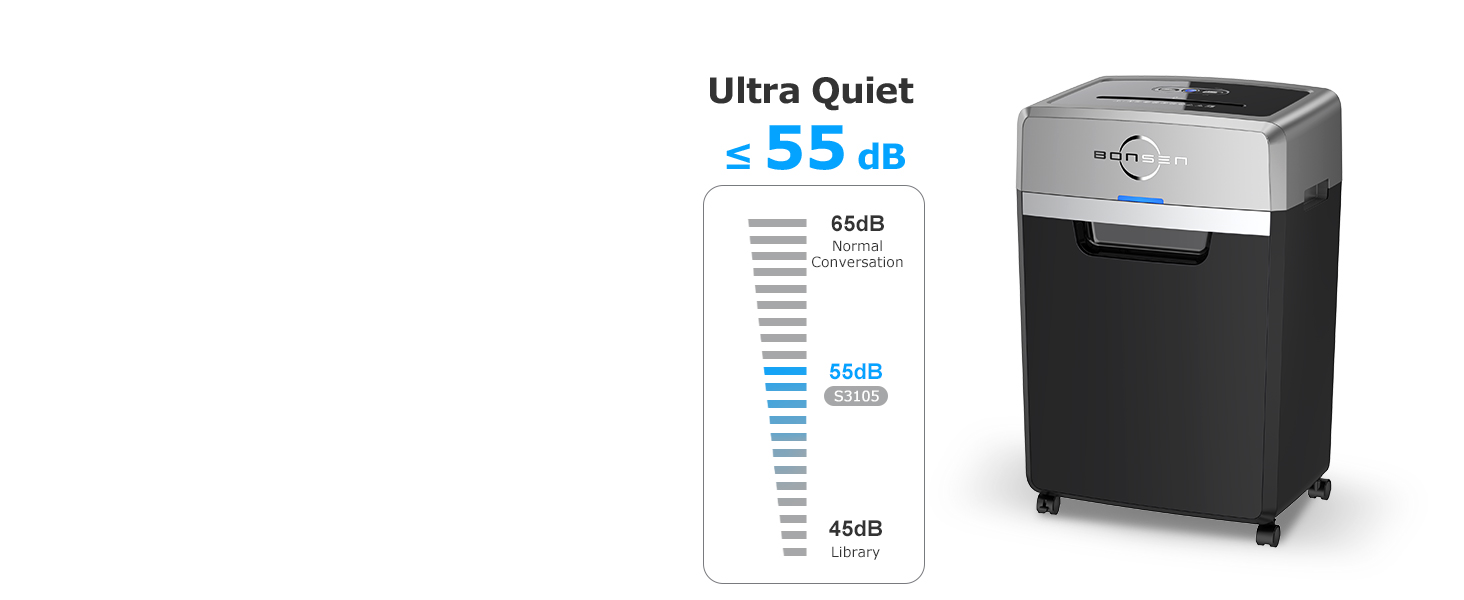
Image: Visual guide showing the unboxing, caster attachment, and bin insertion steps for the BONSEN S3105 shredder.
3. Operating Instructions
The BONSEN S3105 shredder is designed for user-friendly operation with clear controls and indicators.
Control Panel:
The control panel features three main buttons and several LED indicators:
- Power On: Activates the shredder.
- Forward (FWD): Engages the shredding mechanism.
- Reverse (REV): Reverses the shredding mechanism to clear jams.
LED Indicators:
- Power On: Indicates the shredder is powered on.
- Overheat (Red Light On): Indicates the motor is too hot and needs to cool down.
- Overload (Red Light Flashing): Indicates too much material has been inserted, causing a potential jam.
- Bin Open (Red Light On): Indicates the waste bin is not properly closed or inserted.
- Bin Full (Red Light Flashing): Indicates the waste bin is full and needs to be emptied.

Image: Close-up of the BONSEN S3105 control panel showing Power On, Forward, Reverse buttons and LED indicators for Overheat, Overload, Bin Open, and Bin Full.
Shredding Documents:
- Ensure the shredder is plugged in and the waste bin is correctly inserted.
- Press the Power On button. The Power On LED will illuminate.
- Insert paper (up to 24 sheets), CDs, credit cards, or junk mail into the appropriate feed slot. The shredder will automatically begin shredding.
- For optimal performance and to prevent overheating, avoid exceeding the maximum sheet capacity and allow the shredder to cool down after 40 minutes of continuous use.

Image: Illustration of the BONSEN S3105 shredding various materials including paper, junk mail, staples/clips, CDs, and credit cards, highlighting its 24-sheet capacity.

Image: The BONSEN S3105 shredder in an office setting, with an infographic indicating 40 minutes of continuous shredding time, capable of shredding over 5200 sheets.
Official Product Video:
Video: An official product video from Bonsen US demonstrating the features and operation of the BONSEN 24 Sheet Cross-Cut Heavy Duty Paper Shredder S3105.
4. Maintenance
Regular maintenance ensures the longevity and optimal performance of your shredder.
Emptying the Waste Bin:
When the "Bin Full" LED indicator flashes, the waste bin needs to be emptied. Pull out the bin, dispose of the shredded material, and slide the bin back into place until it is securely closed.

Image: The BONSEN S3105 shredder with its 9-gallon pull-out bin extended, illustrating its large capacity and ease of emptying.
Lubrication:
To maintain shredder performance and extend the life of the cutting blades, it is recommended to lubricate the shredder regularly, especially after emptying the waste bin multiple times or after heavy use. Use shredder lubricant sheets or oil specifically designed for paper shredders. Follow the instructions provided with your lubricant product.
Cleaning:
Periodically clean the exterior of the shredder with a soft, dry cloth. Do not use abrasive cleaners or solvents. Ensure the shredder is unplugged before cleaning.
5. Troubleshooting
Refer to this section for common issues and their solutions.
| Problem | Possible Cause | Solution |
|---|---|---|
| Shredder does not turn on. | No power; Bin not properly inserted. | Check power connection; Ensure waste bin is fully closed (Bin Open light off). |
| Shredder stops during operation; Overheat light is on. | Continuous use has caused overheating. | Allow the shredder to cool down for at least 60 minutes. |
| Shredder jams; Overload light is flashing. | Too many sheets inserted; Material not suitable for shredding. | Press the Reverse (REV) button to clear the jam. Remove excess material. |
| Bin Full light is flashing after emptying. | Sensor obstruction or malfunction. | Ensure the bin is completely empty and reinserted correctly. Unplug the unit for a few minutes and plug it back in to reset. If the issue persists, contact customer support. |
For more detailed troubleshooting, please refer to the full user manual PDF available at: BONSEN S3105 User Manual (PDF)
6. Specifications
Detailed technical specifications for the BONSEN S3105 Paper Shredder:
| Feature | Detail |
|---|---|
| Product Dimensions | 11.61 x 16.69 x 25.39 inches |
| Item Weight | 43.2 pounds |
| Model Number | S3105 |
| Cut Type | Cross Cut |
| Shredding Capacity | 24 Sheets (20lb paper) |
| Security Level | P-4 (4 x 35 mm particles) |
| Continuous Run Time | 40 Minutes |
| Cool Down Time | 60 Minutes |
| Waste Bin Capacity | 9 Gallons (approx. 650 sheets) |
| Noise Level | 55 dB |
| Color | Black |
| Manufacturer | BONSEN |
| Country of Origin | Vietnam |
7. Warranty and Support
BONSEN is committed to providing professional customer service and support for your S3105 paper shredder.
Customer Service:
For any questions, concerns, or technical assistance, please contact BONSEN customer service. Refer to the contact information provided in the original product packaging or on the official BONSEN website.
Protection Plans:
Extended protection plans may be available for your BONSEN S3105 shredder. These plans can offer additional coverage beyond the standard manufacturer's warranty. Please check with your retailer or the BONSEN official channels for details on available protection plans.
- 3-Year Protection Plan
- 4-Year Protection Plan
- Complete Protect (Monthly Renewal Option)


