
Surker US-SK5001-GD
Surker Electric Shaver User Manual
Model: US-SK5001-GD
1. Important Safety Information
Please read all instructions carefully before using the Surker Electric Shaver. Keep this manual for future reference.
- Always keep the shaver away from water when not in use or when charging.
- Do not shave over cuts, open wounds, or irritated skin.
- Clean the shaver after each use and dry thoroughly to prevent bacterial growth and maintain hygiene.
- Always unplug the shaver before cleaning or storing.
- Do not shave while the device is charging.
- Keep out of reach of children.
2. Product Overview
The Surker Electric Shaver is designed for a close and comfortable shave, featuring a durable full-metal body and advanced foil technology.
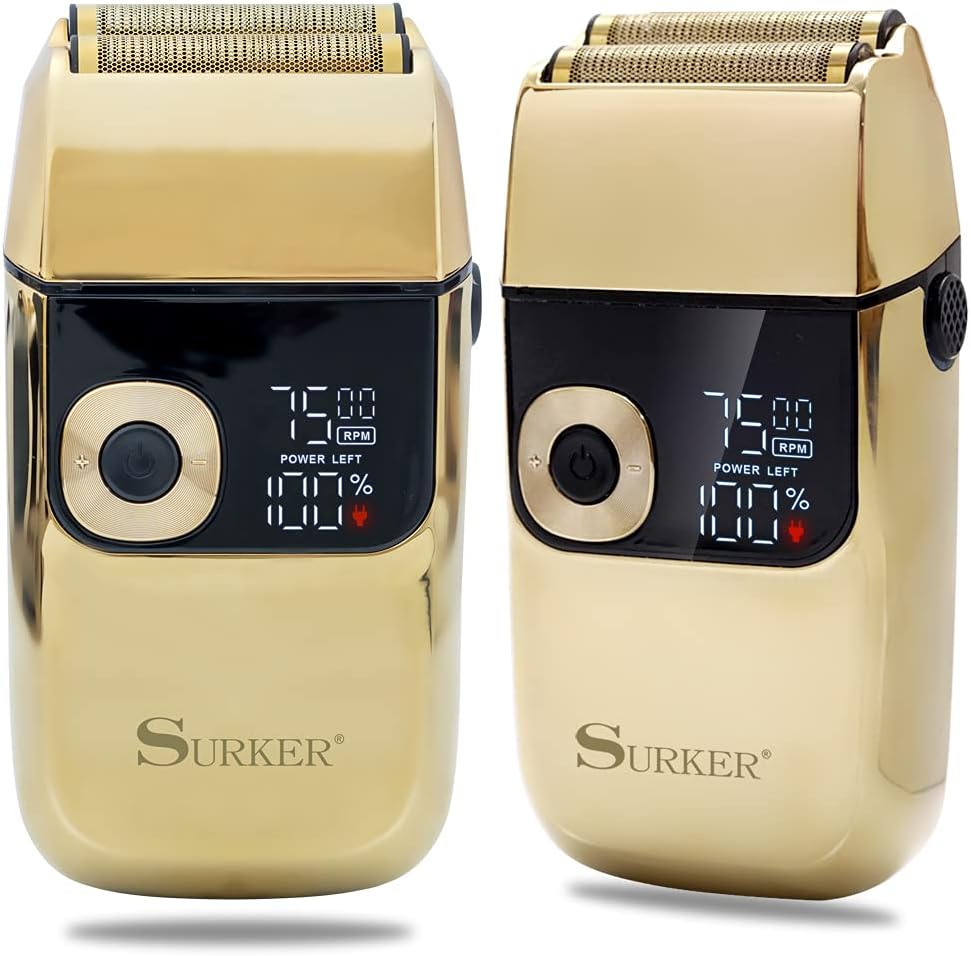
Image: Front view of the Surker Electric Shaver, highlighting its sleek design and digital display.
Components:

Image: Annotated diagram showing the key components of the shaver.
- Reciprocating Cutter Head: Features double floating foils for a close shave.
- Blade Removal Button: For easy cleaning and maintenance of the cutter head.
- LED Display: Shows power left percentage and current RPM speed.
- ON/OFF Button: Powers the shaver on or off.
- Speed Adjustment Button: Allows selection of different shaving speeds.
- Full Metal Body: Ensures durability and a premium feel.
- Pop-up Trimmer: Located on the back for detailing sideburns and beard lines.
3. Setup and Charging
Unboxing:
Upon opening the package, ensure all included components are present:
- Surker Electric Shaver
- Cleaning Brush
- USB Charging Cable
Initial Charging:
Before first use, fully charge the shaver. Connect the USB charging cable to the shaver's charging port and plug the other end into a compatible USB power source (e.g., computer, wall adapter).

Image: The shaver being charged via USB, illustrating the quick charge capability.
- A full charge takes approximately 2 hours.
- Once fully charged, the shaver provides up to 120 minutes of working time.
- The LED display will show the charging progress and battery percentage.
4. Operating Instructions
Powering On/Off:
Press the ON/OFF button located on the front of the shaver to turn it on or off.
Adjusting Speed:
The shaver offers 3 adjustable speeds to suit different beard types and preferences. Use the speed adjustment button to cycle through the settings:
- 6500 RPM: Recommended for youngsters or initial users.
- 7000 RPM: Suitable for ordinary beard types.
- 7500 RPM: Ideal for coarse or hard beards.
Shaving Technique:
The shaver features independently floating double blades and a 0.02mm ultra-thin knife net designed to capture hairs growing at multiple angles for a close shave.

Image: Detailed view of the shaver's cutting head, showing the ultra-thin foil.
- For best results, hold the shaver at a right angle to your skin and move it in short, circular motions or straight strokes against the direction of hair growth.
- Apply light pressure; excessive pressure is not necessary and can cause irritation.
- The shaver can be used for both wet and dry shaving. For a wet shave, apply shaving gel or foam to your face before use.

Image: Examples of the shaver's versatile use for head and facial hair trimming.
Using the Pop-up Trimmer:
The convenient pop-up trimmer is ideal for detailing sideburns, mustaches, and beard lines. Simply slide the trimmer switch upwards to engage the trimmer.

Image: View of the shaver's floating blades and the integrated pop-up trimmer.
5. Cleaning and Maintenance
Regular cleaning ensures optimal performance and extends the life of your shaver. The Surker Electric Shaver is full-body waterproof for easy cleaning.
Daily Cleaning:
- After each use, turn off the shaver and press the blade removal button to detach the cutter head.
- Rinse the cutter head and the main body of the shaver under running water to remove hair clippings and debris.
- Use the included cleaning brush to remove any stubborn hair particles from the foils and blades.
- Allow all parts to air dry completely before reattaching the cutter head and storing the shaver.

Image: The shaver being rinsed under water, highlighting its waterproof design.
Storage:
Store the shaver in a cool, dry place away from direct sunlight and moisture. Ensure the shaver is unplugged before storing.
6. Troubleshooting
If you encounter any issues with your Surker Electric Shaver, please refer to the following common troubleshooting steps:
| Problem | Possible Cause | Solution |
|---|---|---|
| Shaver does not turn on. | Battery is depleted. | Charge the shaver fully for 2 hours. |
| Shaver does not charge. | Loose connection or faulty cable/adapter. | Ensure the USB cable is securely connected. Try a different USB port or power adapter. |
| Poor shaving performance / pulling hair. | Blades are dirty or worn; incorrect technique. | Clean the shaver thoroughly. Ensure you are using the correct shaving technique and appropriate speed setting. Consider replacing the cutter head if performance does not improve. |
| Protective grid/foil is damaged. | Accidental impact or wear over time. | Discontinue use immediately to prevent skin injury. Contact customer support for replacement parts or warranty claim. |
7. Specifications
| Feature | Detail |
|---|---|
| Model | US-SK5001-GD |
| Brand | Surker |
| Power Source | Battery Powered (USB Rechargeable) |
| Battery Type | 2000 mAh large capacity lithium battery |
| Charging Time | Approx. 2 hours |
| Working Time | Up to 120 minutes |
| Blade Material | Stainless Steel |
| Head Type | Foil (Double Floating Cutter Head) |
| Adjustable Speeds | 6500 RPM, 7000 RPM, 7500 RPM |
| Waterproof Rating | Full Body Waterproof |
| Color | Gold |
| Dimensions (L x W x H) | 19.2 x 13.6 x 5.3 cm |
| Weight | 410 g |
8. Warranty and Support
The Surker Electric Shaver is guaranteed for 360 days from the date of purchase against defects in materials and workmanship under normal use. This limited warranty covers manufacturing defects but does not cover damage resulting from misuse, accident, alteration, or unauthorized repair.
For warranty claims, technical support, or inquiries about replacement parts (such as cutter heads), please refer to the contact information provided with your purchase or visit the official Surker website.
Related documentsUS-SK5001-GD

Ask a question about this manual
Ask about setup, troubleshooting, compatibility, parts, safety, or missing instructions. Manuals+ will review the question and use this page’s manual context to help answer it.