Product Overview
The Buoan YL-99 Keyless Electronic Entry Door Knob offers a secure and convenient solution for various entry points. Designed for easy installation, this smart door knob features a keypad for keyless access, automatic locking, and a backlit keyboard for night use. It is suitable for a wide range of applications including homes, hotels, and offices.
- Easy to Install and Use: Designed for quick installation with minimal tools, fitting most standard doors.
- Safe & Useful: Features up to 8 changeable codes, anti-spy encryption, automatic locking after 3 seconds, and IP65 weatherproof rating.
- Multi-Function: Includes low power alert and an emergency power charger for battery backup.
- Smart Keyboard: Backlit keys prevent password peeking and ensure visibility at night.
- Wide Applicability: Versatile for various door types and scenarios like bedrooms, studies, garages, basements, offices, hotels, and apartments.

Figure 1: Overview of the YL-99 Keyless Electronic Door Knob.
Installation Guide
Installing the YL-99 Keyless Electronic Door Knob is straightforward and typically requires only a screwdriver. Ensure your door meets the standard thickness requirements for proper fit.
Package Contents
Before beginning installation, verify all components are present:

Figure 2: Packaging contents including door knob components, screws, and manual.
Door Compatibility
The YL-99 is designed to fit most standard doors in the United States. Refer to the diagram below for specific dimensions.

Figure 3: Door thickness and lock cylinder dimensions.
Battery Installation
The lock requires 4 AAA batteries (not included). Install them into the designated battery compartment before final assembly.

Figure 4: Battery compartment and reset button location.
For detailed step-by-step physical installation, please refer to the included printed instruction manual.
Operating Instructions
The YL-99 door knob offers various functions for secure and convenient access. The keypad features a backlight for easy visibility in low-light conditions.
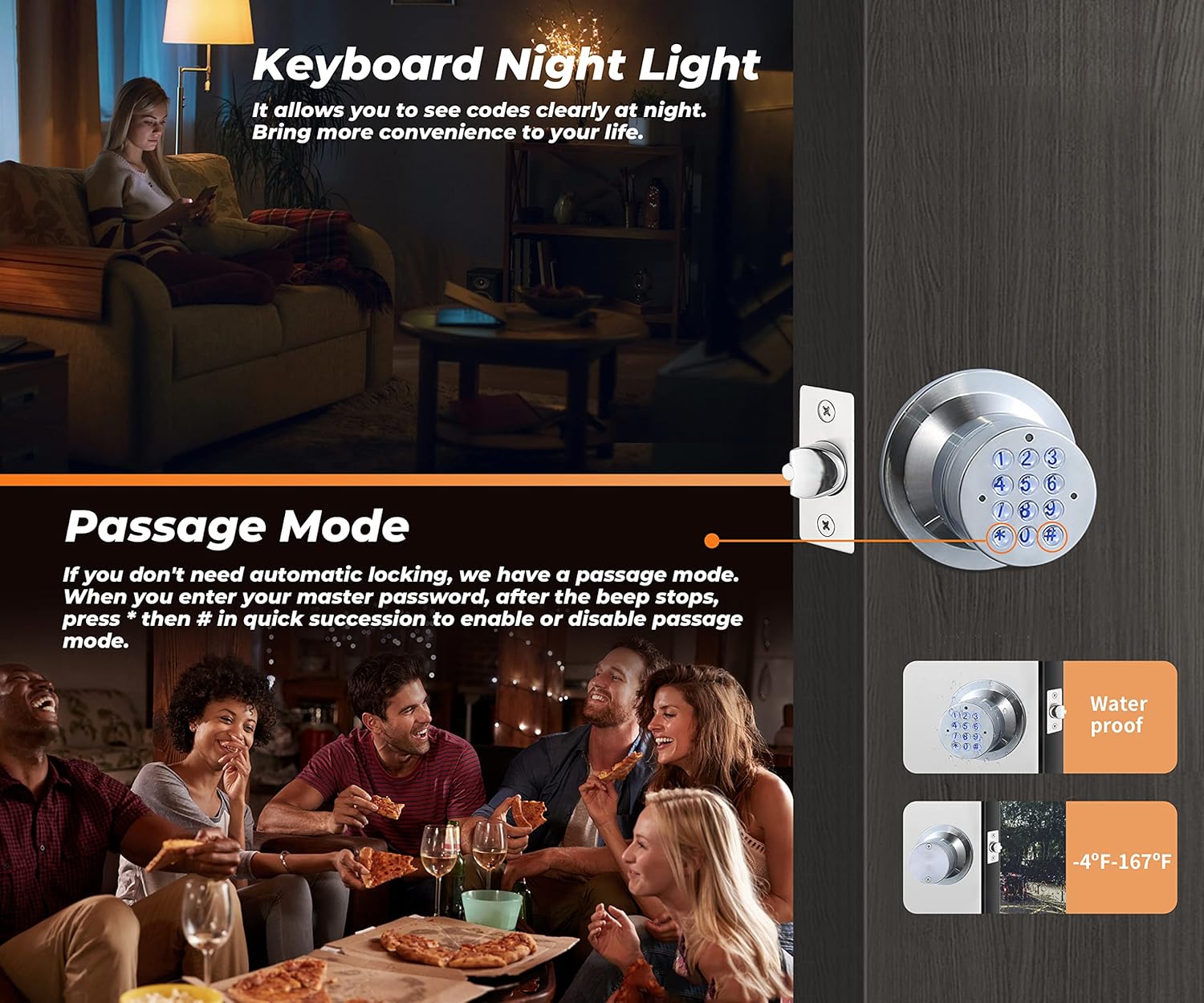
Figure 5: Keypad with night light feature and passage mode.
Keyless Entry
To unlock, simply enter your 4-digit code on the keypad. The door will beep to confirm successful entry. The automatic locking retractor ensures the door locks behind you after 3 seconds.

Figure 6: Demonstrating keyless entry convenience.
Detailed Operation Guide (Video)
For a visual and detailed guide on programming and using your YL-99 door knob, please watch the official instructional video below. This video covers:
- Changing the Master Code
- Adding User Passwords
- Changing User Passwords
- Resetting the Password
- Deleting User Passwords
- Deleting All User Passwords
- Activating and Deactivating Passage Mode
- Using the Anti-Peeping Password Feature
Video 1: How to use the YL-99 Keyless Electronic Door Knob. This video provides a comprehensive guide on how to operate the YL-99 Keyless Electronic Door Knob, including steps for changing the master code, adding and changing user passwords, resetting the device, deleting passwords, activating passage mode, and using the anti-peeping password feature.
Maintenance
Battery Replacement
The door knob features a low power alert mode. When the batteries are low, replace them promptly with 4 new 1.5V AAA alkaline batteries. Batteries are not included in the package.
Emergency Power
In case the batteries completely run out, an emergency power charger (included) can be used via the backup battery port to temporarily power the lock for unlocking. This port is for emergency unlocking only and not for charging the internal batteries.

Figure 7: Emergency USB power port for temporary access.
Cleaning
Clean the keypad and knob surface with a soft, damp cloth. Avoid abrasive cleaners or solvents that could damage the finish or electronic components.
Troubleshooting
Resetting the Lock
If you forget your password or need to restore factory settings, you can reset the lock. Press and hold the reset button (located inside the battery compartment, see Figure 4) for 10 seconds until you hear three beeps. The master code will be restored to its default (0123).
Keypad Not Responding / No Power
If the keypad does not light up or respond, check the batteries. Replace them if they are low or depleted. If the issue persists, use the emergency power charger to temporarily power the lock and gain access, then re-evaluate the battery installation.
Wire Pinching During Installation
Some users have reported that the wire connecting the battery pack can get pinched during installation. Ensure the wire is properly routed and not compressed between the plastic plate of the battery pack and the metal housing of the handle. A small notch might be needed in the plastic plate for optimal wire routing.
Product Specifications
| Feature | Detail |
|---|---|
| Brand | Buoan |
| Model Number | YL-99-sliver (780669095356) |
| Special Features | Keyless, Backlight, Weather Resistant |
| Lock Type | Keypad |
| Material | Zinc |
| Item Dimensions (L x W x H) | 6.06 x 3.23 x 3.23 inches |
| Item Weight | 1 Pounds |
| Color | YL-99-sliver |
| Power Source | 4 AAA Batteries (not included) |
| Control Method | Touch, Mechanical knob |
| Weatherproof Rating | IP65 |
Warranty and Support
Buoan provides a free replacement service for 12 months for non-human caused damage. We are committed to providing lifelong service for our products.
For further assistance, please refer to the contact information provided in your product packaging or visit the official Buoan website.