
Introduction
This manual provides comprehensive instructions for the CELLSTAR CS-92WQH dual camera drive recorder. This device is designed to record high-quality video from both the front and rear of your vehicle, enhancing driving safety and providing crucial evidence in case of incidents. It incorporates advanced features such as WQHD resolution, STARVIS IMX335 sensors for clear night vision, a responsive touch panel display, and various safety driving support functions.
Please read this manual thoroughly before using the product to ensure correct operation and to maximize its performance and longevity.

Image: The main unit of the CELLSTAR CS-92WQH drive recorder with its display showing a road scene, alongside the compact rear camera.
Setup
Package Contents
Before installation, verify that all components are present in the package:

Image: A visual representation of the package contents, including the main drive recorder unit, separate rear camera, direct wiring DC cord, mounting bases, camera connection cord, double-sided tapes, microSD card (64GB), user manual, and cable clips.
- Drive Recorder Main Unit
- Separate Rear Camera
- Direct Wiring DC Cord (3-pole) 5m
- Mount Base (for main unit) - Pre-attached with double-sided tape for glass.
- Mount Base (for separate camera)
- Camera Connection Cord
- Ball Joint (for main unit)
- Double-sided Tape (for main unit)
- Ball Joint (for separate camera)
- Double-sided Tape (for separate camera/glass)
- Double-sided Tape (for separate camera)
- Cable Clips x 5
- 64GB microSD Card Class 10 - Includes SD card conversion adapter and SD card case.
- Degreaser Cleaner
- User Manual
Installation
The drive recorder uses an adhesive mounting type. Ensure the installation location provides a clear view of the road and does not obstruct the driver's vision. The rear camera should be mounted to provide an unobstructed view of the rear.
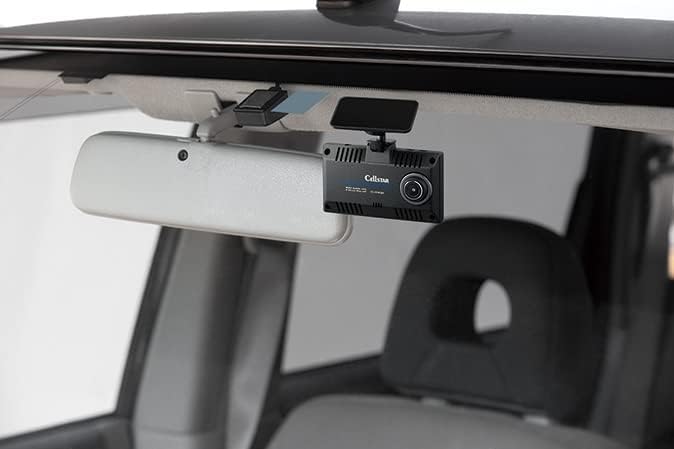
Image: The drive recorder main unit is shown installed on the inside of a car's windshield, positioned discreetly behind the rearview mirror.
- Clean the installation area on the windshield with the degreaser cleaner.
- Attach the main unit's mount base to the chosen location on the windshield.
- Connect the direct wiring DC cord to the main unit and route it to the vehicle's power source (12V/24V compatible).
- Mount the separate rear camera on the rear window using its adhesive mount.
- Connect the camera connection cord between the main unit and the rear camera, routing the cable neatly.
- Insert the provided 64GB microSD card into the main unit.
- Power on the vehicle to confirm the drive recorder starts up and both cameras are recording correctly.
Operating Instructions
Basic Recording
- The device automatically begins recording when the vehicle's ignition is turned on.
- Video is recorded in WQHD (3.7 million pixels) resolution for both front and rear cameras.
- The 2.45-inch wide IPS LCD provides a live view and allows for touch panel control of settings.
- Press the dedicated Quick Record button to manually save an important segment of video.
Advanced Features
- STARVIS IMX335 Sensor: Equipped with STARVIS IMX335 sensors on both front and rear cameras for enhanced low-light performance and clear night recordings.
- HDR (High Dynamic Range): Ensures optimal exposure in varying light conditions, reducing overexposure and underexposure in recordings.
- Safety Driving Support Functions:
- Rear Catch: Detects vehicles approaching from the rear.
- Blind Spot Detection: Alerts to objects in blind spots.
- Front Vehicle Departure Warning: Notifies when the vehicle in front starts moving.
- Inter-vehicle Distance Warning: Alerts if the distance to the vehicle ahead becomes too short.
- Lane Departure Warning: Warns if the vehicle drifts out of its lane.
- GPS Notification Function: Provides audio and on-screen warnings for dangerous areas during driving, including speed cameras, high-speed reverse driving warning areas, Zone 30 areas, and accident-prone areas.
- Super-fast GPS: Utilizes multiple satellite systems (Michibiki, GPS, Glonass, Galileo) for quick and accurate positioning.
- Parking Mode: When the engine is turned off (ACC), the device can record for up to 12 hours. Note: This feature requires the optional adapter GDO-10 or GDO-41 (sold separately).
- Other Functions: External video output, audio recording (ON/OFF selectable), LED signal compatible, terrestrial digital radio wave interference countermeasures (VCCI Class A compliant), and compatible with 12V/24V power systems.
Maintenance
microSD Card Maintenance-Free
The CELLSTAR CS-92WQH features a proprietary file system that prevents file fragmentation on the microSD card, significantly reducing the occurrence of errors. This eliminates the need for regular formatting, simplifying maintenance.
- While regular formatting is not required, it is recommended to periodically check the microSD card for any signs of wear or damage.
- If you experience any recording issues, try using a different compatible microSD card to rule out card failure.
- Keep the lens of both the front and rear cameras clean to ensure clear video recordings. Use a soft, dry cloth to gently wipe away dust or smudges.
Troubleshooting
If you encounter issues with your CELLSTAR CS-92WQH drive recorder, please refer to the following common troubleshooting steps:
- Device does not power on:
- Check if the direct wiring DC cord is securely connected to both the drive recorder and the vehicle's power source.
- Ensure the vehicle's ignition is on.
- Verify the vehicle's power outlet or fuse is functioning correctly.
- No recording / Recording errors:
- Ensure the microSD card is properly inserted.
- Although maintenance-free, try formatting the microSD card via the device's menu if issues persist.
- Test with a different compatible microSD card to check if the original card is faulty.
- Poor video quality:
- Clean the camera lenses of both the front and rear units.
- Ensure the windshield and rear window are clean where the cameras are mounted.
- Check settings for video resolution and HDR to ensure they are configured as desired.
- GPS not acquiring signal:
- Ensure the vehicle is in an open area with a clear view of the sky.
- Metallic window tints or other electronic devices might interfere with GPS reception.
- Touch screen unresponsive:
- Restart the device by turning the vehicle ignition off and on.
- Ensure the screen is clean and dry.
If the problem persists after trying these steps, please contact CELLSTAR customer support.
Specifications

Image: Detailed dimensions of the main drive recorder unit (94mm width, 54mm height) and the rear camera (35mm width, 35mm height).
| Feature | Detail |
|---|---|
| Brand | CELLSTAR |
| Model Name | CS-92WQH |
| Video Capture Resolution | WQHD (1440p), 3.7 Million Pixels (Front/Rear) |
| Sensor | STARVIS IMX335 |
| Display | 2.45-inch Wide IPS LCD (Touch Panel) |
| HDR | Yes |
| GPS | Built-in, Super-fast (Michibiki, GPS, Glonass, Galileo) |
| Included microSD Card | 64GB Class 10 |
| microSD Card Maintenance | Maintenance-free (proprietary file system) |
| Parking Mode | Yes (requires optional adapter GDO-10/GDO-41) |
| Safety Driving Support | Rear Catch, Blind Spot Detection, Front Vehicle Departure Warning, Inter-vehicle Distance Warning, Lane Departure Warning |
| GPS Notification | Speed Camera, High-Speed Reverse Driving Warning Area, Zone 30, Accident Prone Area |
| Power Supply Voltage | 12V/24V Compatible |
| Mounting Type | Adhesive |
| Color | Black |
| Product Weight | 3 g |
| Package Dimensions | 21.7 x 16.4 x 6 cm |
| Country of Origin | Japan |
Warranty and Support
Warranty Information
The CELLSTAR CS-92WQH drive recorder comes with a 3-year manufacturer's warranty. This warranty covers defects in materials and workmanship under normal use. Please retain your proof of purchase for warranty claims.
CELLSTAR products are proudly designed and manufactured in Japan, adhering to strict quality standards. From circuit board mounting to final assembly, all processes are carried out in domestic factories, ensuring reliability and performance.
Customer Support
For technical assistance, troubleshooting beyond this manual, or warranty service, please contact CELLSTAR customer support through their official website or authorized service centers. Refer to the contact information provided in the separate warranty card or on the CELLSTAR official website.
For the latest information and data updates for GPS notification functions, please visit the CELLSTAR official website.