
Midea ST 5.31 wi
Midea ST 5.31 Mini Dishwasher User Manual
Model: ST 5.31 wi | Brand: Midea
Introduction
This manual provides comprehensive instructions for the safe and efficient operation, installation, and maintenance of your Midea ST 5.31 Mini Dishwasher. Please read this manual thoroughly before using the appliance and keep it for future reference.

Figure 1: Front view of the Midea ST 5.31 Mini Dishwasher. This compact appliance features a sleek white design with a black control panel at the top, an LED display showing "2:35", and a transparent door revealing the dish rack inside.
Safety Information
Always follow basic safety precautions when using electrical appliances to reduce the risk of fire, electric shock, and injury to persons.
- Read all instructions before using the dishwasher.
- Do not touch the heating element during or immediately after use.
- Use only detergents and rinse aids specifically designed for dishwashers.
- Keep children away from the dishwasher, especially when the door is open.
- Ensure the appliance is properly grounded.
- Do not operate the dishwasher if it has a damaged power cord or plug.
- Do not immerse the appliance, cord, or plug in water or other liquid.
- Always unplug the dishwasher before cleaning or performing maintenance.
Product Overview
The Midea ST 5.31 is a compact and versatile tabletop dishwasher. It is designed for small living spaces, offering convenience and efficiency.
Key Features:
- Compact 42 cm freestanding design.
- Wi-Fi Control for remote operation via the MSmartHome App.
- 7 Wash Programs for various cleaning needs.
- 3 Place Settings capacity.
- Touch Control Panel with LED display.
- Low noise level of 58 dB.
- Flexible water connection: manual fill or direct water line.
- Automatic door opening feature.

Figure 2: Dimensions of the Midea ST 5.31 Mini Dishwasher. This image illustrates the compact size of the dishwasher with measurements: 420mm width, 465mm height, and 435mm depth (excluding the door handle). The total depth with the door open is approximately 780mm.

Figure 3: Loading flexibility of the Midea ST 5.31 Mini Dishwasher. This diagram shows how various items can be arranged inside, including 3 knives, 3 dessert spoons, 3 forks, 3 soup spoons, 3 teaspoons, 1 ladle, 1 serving fork, 3 glasses, 3 cups, 1 small serving bowl, 2 medium serving bowls, 1 dinner plate, 2 saucers, 5 dessert plates, 2 oval plates, and 1 soup plate.
Setup
Unpacking and Placement:
- Carefully remove all packaging materials.
- Place the dishwasher on a flat, stable surface. Ensure there is adequate space around the unit for ventilation and door opening.
- Verify all included components are present: dishwasher unit, water container, funnel, cold water inlet hose, and drain pipe.

Figure 4: Included components. The image displays the main dishwasher unit alongside its accessories: 1x water container, 1x funnel, 1x cold water inlet hose (3/4 inch thread connector), and 1x drain pipe.
Water Connection Options:
The Midea ST 5.31 offers two methods for water supply:
- Manual Water Fill: Ideal for situations without a direct water connection.
- Use the provided water container and funnel to pour water directly into the designated inlet on top of the dishwasher.
- The dishwasher will signal when the water tank is full.
- Direct Water Line Connection: For permanent installation.
- Connect the cold water inlet hose to a suitable water tap.
- Connect the drain pipe to a sink or drain system.
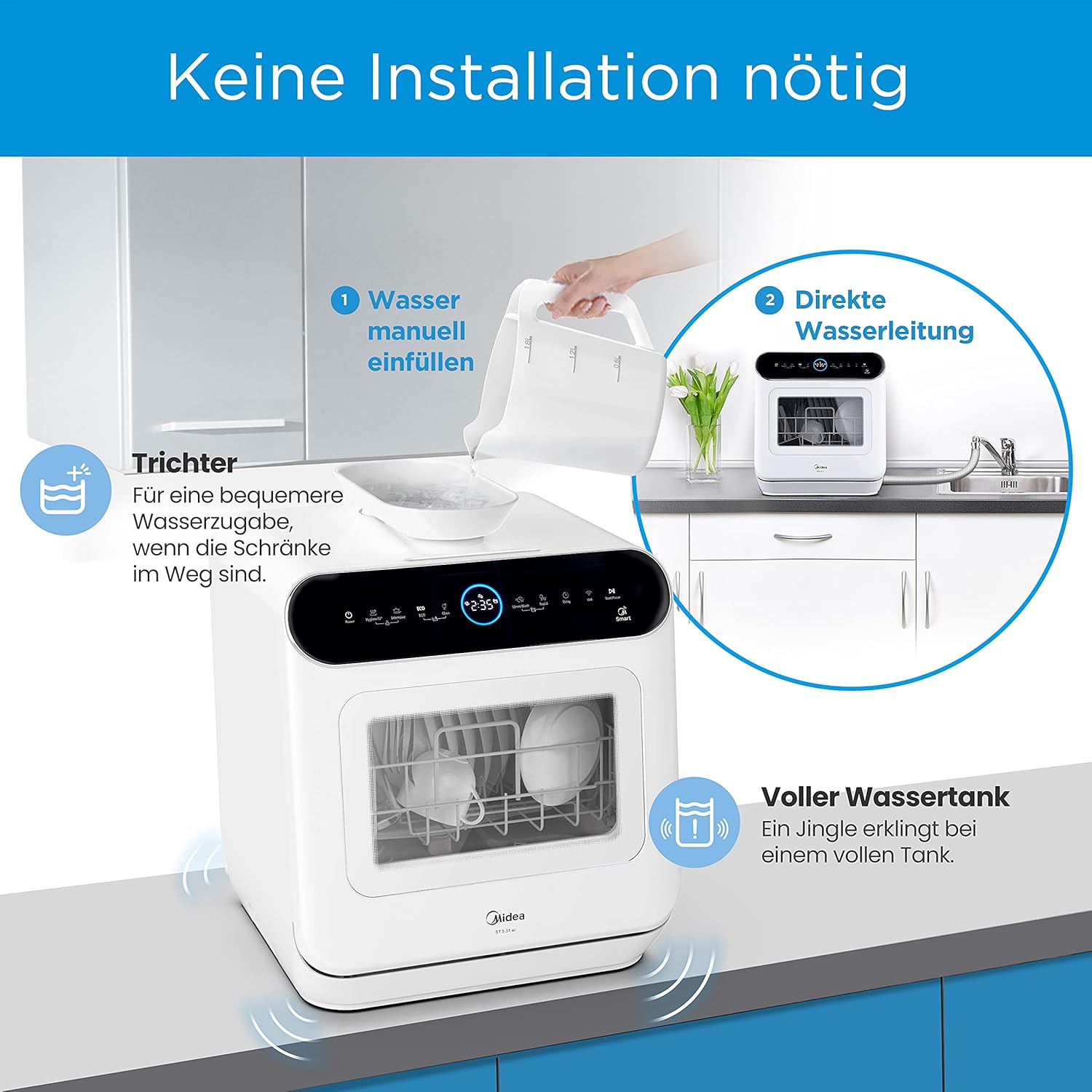
Figure 5: Water connection options. The image shows two methods: (1) Manual water fill using the provided funnel and water container, suitable when cabinets are in the way. (2) Direct water line connection to a faucet. The dishwasher also indicates a full water tank with an audible jingle.
Power Connection:
Plug the dishwasher into a grounded electrical outlet. Ensure the voltage matches the appliance's requirements (240V).
Operating Instructions
Control Panel:
The control panel is located on the top front of the dishwasher and features touch controls and an LED display.

Figure 6: Control panel and wash programs. The image displays the touch control panel with icons for Power, Hygiene 72°, Intensive, ECO, Glass, 58 Min. Wash, Quick, and Smart functions. Below, it details the 7 wash programs with their temperatures and durations.
Loading the Dishwasher:
- Scrape off large food particles from dishes.
- Place dishes securely in the rack, ensuring water spray can reach all surfaces.
- Load cutlery into the designated basket.

Figure 7: Interior view of the dishwasher. This image shows the stainless steel interior with the main dish rack and a smaller, removable cutlery holder positioned on the upper left side.
Adding Detergent and Rinse Aid:
- Add appropriate dishwasher detergent to the dispenser.
- Fill the rinse aid dispenser as needed for optimal drying results.
Selecting a Wash Program:
Choose from the following 7 programs based on your dishwashing needs:
| Program | Description | Temperature | Duration |
|---|---|---|---|
| Hygiene 72° | Protects against bacteria. | 72°C | 115 Min. |
| Intensive | For heavily soiled dishes. | 70°C | 160 Min. |
| ECO | For normally soiled dishes, energy efficient. | 70°C | 155 Min. |
| 58 Min. Wash | For normally soiled dishes, quick cycle. | 65°C | 58 Min. |
| Quick | For lightly soiled dishes. | 60°C | 29 Min. |
| Glass | For lightly soiled glass and dishes. | 65°C | 85 Min. |
| Pre-Rinse | For rinsing dishes before a full wash cycle. | Cold | 15 Min. |
Using the MSmartHome App (Wi-Fi Control):
The dishwasher can be controlled remotely via the MSmartHome App. This allows you to start, stop, and monitor cycles from your smartphone.
- Download the MSmartHome App from your device's app store.
- Follow the in-app instructions to connect your dishwasher to your home Wi-Fi network.
- Once connected, you can access various functions and settings remotely.

Figure 8: MSmartHome App integration. This image depicts the Midea dishwasher alongside a smartphone displaying the MSmartHome app interface, highlighting its Wi-Fi functionality for remote control and monitoring.
Maintenance
Cleaning the Filters:
Regularly clean the filter system to ensure optimal washing performance. Refer to the diagram below for filter location.
- Turn off and unplug the dishwasher.
- Remove the filter assembly at the bottom of the wash tub.
- Rinse the filters under running water to remove food particles. Use a brush if necessary.
- Reassemble and replace the filters securely.
Cleaning the Interior:
- Wipe the interior surfaces with a damp cloth after each use.
- Periodically run the "Self-Clean" program with a dishwasher cleaner to remove grease and limescale buildup.
Cleaning the Exterior:
Wipe the exterior surfaces with a soft, damp cloth. Do not use abrasive cleaners or solvents.
Troubleshooting
Before contacting customer service, please refer to the following table for common issues and their solutions.
| Problem | Possible Cause | Solution |
|---|---|---|
| Dishwasher does not start. | Power cord not plugged in; Door not closed properly; Program not selected. | Ensure power cord is securely plugged in; Close the door firmly; Select a wash program and press start. |
| Dishes are not clean. | Improper loading; Insufficient detergent; Clogged filters; Spray arms blocked. | Reload dishes correctly; Add more detergent; Clean filters; Ensure spray arms can rotate freely. |
| Water not draining. | Drain hose kinked or blocked; Clogged filter. | Check drain hose for kinks or blockages; Clean the filter system. |
| Excessive noise. | Dishes rattling; Foreign object in pump; Unit not level. | Rearrange dishes; Check for foreign objects; Ensure dishwasher is on a level surface. |
| Water leakage. | Improper hose connection; Door seal damaged. | Check all hose connections; Inspect door seal for damage and clean if necessary. |
Specifications
| Feature | Detail |
|---|---|
| Model Number | ST 5.31 wi |
| Dimensions (L x W x H) | 42 x 44 x 47 cm |
| Weight | 14.3 kg |
| Capacity | 3 Place Settings / 6 Liters |
| Number of Programs | 7 |
| Noise Level | 58 dB |
| Internal Material | Stainless Steel |
| Voltage | 240V |
| Special Features | Wi-Fi Control, Automatic Door Opening, LED Display |
| Installation Type | Freestanding / Tabletop |
Warranty and Support
For warranty information and technical support, please refer to the warranty card included with your product or visit the official Midea website. Keep your proof of purchase for warranty claims.
For further assistance, please contact Midea customer service.
Related documentsST 5.31 wi


Ask a question about this manual
Ask about setup, troubleshooting, compatibility, parts, safety, or missing instructions. Manuals+ will review the question and use this page’s manual context to help answer it.