
1. Important Safety Instructions
Please read these instructions carefully before using the appliance and keep them for future reference. Always observe all safety notes. Failure to do so may result in personal injury or damage to the appliance.
- This appliance is intended for domestic use only.
- Do not use the appliance to vacuum liquids, glowing ashes, or sharp objects.
- Keep the appliance away from children.
- Ensure the power adapter is compatible with your mains voltage.
- Do not operate the appliance if it or its power cord is damaged.
- Only use original SEVERIN spare parts and accessories.
2. Product Overview
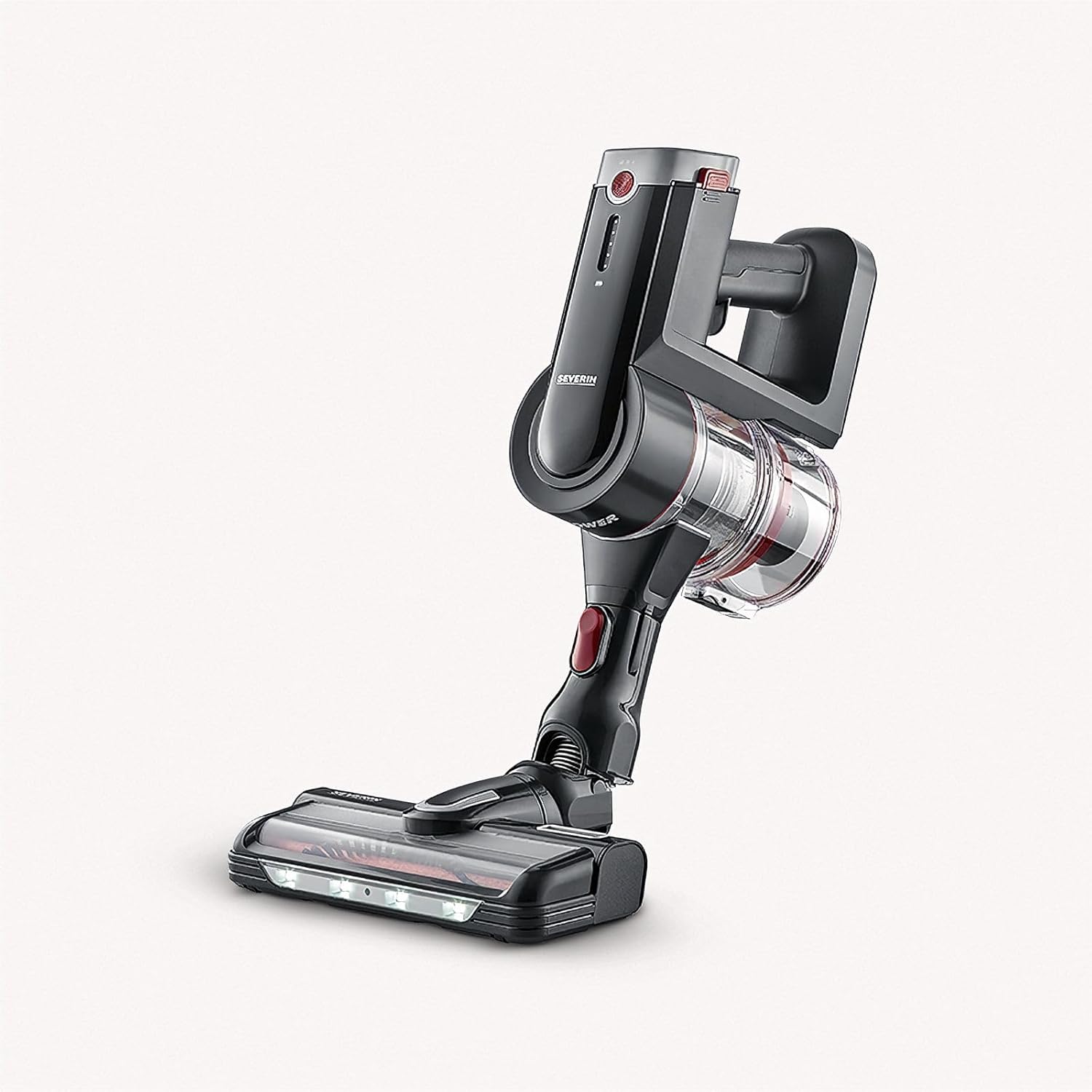
The SEVERIN HV 7168 is a versatile 2-in-1 cordless vacuum cleaner, designed for both stick and handheld use. It features a powerful digital motor, multiple suction modes, and a hygienic filtration system.


Included Components:
- Main unit (motor and dust container)
- Aluminum suction tube
- High-speed electric brush with LED lighting
- 2 x 2500 mAh Lithium-ion batteries
- Charging station with wall mount
- 3-in-1 accessories: upholstery nozzle, furniture brush, crevice tool
- Hygiene E12 exhaust air filter

3. Setup and Assembly
3.1 Initial Charging
- Before first use, fully charge both Lithium-ion batteries.
- Connect the charging station to a power outlet.
- Place the battery into the charging station. The charging indicator lights will illuminate.
- A full charge takes approximately 3-4 hours per battery.

3.2 Assembling the Stick Vacuum
- Insert the aluminum suction tube into the main unit until it clicks into place.
- Attach the high-speed electric brush to the other end of the suction tube, ensuring it clicks securely.
- Insert a fully charged battery into the main unit until it locks.
3.3 Assembling the Handheld Vacuum
- To use as a handheld vacuum, detach the aluminum suction tube from the main unit by pressing the release button.
- Attach desired accessories (e.g., crevice tool, upholstery brush) directly to the main unit until they click into place.
4. Operating Instructions
4.1 Power On/Off and Suction Modes
- Press the power button on the main unit to turn the vacuum cleaner on. It will start in the default suction mode.
- Press the mode selection button to cycle through the available suction modes: Eco, Middle, and Power.
- Press the power button again to turn the appliance off.
4.2 Using the Stick Vacuum
The stick configuration is ideal for cleaning floors, carpets, and larger areas. The high-speed electric brush with LED lighting ensures thorough cleaning and illuminates dark areas under furniture.


4.3 Using the Handheld Vacuum
The handheld configuration is perfect for cleaning upholstery, car interiors, stairs, and hard-to-reach areas. Attach the appropriate 3-in-1 accessory for specific cleaning tasks.

5. Maintenance and Cleaning
Regular maintenance ensures optimal performance and extends the lifespan of your vacuum cleaner.
5.1 Emptying the Dust Container
- Ensure the vacuum cleaner is switched off.
- Press the release button on the dust container and detach it from the main unit.
- Open the dust container lid and empty the contents into a waste bin.

5.2 Cleaning the Filters
The Hygiene E12 exhaust air filter and pre-filter are washable. Clean them regularly to maintain suction power.
- Remove the dust container as described above.
- Carefully remove the pre-filter and the E12 Hygiene filter from the dust container.
- Rinse both filters under running water until the water runs clear. Do not use detergents.
- Allow the filters to air dry completely for at least 24 hours before reinserting them. Do not expose to direct sunlight or heat.

5.3 Cleaning the Brush Roll and Cyclone
If the vacuum cleaner's run time is short or suction decreases, the brush roll and cyclone may be dirty and require cleaning.
- Turn off the vacuum cleaner and detach the floor nozzle.
- Remove any tangled hair or debris from the brush roll. A pair of scissors may be helpful.
- Inspect the cyclone inside the dust container for blockages and clear them if necessary.
5.4 Battery Care
The HV 7168 comes with two replaceable batteries for extended cleaning time. To replace a battery:
- Ensure the vacuum cleaner is off.
- Press the battery release buttons on the sides of the battery pack.
- Slide the battery out of the main unit.
- Insert a fully charged battery until it clicks securely into place.

6. Troubleshooting
If you encounter issues with your SEVERIN HV 7168, please refer to the following common problems and solutions:
| Problem | Possible Cause | Solution |
|---|---|---|
| Vacuum does not turn on | Battery not charged or not inserted correctly. | Ensure battery is fully charged and securely inserted. |
| Reduced suction power | Dust container full, filters clogged, or brush roll/tube blocked. | Empty dust container, clean filters, clear any blockages from brush roll or suction tube. |
| Short operating time | Battery not fully charged or brush roll/cyclone dirty. | Fully charge the battery. Clean the brush roll and cyclone as described in the maintenance section. |
| Brush roll not rotating | Brush roll blocked by hair or debris. | Turn off the vacuum and remove any obstructions from the brush roll. |
7. Specifications
Technical specifications for the SEVERIN HV 7168 vacuum cleaner:
| Feature | Specification |
|---|---|
| Brand | Severin |
| Model Number | 7168 |
| Color | Black - Garnet Red |
| Product Dimensions (L x W x H) | 30 x 35 x 12 cm |
| Item Weight | 1.7 Kilograms |
| Power | 400 Watts |
| Voltage | 25.2 Volts |
| Number of Speeds | 3 (Eco, Middle, Power) |
| Noise Level | 75 dB |
| Battery Type | 2 x 2500 mAh Lithium-ion (included) |
| Run Time | Up to 120 minutes (with 2 batteries) |
| Filter Type | Hygiene E12 Exhaust Filter (washable) |
| Surface Recommendation | Hard floor |
| Special Features | 2 batteries, additional upholstery nozzle, E12 hygienic exhaust filter, charging station with wall mount, aluminum suction tube (75 cm), comfortable ergonomic handle, LED lighting on brush. |
8. Warranty and Support
8.1 Product Warranty
The SEVERIN HV 7168 vacuum cleaner comes with a 2-year manufacturer's warranty. Additionally, there is a 10-year warranty on the digital motor. Please retain your proof of purchase for warranty claims. The warranty covers defects in materials and workmanship under normal use.
8.2 Customer Support
For technical assistance, spare parts, or warranty inquiries, please contact SEVERIN customer service or your retailer. You can find more information and contact details on the official SEVERIN website.
Visit the official Severin store: Severin Brand Store


