
Baseus DGXC-C0G
Baseus LED Desk Lamp Instruction Manual
Model: DGXC-C0G
Brand: Baseus
Product Overview
The Baseus LED Desk Lamp is a versatile, cordless lighting solution designed for various environments such as home offices, kitchens, bedrooms, and study areas. It features touch controls for brightness adjustment, magnetic mounting for easy installation, and a convenient 30-second turn-off delay.

Figure 1: Baseus LED Desk Lamp and its magnetic base.
What's Included
Upon unboxing, please ensure all the following components are present:
- Magnetic desk lamp (x1)
- 1M USB Type-C cable (x1)
- Magnetic strip base (x1)
- User manual (x1)
Video 1: Overview of included components.
Setup and Installation
The Baseus LED Desk Lamp offers flexible installation options due to its magnetic design.
- Magnetic Attachment: The lamp features a built-in magnet, allowing it to be directly adsorbed onto any ironwork surface.
- Adhesive Installation: For non-iron surfaces, use the included 3M adhesive strip on the magnetic base. Ensure the surface is clean and flat before attaching the base. Once the base is secured, the lamp can be magnetically attached to it.
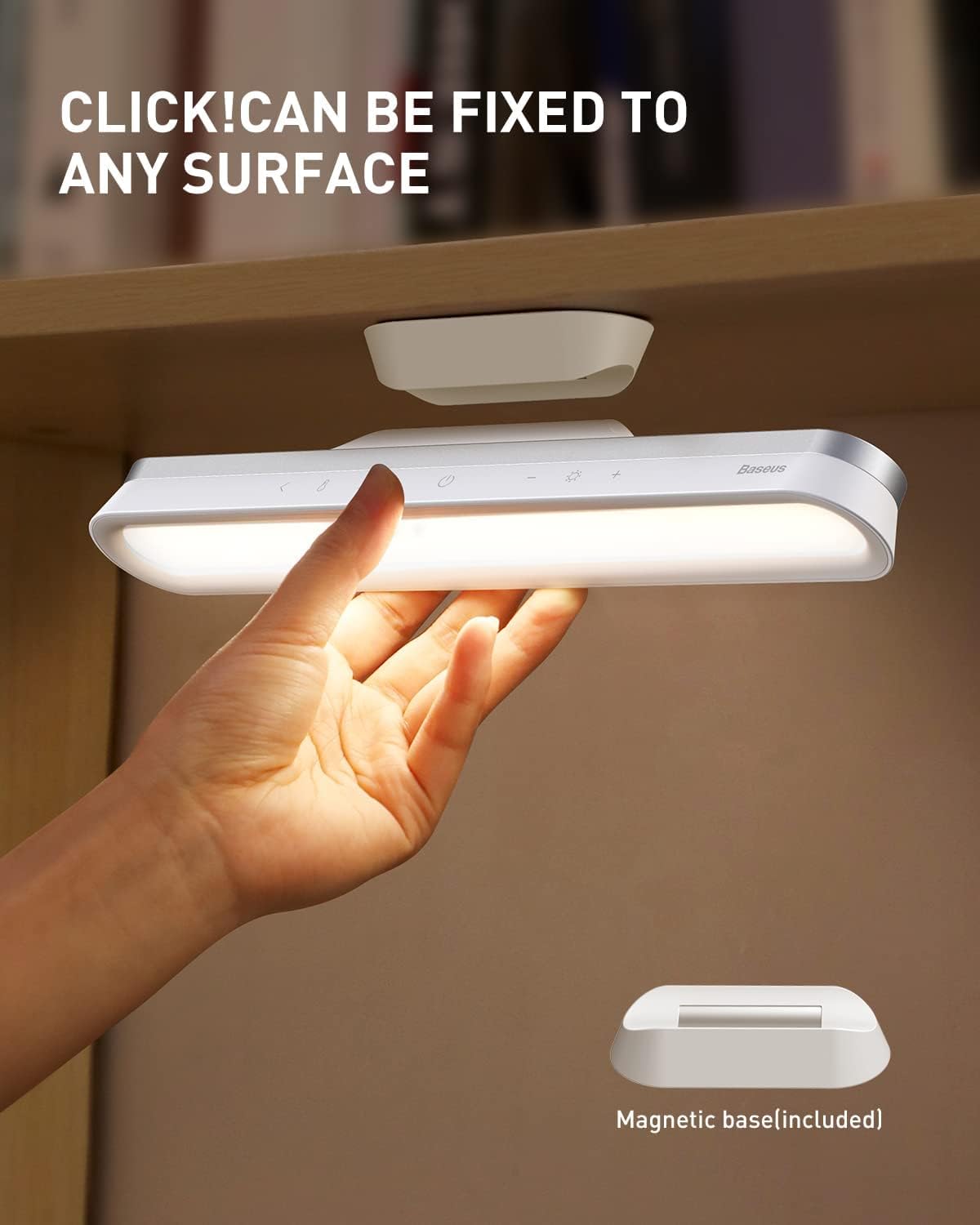
Figure 2: The magnetic base allows for easy attachment to various surfaces.
Video 2: Demonstration of magnetic installation.
Operating Instructions
The lamp is controlled via sensitive touch buttons located on its surface.
- Power On/Off: Press the power button (⑁) to turn the lamp on or off.
- Brightness Adjustment:
- Single click the brightness adjustment buttons (⌃ / ⌄) for three preset brightness levels.
- Long press the brightness adjustment buttons (⌃ / ⌄) for stepless dimming, allowing you to fine-tune the brightness from 10% to 100%. The lamp remembers your last brightness setting.
- 30-Second Turn-off Delay: Single click the timer button (⏱) to activate a 30-second delay before the light turns off. This feature provides a buffer, allowing your eyes to adjust to darkness and preventing you from fumbling in the dark.
- Angle Adjustment: The lamp body can be rotated 80 degrees to direct light precisely where needed, reducing glare and reflection.

Figure 3: Touch control interface for power, brightness, and delay.
Video 3: Demonstration of brightness adjustment.

Figure 4: The 30-second turn-off delay feature.
Video 4: Demonstration of 30-second turn-off delay.
Battery and Charging
The lamp is equipped with a built-in 1800mAh USB rechargeable battery.
- Charging: Use the provided USB Type-C cable to charge the lamp. A full charge typically takes 4-5 hours.
- Battery Life: The wireless rechargeable bar light can be used for 4-24 hours on a single charge, depending on the brightness level set.

Figure 5: Battery life estimates based on brightness levels.
Video 5: Charging the Baseus LED Desk Lamp.
Recommended Applications
This versatile lamp is suitable for a wide range of uses:
- Under cabinet lighting in kitchens
- Closet lighting
- Desk lamp for reading or study
- Emergency light
- Fill light for mirrors or makeup areas
- Stairs and hallway lighting

Figure 6: Examples of the lamp's use in different settings.
Video 6: Various usage scenarios for the lamp.
Product Specifications
| Feature | Specification |
|---|---|
| Model Number | DGXC-C0G |
| Dimensions (D x W x H) | 1"D x 10.87"W x 8"H |
| Item Weight | 6.5 ounces (185 Grams) |
| Material | Wood, Plastic, Metal, Acrylonitrile Butadiene Styrene |
| Light Source Type | LED (42 LEDs) |
| Wattage | 5 watts |
| Voltage | 5 Volts |
| Brightness | 100 Lumen |
| Power Source | Battery Powered (1800mAh Lithium Polymer) |
| Control Method | Touch |
| Special Features | Rechargeable, MAX 24H LONG BATTERY LIFE, Easy Visual Interaction, No Blue Light Hazard, No Visible Strobing, Eye-Caring, 80° Angle Adjustment, Steplessly Adjustable Brightness, Magnetic & Handheld & 3M Adhesive Paste, Easy to Install, Portable, Light Color Memory Function, Cordless, 30 Seconds Turn-off Delay Touch Push |
| Indoor/Outdoor Usage | Indoor |
| Finish Type | Polished |
| Color | Gray |
Troubleshooting
If you encounter any issues with your Baseus LED Desk Lamp, please refer to the following common solutions:
- Light not turning on: Ensure the lamp is charged. Connect it to a power source using the USB-C cable and allow it to charge for a few minutes before attempting to turn it on again.
- Brightness not adjusting: Check if you are using the correct touch gestures. A single tap cycles through preset levels, while a long press enables stepless dimming.
- Magnetic base not holding: Ensure the surface where the magnetic base is attached is clean, dry, and smooth. If using the adhesive, ensure it has fully cured (typically 24 hours) before applying significant weight or force.
- Short battery life: Battery life varies significantly with brightness settings. Using the lamp at higher brightness levels will deplete the battery faster. Ensure the lamp is fully charged before extended use.
For persistent issues not covered here, please contact Baseus customer support.
Warranty and Support
Baseus is committed to customer satisfaction. We provide lifetime technical support and service for your product. For any inquiries or assistance, please contact our 24-hour friendly customer service team.
Please note: It is recommended to fully charge the lamp before its first use to optimize battery performance.
Related documentsDGXC-C0G


Ask a question about this manual
Ask about setup, troubleshooting, compatibility, parts, safety, or missing instructions. Manuals+ will review the question and use this page’s manual context to help answer it.