
NC M10
NC TWS Bluetooth 5.1 Earphones User Manual
Model: M10
Important Safety Information
Please read this manual carefully before using the product and retain it for future reference. Improper use may result in product damage or personal injury.
- Do not expose the device to extreme temperatures, humidity, or corrosive environments.
- Avoid dropping, impacting, or disassembling the device.
- Keep the device away from children and pets.
- Use only the provided or certified charging cable and power adapter.
- Do not use the earbuds at excessively high volumes for extended periods to prevent hearing damage.
- Exercise caution when using the earbuds in situations requiring awareness of surroundings, such as driving or walking in traffic.
Product Overview
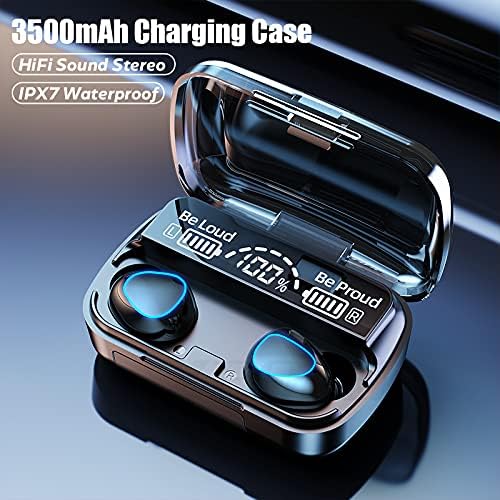
The NC TWS Bluetooth 5.1 Earphones are designed for high-fidelity audio and convenient wireless use. They feature a portable charging case that also functions as a power bank.
Package Contents
- 2 x Bluetooth Earphones (Left and Right)
- 1 x Charging Case
- 1 x USB Charging Cable
- 1 x User Manual (This Document)
- 2 x Pairs of Earphone Cups (L, M Size)
Components



Setup
Charging the Earbuds and Case
Before first use, fully charge the earbuds and the charging case.
- Place both earbuds into the charging case. Ensure they are properly seated; the earbuds will light up to indicate charging.
- Connect the USB charging cable to the charging case's port and the other end to a compatible USB power source (e.g., computer USB port, wall adapter).
- The digital display on the charging case will show the battery percentage. A full charge for the case takes approximately 1.5 hours.
- When the earbuds are fully charged, the indicator lights on the earbuds will turn off. The charging case can fully charge the earbuds approximately 8 times.

Pairing with a Device
The earbuds feature one-step pairing for convenience.
- Open the charging case and remove both earbuds. They will automatically power on and enter pairing mode, indicated by flashing lights.
- On your Bluetooth-enabled device (smartphone, tablet, laptop), go to the Bluetooth settings.
- Search for available devices and select "M10" (or similar name) from the list.
- Once connected, the earbud indicator lights will stop flashing, and you will hear a confirmation tone.
- After the initial pairing, the earbuds will automatically connect to the last-paired device when removed from the case.

Operating Instructions
The earbuds feature touch controls for various functions.
| Action | Function |
|---|---|
| Light touch (Left or Right earbud) once | Play/Pause music |
| Light touch (Left or Right earbud) once | Answer/Hang up phone call |
| Long press (Left or Right earbud) for 1 second | Summon Siri / Voice Assistant |
| Touch (Left earbud) triple in a row | Volume reduction |
| Touch (Right earbud) triple in a row | Volume increase |
| Touch (Left earbud) for 2 seconds | Switch to previous song |
| Touch (Right earbud) for 2 seconds | Switch to next song |
| Long press (Left or Right earbud) for 5 seconds | Turn On/Off |
For optimal fit and sound quality, try the different sizes of earphone cups included in the package. A comfortable and stable fit is crucial for the best audio experience and during physical activity.

Maintenance
- Cleaning: Regularly clean the earbuds and charging case with a soft, dry, lint-free cloth. Do not use abrasive cleaners or solvents. For earwax buildup, gently clean the earbud mesh with a small, soft brush.
- Storage: When not in use, store the earbuds in their charging case to protect them and keep them charged. Store the device in a cool, dry place away from direct sunlight.
- Water Resistance: The earbuds are IPX7 waterproof, meaning they can withstand submersion in up to 1 meter of water for 30 minutes. However, they are not designed for swimming or showering. Ensure the earbuds are dry before placing them back in the charging case to prevent damage.
Troubleshooting
| Problem | Possible Cause | Solution |
|---|---|---|
| Earbuds not pairing with device. | Earbuds not in pairing mode; Bluetooth off on device; previously paired with another device. | Ensure earbuds are removed from case and flashing. Turn Bluetooth off and on again on your device. Forget previous pairings on your device and re-pair. |
| Only one earbud working. | Earbuds not properly connected to each other (TWS mode). | Place both earbuds back into the charging case, close the lid, wait a few seconds, then remove them simultaneously to re-establish TWS connection. |
| Earbuds not charging. | Poor contact with charging pins; charging cable or adapter faulty; case battery depleted. | Ensure earbuds are correctly seated in the case. Check charging cable and adapter. Charge the charging case. |
| Low volume or poor sound quality. | Earbuds not properly seated in ear; earwax buildup; device volume too low. | Adjust earbud position or try different size ear tips. Clean earbud mesh. Increase volume on both earbuds and connected device. |
| Intermittent connection. | Too far from device; interference; low battery. | Stay within 15 meters of your device. Avoid strong electromagnetic interference. Charge earbuds and case. |
Specifications
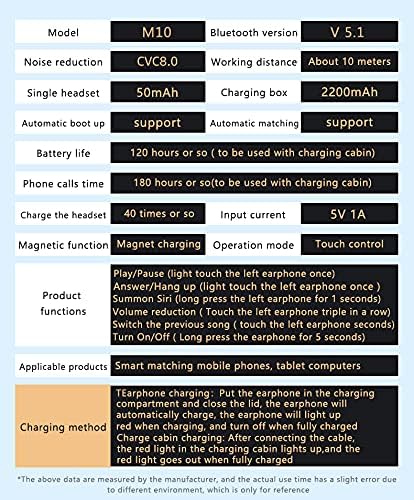
Below are the technical specifications for the NC TWS Bluetooth 5.1 Earphones (Model M10).
| Feature | Detail |
|---|---|
| Model | M10 |
| Bluetooth Version | 5.1 |
| Wireless Range | Up to 15 meters (49 feet) |
| Noise Cancellation | CVC 8.0 Noise Cancelling |
| Earbud Battery Capacity | 50mAh (each earbud) |
| Charging Case Battery Capacity | 3500mAh |
| Earbud Playtime | 5-6 hours on a single charge |
| Total Playtime (with charging case) | Up to 180 hours |
| Charging Case Charging Time | Approx. 1.5 hours (USB-C) |
| Water Resistance Rating | IPX7 |
| Control Method | Touch Control |
| Compatible Devices | Smartphones, Laptops, Tablets, Smart Speakers |
Warranty and Support
For warranty information and technical support, please refer to the official NC product website or contact their customer service directly. Keep your purchase receipt as proof of purchase for warranty claims.
Online Support: Visit the NC Store on Amazon for product information and updates.
Related documentsM10


Ask a question about this manual
Ask about setup, troubleshooting, compatibility, parts, safety, or missing instructions. Manuals+ will review the question and use this page’s manual context to help answer it.