
Monster CP16-4CL500-30M
MONSTER CP16-4CL500-30M Speaker Cable User Manual
Model: CP16-4CL500-30M | Brand: Monster
Product Overview
The Monster CP16-4CL500-30M Speaker Cable is designed for high-quality audio transmission, particularly suitable for home theater systems. It features a robust 4-core structure engineered to minimize electromagnetic interference and signal attenuation, ensuring clear and dynamic sound reproduction even over extended lengths.
This cable is constructed with a low-friction outer layer, providing durability, flexibility, and ease of installation. Its renewed black color offers a more discreet appearance for various setups.
Key Features:
- Advanced 4-Core Structure: Reduces electromagnetic wave generation and signal attenuation for superior audio clarity.
- High Purity Copper: Utilizes 16 Gauge high purity copper for reliable conduction.
- Durable and Flexible Outer Layer: Designed for easy pulling and excellent aging resistance.
- Optimized for Home Theater: Popular choice for home audio installations.
- Discreet Black Color: Blends seamlessly into various environments.
Setup Instructions
This section provides guidance on preparing and connecting your Monster speaker cable.
Preparation:
- Unpack the Cable: Carefully uncoil the Monster CP16-4CL500-30M speaker cable from its packaging.
- Measure and Cut: Determine the required length for your audio setup. Use appropriate wire cutters to cut the cable to the desired length. Remember to account for any slack needed for routing.
- Strip the Insulation: At each end of the cut cable, carefully strip approximately 0.5 to 0.75 inches (1.2 to 1.9 cm) of the outer black insulation to expose the four inner insulated wires (white, blue, red, black).
- Strip Inner Wires: For each of the four inner wires, strip about 0.25 to 0.5 inches (0.6 to 1.2 cm) of their respective colored insulation to expose the bare copper strands. Twist the exposed copper strands tightly to prevent fraying.
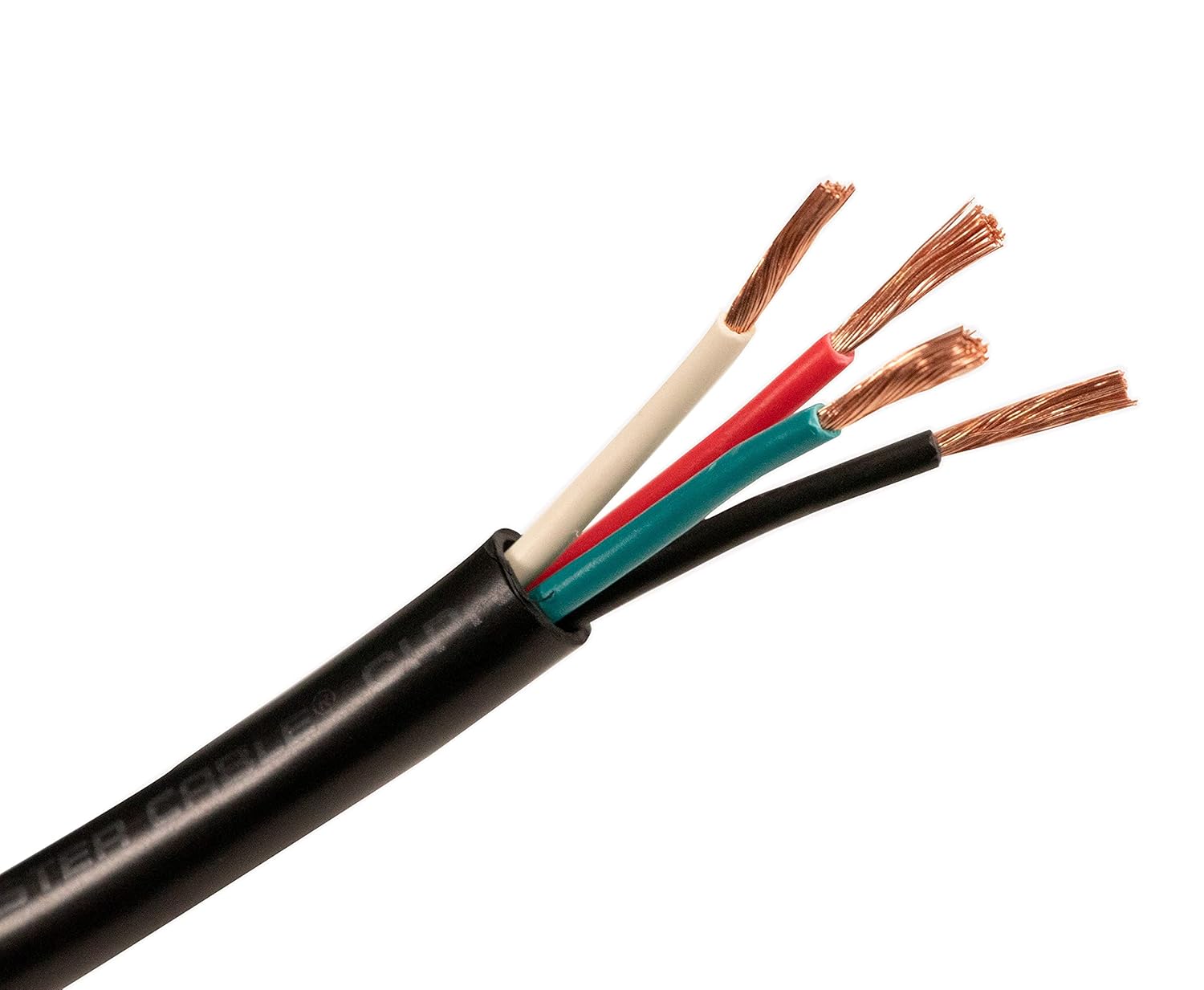
Image: The Monster CP16-4CL500-30M speaker cable with its outer jacket removed, revealing the four color-coded inner wires (white, blue, red, black) and their twisted copper conductors. This illustrates the cable's internal structure ready for termination.
Connection:
- Identify Polarity: While speaker cables typically do not have strict polarity for the cable itself, the individual wires within the 4-core structure are often used for specific channels or positive/negative connections in multi-channel or bi-wiring setups. Consult your amplifier and speaker manuals for proper wiring configurations. Common practices include using two wires for positive and two for negative, or assigning each pair to a specific channel.
- Connect to Amplifier/Receiver: Insert the prepared bare wire ends into the appropriate speaker terminals on your amplifier or receiver. Ensure a secure connection, avoiding any stray copper strands that could cause a short circuit.
- Connect to Speakers: Similarly, connect the other end of the cable to the corresponding speaker terminals. Maintain consistent wiring (e.g., white and blue for one channel, red and black for another, or specific colors for positive/negative) at both the amplifier and speaker ends.

Image: A detailed view of the Monster CP16-4CL500-30M speaker cable, highlighting the four distinct internal wires (white, blue, red, black) with their exposed copper strands, ready for connection to audio components.
For optimal performance, ensure all connections are tight and free from corrosion. Avoid bending the cable sharply, especially near connection points.
Operating Guidelines
The Monster CP16-4CL500-30M speaker cable is a passive component designed to transmit audio signals. Its operation is integrated with your audio system.
- Signal Transmission: Once properly connected between your amplifier/receiver and speakers, the cable will transmit the electrical audio signals from the amplifier to the speaker drivers, converting them into sound.
- Sound Quality: The cable's 4-core structure and high-purity copper are engineered to maintain signal integrity, contributing to clear and dynamic sound reproduction.
- Long Runs: Due to its design, the cable is effective in reducing signal level attenuation even during long runs, making it suitable for various room sizes and speaker placements.
No specific operational steps are required for the cable itself beyond proper installation. The performance of the cable is directly related to the quality of your audio components and the correctness of the connections.
Maintenance
Proper care and maintenance will ensure the longevity and optimal performance of your Monster speaker cable.
- Cleaning: If the cable becomes dusty or dirty, gently wipe it with a soft, dry cloth. Avoid using harsh chemicals or abrasive cleaners, as these can damage the outer jacket.
- Cable Management: Avoid kinking, twisting, or sharply bending the cable, especially near the connection points. Use cable ties or wraps to manage excess length and keep the setup tidy.
- Environmental Conditions: Store and use the cable in a dry environment, away from extreme temperatures, direct sunlight, and excessive moisture.
- Connection Integrity: Periodically check the connections at both the amplifier/receiver and speaker ends to ensure they remain tight and free from corrosion. Loose connections can degrade audio quality.
- Physical Inspection: Occasionally inspect the cable for any signs of physical damage, such as cuts, nicks, or frayed insulation. If significant damage is observed, consider replacing the cable to prevent potential issues.
Troubleshooting
This section addresses common issues you might encounter with speaker cable connections.
| Problem | Possible Cause | Solution |
|---|---|---|
| No sound from speakers | Loose or incorrect cable connections. Amplifier/receiver or speakers are off or malfunctioning. |
|
| Distorted or poor sound quality | Loose connections, frayed wires, or interference. |
|
| Only one speaker working | Faulty connection to the non-working speaker or amplifier channel. |
|
If troubleshooting steps do not resolve the issue, consult the user manuals for your amplifier/receiver and speakers, or contact Monster customer support.
Specifications
| Attribute | Detail |
|---|---|
| Model Number | CP16-4CL500-30M |
| Brand | Monster |
| Gauge | 16 AWG |
| Number of Wires/Cores | 4 |
| Material | High Purity Copper |
| Cable Strands | Multi Strand |
| Length | 98.4 ft (30 m) |
| Outer Jacket | Low-friction type, Black |
| Manufacturer | MONSTER |
| First Available Date | November 10, 2022 |
| Package Dimensions | 15.75 x 11.81 x 7.87 inches |
| Package Weight | 4.41 Pounds |
Warranty and Support
For information regarding the product warranty, please refer to the documentation included with your purchase or visit the official Monster website. Warranty terms and conditions may vary by region and retailer.
For technical support, product inquiries, or assistance with troubleshooting beyond the scope of this manual, please contact Monster customer service through their official website or the contact information provided with your product packaging.
Official Monster Website: www.monsterproducts.com
Related documentsCP16-4CL500-30M


Ask a question about this manual
Ask about setup, troubleshooting, compatibility, parts, safety, or missing instructions. Manuals+ will review the question and use this page’s manual context to help answer it.