
1. Introduction
This user manual provides essential information for the safe and efficient operation of your MSI Katana 15 HX B14WEK-438IN gaming laptop. Please read this manual thoroughly before using your device to ensure proper setup, usage, and maintenance. Keep this manual for future reference.
2. Product Overview
2.1 Key Components
- Processor: Intel Core i5-14450HX (14th Gen)
- Graphics: NVIDIA GeForce RTX 5050 with 8GB GDDR7 dedicated memory
- Display: 15.6-inch Full HD (1920x1080) with 144Hz refresh rate
- Memory: 16GB DDR5 RAM (expandable up to 96GB)
- Storage: 512GB PCIe Gen4 NVMe SSD
- Operating System: Windows 11 Home
- Keyboard: 4-Zone RGB Gaming Keyboard with 1.7mm key travel
- Audio: Hi-Res Audio, Nahimic by SteelSeries
- Cooling: Cooler Boost 5 technology
2.2 Laptop Layout and Ports
Familiarize yourself with the various ports and indicators on your laptop for optimal connectivity and usage.

Figure 2.2.1: Side view of the MSI Katana 15 HX laptop, illustrating the location of various input/output ports and indicators. These include USB Type-C, HDMI 2.1, USB Type-A, audio jacks, and the power input.
The laptop features multiple high-speed ports for connecting peripherals, external displays, and network devices. These typically include USB Type-C, USB Type-A, HDMI 2.1 for external displays, and an RJ-45 Ethernet port for wired network connections. Specific port configurations may vary slightly by model variant.
3. Setup
3.1 Initial Power-On
- Connect Power Adapter: Plug the power adapter into the laptop's power input port and then into a wall outlet.
- Open Display: Gently lift the display panel to open the laptop.
- Power On: Press the power button, usually located above the keyboard or on the side, to turn on the laptop.
- Initial Windows Setup: Follow the on-screen instructions to complete the Windows 11 Home setup, including language selection, network connection, and user account creation.
3.2 Software Installation
Your laptop comes pre-installed with Windows 11 Home and MSI Center software. MSI Center allows for system monitoring, performance tuning, and customization of features like keyboard RGB lighting and cooling profiles.

Figure 3.2.1: The 4-Zone RGB gaming keyboard of the MSI Katana 15 HX, customizable via MSI Center software.
4. Operating Instructions
4.1 Basic Operation
- Power On/Off: Press the power button to turn on. To shut down, go to Start > Power > Shut down in Windows.
- Sleep Mode: Close the lid or select Sleep from the Start > Power menu.
- Restart: Select Restart from the Start > Power menu.
4.2 Display and Graphics
The 15.6-inch Full HD display supports a 144Hz refresh rate for smooth visuals, especially beneficial for gaming. Ensure your display settings in Windows are configured to utilize the 144Hz refresh rate for optimal performance.

Figure 4.2.1: Visual comparison demonstrating the difference between a standard display and the 144Hz refresh rate of the MSI Katana 15 HX, highlighting smoother motion.
The NVIDIA GeForce RTX 5050 GPU provides dedicated graphics processing. For graphics-intensive applications or games, ensure that the application is configured to use the dedicated GPU for best performance. This can often be managed through NVIDIA Control Panel settings.

Figure 4.2.2: Illustration of NVIDIA GeForce RTX graphics and the MUX switch, enabling direct GPU output for enhanced gaming performance.
4.3 Audio Features
Your laptop supports Hi-Res Audio and features Nahimic by SteelSeries for an enhanced audio experience. Adjust audio settings and profiles through the Nahimic software for optimized sound for gaming, music, or movies.

Figure 4.3.1: The MSI Katana 15 HX laptop highlighting its Hi-Res Audio and Nahimic by SteelSeries sound technologies.
4.4 Cooling System
The Cooler Boost 5 technology is designed to maintain optimal temperatures during intensive tasks. Ensure proper airflow by not blocking the ventilation openings on the laptop. You can monitor and adjust fan speeds via the MSI Center software.
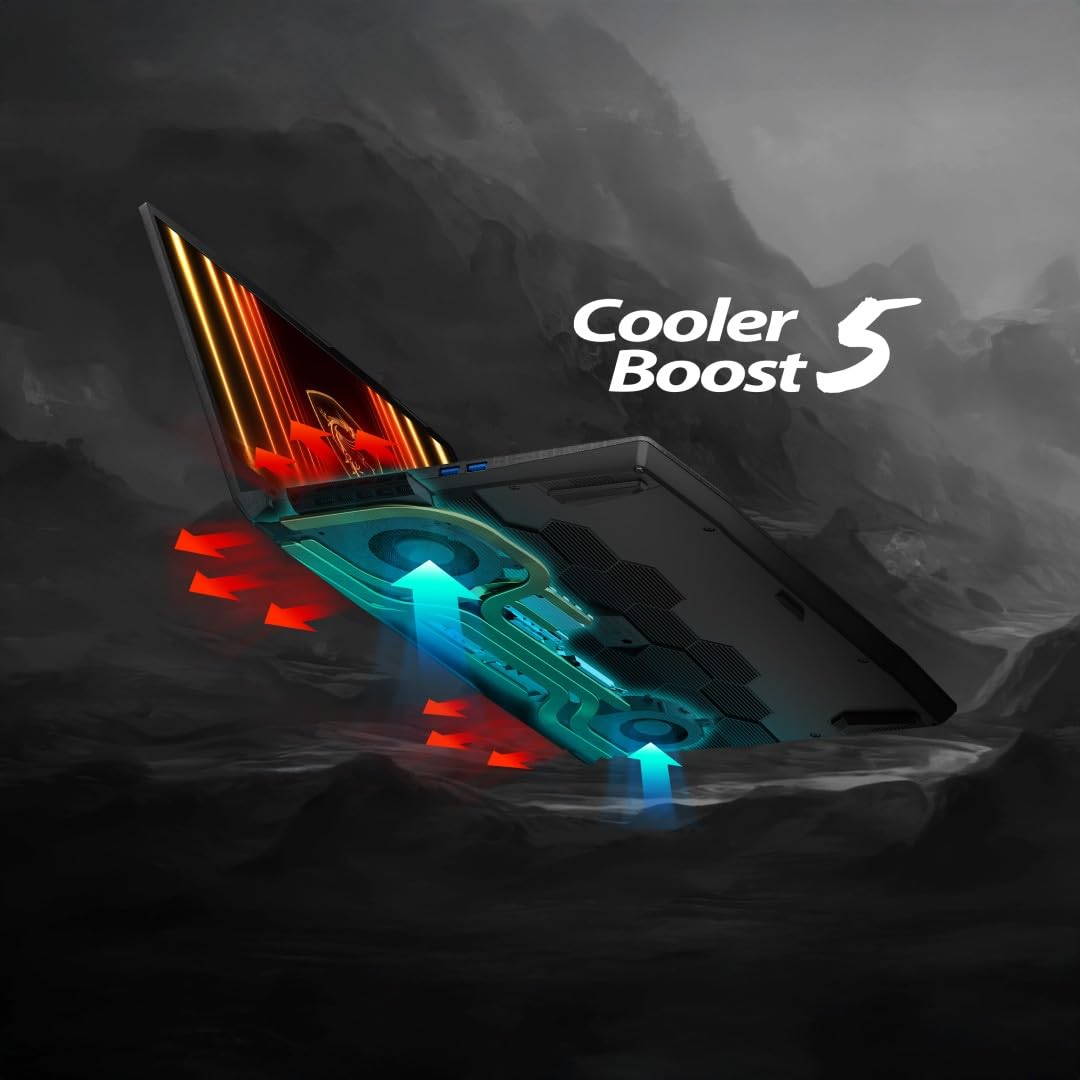
Figure 4.4.1: Diagram illustrating the Cooler Boost 5 thermal solution within the MSI Katana 15 HX, showing heat pipes and fan airflow.
5. Maintenance
5.1 Battery Care
- Avoid fully discharging the battery frequently.
- Store the laptop in a cool, dry place if not used for extended periods.
- The laptop features a 52.5 Wh fast-charging battery, capable of reaching 50% charge in approximately 45 minutes.
5.2 Cleaning
- Use a soft, lint-free cloth to clean the screen and chassis.
- For stubborn marks, slightly dampen the cloth with water or a screen cleaner.
- Avoid spraying liquids directly onto the laptop.
- Regularly clean the keyboard and ventilation grilles to prevent dust buildup.
5.3 Software Updates
Regularly update your Windows operating system, graphics drivers (NVIDIA), and MSI software (MSI Center, BIOS) to ensure optimal performance, security, and compatibility. Updates can be managed through Windows Update and MSI's official website or MSI Center.
6. Troubleshooting
This section addresses common issues you might encounter with your laptop.
6.1 Common Issues and Solutions
| Issue | Possible Cause / Solution |
|---|---|
| Laptop does not power on. | Ensure the power adapter is securely connected to both the laptop and a working power outlet. Check if the power adapter's indicator light is on. |
| System lagging or freezing. | Close unnecessary applications. Check Task Manager for high CPU/RAM usage. Ensure drivers and Windows are up to date. Verify sufficient free storage space on the SSD. |
| Battery drains quickly. | Adjust power settings to a more conservative plan. Reduce screen brightness. Close background applications. Ensure Cooler Boost 5 is active during heavy loads to prevent thermal throttling. |
| Mousepad not responding. | Check if the touchpad has been accidentally disabled (often via a function key, e.g., Fn + F3). Restart the laptop. Update or reinstall touchpad drivers from the MSI support website. |
| Display issues (no image, flickering). | Ensure the laptop is powered on. Try connecting an external monitor to check if the issue is with the laptop's display or the graphics output. Update graphics drivers. |
If you encounter persistent issues not covered here, please refer to the Warranty and Support section for further assistance.
7. Specifications
| Feature | Detail |
|---|---|
| Brand | MSI |
| Model Name | Katana 15 HX B14WEK |
| Model Number | B14WEK-438IN |
| Screen Size | 40 Centimetres (15.6-inch) |
| Display Type | LED, LCD, FHD (1920 x 1080) |
| Video Output (Refresh Rate) | 144 Hz |
| Processor Brand | Intel |
| CPU Model | Core i5-14450HX (14th Generation) |
| CPU Speed | 2.4 GHz (up to 4.8 GHz Max Boost) |
| RAM Memory Installed Size | 16 GB DDR5 |
| Memory Clock Speed | 5600 MHz |
| RAM Memory Maximum Size | 96 GB |
| Hard Disk Size | 512 GB SSD (PCIe Gen4 NVMe) |
| Graphics Card Description | Dedicated NVIDIA GeForce RTX 5050 |
| Graphics RAM Size | 8 GB GDDR7 |
| Operating System | Windows 11 Home |
| Keyboard Description | Gaming (4-Zone RGB) |
| Network Connectivity | Wi-Fi 6E, Bluetooth 5.3 |
| Total HDMI Port | 1 (HDMI 2.1) |
| Audio Output Type | Headphones, Speakers (Hi-Res Audio, Nahimic) |
| Battery Cell Type | Lithium Polymer |
| Lithium Battery Energy Content | 75 Watt Hours |
| Item Weight | 2.4 Kilograms |
| Item Dimensions (L x W x Thickness) | 26.2L x 35.9W x 2.5Th Centimeters |
| Box Contents | Laptop, Power Adaptor, User Guide |
8. Warranty and Support
8.1 Warranty Information
Your MSI Katana 15 HX laptop comes with a 2-year On-Site warranty. This warranty covers manufacturing defects. It does not cover physical damage, burn damage, or liquid damage. On-Site Service eligibility may vary by region.
For detailed warranty terms and conditions, please visit the official MSI India Website.

Figure 8.1.1: MSI warranty details, including validation instructions and contact information for support.
8.2 Warranty Validation and Support
To validate your warranty or for self-service support, visit: https://in.msi.com/support/nb
For queries on warranty or technical support, you can contact MSI through the following channels:
- Visit: More than 170 service centers across India.
- Call: 011 4748 4000 (9 AM to 5 PM)
- Email: indiaservicenb@msi.com
The unit comes with a two-year base domestic warranty from the unit shipped date. This can be corrected by contacting MSI if needed.


