Introduction
This user manual provides comprehensive instructions for the FeiyuTech SCORP-C2 Gimbal Stabilizer. It covers product features, setup, operation, maintenance, and troubleshooting to ensure optimal performance and longevity of your device. The SCORP-C2 is designed for DSLR and mirrorless cameras, featuring built-in AI tracking, native vertical shooting, and a robust 3.5kg payload capacity.
What's in the Box
Please verify that all items listed below are included in your package:
- FeiyuTech SCORP C2 Stabilizer
- USB 2.0 to Type-C Charging Cable
- Type-C to Type-C Camera Control Cable
- Tripod
- Fixed Plate
- Quick Release Plate
- Secondary Quick Release Plate
- Lens Holder
- Lens Holder Fixing Knob
- Camera Fixing Screw
- Hexagonal Wrench

Image: All components included in the FeiyuTech SCORP-C2 package, laid out clearly with numbers indicating each part.
Product Overview
The FeiyuTech SCORP-C2 features an ergonomic design with intuitive controls for seamless operation.
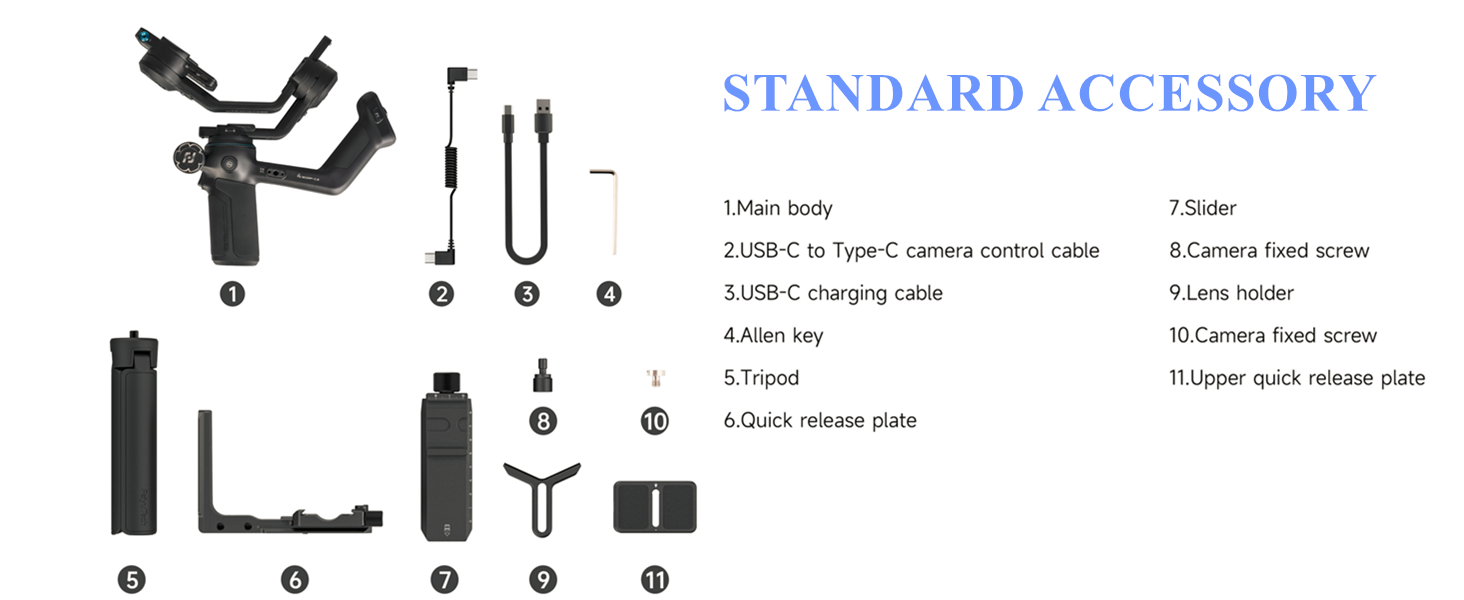
Image: A detailed diagram highlighting the control buttons on the FeiyuTech SCORP-C2 gimbal, including Joystick, Record Button, Mode Button, Left Button, Right Button, and Auto Rotation Button.
Key components include:
- Integrated Grip: Ergonomically designed for comfortable and extended use.
- OLED Color Display: Visualizes status and allows for precise parameter adjustments.
- Multi-Function Electric Magic Wheel: High-precision magnetic sensor knob for control over axis rotation, follow focus, or zoom.
- AI Tracking Module: Built-in for fast and accurate subject tracking without an app.
- Open Mounting Platform: Allows flexible camera positioning.
Setup Guide
1. Attaching the Tripod
Screw the included tripod onto the 1/4-inch thread at the bottom of the gimbal handle. Ensure it is securely tightened for stability.
2. Mounting the Camera
- Attach the quick release plate to the bottom of your camera using the camera fixing screw.
- Slide the quick release plate with the camera onto the fixed plate on the gimbal until it locks into place.
- Adjust the camera's position on the quick release plate to ensure it is centered and stable.

Image: The FeiyuTech SCORP-C2 gimbal with a camera securely mounted, demonstrating the proper attachment.
3. Balancing the Gimbal
Proper balancing is crucial for optimal performance and to prevent motor strain. Follow these steps:
- Tilt Axis Balance: Unlock the tilt axis. Adjust the camera forward or backward on the quick release plate until the camera remains level when tilted at any angle. Tighten the lock.
- Roll Axis Balance: Unlock the roll axis. Adjust the horizontal arm until the camera remains level when rotated. Tighten the lock.
- Pan Axis Balance: Unlock the pan axis. Hold the gimbal horizontally and adjust the vertical arm until the gimbal remains stable without drifting. Tighten the lock.

Image: The FeiyuTech SCORP-C2 gimbal with a camera mounted in a vertical shooting orientation, illustrating the native vertical shooting capability.
4. Connecting Camera Control Cables
Use the provided Type-C to Type-C camera control cable to connect your camera to the gimbal for integrated control functions.
Operating Instructions
Powering On/Off
Press and hold the power button for 3 seconds to power on or off the gimbal. The OLED display will illuminate upon startup.
Mode Selection and AI Tracking
The SCORP-C2 features a built-in AI tracking module. To activate AI tracking, ensure the AI tracking module is enabled via the settings on the OLED display. The gimbal can track subjects without the need for an external app.
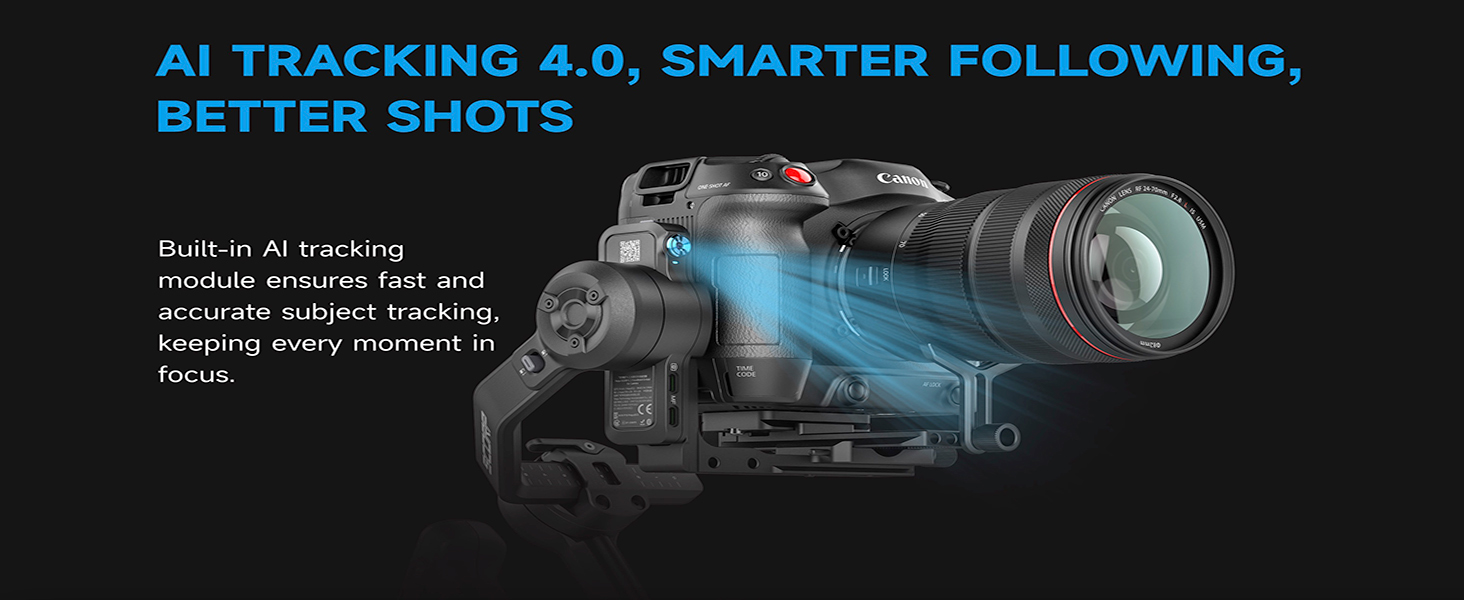
Image: A camera mounted on the FeiyuTech SCORP-C2 gimbal, with blue light rays indicating the AI tracking module actively focusing on a subject.
Gesture Control: The gimbal supports various gestures for control:
- Open Palm: Shoot/Record
- Thumbs Opposite Direction: Start/Stop Tracking
- OK Gesture: Start/Stop Face Tracking
- Double L-shaped Gesture: Custom Framing
- Double Thumb-up Gesture: Turn off gesture control

Image: Illustrations of various hand gestures recognized by the FeiyuTech SCORP-C2 for controlling functions like shooting, tracking, and framing.
Native Vertical Shooting
The SCORP-C2 allows for native vertical shooting without additional accessories. Double-press the F1 button to quickly switch between horizontal and vertical shooting modes.
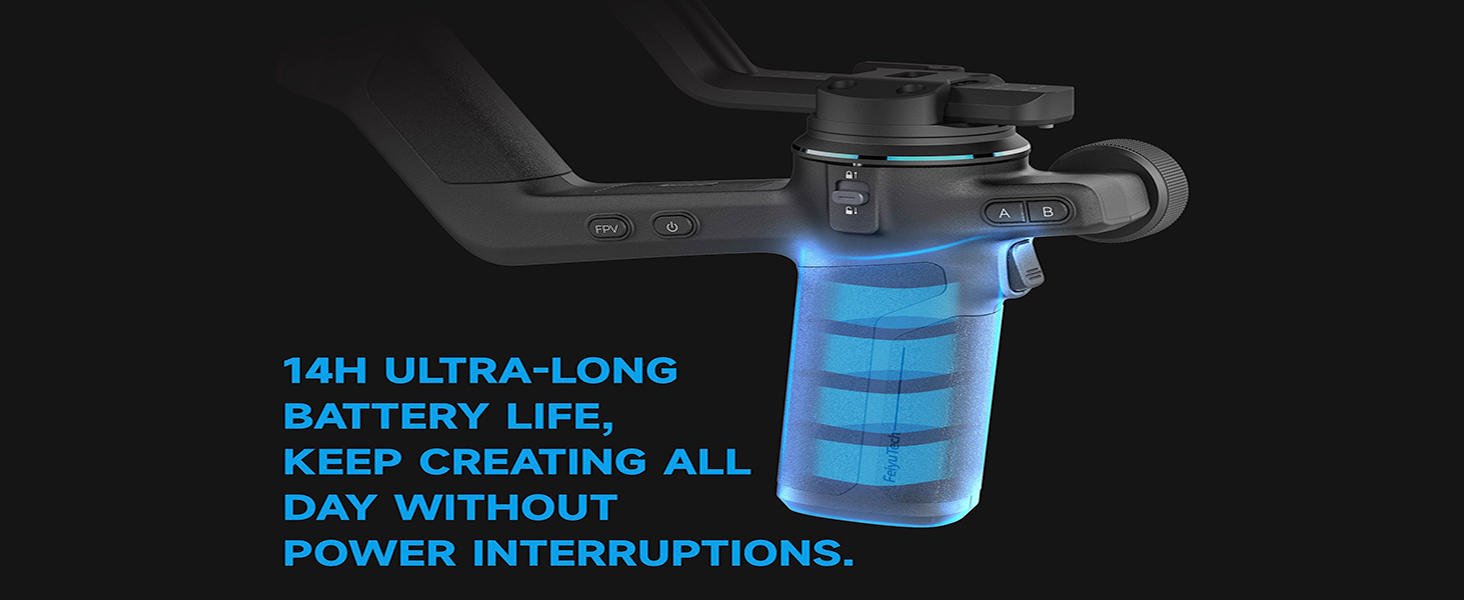
Image: A close-up of the FeiyuTech SCORP-C2 handle, highlighting the F1 button used for one-tap vertical mode switching.
Using the Multi-Function Electric Magic Wheel
The magic wheel provides precise control. Rotate it to adjust axis rotation, follow focus, or zoom, depending on the selected mode.

Image: A close-up of the FeiyuTech SCORP-C2's multi-function electric magic wheel, emphasizing its design and placement for precise control.
A/B Point Trajectory Memory
Preset two points (A and B) to define camera movement paths. Customize speed, angle, and dwell time for repeatable cinematic moves.

Image: A hand operating the FeiyuTech SCORP-C2, with focus on the A/B buttons used for setting trajectory memory points.
Battery Life and Charging
The SCORP-C2 offers up to 14 hours of ultra-long battery life. Charge the gimbal using the provided USB-C charging cable.
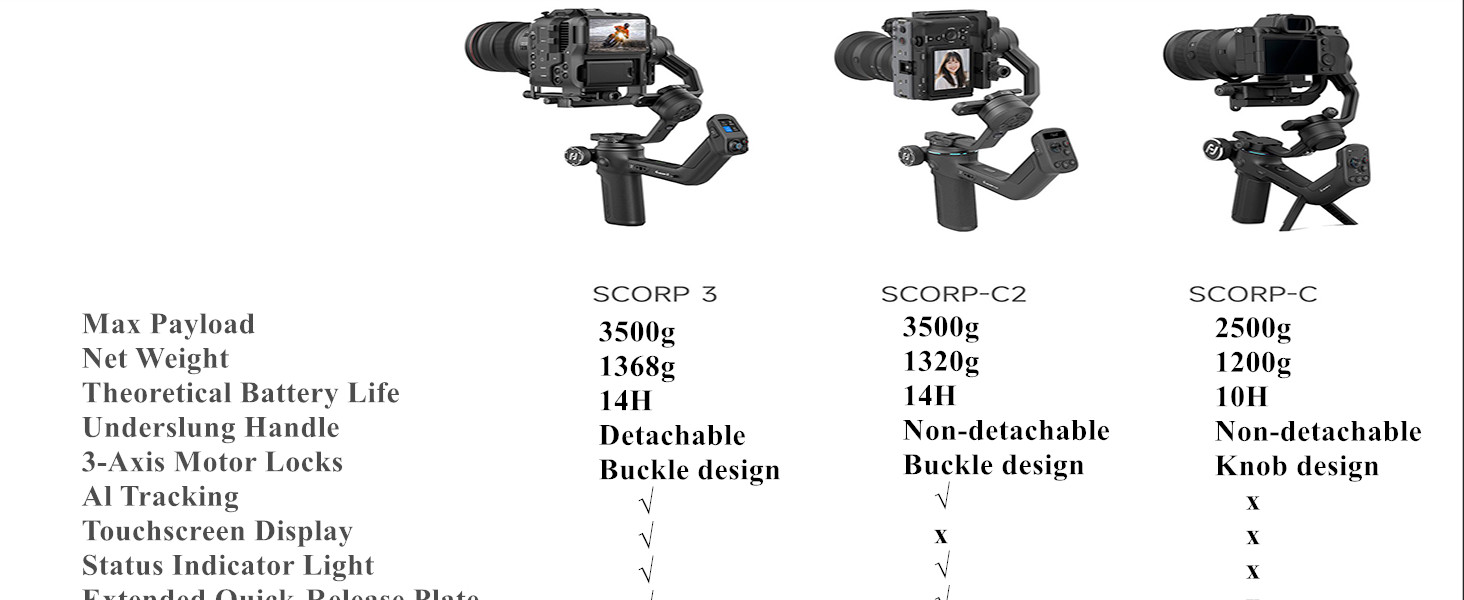
Image: An illustration of the FeiyuTech SCORP-C2 gimbal's handle, showing a glowing battery icon to represent its long battery life.
Expansion Options
The gimbal supports various accessories for enhanced functionality:
- Fill Light
- Monitor
- Follow Focus Motor
- 1/4" Articulating Arm
- Extension Rod

Image: The FeiyuTech SCORP-C2 gimbal shown with various compatible accessories such as a monitor, fill light, follow focus motor, and extension rod, demonstrating its expandability.
Maintenance
- Keep the gimbal clean and free from dust and debris. Use a soft, dry cloth for cleaning.
- Avoid exposing the gimbal to extreme temperatures or moisture.
- Store the gimbal in its protective case when not in use to prevent damage.
- Regularly check all screws and connections to ensure they are secure.
- Do not attempt to disassemble the gimbal, as this will void the warranty.
Troubleshooting
| Problem | Possible Cause | Solution |
|---|---|---|
| Gimbal not powering on | Low battery; Power button not held long enough | Charge the gimbal fully; Press and hold the power button for 3 seconds |
| Camera shaking or unstable | Improper balancing; Payload exceeds limit | Re-balance the gimbal carefully; Ensure camera weight is within 3.5kg payload capacity |
| AI tracking not working | AI module disabled; Subject out of range/obscured | Enable AI tracking in settings; Ensure subject is within 18 meters and clearly visible |
| Camera control not responding | Cable not connected properly; Incompatible camera model | Check cable connection; Refer to compatibility list for supported cameras |
Product Specifications
| Feature | Detail |
|---|---|
| Product Name | Feiyu SCORP-C 2 Handheld Gimbal |
| Max Payload | Approx. 3500g (7.72 lbs) |
| Weight (main body) | Approx. 1320g (Not including tripod) |
| Max. Tilt Range | +120° ~ -200° (±3°) |
| Max. Roll Range | +75° ~ -245° (±3°) |
| Max. Pan Range | 360° |
| Battery Life | Approx. 14 Hours (Motion State) |
| Battery Capacity | 4500mAh |
| Operating Voltage | 6.8V-8.4V |
| Product Dimensions | 3.87 x 2.72 x 5.31 inches (folded size: 299.1*667*252.7mm) |
| AI Tracking | Built-in AI Tracking 4.0 |
| Display | OLED Color Display |
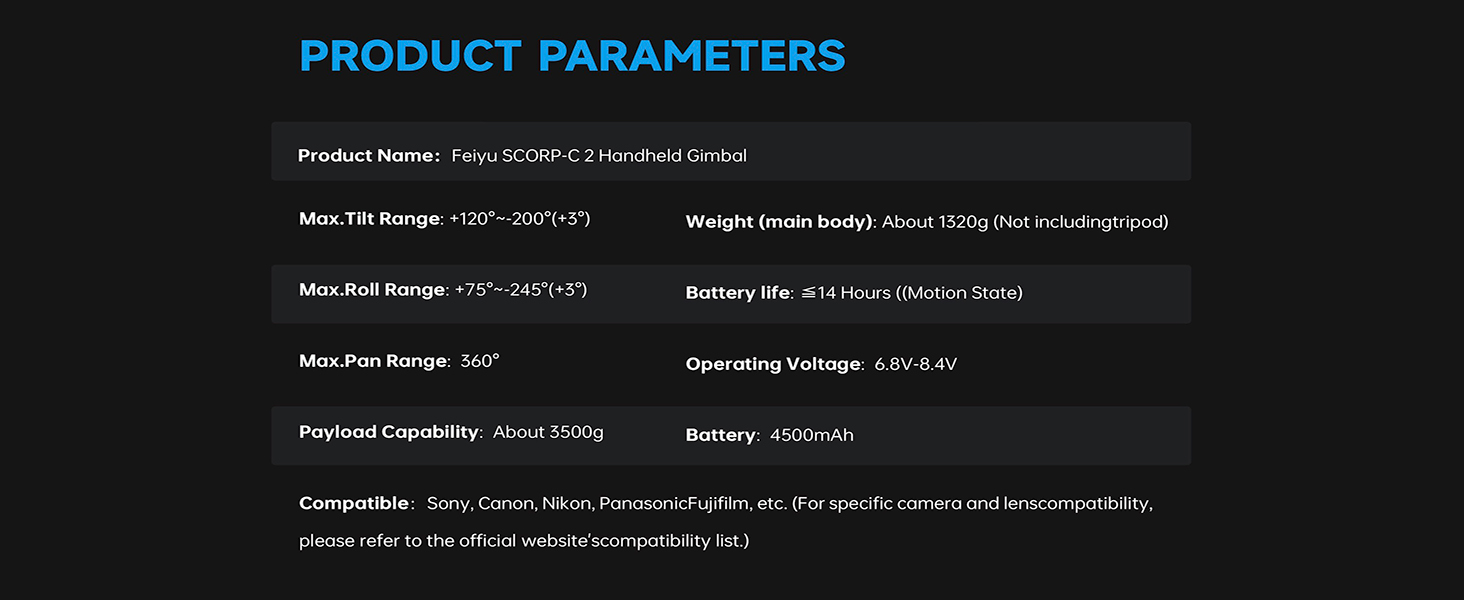
Image: A table summarizing the key product parameters of the FeiyuTech SCORP-C2 gimbal, including tilt range, roll range, pan range, payload, battery life, and operating voltage.
Camera Compatibility
The FeiyuTech SCORP-C2 is compatible with a wide range of cameras from Sony, Canon, Nikon, Panasonic, and Fujifilm. For specific camera and lens compatibility, please refer to the tables below. Note that some camera brands restrict control features due to closed-source protocols, which may limit advanced controls on certain models.
Sony Camera Compatibility

Image: A detailed table listing compatible Sony camera models and tested lenses for the FeiyuTech SCORP-C2, indicating support for Bluetooth and Type-C cable control.
Canon Camera Compatibility

Image: A detailed table listing compatible Canon camera models and tested lenses for the FeiyuTech SCORP-C2, indicating support for Bluetooth and Type-C cable control.
Nikon / Sigma / BMPCC Camera Compatibility
Image: A detailed table listing compatible Nikon, Sigma, and Blackmagic Pocket Cinema Camera (BMPCC) models and tested lenses for the FeiyuTech SCORP-C2, indicating support for Bluetooth and Type-C cable control.
Panasonic / Fujifilm Camera Compatibility

Image: A detailed table listing compatible Panasonic and Fujifilm camera models and tested lenses for the FeiyuTech SCORP-C2, indicating support for Type-C cable control, along with a warm reminder about compatibility checks and function limitations.
Warranty and Support
FeiyuTech products come with a standard manufacturer's warranty. For detailed warranty information, technical support, or service inquiries, please visit the official FeiyuTech website or contact their customer service. Keep your purchase receipt as proof of purchase for warranty claims.
Official Website: www.feiyu-tech.com


